1. Important Safety Instructions
Please read all instructions carefully before assembly and use. Keep this manual for future reference.
- Ensure all components are present and undamaged before assembly. Do not use if any parts are missing or broken.
- Keep children and pets away from the chair during operation, especially when reclining or lifting.
- Do not allow children to play on or with the chair.
- Ensure the power cord is not pinched or damaged. Do not operate the chair with a damaged cord or plug.
- Do not place hands or feet near the moving parts of the chair mechanism.
- Do not exceed the maximum weight capacity of 298 lbs (135 kg).
- Unplug the chair from the power outlet before cleaning or performing any maintenance.
- Use only the provided remote controllers.
- Avoid spilling liquids on the chair, especially near electrical components.
2. Package Contents
Verify that all the following components are included in your package:
- Arm Pad (2)
- Backrest (1)
- Cushion (1)
- Footrest (1)
- Remote Controllers (2)
- Power Adapter (1)
If any parts are missing or damaged, please contact HOMCOM customer support.
3. Assembly Instructions
Assembly is required for this power lift recliner chair. It is recommended to have two people for assembly due to the weight of the components. While instructions are provided, some users have found them to be self-explanatory if familiar with basic furniture assembly.
- Carefully unpack all components and lay them out on a clean, soft surface to prevent scratching.
- Attach the backrest to the seat base, ensuring the connection points align and click securely into place.
- Connect the power cables from the backrest to the corresponding cables on the seat base. Ensure connections are firm.
- Attach the arm pads to the sides of the chair, ensuring they are securely fastened.
- Connect the footrest mechanism to the chair base if it is not pre-attached.
- Plug the power adapter into the chair's power input and then into a wall outlet.
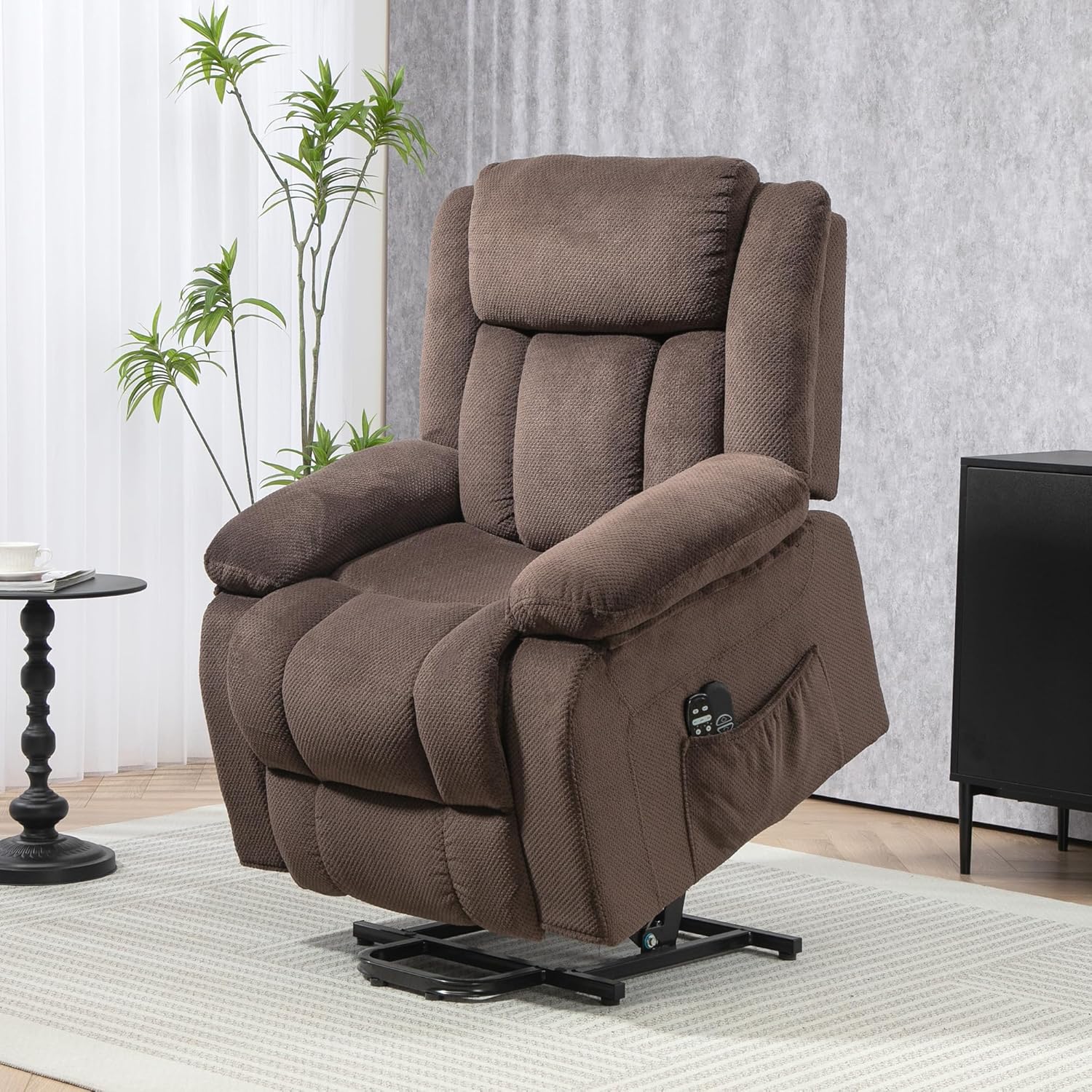
Image: The fully assembled HOMCOM Power Lift Recliner Chair in a home environment.
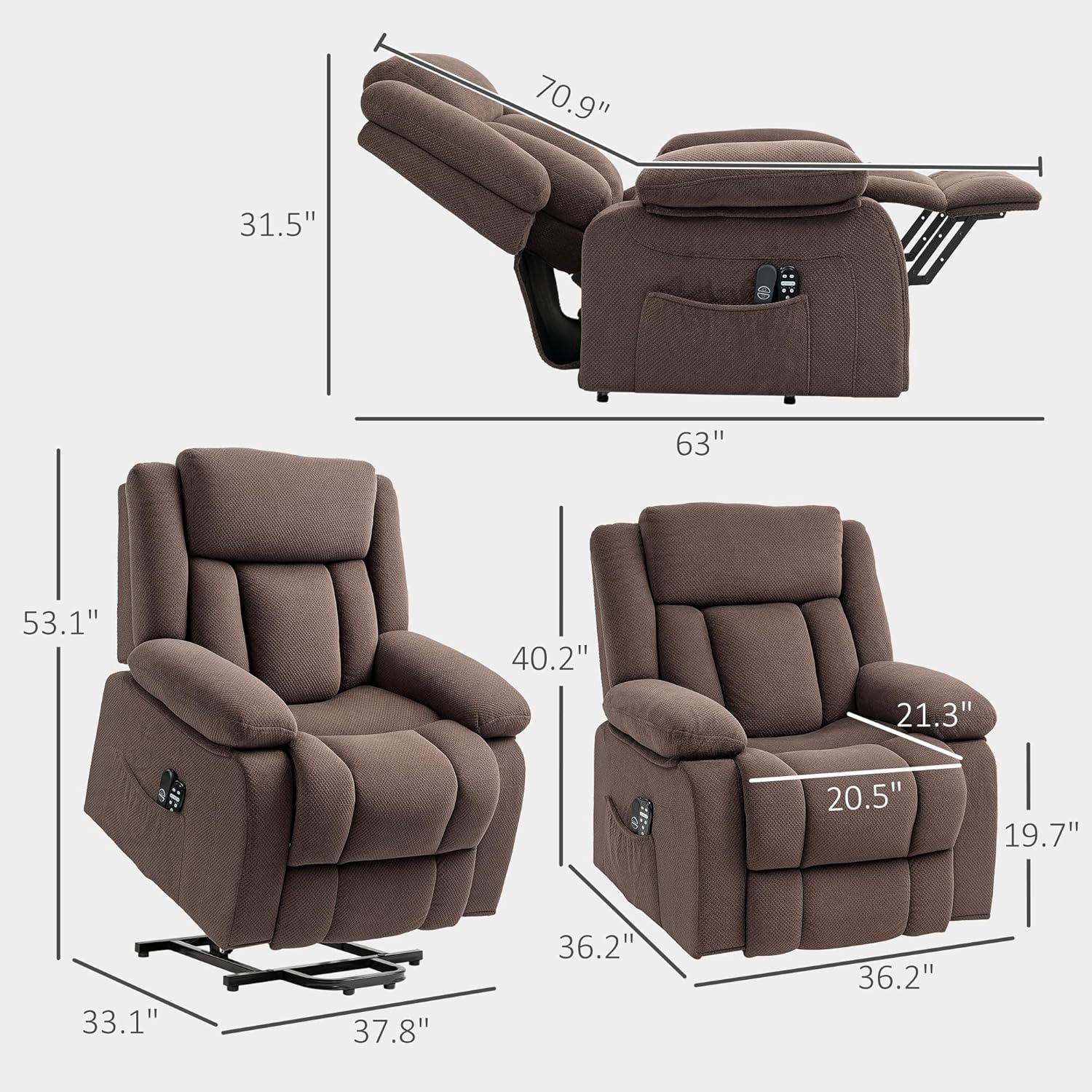
Image: Detailed dimensions of the recliner chair in upright, reclined, and lifted positions.
4. Operating Instructions
Your HOMCOM Power Lift Recliner Chair comes with two remote controllers for easy operation of its various functions.
4.1 Power Lift and Reclining Functions
The main remote controls the lift and recline functions. This chair offers a smooth transition between positions.
- Lift Function: Press the 'Up' button on the remote to gently lift the chair to a 45° near-standing position, assisting users in getting up easily.
- Recline Function: Press the 'Down' button to smoothly transition the chair from an upright position to any angle up to 150° reclined, extending the footrest for comfort.
- Release the button at your desired position to stop the movement.

Image: Visual guide to the 2-button, 3-position lift and recline functionality.
4.2 Massage and Heat Functions
The second remote controls the 8-point massage system and lumbar heating feature.
- Massage Points: The chair features 8 massage points targeting the back, lumbar, thighs, and legs.
- Massage Modes: Select from five different massage modes for a personalized relaxation session.
- Lumbar Heating: Activate the lumbar heating function for soothing warmth to the lower back area.
- Refer to the massage remote for specific button functions to adjust intensity, mode, and timer settings.
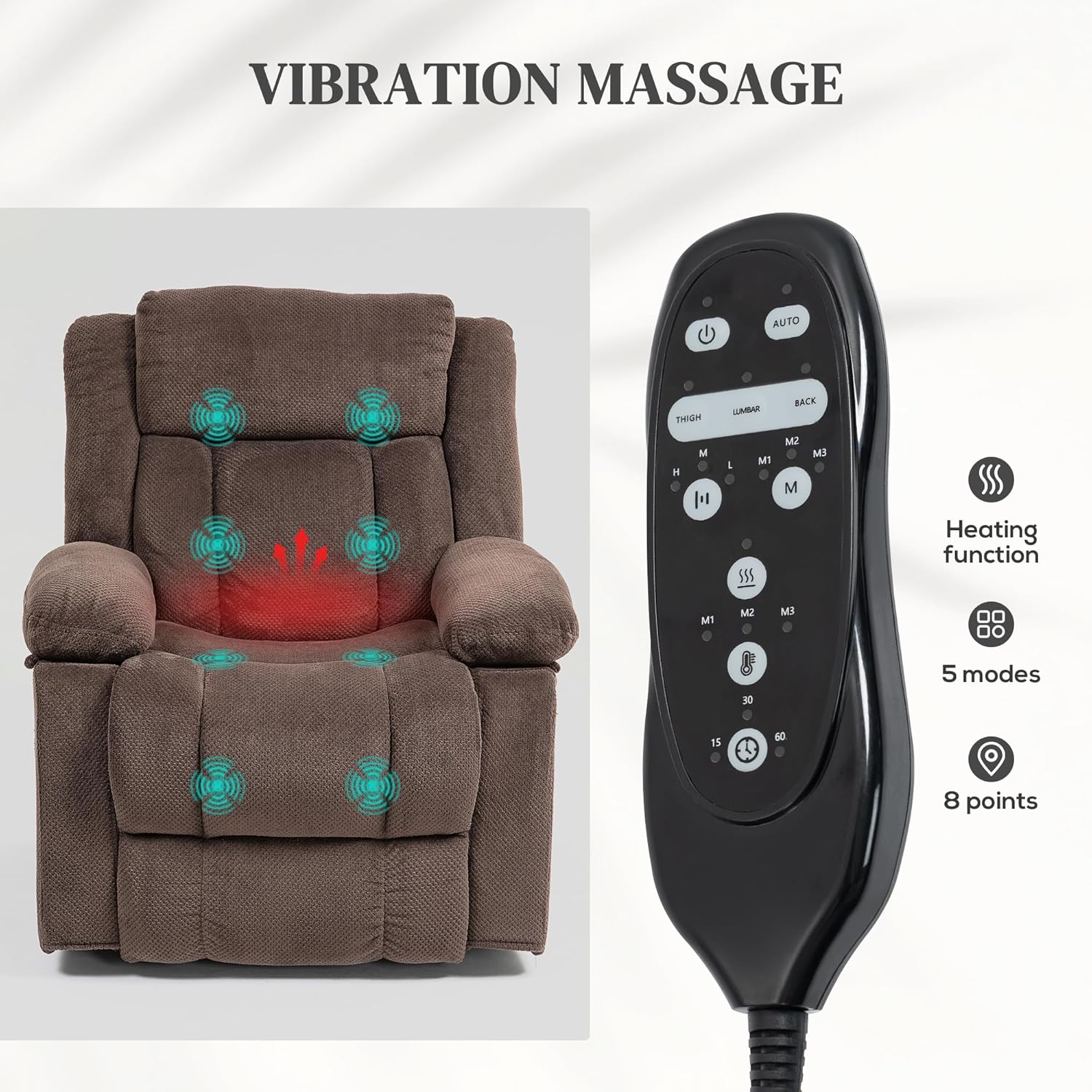
Image: Illustration of the 8-point vibration massage system with heating function and remote control.
4.3 USB Ports and Side Pockets
The chair is designed with convenience in mind:
- USB Ports: Two USB ports are integrated for convenient charging of mobile devices.
- Side Pockets: Store the remote controllers and other essentials in the integrated side pockets, keeping them within easy reach.
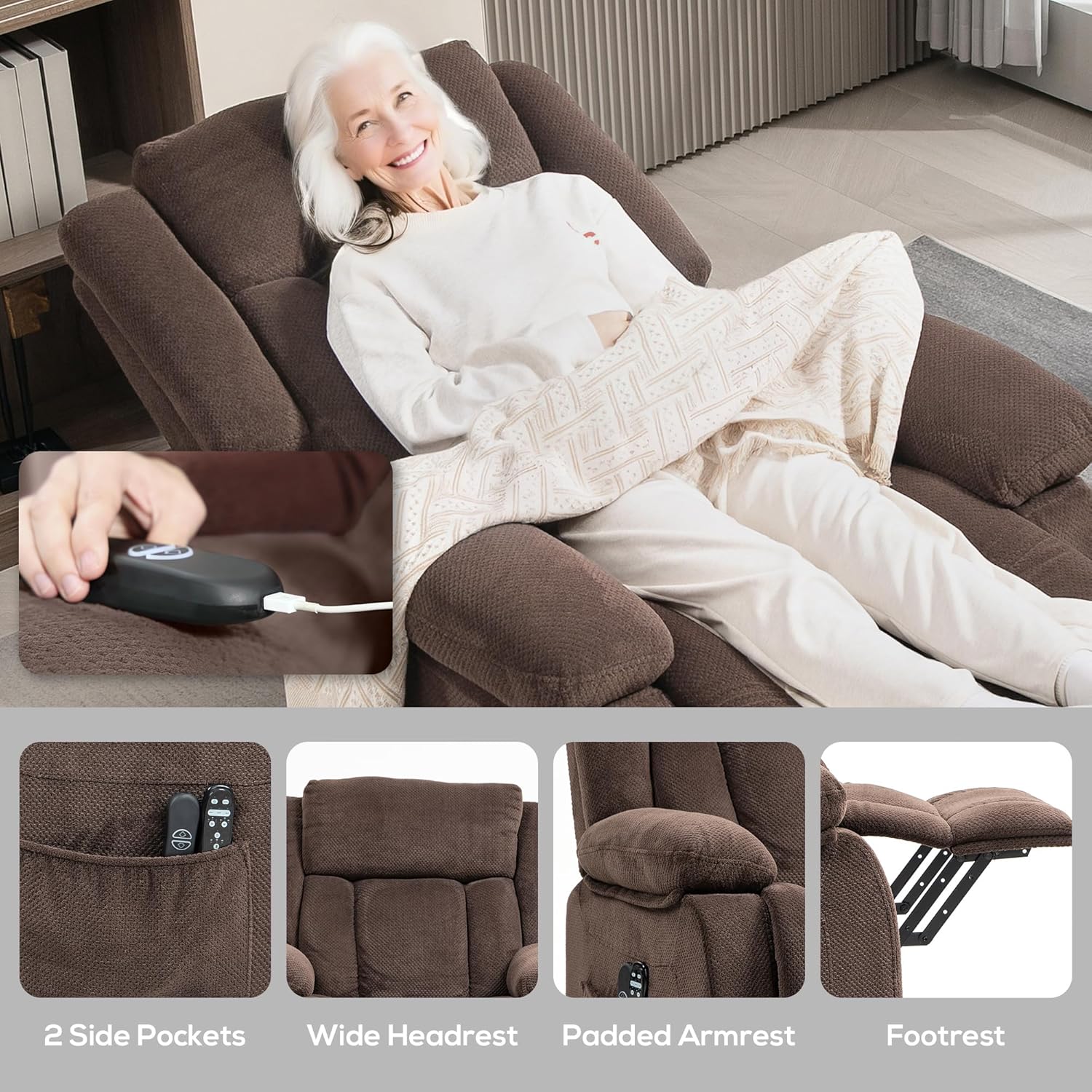
Image: Detailed view of the chair's convenient features, including side pockets and USB charging.
5. Care and Maintenance
Proper care will extend the life and appearance of your recliner chair.
- Cleaning: Wipe clean with a damp cloth. For spills, blot immediately with a clean, dry cloth. Do not use harsh chemicals or abrasive cleaners.
- Fabric Care: The chair is upholstered in plush velvet fabric. Regular vacuuming with a soft brush attachment can help remove dust and debris.
- Mechanism: The internal mechanism is designed for durability. Avoid forcing the chair into positions. If the mechanism becomes stiff, ensure no obstructions are present.
- Power Cord: Periodically inspect the power cord and plug for any signs of damage.

Image: Illustrates the soft texture of the chair's velvet fabric.

Image: Depicts the internal construction of the chair, highlighting the pocket spring system for high resilience and softness.
6. Troubleshooting
If you encounter issues with your HOMCOM Power Lift Recliner Chair, refer to the following common problems and solutions:
| Problem | Possible Cause | Solution |
|---|---|---|
| Chair does not move or respond to remote. | Power cord unplugged, loose connection, power outage, remote battery issue. | Check if the power cord is securely plugged into the wall outlet and the chair. Ensure all internal connections are firm. Test the outlet with another device. If remote uses batteries, replace them. |
| Massage/Heat function not working. | Massage remote not connected, power issue, internal wiring. | Ensure the massage remote is properly connected to the chair. Verify the main power is on. If the issue persists, contact customer support. Note that massage is vibration-based. |
| Chair makes unusual noises during operation. | Loose bolts, obstruction in mechanism, worn parts. | Inspect for any loose bolts and tighten them. Check for any objects obstructing the mechanism. If noises persist, contact customer support. |
| Chair is uncomfortable or padding feels thin. | Initial break-in period, personal preference, manufacturing variation. | Allow for a break-in period as padding may settle. Consider adding a cushion for personal comfort. If discomfort is severe or unexpected, contact customer support. |
If the problem persists after attempting these solutions, please contact HOMCOM customer support for further assistance.
7. Specifications
| Feature | Detail |
|---|---|
| Brand | HOMCOM |
| Model Name | Power Lift Chair |
| Model Number | 713-175V81BN |
| Color | Brown |
| Product Dimensions (Upright) | 37.8" W x 39.4" D x 41.3" H |
| Product Dimensions (Reclined) | 37.8" W x 63" D x 31.5" H |
| Product Dimensions (Lifting) | 37.8" W x 20.9" D x 57.9" H |
| Maximum Weight Recommendation | 298 Pounds (135 kg) |
| Item Weight | 101 pounds (45.8 kg) |
| Material | Velvet Fabric, Foam, Stretchy Pocket Spring |
| Special Features | Adjustable Backrest, Foot Rest, Massage, Power Lift, Power Recliner, Reclining, USB Ports, Side Pockets |
| Reclining Position Count | Infinite Position |
| Included Components | Arm Pad, Backrest, Cushion, Footrest, Remote |
| UPC | 196393228265 |
| ASIN | B0DRXTCFH2 |
8. Warranty and Support
HOMCOM is committed to providing quality products and customer satisfaction.
- Returns: This product is eligible for 30-day easy returns. Please refer to your purchase platform's return policy for detailed instructions.
- Protection Plans: Extended protection plans may be available for purchase. Options include 2-Year and 3-Year Protection Plans, as well as a Complete Protect monthly plan. Check with your retailer for details.
- Customer Support: For any questions, concerns, or assistance with assembly, operation, or troubleshooting, please contact HOMCOM customer support. You can typically find contact information on the HOMCOM brand store or through your purchase platform.
Visit the HOMCOM Store for more information and products.


