
1. Introduction
The Metapen Pencil A8 is a high-precision stylus designed for use with compatible Apple iPad models. It offers features such as fast charging, tilt sensitivity, pixel-perfect accuracy, magnetic attachment, and palm rejection for a natural writing and drawing experience.

The Metapen Pencil A8, a sleek gray stylus, is shown alongside three interchangeable replacement tips, highlighting its design and included accessories.
2. Compatibility
The Metapen Pencil A8 is compatible with the following Apple iPad models from 2018 to 2025:
- iPad Pro M4
- iPad Air M2 & M3
- iPad (11th (A16), 10th, 9th, 8th, 7th, 6th Generations)
- iPad Air (3rd, 4th, 5th, 6th (M2), 7th (M3) Generations)
- iPad Pro 11-inch (1st, 2nd, 3rd, 4th Generations)
- iPad Pro 12.9-inch (3rd, 4th, 5th, 6th Generations)
- iPad Mini (5th, 6th Generations)
Important Note:
- The stylus is NOT compatible with iPad models released before 2018.
- It does NOT work with iPhone, Android, Microsoft devices, or the iPad Mini 7th Generation.
- Please verify your device model before use.
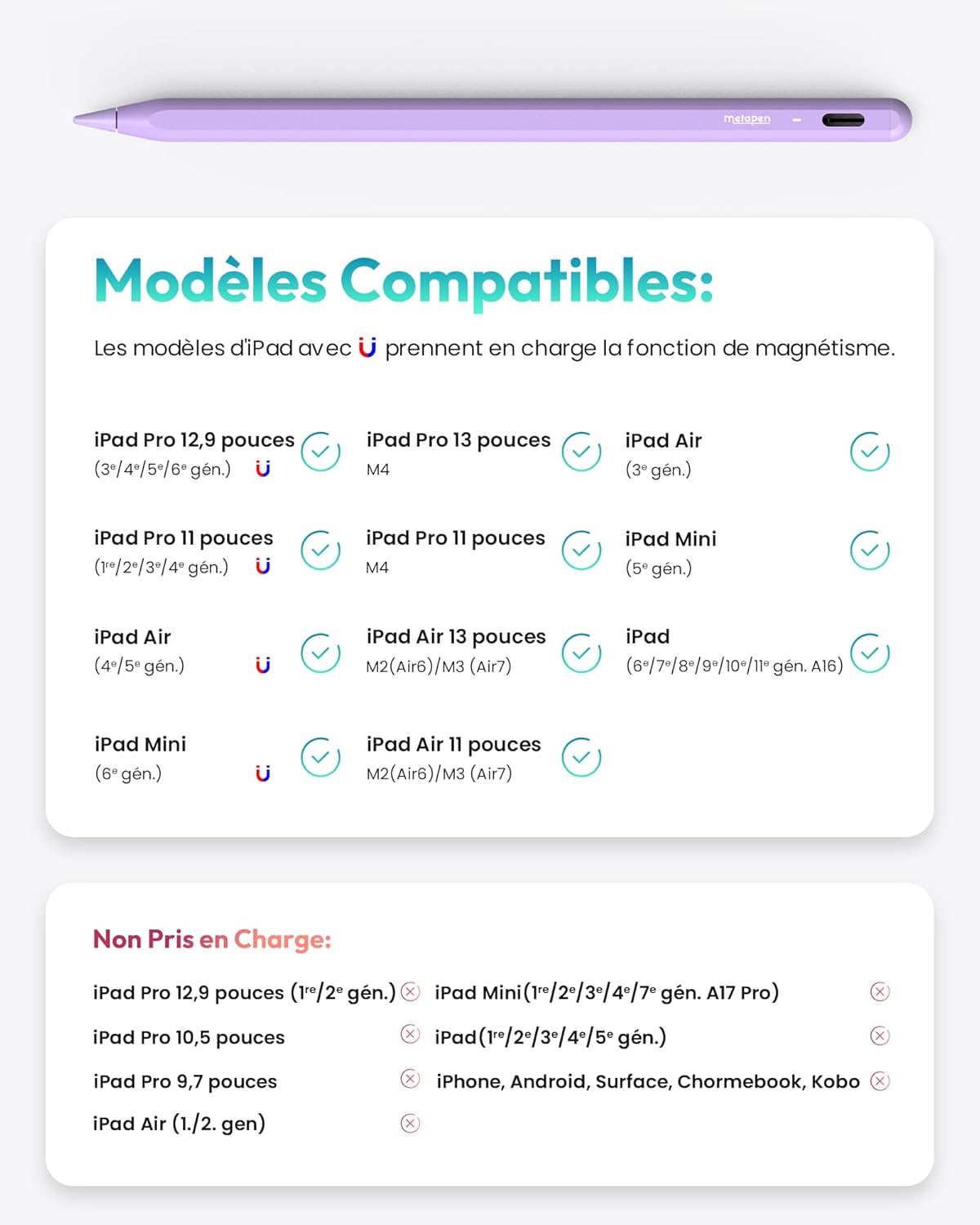
A detailed chart outlining the specific iPad models and generations (2018-2025) that are compatible with the Metapen Pencil A8, along with models that support magnetic attachment.
How to Identify Your iPad Model
Follow these steps to identify your iPad model:
- Go to your iPad's Settings.
- Tap on General.
- Select About.
- Look for Model Name or Model Number to confirm compatibility.

A screenshot from an iPad's 'Settings' menu, specifically the 'General' section, highlighting where to locate the device's model name and number for compatibility verification.
3. Setup
Power On/Off
To power on or off the Metapen Pencil A8, simply double-tap the round end of the stylus.
No Pairing Required
The Metapen Pencil A8 does not require Bluetooth pairing. It is ready for immediate use once powered on.
4. Operating Instructions
Charging and Battery Indicator
The stylus can be fully charged in approximately 30 minutes via USB-C, providing up to 10 hours of continuous use. A 1-minute charge offers 50 minutes of use, and a 4-minute charge provides 2 hours of use.

This image illustrates the fast charging capability of the Metapen Pencil A8, indicating a full charge in 30 minutes provides up to 10 hours of continuous use.
The LED indicator on the stylus changes color to show the battery level:
- White: Battery level > 60%
- Blue: Battery level 20% - 60%
- Red: Battery level < 20%
During charging:
- Flashing Red: Charging in progress
- Solid White: Charging complete
Automatic Shutdown
The stylus automatically turns off after 5 minutes of inactivity to conserve battery life.
Tilt Sensitivity
The Metapen Pencil A8 supports tilt sensitivity, allowing you to vary line thickness and create shading effects by tilting the stylus on your iPad screen. The thickness of the stroke adjusts based on the angle from 15° to 90°.

This visual guide demonstrates the tilt sensitivity feature of the Metapen Pencil A8, showing how tilting the stylus at different angles (15°, 45°, 90°) produces lines of varying thickness, ideal for shading and artistic effects.
Palm Rejection
The stylus features palm rejection technology, enabling you to rest your hand comfortably on the iPad screen while writing or drawing without creating unintended marks.

An individual is shown using the Metapen Pencil A8 to draw on an iPad, with their palm comfortably resting on the screen, demonstrating the effective palm rejection feature.
Magnetic Attachment
The Metapen Pencil A8 includes two integrated magnets, allowing it to attach securely to the side of compatible iPad models. This feature is supported on:
- iPad Pro 11-inch (1st, 2nd, 3rd Generations)
- iPad Pro 12.9-inch (3rd, 4th, 5th Generations)
- iPad Air (4th, 5th Generations)
- iPad Mini 6th Generation
Note: Wireless charging is not supported.
5. Maintenance
Replacing the Stylus Tip
The Metapen Pencil A8 comes with two additional replacement tips. To replace a tip:
- Gently twist the old tip counter-clockwise to remove it.
- Align a new tip and twist it clockwise until it is securely fastened.

This composite image provides three key instructions: a diagram of the LED indicator colors for battery status, a visual guide on how to twist and replace the stylus tip, and an illustration of double-tapping the stylus end to power it on or off.
Cleaning
Wipe the stylus with a soft, dry cloth. Avoid using harsh chemicals or abrasive materials.
6. Troubleshooting
Stylus Not Functioning with iPad
If your Metapen Pencil A8 is not working with your iPad:
- Verify the compatibility of your iPad model with the A8 stylus (refer to Section 2: Compatibility).
- If compatible, try the following:
- Double-tap the round end of the stylus to ensure it is powered on.
- Tighten or replace the stylus tip.
- Ensure your iPad is running iOS 12.2 or a later version.
- If you have previously used an Apple Pencil, go to iPad Settings > Bluetooth, tap the "i" icon next to the Apple Pencil, and select "Forget This Device."
- Note: If the original screen of your iPad has been replaced, the A8 stylus may not function correctly.
Rapid Battery Discharge
The A8 stylus typically offers 10 hours of battery life. If you experience rapid battery discharge, it may indicate a defect. Please contact customer support immediately.

A troubleshooting section detailing common issues such as the stylus not working with an iPad or rapid battery discharge, along with suggested solutions.
7. Specifications
| Feature | Detail |
|---|---|
| Brand | Metapen |
| Model Number | ME-APP152 |
| Color | Gray |
| Material | Aluminum & Plastic |
| Weight | 15 Grams |
| Dimensions (L x W x H) | 16.6 x 0.9 x 0.9 Centimeters |
| Battery Composition | Lithium-polymer |
| Battery Life (Average Standby) | 365 Days |
| Special Features | 2x Durable & Replaceable Tips, Compatible with Apple iPad 2018-2025, Stronger Dual Magnets, Absolute Precision & No Delay, Instant Use & No Pairing Needed |
8. Warranty and Support
Warranty
The Metapen Pencil A8 comes with a 12-month warranty from the date of purchase.
Customer Support
For any inquiries, technical assistance, or warranty claims, please contact Metapen customer service. 24-hour customer service is available.


