
PUPKIDS Cavalier 400
PUPKIDS GPS Wireless Dog Fence System User Manual
Model: Cavalier 400
Introduction
The PUPKIDS GPS Wireless Dog Fence System provides a safe and effective way to establish a virtual boundary for your dog outdoors. Utilizing advanced GPS and GNSS technology, the system offers precise positioning and customizable warning modes to ensure your pet remains within a designated safe area. This manual provides comprehensive instructions for setup, operation, and maintenance of your device.
Package Contents
Upon unboxing your PUPKIDS GPS Wireless Dog Fence System, please verify that all components listed below are included:
- Wireless Fence Collar
- Boundary Flags (10 pieces)
- Silicone Prong Set (various sizes)
- Type-C Charging Cable
- User Manual
- Dog Training Guide
- Test Light

Image: All components included in the PUPKIDS GPS Wireless Dog Fence System package.
Setup Instructions
Follow these steps to set up your GPS Wireless Dog Fence System:
1. Charging the Collar
Before first use, fully charge the collar using the provided Type-C charging cable. The collar features a 1000 mAh battery, providing up to 24 hours of working time on a full charge. The light indicator on the collar will turn green when fully charged.

Image: The collar connected to its Type-C charging cable, illustrating the charging process.
2. Attaching Prongs and Caps
Select the appropriate size of contact prongs and silicone caps based on your dog's coat length. Use shorter prongs for thin-haired dogs and longer prongs for thick-haired dogs. Securely screw the chosen prongs into the collar and place the silicone caps over them for comfort and double protection.

Image: Illustration of different prong sizes and silicone caps for the collar, emphasizing double protection.
3. Finding GPS Signal and Setting Up Boundary
The system operates outdoors using GPS and GNSS dual satellite technology. For optimal performance, ensure you are in an open outdoor area with at least three GPS signal bars on the collar's display. The collar positions twice per second for accurate boundary definition.
- Turn on the device and allow it to search for satellite signals to begin positioning.
- Move to your desired center point for the safe zone. This will be the central reference for your dog's boundary.
- Set the center point: After the receiver successfully searches for a GPS signal, hold the appropriate button for 3 seconds. The TFT display will show the "Center Reset" interface. Press "YES" to confirm the center point.
- Set the safe radius distance: From the functional interface, select the radius setting icon. Adjust the safe radius distance from 33 yards up to 9999 yards. This defines the circular boundary for your dog.
- Select a warning mode: Choose from No Static (Beep + Vibrate), General Static (Beep + Vibrate + Static), or Enhanced Static.
- Once all settings are configured, the system is ready for use.

Image: Visual guide on how to set up the GPS Wireless Dog Fence System, from power on to setting the safe zone.

Image: Step-by-step instructions for setting the center point of the boundary using the collar's interface.

Image: Step-by-step instructions for adjusting the safe radius distance on the collar's display.
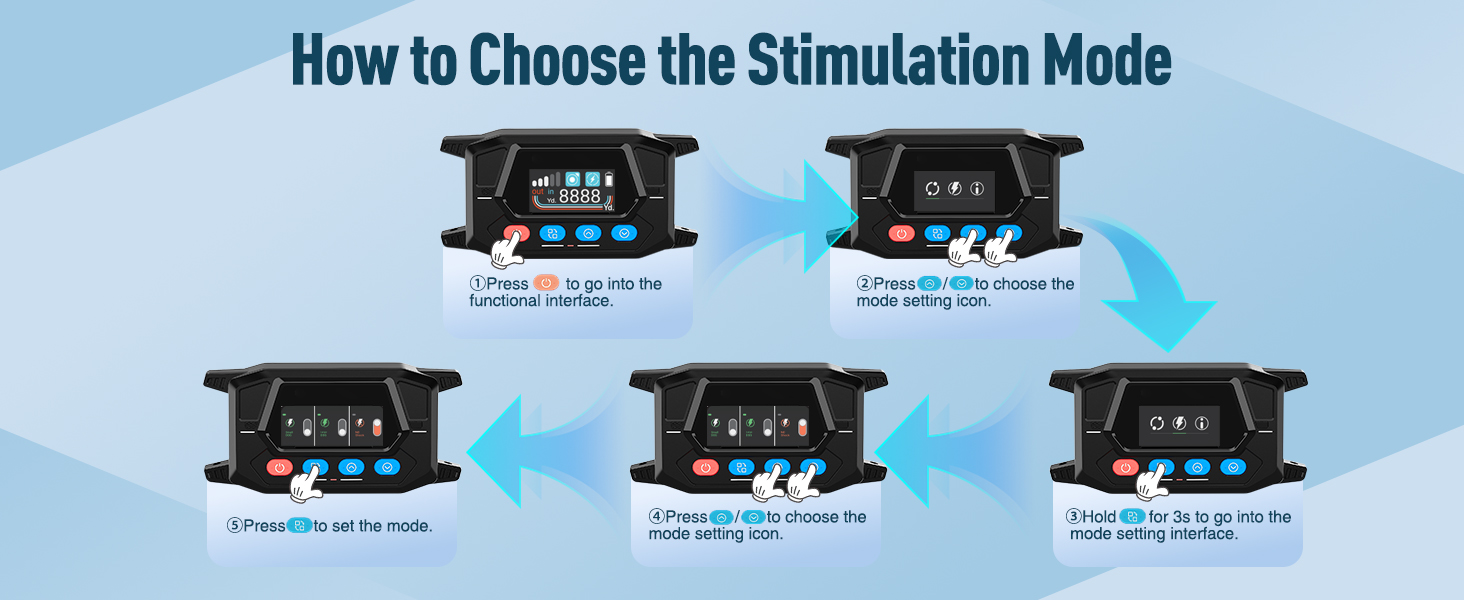
Image: Step-by-step instructions for selecting the desired stimulation mode on the collar's display.
Operating Instructions
Once the system is set up, ensure your dog is wearing the collar correctly. The collar is designed for medium to large dogs weighing over 20 lbs, with neck sizes ranging from 12 to 25 inches. It is not suitable for small dogs or puppies.
Warning Modes
The system features three distinct warning modes to effectively train your dog:
- No Static: Provides a warning through a combination of beep sounds and vibration.
- General Static: Combines beep sounds, vibration, and a mild static correction.
- Enhanced Static: Combines beep sounds, vibration, and a stronger static correction.
The warning intensity increases as your dog approaches the boundary. The system is designed to provide a low warning in the outer border zone and a high warning as the dog gets closer to the defined perimeter.
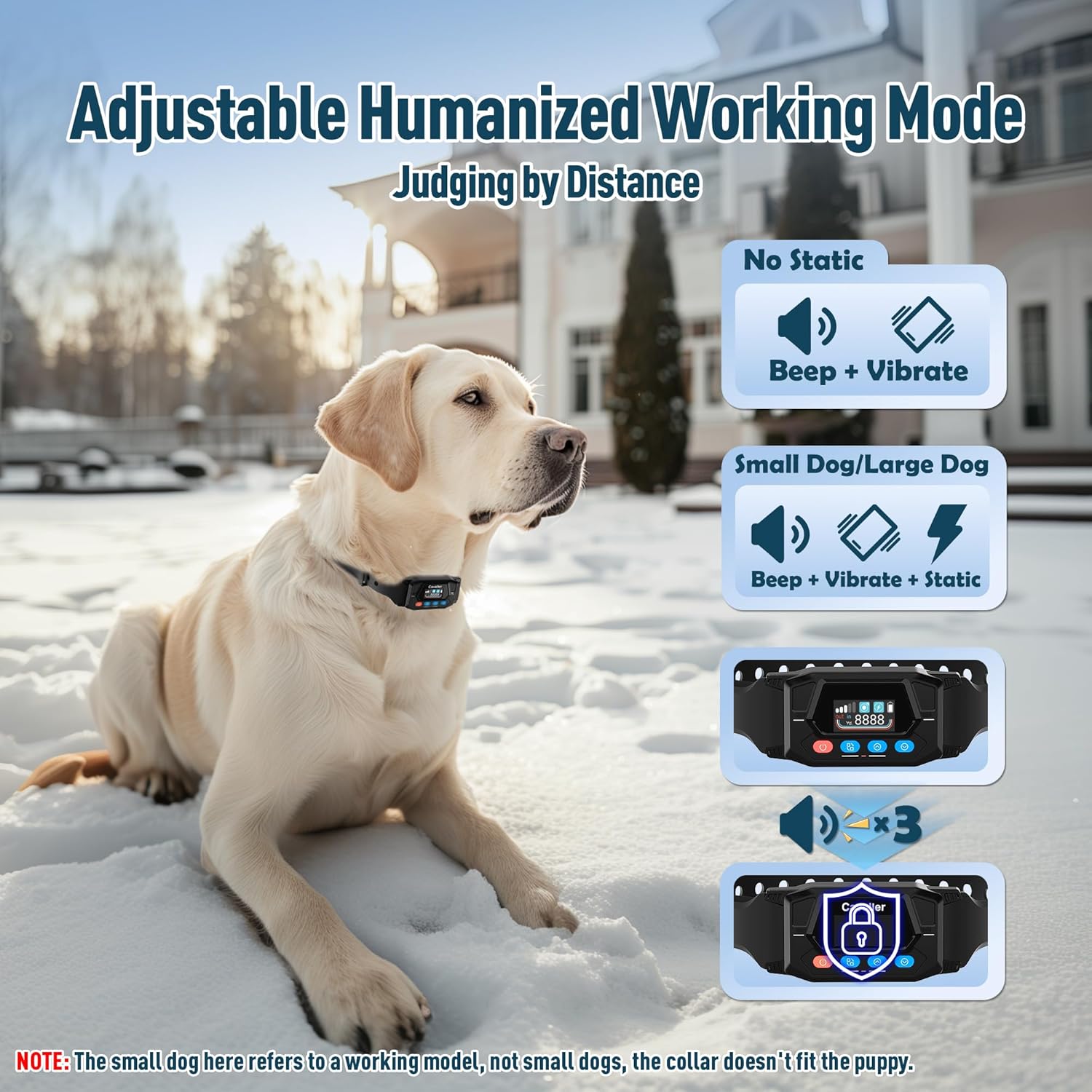
Image: Visual representation of the collar's adjustable warning modes based on distance from the boundary.

Image: Illustration of how warning intensity increases as the dog approaches the boundary of the wireless fence.
Outdoor Use Only
This GPS wireless fence system is designed exclusively for outdoor use. It requires a clear line of sight to GPS satellites and will not function reliably indoors or in areas with significant interference (e.g., dense forests, large buildings). Ensure the GPS signal strength is consistently strong (three bars or more) for accurate boundary enforcement.

Image: The GPS/GNSS dual satellite system is effective in open outdoor environments like farms, dog parks, and camping areas, but not indoors or in dense forests.

Image: The wireless fence offers an adjustable range from 33 yards to 9999 yards, suitable for yards larger than 3/4 acre.
Maintenance
Waterproof Design
The PUPKIDS GPS Wireless Dog Fence Collar is IPX7 waterproof, meaning it can withstand immersion in water up to 1 meter for 30 minutes. This makes it suitable for use in rainy conditions, during bathing, or even while your dog is swimming. Always ensure the charging port cover is securely closed when not charging to maintain its waterproof integrity.

Image: The IPX7 waterproof collar is designed for durability in various wet conditions, including rain and swimming.
Troubleshooting
If you encounter any issues with your PUPKIDS GPS Wireless Dog Fence System, please refer to the detailed training guide included in your package. This guide provides specific steps for common problems and training tips. Ensure the collar has a strong GPS signal (at least three bars) and is used in an open outdoor environment without interference.
Specifications
| Feature | Detail |
|---|---|
| Brand Name | PUPKIDS |
| Model Name | Cavalier 400 |
| Item Weight | 15.8 ounces |
| Item Package Dimensions | 7.4 x 7.13 x 2.13 inches |
| Batteries | 2 Lithium Polymer batteries (included) |
| Battery Capacity | 1000 mAh |
| Working Time | Up to 24 hours |
| Waterproof Rating | IPX7 |
| Adjustable Radius | 33 - 9999 Yards |
| Warning Modes | No static, General static, Enhanced static |
| Target Dog Size | Medium to Large dogs (over 20 lbs, neck 12-25 inches) |
| Country of Origin | China |
Warranty and Support
The PUPKIDS GPS Wireless Dog Fence System comes with a 1-year warranty from the date of purchase.
For any questions, technical support, or warranty claims, please contact PUPKIDS customer service:
Email: support@pupkids.net (Available 24 hours/7 days)
Related Documents - Cavalier 400
 |
PetSafe Guardian GPS + Tracking Dog Fence Collar User Guide Comprehensive user guide for the PetSafe Guardian GPS + Tracking Dog Fence Collar, covering setup, features, training, and troubleshooting. Learn how to set up boundaries, fit the collar, train your pet, and understand LED indicators. |
 |
Dogtra GPS Fence Owner's Manual This manual provides comprehensive instructions for the Dogtra GPS Fence system, covering setup, operation, safety precautions, and troubleshooting. Learn how to create virtual fences, manage settings via the app, and ensure proper fit and use for your dog's safety and training. |
 |
PetSafe Guardian GPS 2.0 Dog Fence + Tracking User Guide Comprehensive user guide for the PetSafe Guardian GPS 2.0 Dog Fence + Tracking system, covering setup, fitting, training, operation, and troubleshooting for pet containment and tracking. |
 |
Dogtra GPS Fence: User Manual and Safety Information Comprehensive guide to the Dogtra GPS Fence system, including setup, training, safety precautions, and product information. Learn how to create virtual fences, manage training settings, and ensure safe operation for your dog. |
 |
PetSafe Unbound Customizable GPS Fence: Setup, Usage, and Features Comprehensive guide to setting up and using the PetSafe Unbound Customizable GPS Fence system. Learn about the base unit, collar, app features, installation, fitting, training, and troubleshooting. Keep your dog safe within a defined boundary. |
 |
Dogtra GPS Fence Owner's Manual Comprehensive owner's manual for the Dogtra GPS Fence system, detailing setup, usage, safety precautions, and troubleshooting for effective dog containment. |
Ask a question about this manual
Ask about setup, troubleshooting, compatibility, parts, safety, or missing instructions. Manuals+ will review the question and use this page’s manual context to help answer it.