
1. Product Overview
The Douk A5 is a compact and powerful Class D stereo amplifier designed to deliver high-fidelity audio. Featuring TPA3255 chips, it provides 300W x 2 output power with extremely low distortion. Its adjustable high-pass filter and plug-and-play operational amplifier replacement capability allow for sound customization, making it suitable for various audio setups, from desktop bookshelf speakers to home theater systems.

Front view of the Douk A5 Stereo Amplifier, showcasing its compact design and control knobs.
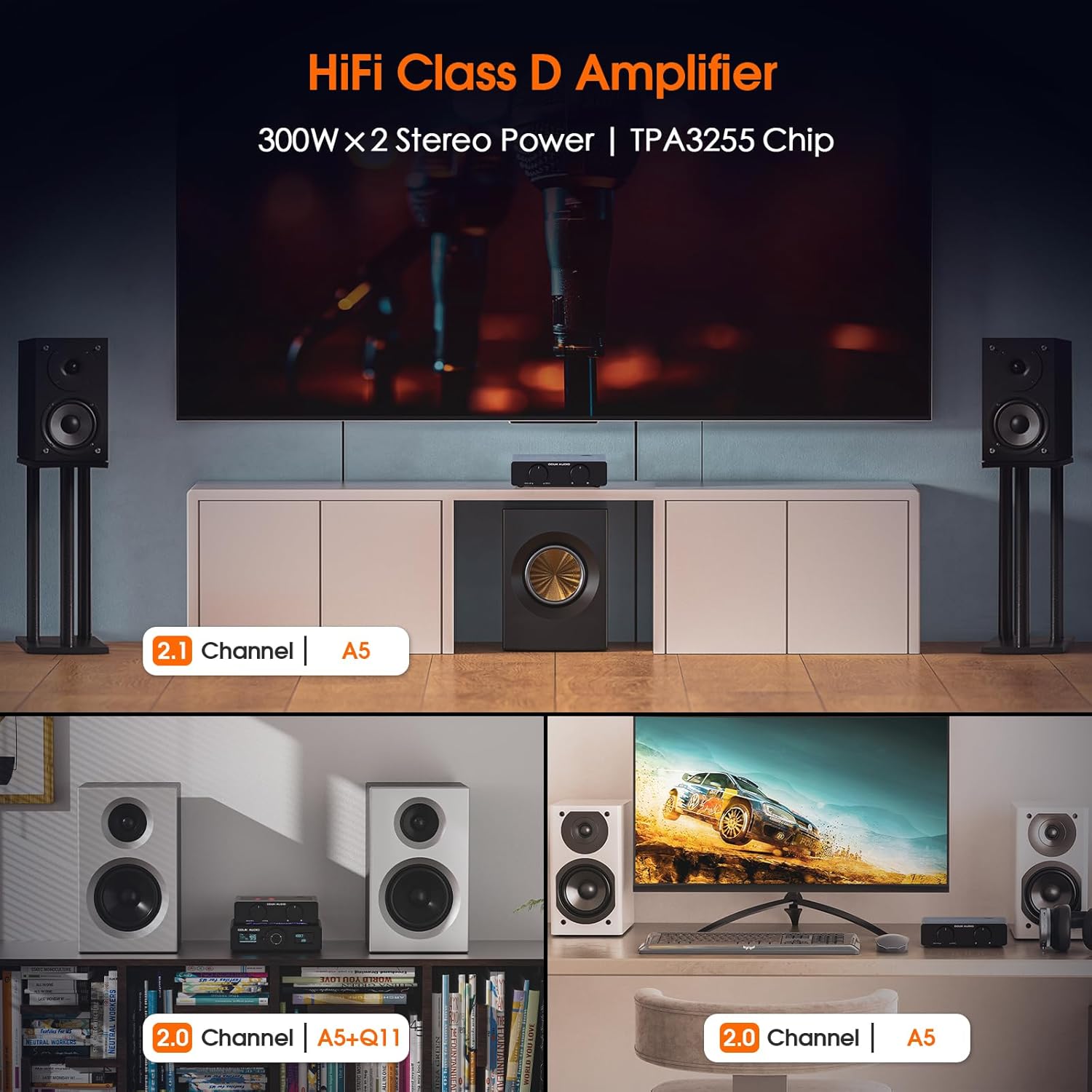
The Douk A5 amplifier integrated into a home audio setup, demonstrating its application with speakers and a display.
2. Setup Instructions
Follow these steps to set up your Douk A5 amplifier:
- Unpack the Contents: Carefully remove all items from the packaging. Verify that all components listed in the packing list are present.
- Connect Speakers: Connect your passive speakers to the 'SPK OUT' terminals on the rear panel. Ensure correct polarity (red to red, black to black).
- Connect Audio Source: Use RCA cables to connect your audio source (e.g., Tablet PC, iPhone/Android Devices, CD/DVD/Media Players, TV/TV Set Top Box, Laptop/Mac/Computer, MP3) to the 'AUDIO IN' RCA inputs. A 3.5mm AUX output is also available for connecting to active subwoofers or active speakers.
- Connect Power: Connect the provided DC 32V/5A power adapter to the 'DC 24V-48V' input on the rear panel, then plug the adapter into a wall outlet.
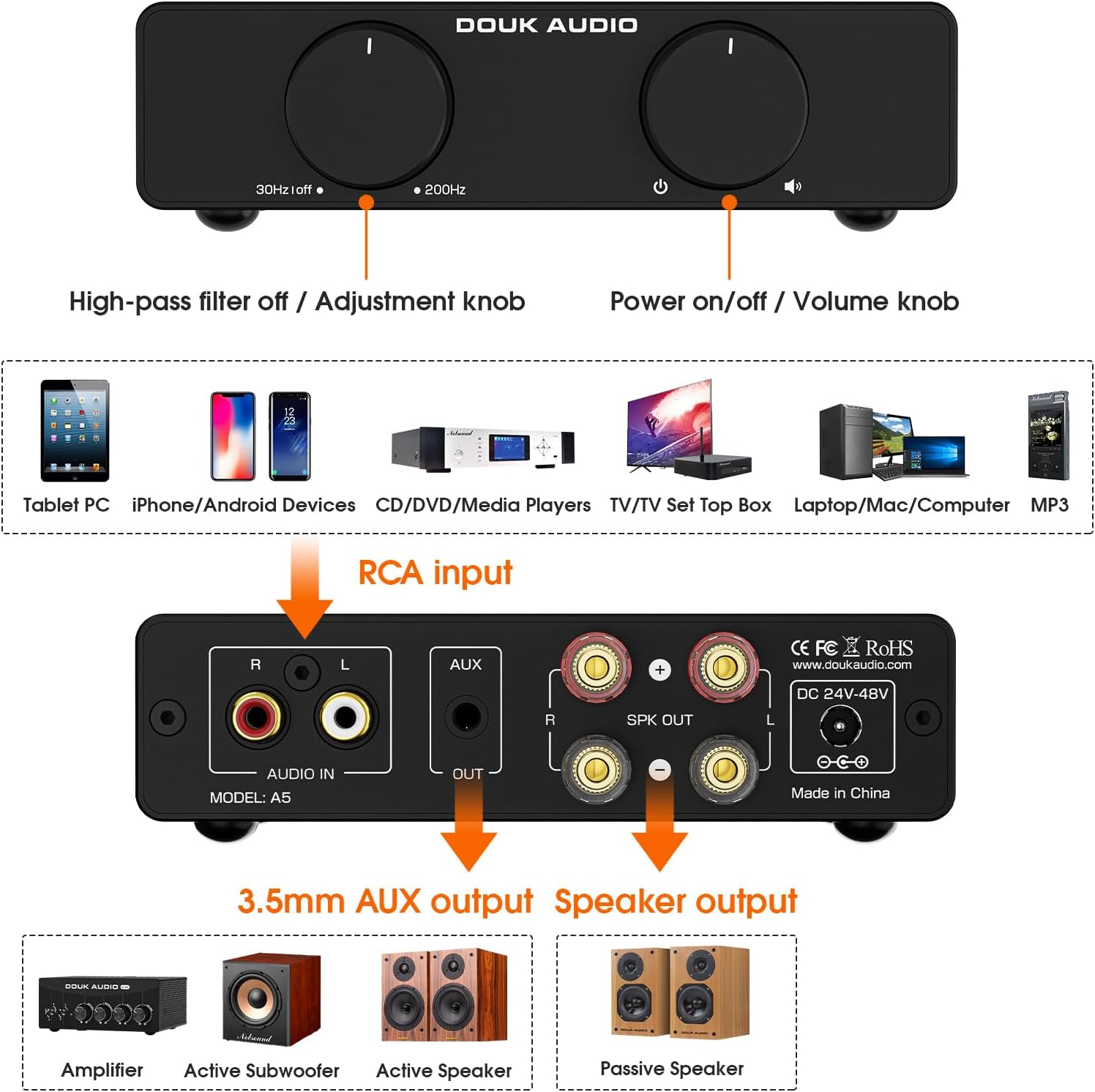
Detailed diagram showing the front panel controls (High-pass filter, Power/Volume knob) and rear panel connections (RCA input, 3.5mm AUX output, Speaker output).
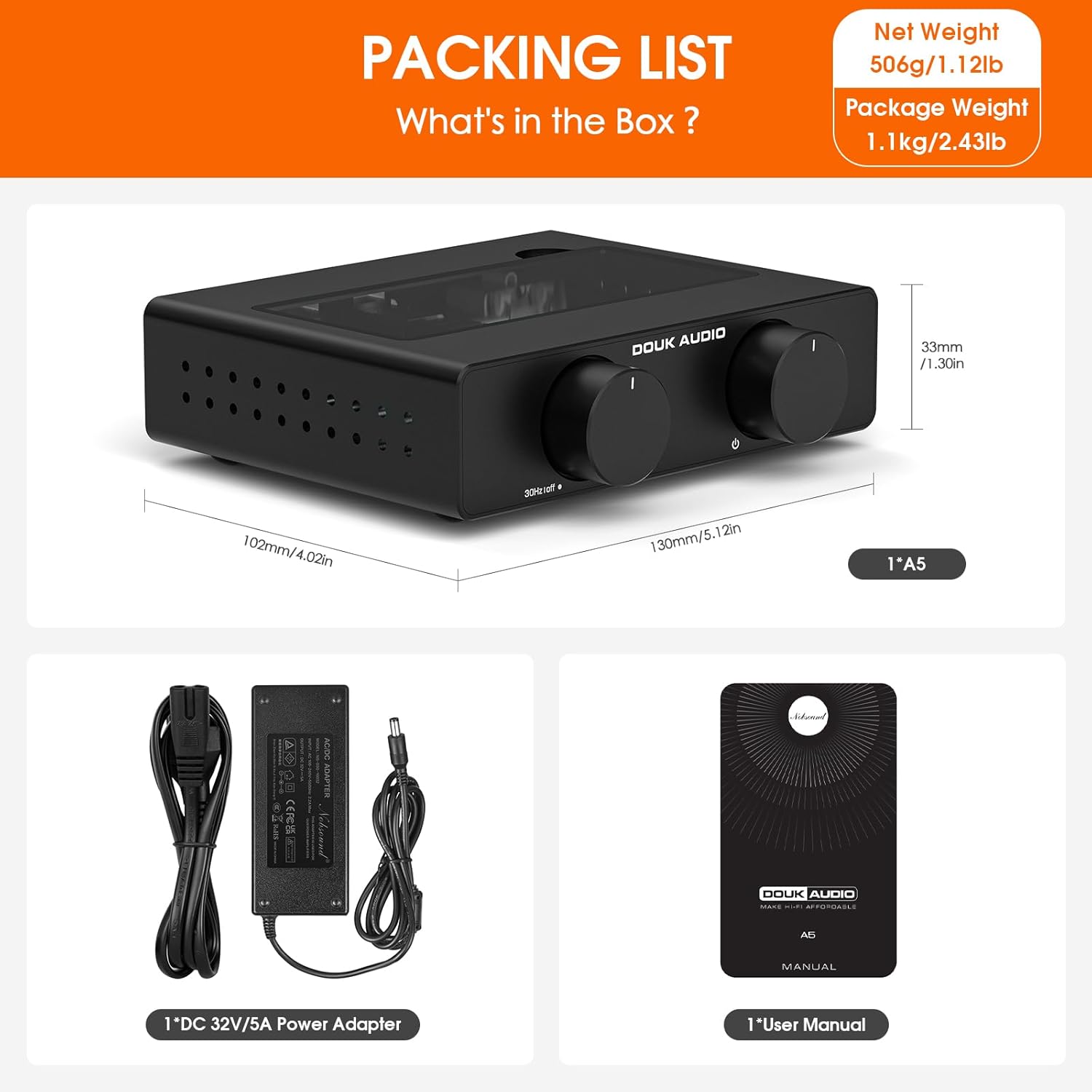
Image illustrating the contents of the Douk A5 package, including the amplifier unit, DC power adapter, and user manual.
3. Operating Instructions
Once connected, operate your Douk A5 amplifier as follows:
- Power On/Off and Volume Control: Use the right knob on the front panel to power the unit on or off and adjust the master volume.
- Adjustable High-Pass Filter (HPF): The left knob controls the adjustable high-pass filter, ranging from 30 Hz to 200 Hz. This feature refines mid and high frequencies by minimizing low-frequency interference, ideal for optimizing sound with bookshelf or passive speakers.

Close-up of the adjustable high-pass filter knob on the Douk A5, with a frequency response graph in the background.
- Customizable Sound (Op-Amp Rolling): The Douk A5 features a tempered glass cover allowing for quick replacement of operational amplifiers. This enables audiophiles to easily fine-tune their sound profiles without disassembling the device.

Image demonstrating the easy plug-and-play op-amp replacement feature of the Douk A5, with the tempered glass cover removed.
- Sleek Glass Panel with LED Ambiance: The transparent control panel and adjustable internal LED lighting offer multiple color options, adding a modern and sophisticated aesthetic to your audio setup.

Visual representation of the Douk A5's customizable LED lighting, showing various color options through its sleek glass panel.
4. Advanced Features and Technology
- PFFB Technology and High-Performance PCB: The amplifier incorporates a post-filter feedback circuit and a 4-layer immersion gold PCB. This design significantly reduces distortion and enhances frequency response, ensuring unparalleled audio precision and signal integrity.

Diagram illustrating the PFFB (Post-Filter Feedback) technology and the 4-layer immersion gold PCB used in the Douk A5 for improved audio performance.
- Advanced Full-Body Heat Dissipation: The robust design ensures efficient heat management, guaranteeing long-term and stable high-power output. It is normal for the casing to warm up during operation.

Visual representation of the advanced full-body heat dissipation mechanism within the Douk A5 amplifier.
- Premium Components: The A5 utilizes high-quality components such as Japanese Rubycon, Japanese Nichicon, Germany WIMA, and Japanese SAGAMI, contributing to its exceptional sound quality and reliability.
Close-up view of the internal components of the Douk A5, highlighting premium capacitors and other parts.
5. Specifications
| Model | Power Supply | Speaker Impedance | Output Power |
|---|---|---|---|
| A5 | 32V / 5A | 4 Ω | 78W + 78W |
| 6 Ω | 71W + 71W | ||
| 8 Ω | 65W + 65W | ||
| 36V / 6A | 4 Ω | 107W + 107W | |
| 6 Ω | 100W + 100W | ||
| 8 Ω | 94W + 94W | ||
| 48V / 5A | 4 Ω | 120W + 120W | |
| 6 Ω | 110W + 110W | ||
| 8 Ω | 102W + 102W | ||
| 48V / 10A | 4 Ω | 250W + 250W | |
| 6 Ω | 210W + 210W | ||
| 8 Ω | 185W + 185W |
Additional specifications:
- Brand: Douk Audio
- Model Number: A5
- ASIN: B0DRWVF4VT
- Manufacturer: Douk Audio
- Software Updates Guaranteed Until: Information not available
- Spare Parts Availability: Information not available
6. Maintenance
To ensure the longevity and optimal performance of your Douk A5 amplifier, follow these maintenance guidelines:
- Cleaning: Use a soft, dry cloth to wipe the exterior of the amplifier. Avoid using liquid cleaners or abrasive materials, as they may damage the finish or internal components.
- Ventilation: Ensure that the amplifier has adequate ventilation. Do not block the ventilation holes on the sides and bottom of the unit. Proper airflow prevents overheating.
- Storage: When not in use for extended periods, store the amplifier in a cool, dry place away from direct sunlight and excessive dust.
7. Troubleshooting
If you encounter issues with your Douk A5 amplifier, refer to the following common troubleshooting steps:
- No Power:
- Ensure the power adapter is securely connected to both the amplifier and a working power outlet.
- Check if the power outlet is functional by plugging in another device.
- No Sound:
- Verify that the speakers are correctly connected to the 'SPK OUT' terminals with proper polarity.
- Confirm that the audio source is properly connected to the 'AUDIO IN' RCA inputs and is playing audio.
- Check the volume level on both the amplifier and your audio source.
- Ensure the high-pass filter knob is not set to 'off' if you expect full range sound, or adjust it appropriately for your speakers.
- Distorted Sound:
- Reduce the volume level on both the amplifier and the audio source to prevent clipping.
- Ensure speaker impedance matches the amplifier's capabilities (refer to specifications).
- Check audio cables for damage or loose connections.
- Overheating:
- Ensure adequate ventilation around the amplifier. Do not place it in an enclosed space.
- While some warmth is normal, excessive heat may indicate an issue. Disconnect power and allow the unit to cool before resuming use.
If the issue persists after following these steps, please contact customer support.
8. Warranty and Support
For warranty information and technical support, please refer to the official Douk Audio website or contact their customer service directly. When seeking support, please provide your product model (A5) and ASIN (B0DRWVF4VT) for faster assistance.
You can find more information and contact details on the Douk Audio Brand Store.


