
Garmin Alpha XL
Contents
Garmin Alpha XL GPS Navigator User Manual
Model: Alpha XL (010-03394-00)
Introduction
This manual provides comprehensive instructions for the Garmin Alpha XL in-vehicle dog tracking GPS navigator. The Alpha XL is designed to assist users in monitoring and recalling dogs in the field, offering advanced navigation and training capabilities. It pairs directly with compatible dog collars via VHF radio, allowing tracking of up to 20 dogs from a range of up to 9 miles. The device features a large 10-inch touchscreen display for real-time dog location and detailed mapping.
What's in the Box
Verify that all items listed below are included in your product packaging:
- Garmin Alpha XL dog tracking GPS navigator
- Rugged suction cup mount with powered VHF capability
- Socket arm and 1-inch ball mount
- 16-inch (40.6 cm) magnetic mount
- Vehicle power cable
- Charging/data cable
- Documentation (this manual and other guides)
Setup
1. Device Mounting
The Alpha XL can be mounted in your vehicle using either the rugged suction cup mount or the magnetic mount. Ensure the mount is securely attached to a clean, flat surface that does not obstruct your view or vehicle controls. The powered VHF mount integrates the VHF antenna for optimal tracking performance.
2. Power Connection
Connect the vehicle power cable to the Alpha XL and your vehicle's 12V power outlet. The device includes a rechargeable battery (P76 type) for portable operation up to 2 hours. Use the charging/data cable to charge the device or connect it to a computer for data transfer and software updates.
3. Initial Power On and Configuration
Press and hold the power button to turn on the device. Follow the on-screen prompts to select your language, time zone, and other initial settings. Ensure the device has a clear view of the sky to acquire GPS satellite signals.
4. Pairing with Dog Collars
The Alpha XL pairs directly with compatible Garmin dog collars using VHF radio technology. Refer to your dog collar's manual for specific pairing instructions. Once paired, the Alpha XL can track up to 20 dogs simultaneously.
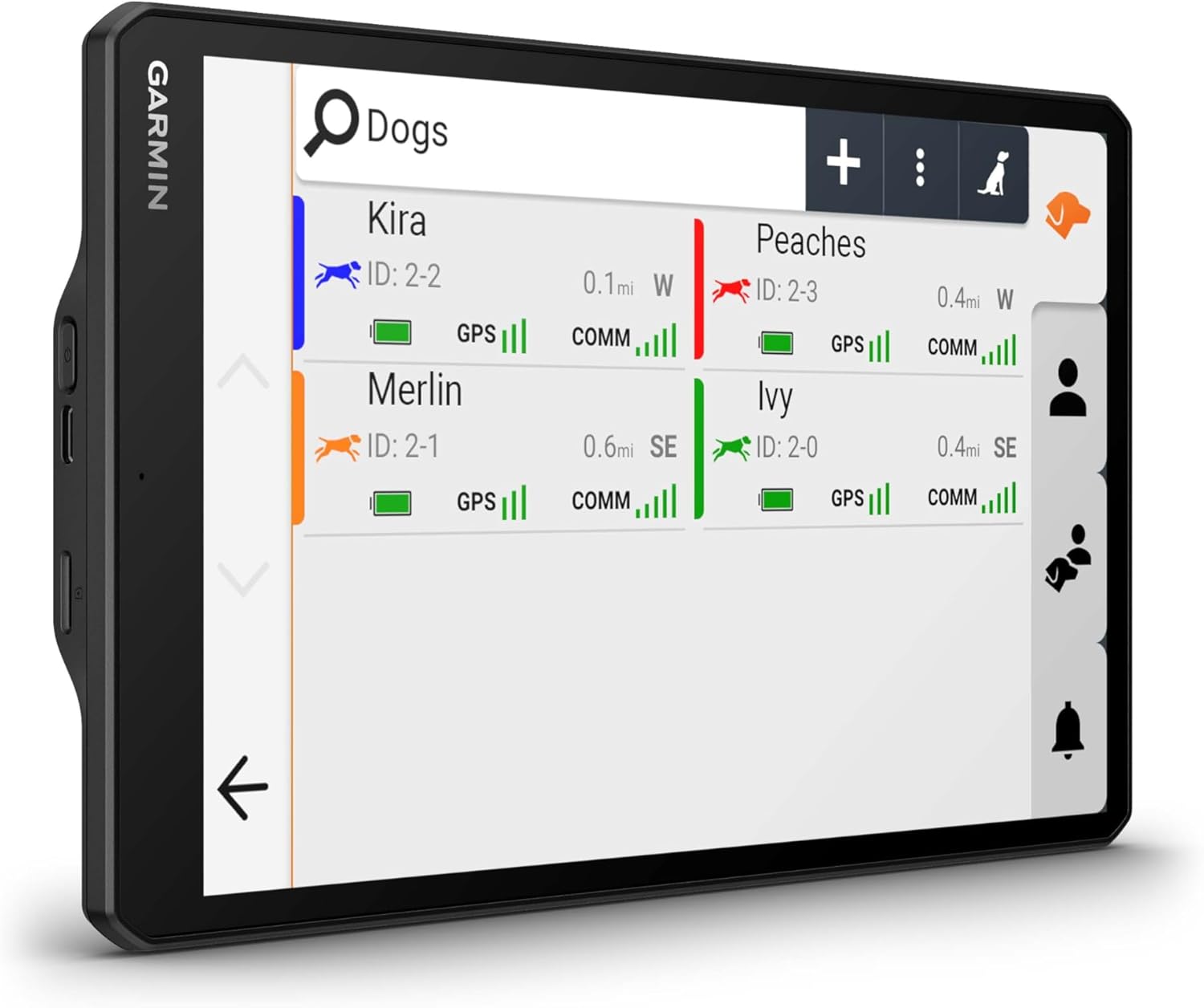
Image: The Garmin Alpha XL device shown connected to an external magnetic mount antenna, displaying a detailed map with dog tracking information and a list of active dogs.
Operating the Device
1. Touchscreen Interface
The Alpha XL features a crisp, high-resolution 10-inch touchscreen display. You can operate the device in both portrait and landscape modes. Navigate through menus and maps by tapping, swiping, and pinching gestures.

Image: The Garmin Alpha XL's main map screen, showing dog tracks overlaid on a topographic map, along with real-time data such as speed, movement status, direction, and elevation.
2. Main Menu Overview
From the main screen, you can access various functions including Map View, Pro View, Dog Training, New Hunt setup, and Map Manager. Use the icons to quickly navigate to desired features.

Image: The Garmin Alpha XL's home screen, presenting quick access tiles for key functions such as map viewing, Pro View, dog training, and hunt management, alongside current weather conditions.
3. Dog List and Group Management
The device allows storage for up to 250 dogs in its memory. This feature simplifies managing active groups without needing to re-enter dog names for each hunt. Access the "Hunt Group" or "Dogs" menu to view and manage your tracked dogs.

Image: The Garmin Alpha XL screen showing the "Hunt Group" list, which displays the names and unique IDs of dogs currently being tracked or managed.

Image: The Garmin Alpha XL's "Dogs" list interface, providing an overview of each dog's status, including GPS signal strength and communication status with the collar.
4. Channel View
Utilize the channel view feature to monitor the congestion of collars on individual VHF channels. This helps in selecting less congested frequencies to avoid interference and ensure reliable tracking.
Dog Tracking and Training
1. Real-time Tracking
Monitor the location of your dogs in real time on the large 10-inch touchscreen display. The device provides updates on each dog's distance traveled, average speed, and barks per minute. Geofencing alerts can be configured to notify you when a dog enters or exits a predefined area.
2. Training Commands
When paired with a training-enabled dog collar, the Alpha XL allows you to deliver training commands directly from the touchscreen. This includes 18 levels of stimulation, tone, and vibration options. You can also view the collar battery level and other settings for each dog.

Image: The Garmin Alpha XL's "Pro View" screen, which provides individual status cards for each dog, displaying their distance, time since last update, and offering direct access to training controls.
Maintenance
1. Cleaning the Device
Regularly clean the touchscreen and device exterior with a soft, damp, lint-free cloth. Avoid using abrasive cleaners or solvents that could damage the screen or casing.
2. Battery Care
To maximize battery life, avoid exposing the device to extreme temperatures. Charge the device fully before extended periods of non-use. The internal P76 battery is not user-replaceable; contact Garmin support for battery service.
3. Software Updates
Periodically check for software updates to ensure optimal performance and access to the latest features. Updates can typically be performed by connecting the device to a computer using the charging/data cable and using Garmin's update software, or wirelessly with an Outdoor Maps+ subscription.
Troubleshooting
Device Not Powering On
- Ensure the device is fully charged. Connect it to the vehicle power cable or charging/data cable.
- Verify the power cable is securely connected to both the device and the power source.
- If using vehicle power, check the vehicle's 12V outlet for power.
No GPS Signal
- Ensure the device has a clear, unobstructed view of the sky.
- Move to an open area away from tall buildings, dense forests, or large metal structures.
- Allow several minutes for the device to acquire satellite signals.
Dog Collars Not Tracking
- Verify that the dog collars are powered on and within the 9-mile tracking range.
- Ensure the collars are properly paired with the Alpha XL.
- Check the channel view feature for frequency interference and select a less congested channel if necessary.
- Confirm collar batteries are charged.
Screen Unresponsive
- Perform a soft reset by holding the power button until the device restarts.
- Ensure the screen is clean and free of debris or moisture.
For further assistance, refer to the Garmin support website or contact customer service.
Specifications
| Model Name | Alpha XL |
| Item Model Number | 010-03394-00 |
| Brand | Garmin |
| Product Dimensions | 6.06"L x 0.83"W x 9.65"H (15.39 x 2.11 x 24.51 cm) |
| Item Weight | 1.78 pounds (0.81 kg) |
| Screen Size | 10.1 Inches |
| Connectivity Technology | Bluetooth, USB, Wi-Fi |
| Human Interface Input | Buttons, Touchscreen |
| Map Type | Topographical (Preloaded TopoActive, City Navigator) |
| Mounting Type | Dashboard Mount (Suction Cup, Magnetic) |
| Batteries | 1 P76 battery required (included) |
| Manufacturer | Garmin |
Warranty and Support
The Garmin Alpha XL GPS Navigator is manufactured by Garmin. For detailed warranty information, product registration, and technical support, please visit the official Garmin website. You can typically find support resources, FAQs, and contact information for customer service on their dedicated support pages.
For the most up-to-date information, please visit: www.garmin.com/support
Documents and downloads
Ask a question about this manual
Ask about setup, troubleshooting, compatibility, parts, safety, or missing instructions. Manuals+ will review the question and use this page’s manual context to help answer it.