
eufy E18
Contents
eufy E18 Robot Lawn Mower User Manual
Model: E18
Important Safety Information
Please read this manual carefully before operating the eufy E18 Robot Lawn Mower. Failure to follow instructions may result in injury or damage. Keep this manual for future reference.
- Ensure the lawn area is clear of all objects (stones, toys, wires, etc.) before operation.
- Keep children and pets away from the mowing area during operation.
- Do not operate the mower in wet conditions or during heavy rain. The mower is designed to return to its charging station automatically in such conditions.
- Never attempt to lift or carry the mower while the blades are rotating.
- Always turn off the mower and remove the safety key before performing any maintenance or cleaning.
- The robot lawn mower's camera has a 96° horizontal field of view (FOV) and an 80° vertical FOV. To ensure safety, please avoid standing in the blind spots on the sides or behind the mower while it is mowing.

Image: Visual representation of safety guidelines, including keeping clear of the mower's path and understanding its camera's field of view.
Package Contents
Verify that all items are present in the package before beginning setup.

Image: Diagram showing the eufy E18 Robot Lawn Mower, Base Station, Garage, Extension Cable, Power Adapter, Screws, Blade Screws, Blades, Lens Cloth, Garage Screws, Grease, and Hex Key.
- Robot Lawn Mower
- Base Station
- Garage
- Extension Cable
- Power Adapter
- Screws (x8)
- Blade Screws (x9)
- Blades (x9)
- Lens Cloth
- Garage Screws (x4)
- Grease
- Hex Key
Product Overview
The eufy E18 Robot Lawn Mower is designed for efficient and autonomous lawn care. It features advanced vision navigation and obstacle avoidance.

Image: The eufy E18 Robot Lawn Mower shown alongside a smartphone displaying its mapping interface.
Key Features:
- Pure Vision FSD Technology: Utilizes high-precision cameras and intelligent algorithms for navigation without physical wires or RTK stations.
- Auto Mapping: Automatically maps your yard and plans mowing paths.
- Precise Obstacle Avoidance: 3D perception system detects and avoids obstacles.
- Multi-Zone Management: Manage multiple lawn areas via the app.
- Edge Trimming: Designed to trim close to edges for complete coverage.
- Adjustable Cutting Height: Cut height can be adjusted from 1 to 3 inches (25-75 mm).
- Quiet Operation: Operates at a low noise level of 56dB.
- Anti-Theft System: Features GPS tracking and alerts.
- Smart Automatic Recall: Returns to charging station during rain or low-light conditions.

Image: Illustration of eufy V-FSD 1.0 technology, highlighting its camera-based navigation system.
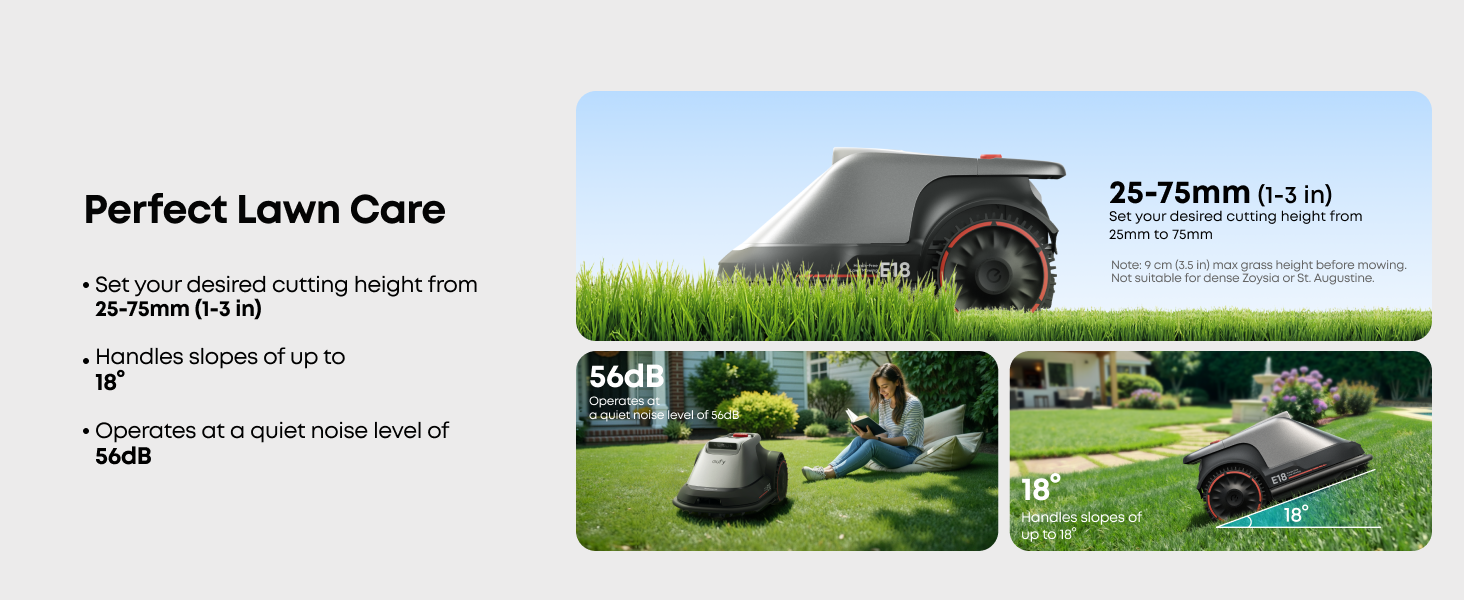
Image: The eufy E18 Robot Lawn Mower operating in a yard, emphasizing its wire-free and RTK-free navigation.
Setup Guide
1. Before Purchasing & Mowing:
Ensure your lawn meets the following criteria for optimal performance:
- Lawn Size: Max 0.3 acres (13,000 sq ft).
- Slope Check: Less than 18 degrees.
- Grass Type: Not suitable for St. Augustine and dense Zoysia grass. Grass height should be under 3.5 inches (9 cm) before mowing.
- Terrain: Mostly flat with variations under 1.2 inches (3 cm). Ensure no unfilled pits, trenches, or tree root networks covered by grass. Mark any such areas as no-go zones.
- Clear Obstacles: Remove stones, debris, and fill in any holes or uneven ground.

Image: Visual guide detailing maximum lawn size, slope, terrain variations, and grass height requirements for the eufy E18.
2. Base Station Placement:
- Ensure a straight path of at least 5 meters (5.5 yards) in front of the base station.
- Secure the base station using nails for lawns or glue for hard surfaces.
- Keep the charging cable 30 cm (12 inches) above ground to prevent water damage.

Image: Diagram illustrating proper base station placement and cable management for the eufy E18.
3. Initial Configuration:
The initial setup and auto-mapping process typically takes approximately 5 minutes for quick start. For a standard 0.3 acre (13,000 sq ft) area, the first use of auto mapping may require 3-4 hours. Larger or more complex areas will take longer.
- Unbox the product.
- Install the garage by inserting the 8 ground nails.
- Charge the lawn mower.
- Connect to the Internet.
- Initiate mapping.
Wi-Fi Setup: Use a mobile hotspot for initial setup if Wi-Fi coverage is limited in your yard. After setup, enable 4G via the app for stable connectivity if your yard isn't fully covered by Wi-Fi.

Image: Step-by-step visual guide for the quick setup process of the eufy E18, from unboxing to mapping.
Operating Instructions
1. Auto Mapping & Multi-Zone Management:
The E18 uses precise positioning and distance measurement to map your yard. The mapped areas and planned mowing paths can be easily viewed and managed through the smartphone application.

Image: The eufy E18 Robot Lawn Mower actively mapping a lawn, with a smartphone displaying the mapping progress.

Image: The eufy E18 Robot Lawn Mower mapping a lawn, emphasizing the one-click auto-mapping feature accessible via the app.
Effortlessly manage multiple lawn areas (front and back yards) without hassle. The connection path can extend up to 60m, and the minimum editable map length is 0.2m.

Image: Aerial view of a property showing the eufy E18 managing multiple distinct lawn areas (A, B, C) with connecting paths.
2. Precise Mowing Mode & Scheduling:
Schedule and customize mowing for multiple areas with just a tap, even when you're away. You can adjust mowing schedules, path direction, grass height, and travel speed.

Image: A diagram showing different lawn zones (A, B1, B2, C, D) with varying mowing schedules and cutting heights, controlled via the app.
The cutting height can be set from 25-75 mm (1-3 inches). For grass under 3.5 inches (9 cm) before mowing.

Image: The eufy E18 Robot Lawn Mower demonstrating its adjustable cutting height feature on a lawn.
3. Obstacle Avoidance:
The E18's 3D perception system accurately detects and avoids obstacles, ensuring it navigates complex garden environments safely. It can measure the size and distance of obstacles, selecting the best path to avoid them and maximize mowing coverage.

Image: The eufy E18 Robot Lawn Mower navigating around a child and a dog, demonstrating its obstacle avoidance capabilities.

Image: An aerial view of a lawn with the eufy E18, showing various objects like trees, sprinklers, fences, and fountains being identified as obstacles.
Note: Objects smaller than 5cm in height or with a projection area smaller than 10cm x 10cm must be cleared or marked as No-Go Zones.
4. Edge Trimming:
The E18 features Ride-On-Edge Technology for precise edge trimming, ensuring every inch of grass is mowed.

Image: The eufy E18 Robot Lawn Mower positioned along a paved edge, demonstrating its ability to trim close to boundaries.

Image: The eufy E18 Robot Lawn Mower trimming grass along a flower bed, highlighting its edge trimming capability.
5. Smart Automatic Recall:
When the E18 detects rainfall, it will automatically stop working and return to the charging station. During low-light conditions, the E18 will automatically sense the environment and return to the station.

Image: The eufy E18 Robot Lawn Mower returning to its base station during simulated rain and low-light conditions.
6. Anti-Theft System:
The E18 features GPS tracking to prevent theft. With easy app control, you can monitor its location and receive alerts.

Image: A user controlling the eufy E18 Robot Lawn Mower via a smartphone app, showcasing the anti-theft system and GPS tracking.

Image: The eufy E18 Robot Lawn Mower in a yard with an overlay indicating its anti-theft system, GPS, and 4G transmission capabilities.
Maintenance
1. Battery Usage and Maintenance:
- Coverage per Charge: 0.037 - 0.067 acres (1,615 - 2,906 sq ft). Actual coverage may vary depending on settings and environmental conditions.
- Resume Mowing: The mower automatically resumes unfinished tasks after charging.
- Software Updates: Regularly update firmware via the app for optimal performance and new features.

Image: Information on battery performance, automatic task resumption, and the importance of software updates for the eufy E18.
2. Cleaning:
Regular cleaning of the mower and its blades is essential for maintaining performance. Always turn off the mower and remove the safety key before cleaning.
3. Blade Replacement:
Inspect blades regularly for wear and tear. Replace dull or damaged blades using the provided hex key and new blades/screws from the package contents. Refer to the package contents diagram for blade and screw identification.
Troubleshooting
This section addresses common issues you might encounter with your eufy E18 Robot Lawn Mower.
| Problem | Possible Cause | Solution |
|---|---|---|
| Mower not starting or returning to base. | Low battery, rain detected, low light, or mapping issue. | Check battery level. Ensure weather conditions are suitable. Verify base station connection. Check app for error messages. |
| Mower getting stuck or missing spots. | Obstacles, uneven terrain, or mapping inaccuracies. | Clear the mowing area of small objects. Update the app to the latest version for map splitting and zone management features. Mark problematic areas as No-Go Zones. |
| Poor cutting performance. | Dull blades, grass too tall, or incorrect cutting height setting. | Replace blades. Ensure grass is under 3.5 inches before mowing. Adjust cutting height gradually. |
| App connectivity issues. | Weak Wi-Fi signal or 4G connectivity issues. | Ensure strong Wi-Fi signal in the mowing area. If Wi-Fi is insufficient, subscribe to 4G data via the app for stable connectivity. |
| Virtual no-go line or lawn segment modification issues. | App software limitation or bug. | Ensure the app is updated to the latest version. If issues persist, deleting and re-mapping the lawn sections might be necessary as a temporary solution. Contact customer support for persistent software issues. |
For further assistance, refer to the official eufy support channels.
Specifications
Technical specifications for the eufy E18 Robot Lawn Mower.

Image: A comparison table detailing specifications for both eufy E15 and E18 Robot Lawn Mowers.
| Feature | Detail (eufy E18) |
|---|---|
| Max Mapping Size | 0.3 acres (13,000 sq ft) |
| Cutting Width | 203 mm (8 in) |
| Cutting Height | 25-75 mm (1-3 in) |
| Maximum Slope | 18° |
| Noise Level | 56 dB |
| Charging Time | 90 to 110 min |
| Waterproof Level | IPX6 |
| Mower Dimensions (D x W x H) | 60.3 x 39.1 x 31.8 cm (23.74" x 15.39" x 12.52") |
| Base Station Dimensions (D x W x H) | 72.7 x 48.2 x 45.2 cm (28.6" x 18.9" x 17.8") |
| Item Weight | 28 Pounds |
| Power Source | Battery Powered (1 12V battery included) |
| Model Number | T2801 |
| UPC | 194644231163 |
Warranty and Support
For warranty information and customer support, please refer to the official eufy website or contact eufy customer service directly.
- Online Support: Visit the eufy support page for FAQs, troubleshooting guides, and contact options.
- Product Registration: Register your product to receive updates and support.
- Protection Plans: Additional protection plans may be available for purchase. Refer to your retailer for details.
You can also find the official user guide in PDF format here.
Ask a question about this manual
Ask about setup, troubleshooting, compatibility, parts, safety, or missing instructions. Manuals+ will review the question and use this page’s manual context to help answer it.