
1. Introduction
The TIMNUT 4K60FPS Mini Action Camera is a compact and versatile device designed to capture high-quality video and photos in various environments. Its small size and robust features make it ideal for adventurers, sports enthusiasts, and everyday users.
Key features include 4K 60FPS video recording, a 1.69-inch IPS touchscreen for easy control, 6-axis stabilization, and IPX8 waterproofing up to 20 meters without an additional case. The camera supports multiple shooting modes and offers convenient Wi-Fi connectivity for seamless content transfer.
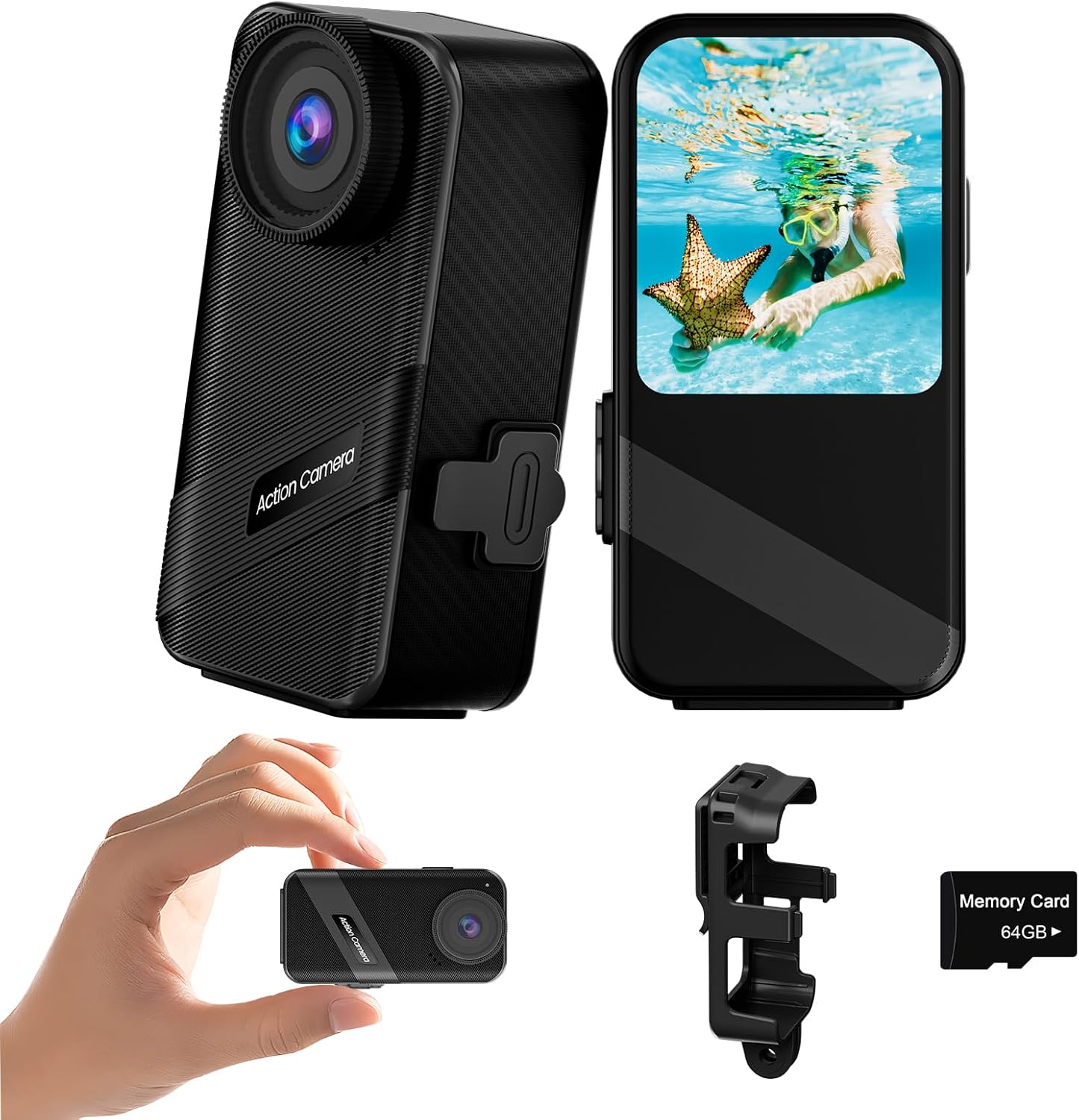
2. Product Components
The package includes the following items:
- Camera Body
- Battery
- 64GB Card
- Dual-path Capsule Charging Dock
- Waterproof Case
3. Setup
3.1. Battery Installation
To install the battery:
- Locate the battery cover on the bottom of the camera.
- Turn down the black folding clasp.
- Pinch the black folding clasp and gently lift it upwards to open the battery compartment.
- Insert the battery into the compartment, ensuring correct orientation.
- Close the battery cover firmly until it clicks into place.

3.2. SD Card Installation
Insert the provided 64GB Micro SD card into the designated slot, usually located near the battery compartment or on the side of the camera. Ensure the card is inserted with the correct orientation until it clicks into place.
3.3. Charging the Battery
Use the included dual-path capsule charging dock to charge the camera batteries. Connect the charging dock to a USB power source using a Type-C cable. The dock allows for simultaneous charging of both batteries, ensuring you are always ready to capture moments.

4. Operating Instructions
4.1. Basic Controls
The camera features intuitive controls for easy operation:
- Power On/Off: Long press the switch button.
- Take Photo/Start Recording: Short press the switch button.
- End Recording: Short press the switch button again.
- Access Video/Photo Album: Tap the designated area on the touchscreen.
- Select Video Mode: Tap the area to select different video modes.
- Parameter Settings: Access settings via the touchscreen.

4.2. Touchscreen Navigation
The 1.69-inch IPS touchscreen provides a clear and responsive interface. Swipe down on the screen to turn on Wi-Fi. Slide up and down in specific areas to zoom in and out. The touchscreen allows for easy adjustment of settings and review of footage.

4.3. Shooting Modes
The camera offers a variety of shooting modes to suit different scenarios:
- Regular Video
- Pre-recording (captures 12 seconds before you press record)
- Vertical Shooting
- Time-lapse
- Slow Motion
- Loop Recording
- Driving Mode
- Single Shot
- Burst Shot
- Timed Shot

4.4. Wi-Fi Connectivity
The camera supports 2.4G/5G dual Wi-Fi for fast download and transfer of photos and videos to your smartphone or other devices. This allows for easy sharing and remote control.

4.5. Waterproof Operation
The TIMNUT Mini Action Camera is IPX8 waterproof up to 20 meters (65 feet) without the need for an additional waterproof case. This allows for direct underwater use for spontaneous diving and water sports.

4.6. Advanced Features
- 6-Axis Stabilization (EIS): Ensures smooth and steady footage even in dynamic environments. This electronic image stabilization helps reduce blur from camera shake.
- Deformity Correction: Corrects the 'fish-eye' effect often seen with wide-angle lenses, providing a more natural perspective.
- 8x Digital Zoom: Allows you to focus on distant details in both photo and video modes.
- Low Light Shooting: Enhanced performance in low light conditions to capture clear and vibrant images.
- Remote Control: The camera supports wireless remote control for convenient operation from a distance.


5. Maintenance
5.1. Cleaning
To maintain optimal performance and appearance:
- Wipe the camera body with a soft, damp cloth. Avoid abrasive cleaners.
- For the lens, use a specialized lens cleaning cloth and solution. Do not touch the lens with your fingers.
- Ensure the Type-C interface and battery compartment are free of dust and debris.
5.2. Storage
When not in use, store the camera in a cool, dry place away from direct sunlight and extreme temperatures. Remove the battery if storing for extended periods to prevent discharge or damage.
5.3. Battery Care
To prolong battery life:
- Fully charge the batteries before first use.
- Avoid completely draining the battery before recharging.
- Store batteries in a cool, dry place.
6. Troubleshooting
This section addresses common issues you might encounter with your TIMNUT Mini Action Camera.
| Problem | Possible Cause | Solution |
|---|---|---|
| Camera does not power on. | Low or depleted battery; Battery not properly installed. | Charge the battery fully. Ensure the battery is inserted correctly and the battery cover is securely closed. |
| Wi-Fi connection issues. | Incorrect Wi-Fi settings; App issues; Interference. | Ensure Wi-Fi is enabled on the camera (swipe down on touchscreen). Restart both camera and smartphone. Check for app updates. Try connecting in a different location to rule out interference. |
| Recording stops unexpectedly. | SD card full; SD card speed too slow; Overheating. | Delete unnecessary files or replace SD card. Use a high-speed (U3 or V30) Micro SD card. Allow camera to cool down if it feels hot. |
| Poor image/video quality. | Dirty lens; Incorrect settings; Low light conditions. | Clean the lens with a soft cloth. Check resolution and frame rate settings. Utilize low light shooting mode if applicable. |
| Battery door not closing properly. | Misalignment; Obstruction. | Ensure the battery is fully seated and no foreign objects are obstructing the latch. Gently align the clasp and press firmly until it clicks. |
7. Specifications
| Feature | Detail |
|---|---|
| Product Dimensions | 1.3 x 1.3 x 0.8 inches |
| Item Weight | 14.4 ounces |
| Batteries | 1 Lithium Ion batteries required (included) |
| Photo Sensor Technology | CMOS |
| Video Capture Resolution | 4K |
| Flash Memory Type | Micro SD |
| Video Capture Format | MP4 |
| Screen Size | 4.24 Centimeters (1.69 inches) |
| Connectivity Technology | Wi-Fi |
| Color | Black |
| Special Feature | Zoom |
| Optical Zoom | 8 x |
| Manufacturer | TIMNUT |
| Date First Available | December 30, 2024 |
8. Warranty and Support
TIMNUT is committed to providing high-quality products and excellent customer service. For any inquiries or assistance, please refer to the following:
- 30-Day Refund: If you are not satisfied with your purchase, you may be eligible for a refund within 30 days.
- 365-Day Replacement: The product is covered by a 365-day replacement policy for manufacturing defects.
- 24-Hour Troubleshooting: Dedicated support is available for troubleshooting assistance within 24 hours.
- Lifetime Support: TIMNUT offers lifetime support for its products.
For further assistance, please visit the official TIMNUT store or contact customer service through the platform where you purchased the product.
