
SIYEGK YJL-WB1020
SIYEGK Emergency Weather Radio YJL-WB1020 Instruction Manual
Model: YJL-WB1020
Introduction
This manual provides detailed instructions for the safe and efficient operation of your SIYEGK YJL-WB1020 Emergency Weather Radio. Designed for reliability in various situations, this multi-functional device offers AM/FM/SW/NOAA radio reception, multiple power sources, an SOS alarm, and a powerful flashlight. Please read this manual thoroughly before use and retain it for future reference.
Product Overview
The SIYEGK YJL-WB1020 is a versatile emergency radio equipped with essential features for preparedness and outdoor activities. Key components include:
- AM/FM/SW/NOAA Weather Band Radio: For receiving local and international broadcasts, including critical weather alerts.
- Multiple Charging Options: Built-in rechargeable battery, USB input, hand crank, and solar panel. Also supports 3 AAA batteries (not included).
- 10000mAh/37000mWh Power Bank: To charge external devices via USB.
- SOS Alarm: Loud siren with flashing lights for emergency signaling.
- Flashlight & Reading Lamp: Integrated LED lighting with multiple modes for illumination.
- Bluetooth Speaker: For audio playback from compatible devices.
- Headphone Jack: For private listening.
- IPX3 Water Resistance: Provides protection against splashing water.

Figure 1: Front view of the SIYEGK Emergency Weather Radio, showing the display, controls, and extended antenna.
Setup
1. Initial Charging
Before first use, fully charge the internal 10000mAh lithium battery using one of the following methods:
- USB-C Charging: Connect the provided USB-C cable to the radio's USB-C input port and to a USB power adapter (not included) or computer.
- Hand Crank: Rotate the hand crank clockwise or counter-clockwise for 3-5 minutes to provide initial power.
- Solar Panel: Place the radio with the solar panel facing direct sunlight. This method is primarily for maintaining charge or slow charging.
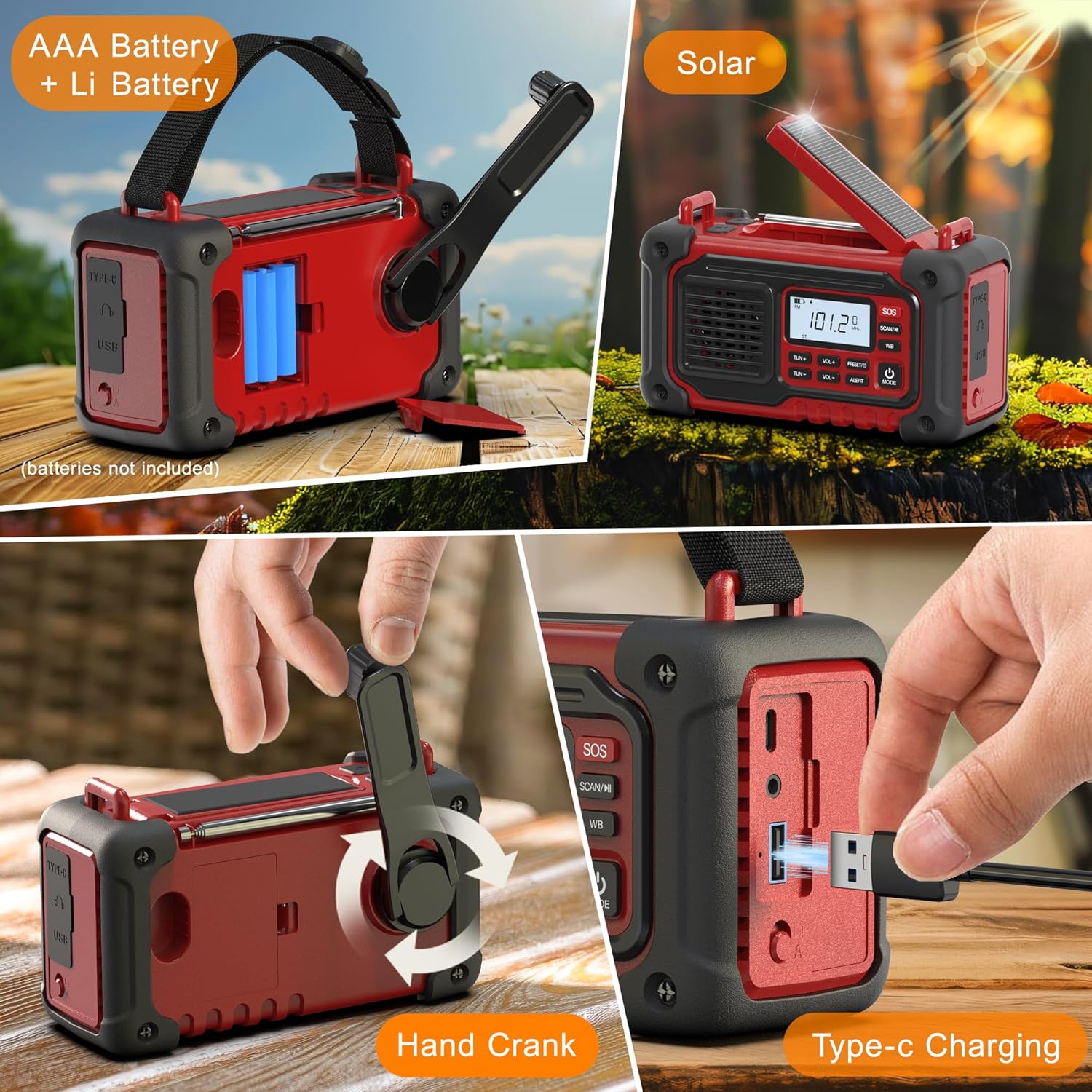
Figure 2: Various charging methods including AAA battery compartment, hand crank, solar panel, and USB-C port.
2. AAA Battery Installation (Optional Backup)
For an additional backup power source, you can install 3 AAA batteries (not included):
- Locate the battery compartment cover on the back of the radio.
- Open the cover and insert 3 AAA batteries, ensuring correct polarity (+/-).
- Close the battery compartment cover securely.
- Use the battery selection switch (usually near the battery compartment) to select between the internal Li-Battery and AAA batteries. Ensure the switch is set to the desired battery mode before turning on the radio.
Operating Instructions
1. Power On/Off
- Press and hold the POWER/MODE button to turn the radio ON or OFF.
- The LCD display will show the current time and battery level.
2. Radio Functions (AM/FM/SW/NOAA)
- Press the MODE button repeatedly to cycle through AM, FM, SW (Shortwave), and WB (Weather Band) modes.
- Manual Tuning: Use the TUN+ and TUN- buttons to manually adjust the frequency.
- Automatic Scan: Press and hold the SCAN/M button to automatically scan for available stations. The radio will stop on the next strong signal.
- NOAA Weather Alert: In WB mode, the radio can automatically scan for emergency alerts. When an alert is issued, the radio will sound an alarm and display the warning.
- Volume Control: Use the VOL+ and VOL- buttons to adjust the volume.
- Antenna: Extend the telescopic antenna for improved FM, SW, and WB reception.

Figure 3: The radio's LCD display showing the frequency and battery status.
3. Bluetooth Speaker Function
- Press the MODE button until "BT" appears on the display.
- On your mobile device, search for Bluetooth devices and select "YJL-WB1020" to pair.
- Once paired, you can play audio through the radio's speaker.
4. SOS Alarm
- Press and hold the SOS button to activate the loud siren and flashing lights.
- Press the SOS button again to deactivate.

Figure 4: The SOS alarm feature with flashing lights.
5. Flashlight & Reading Lamp
- Press the LIGHT button (usually on the side or front) to cycle through flashlight modes: standard light, reading lamp, and SOS flashing.
- The reading lamp is located on the underside of the solar panel. Lift the solar panel to use it.

Figure 5: The 3W LED flashlight and reading lamp in use.
6. Charging External Devices (Power Bank)
- Connect your device's USB charging cable to the radio's USB-A output port.
- The radio's internal 10000mAh battery will begin charging your device.

Figure 6: The radio functioning as a power bank to charge a smartphone.
Maintenance
- Keep the radio clean by wiping it with a soft, dry cloth. Do not use abrasive cleaners or solvents.
- Avoid exposing the radio to extreme temperatures, direct sunlight for prolonged periods (except for solar charging), or high humidity.
- If storing for an extended period, ensure the internal battery is partially charged (around 50%) and recharge it every 3-6 months to maintain battery health.
- Ensure all port covers are securely closed to maintain water resistance (IPX3).
Troubleshooting
| Problem | Possible Solution |
|---|---|
| Radio does not power on. | Check battery level. Recharge the internal battery or install fresh AAA batteries. Ensure the battery selection switch is in the correct position. |
| Poor radio reception. | Extend the telescopic antenna fully. Try repositioning the radio. Perform an automatic scan to find stronger signals. |
| Cannot charge external device. | Ensure the radio's internal battery has sufficient charge. Check the USB cable connection. Some devices may draw too much power or be incompatible. |
| SOS alarm not working. | Ensure the radio is powered on and the SOS button is pressed and held for a few seconds. |
Specifications
| Feature | Detail |
|---|---|
| Model Number | YJL-WB1020 |
| Product Dimensions | 6.3 x 2.6 x 3.1 inches (16.0 x 6.6 x 7.9 cm) |
| Item Weight | 1.54 pounds (0.7 kg) |
| Battery Capacity | 10000mAh / 37000mWh (Built-in rechargeable) |
| Backup Batteries | 3 AAA batteries (not included) |
| Tuner Technology | AM, FM, NOAA, SW (7-Band Support) |
| Special Features | Built-In AM Antenna, Built-In Flashlight, Rechargeable, SOS Alarm, Bluetooth, Reading Lamp |
| Connectivity Technology | Auxiliary, Bluetooth |
| Power Source | Battery Powered, Solar Powered, Cranked Powered |
| Water Resistance Rating | IPX3 |
Instructional Videos
Best Prepared Gifts - Emergency Weather Radio
Video 1: A detailed overview of the SIYEGK Emergency Weather Radio's features and benefits, including its various functions and power options.
Good Survival Gifts for Family - Crank Weather Radio
Video 2: Demonstrates the hand-crank charging mechanism and other survival-oriented features of the radio.
Crank Emergency Radios - ALL-IN-1 Wind Up Radio
Video 3: Highlights the all-in-one functionality of the wind-up radio, showcasing its various uses in emergency situations.
Warranty and Support
For warranty information or technical support, please refer to the contact details provided with your purchase or visit the official SIYEGK website. Keep your purchase receipt as proof of purchase for warranty claims.
Included Components: Owner's Manual (this document).
Ask a question about this manual
Ask about setup, troubleshooting, compatibility, parts, safety, or missing instructions. Manuals+ will review the question and use this page’s manual context to help answer it.