1. Introduction
The SEHMUA RBX-B40 Smart Bird Feeder with Camera offers an advanced birdwatching experience. Equipped with an HD camera and AI recognition technology, it identifies over 10,000 bird species. This feeder is designed for outdoor use, featuring solar power, a large capacity, and customizable DIY add-ons to attract a diverse range of birds.
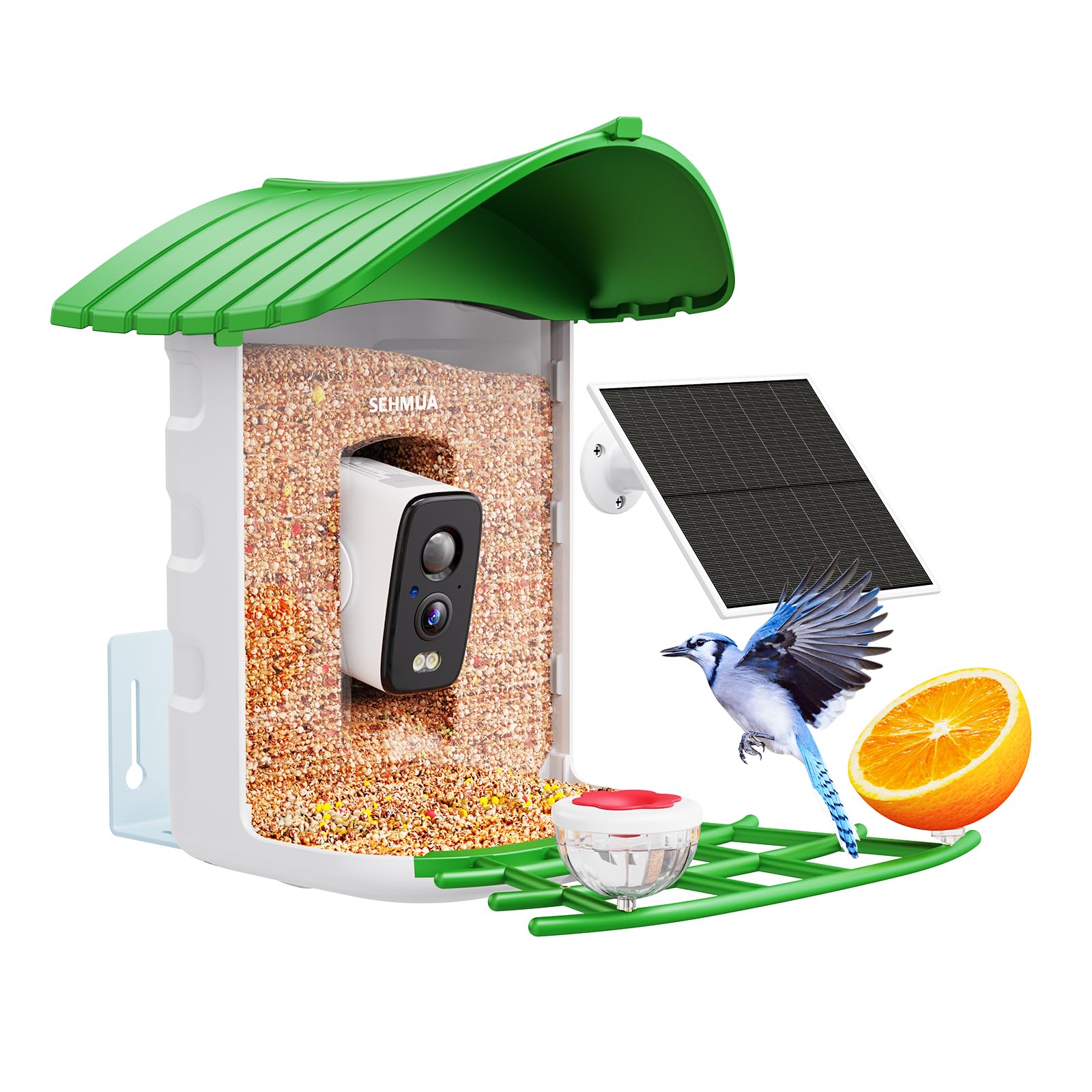
The SEHMUA RBX-B40 Smart Bird Feeder, shown in Mint Green.
2. What's Included
Verify that all components are present in the package:
- Smart Bird Feeder Unit with Integrated HD Camera
- Solar Panel (6W)
- Mounting Bracket and Screws
- Tree Strap
- USB Charging Cable
- Mini Hummingbird Feeder Add-on
- Jelly Feeder Add-on
- Fruit Clips Add-on
- Suet Ball Holder Add-on
- User Manual

All components included in the SEHMUA RBX-B40 package.
3. Setup
3.1 Mounting the Feeder
The bird feeder can be mounted in two primary ways: on a wall or strapped to a tree. Choose a location with good sunlight exposure for the solar panel and within range of your 2.4GHz Wi-Fi network (5GHz Wi-Fi is not supported).

Mounting the feeder on a wall using the provided bracket.

Securing the feeder to a tree using the tree strap. Ensure it is strapped twice for security.
3.2 Initial Charging and Power
The feeder includes a built-in 6000mAh rechargeable battery and a 6W solar panel. For initial setup, it is recommended to fully charge the battery using the provided USB cable before relying solely on solar power. The solar panel will then maintain the charge, ensuring continuous operation throughout the year.

The 6W solar panel ensures continuous power for the feeder.
3.3 App Installation and Wi-Fi Connection
Download the dedicated mobile app from your device's app store. Follow the in-app instructions to pair your bird feeder with your smartphone. Ensure your device is connected to a 2.4GHz Wi-Fi network during the pairing process.

Visual guide for installing the feeder and connecting to the app.
Video demonstrating the setup process for the bird feeder camera.
4. Operating Instructions
4.1 Real-time Bird Watching and Notifications
The HD camera with a 140° wide-angle lens captures clear images and videos of visiting birds. The mobile app provides instant notifications when birds arrive, allowing for real-time viewing and an immersive birdwatching experience.

Receive instant notifications and view birds in HD resolution.
4.2 AI Bird Recognition
Utilize the complimentary 1-year AI bird recognition trial (Cloud only) to identify over 10,000 bird species. The app will analyze the captured footage and provide information about the birds visiting your feeder.

The AI system identifies over 10,000 bird species.
4.3 Video Recording and Sharing
The feeder automatically records videos of bird activity. These videos can be stored in the cloud (30-day trial included) or on a memory card (supports up to 128GB, not included). The app allows you to share these moments with up to 10 users, with 4 users able to watch online simultaneously.

Record and playback bird videos, with options for cloud or local storage.
Video showcasing the bird feeder with camera in action.
Video demonstrating the ideal use of the bird feeder for bird lovers.
5. DIY Add-ons
Customize your bird feeder to attract a wider variety of bird species with the four included DIY add-ons:
- Mini Hummingbird Feeder: For attracting hummingbirds with nectar.
- Jelly Feeder: Ideal for attracting orioles and other fruit-eating birds.
- Fruit Clips: Securely hold fruit pieces to entice various bird species.
- Suet Ball Holder: Provide high-energy suet for woodpeckers and other insect-eating birds.

The four DIY add-ons for customizing your bird feeder.
6. Maintenance
6.1 Refilling Birdseed
The feeder features a spacious 2.5L container, reducing the frequency of refills. To refill, simply lift the green roof and pour in your desired birdseed. The waterproof funnel design helps keep the birdseed dry and minimizes spoilage.
6.2 Cleaning
Regular cleaning is essential to prevent the spread of disease among birds. Disassemble the feeder components as needed and clean with a mild soap solution and water. Rinse thoroughly and ensure all parts are dry before reassembling and refilling.
6.3 Weather Protection
The feeder has an IP66 weatherproof rating, protecting it from rain and dust. The sloping roof also provides shelter for birds from direct sunlight and precipitation.

The feeder's IP66 weatherproof design ensures durability.
7. Troubleshooting
- No Power: Ensure the solar panel is receiving adequate sunlight. Check the battery charge level in the app. Fully charge the battery via USB if needed.
- Wi-Fi Connection Issues: Verify your Wi-Fi network is 2.4GHz. Ensure the feeder is within range of your router. Restart the feeder and attempt to re-pair with the app.
- Poor Camera Quality: Clean the camera lens gently with a soft cloth. Ensure there are no obstructions in front of the lens.
- AI Recognition Inaccurate: Ensure the camera has a clear view of the birds. AI accuracy may vary based on lighting conditions and bird species.
- Birds Not Visiting: Try different types of birdseed or add-ons. Ensure the feeder is placed in a safe, quiet location away from potential predators.
8. Specifications
| Feature | Detail |
|---|---|
| Brand | SEHMUA |
| Model Number | RBX-B40 |
| Target Species | Birds |
| Recommended Uses | Fruit, Seed |
| Mounting Type | Freestanding |
| Power Source | Solar Powered |
| Capacity | 2.5 Liters |
| Color | Mint Green |
| Item Weight | 2.63 Kilograms (5.79 pounds) |
| Smart Home Compatibility | Smart Home Compatible |
| Product Dimensions | 9.5 x 9.5 x 11 inches |
| Batteries | 1 C batteries required (included) |
| Wi-Fi Support | 2.4GHz (5GHz not supported) |
9. Safety Information
Please observe the following safety guidelines:
- Avoid using with certain bird species if local regulations or environmental concerns advise against it.
- Keep electrical components dry to prevent damage and ensure safe operation.
- Secure the feeder properly to prevent access by larger animals that could damage the unit or harm birds.
- Always follow local regulations regarding wildlife feeding and feeder placement.
10. Warranty and Support
For warranty information and customer support, please refer to the documentation included with your product or visit the official SEHMUA website. Contact customer service for assistance with any issues or questions regarding your Smart Bird Feeder.


