1. Introduction
The SKMEI Model 2328 is a multi-functional digital sports watch designed for durability and precision. It features an analog-digital display, 50-meter water resistance, and various timing functions suitable for daily wear and outdoor activities. This manual will guide you through its features and operation.
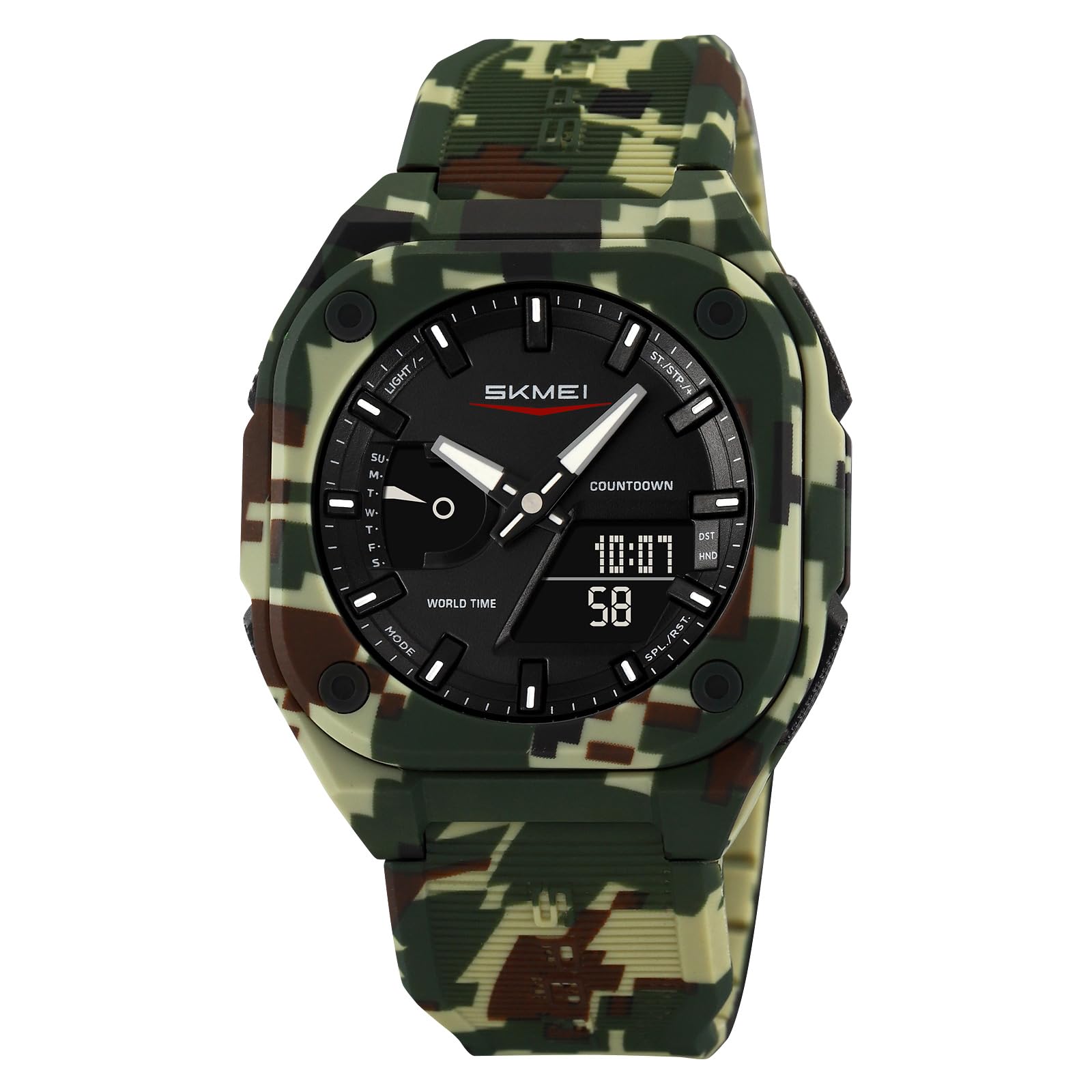
A front view of the SKMEI Sports Watch Model 2328, showcasing its green camouflage strap and black dial with both analog hands and a digital display.
2. Key Features

An image highlighting the key features of the SKMEI 2328 watch, including its analog-digital display, square dial shape, functions like date, week, 5 alarms, EL light, TPU strap material, and 50m water resistance.
- Analog-Digital Display
- World Time Function
- 5 Daily Alarms
- Countdown Timer
- Chronograph (Stopwatch)
- EL Backlight for low-light visibility
- Date and Day of Week Display
- 12/24-Hour Format
- 50 Meters Water Resistance
3. Initial Setup
Your SKMEI 2328 watch comes with a pre-installed CR2016 battery. No initial battery installation is required.
Identifying Buttons

A close-up view of the SKMEI 2328 watch face, showing the four control buttons: LIGHT (top left), MODE (bottom left), ST/STP (top right), and SPL/RST (bottom right). The digital display shows '10:07 58'.
- LIGHT: Activates the EL backlight.
- MODE: Cycles through different modes (Time, Alarm, Stopwatch, Countdown, World Time).
- ST/STP (Start/Stop): Used to start/stop functions or adjust settings.
- SPL/RST (Split/Reset): Used to reset functions or select items during setting.
4. Operating Instructions
Time Setting
- In Time Mode, press and hold the MODE button until the seconds begin to flash.
- Press SPL/RST to cycle through seconds, hours, minutes, year, month, and day.
- Use ST/STP to adjust the flashing value.
- Press MODE to confirm and exit setting mode.
- To switch between 12-hour and 24-hour format, press ST/STP while the hour is flashing.
Alarm Setting
- From Time Mode, press MODE to enter Alarm Mode (indicated by "AL" or an alarm icon).
- Press SPL/RST to select the alarm number (AL1 to AL5).
- Press ST/STP to toggle the selected alarm ON/OFF.
- To set an alarm, press and hold MODE until the hour flashes.
- Use SPL/RST to select hours or minutes.
- Use ST/STP to adjust the flashing value.
- Press MODE to confirm and exit.
Stopwatch Function
- From Time Mode, press MODE to enter Stopwatch Mode (indicated by "STW" or a stopwatch icon).
- Press ST/STP to start the stopwatch.
- Press ST/STP again to stop it.
- Press SPL/RST to reset the stopwatch to zero.
- For split time, press SPL/RST while the stopwatch is running. Press SPL/RST again to return to running time.
Countdown Timer
- From Time Mode, press MODE to enter Countdown Timer Mode (indicated by "CD" or a timer icon).
- Press and hold MODE until the hour flashes to set the timer.
- Use SPL/RST to select hours, minutes, or seconds.
- Use ST/STP to adjust the flashing value.
- Press MODE to confirm the setting.
- Press ST/STP to start or pause the countdown.
- Press SPL/RST to reset the timer to its set value.
World Time
- From Time Mode, press MODE to enter World Time Mode (indicated by "WT" or a globe icon).
- Use ST/STP to cycle through different city codes/time zones.
- The digital display will show the time for the selected city.
EL Backlight
Press the LIGHT button (top left) to illuminate the display for a few seconds in low-light conditions.
5. Care and Maintenance
Cleaning
Wipe the watch case and strap with a soft, damp cloth. Avoid using harsh chemicals or abrasive cleaners.
Water Resistance
The watch is water-resistant up to 50 meters (5 ATM). This means it is suitable for showering, swimming in shallow water, and rain exposure. It is not suitable for diving, snorkeling, or hot water activities (e.g., hot showers, saunas) as steam can penetrate the seals. Do not operate buttons underwater.
Battery Replacement
The watch uses a CR2016 battery. When the display dims or functions become erratic, it may be time for a battery replacement. It is recommended to have the battery replaced by a qualified watch technician to ensure proper sealing and maintain water resistance.

The back of the SKMEI 2328 watch, showing the stainless steel case back with 'SKMEI', '2328', 'Water Resistant 5ATM', and 'Battery Code CR2016' engraved, along with four screws securing it.
Storage
Store the watch in a cool, dry place away from direct sunlight and extreme temperatures when not in use for extended periods.
6. Troubleshooting Guide
| Problem | Possible Cause | Solution |
|---|---|---|
| Display is blank or dim. | Low battery. | Replace the battery (CR2016). |
| Time is incorrect. | Incorrect setting or accidental adjustment. | Re-set the time according to the "Time Setting" instructions. |
| Buttons are unresponsive. | Watch is in a locked mode or internal malfunction. | Try pressing all buttons to ensure no debris is stuck. If the problem persists, contact support. |
| Water inside the watch. | Water resistance exceeded or seals compromised. | Stop using the watch immediately and seek professional repair. Avoid hot water exposure. |
7. Product Specifications
| Brand | SKMEI |
|---|---|
| Model Number | 2328 |
| Display Type | Analog-Digital |
| Case Material | ABS |
| Band Material | Thermoplastic Polyurethane (TPU) |
| Crystal Material | Resin |
| Water Resistance | 50 Meters (5 ATM) |
| Functions | World Time, 5 Alarms, Countdown Timer, Stopwatch, EL Light, Date, Day, 12/24H Format |
| Case Diameter | 44.8 mm |
| Case Thickness | 14.3 mm |
| Item Weight | 43.9 g |
| Battery Type | CR2016 (included) |
A diagram illustrating the dimensions of the SKMEI 2328 watch, showing a case height of 51.5mm, case width of 44.8mm, strap/lug width of 24.7mm, and case thickness of 14.3mm, with a credit card for scale.
8. Warranty and Customer Support
Warranty Information
This SKMEI watch comes with a limited warranty. Please refer to the warranty card included with your purchase for specific terms and conditions. The warranty typically covers manufacturing defects.
Customer Support
For any questions, issues, or repair services not covered in this manual, please contact your retailer or the official SKMEI customer support. Keep your purchase receipt as proof of purchase.


