1. Introduction
This manual provides detailed instructions for the safe and efficient operation of your HOTA T6 1-6S Lipo Battery Charger. Please read this manual thoroughly before using the device to ensure proper function and to prevent damage or injury.
The HOTA T6 is a compact and portable RC smart battery charger designed for various battery types, featuring dual input (DC 300W / PD 90W) and support for PD3.0 and QC fast charging protocols. It is equipped with a 2.4-inch IPS LCD display for clear operation and multiple intelligent protection mechanisms.

Figure 1.1: HOTA T6 Smart Battery Charger. This image shows the compact charger with its vibrant display, indicating charging parameters like current, power, and individual cell voltages. An XT60 connector is also visible.

Figure 1.2: HOTA T6 RC Battery Charger Packing List. This image illustrates the contents of the product package, including the HOTA T6 smart charger unit and an XT60 Female to XT30 Male adapter.
2. Safety Information
Always prioritize safety when operating battery chargers. Failure to follow these guidelines may result in fire, electric shock, or personal injury.
- Use the charger only with compatible battery types as specified in the "Specifications" section.
- Do not attempt to charge damaged or swollen batteries.
- Ensure proper ventilation during charging. Do not cover the charger or batteries.
- Keep the charger away from water, moisture, and flammable materials.
- Supervise the charging process, especially for LiPo batteries.
- Disconnect the power supply before connecting or disconnecting batteries.
- The HOTA T6 RC Charger is equipped with multiple intelligent protection mechanisms, including:
- Short Circuit Protection
- Overheating Protection
- Capacity Protection
- Time Protection
- Low Voltage Protection
- Overvoltage Protection
- Overcurrent Protection
- VO Standard Flame Retardant Material
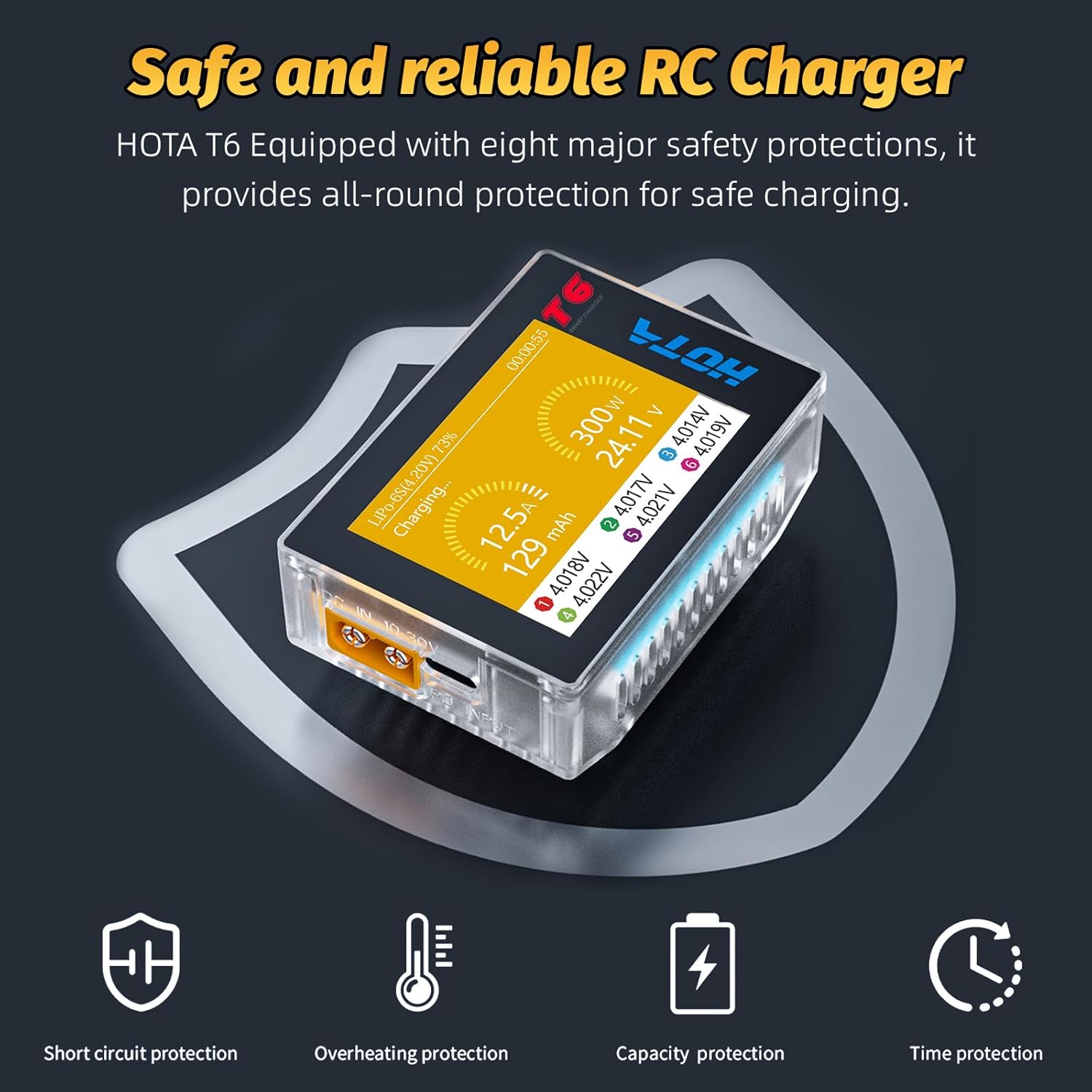
Figure 2.1: HOTA T6 Intelligent Protection Features. This graphic highlights the eight safety protections integrated into the HOTA T6 charger, ensuring safe charging operations.
3. Product Overview
The HOTA T6 charger is designed for portability and high performance, featuring a clear display and versatile input options.
3.1 Key Features
- Compact and Portable Design: Weighing only 3.28 ounces and with dimensions of 2.78 x 1.95 x 1.2 inches, it is highly portable.
- Fast Charging Technology: Supports DC input up to 300W (15A max) and PD input up to 90W (5A max), compatible with PD3.0 and QC fast charging protocols.
- 2.4 Inch IPS LCD Display: A sunlight-readable, full-viewing angle IPS LCD provides clear information and easy navigation.
- Universal Compatibility: Supports a wide range of battery types including LiHv/LiPo/LiFe/Lilon/Lixx (1-6S), NiZn/NiCd/NiMH (1-14S), Smart Battery (1-6S), Lead Acid (Pb) (1-12S/2-24V), and Enelop (1-14S).

Figure 3.1: Small, Portable and Easy to Carry. This image demonstrates the compact size of the HOTA T6 charger, showing it held between fingers and comparing its size to a smartphone and other RC chargers.

Figure 3.2: 2.4 Inch IPS LCD Display. This image highlights the charger's bright and clear IPS LCD screen, which provides a full-viewing angle for easy readability.
3.2 Charger Components
Familiarize yourself with the various ports and controls on the HOTA T6 charger.

Figure 3.3: HOTA T6 Specifications Diagram. This diagram illustrates the various components and ports of the HOTA T6 charger, including the DC input port, Type-C (PD) input port, Down key, O key, Up key, Fan, Balance Port, and Output Port.
- DC In Port: For connecting DC power sources (10-30V, max 15A).
- Type-C In Port (PD Input): For connecting USB-C PD power adapters (max 5A).
- Down Key: Navigates menus or decreases values.
- O Key: Selects options or confirms settings.
- Up Key: Navigates menus or increases values.
- Fan: Internal cooling fan for heat dissipation.
- Balance Port: For connecting battery balance leads (e.g., JST-XH) to monitor individual cell voltages during charging.
- Output Port: Main charging output port (e.g., XT60).
4. Setup
Follow these steps to set up your HOTA T6 charger for the first time.
- Connect Power Source:
- For DC input, connect a compatible DC power supply (10-30V) to the DC In Port. Ensure the power supply can provide sufficient current for your desired charging power.
- For PD input, connect a compatible USB-C PD power adapter to the Type-C In Port.

Figure 4.1: Dual Input Smart Charger. This image illustrates the two input options for the HOTA T6 charger: DC input (10-30V, 15A max) via XT60 and PD input (20V, 5A max) via USB-C.
- Power On: Once a power source is connected, the charger will automatically power on and display the main interface.
- Language Selection (if applicable): If prompted, select your preferred language using the Up/Down keys and confirm with the O key. The charger supports multiple languages.
5. Operating Instructions
This section outlines the general steps for charging batteries with your HOTA T6 charger.
5.1 Connecting a Battery
- Ensure the charger is powered on.
- Connect the main power lead of your battery to the Output Port on the charger.
- For LiPo/LiFe/LiIon/LiHv batteries, connect the balance lead of the battery to the Balance Port on the charger. This is crucial for safe and balanced charging.
5.2 Selecting Battery Type and Parameters
The HOTA T6 supports a wide range of battery chemistries. The charger will typically auto-detect the battery type and cell count for LiPo/LiFe/LiIon/LiHv batteries when the balance lead is connected. However, manual adjustment may be necessary.

Figure 5.1: Various Battery Type Compatibility. This graphic illustrates the broad compatibility of the HOTA T6 charger with different battery chemistries, including LiHV, LiPo, LiFe, Lilon, Lixx, NiCd, NiZn, NiMH, Smart Battery, Lead Acid, and Enelop.
- Navigate the menu using the Up/Down keys to select the desired charging mode (e.g., Charge, Balance Charge, Storage).
- Press the O key to enter the settings for the selected mode.
- Adjust parameters such as:
- Battery Type: Ensure this matches your connected battery (e.g., LiPo, NiMH).
- Cell Count (S): For lithium batteries, verify the detected cell count is correct.
- Charging Current (A): Set the charging current. A common guideline for LiPo batteries is 1C (e.g., for a 5000mAh battery, set to 5.0A). Refer to your battery's specifications for safe charging rates.
- Once all parameters are set, confirm with the O key to start the charging process.
5.3 Monitoring Charging Progress
The 2.4-inch IPS display provides real-time information during charging:
- Current (A): Displays the charging current.
- Power (W): Shows the current charging power.
- Voltage (V): Displays the total battery voltage.
- Capacity (mAh): Indicates the charged capacity.
- Individual Cell Voltages: For balanced charging, individual cell voltages are displayed, allowing you to monitor their balance.
- Charging Time: Shows the elapsed charging time.
The screen will change color to indicate when the battery is fully charged.
5.4 Ending Charging
When charging is complete, the charger will typically emit an audible alert and display a "Full" or "Complete" message. Disconnect the battery from the charger, first the balance lead (if applicable), then the main power lead.
6. Maintenance
Proper maintenance ensures the longevity and reliable operation of your HOTA T6 charger.
- Cleaning: Use a soft, dry cloth to clean the charger's exterior. Do not use solvents or abrasive cleaners. Ensure no dust or debris accumulates in the fan vents.
- Storage: Store the charger in a cool, dry place away from direct sunlight and extreme temperatures.
- Cable Inspection: Regularly inspect all cables and connectors for signs of wear, damage, or corrosion. Replace damaged cables immediately.
7. Troubleshooting
If you encounter issues with your HOTA T6 charger, refer to the following common problems and solutions.
| Problem | Possible Cause | Solution |
|---|---|---|
| Charger does not power on. | No power supply, incorrect voltage, or faulty cable. | Ensure power supply is connected and providing correct voltage. Check cables for damage. |
| Charging does not start. | Incorrect battery type/cell count selected, battery not properly connected, or safety protection triggered. | Verify battery type and cell count settings. Reconnect battery securely. Check for error messages on display. |
| Charger displays "Overheating" error. | Insufficient ventilation, high ambient temperature, or fan obstruction. | Ensure charger is in a well-ventilated area. Clear any obstructions from the fan. Allow charger to cool down. |
| Battery cells are unbalanced after charging. | Balance lead not connected or faulty, or battery issue. | Ensure balance lead is securely connected. Try a balance charge cycle. If issue persists, battery may be faulty. |
8. Specifications
Detailed technical specifications for the HOTA T6 Smart Battery Charger.
| Feature | Specification |
|---|---|
| Product Dimensions | 2.78 x 1.95 x 1.2 inches (7.06 x 4.95 x 3.05 cm) |
| Item Weight | 3.28 ounces (93 grams) |
| Model Number | Hota T6 |
| Brand | ATA HOBBY |
| Color | Transparent |
| Input Voltage (DC) | 10-30 Volts (DC) |
| Max. DC Input Current | 15A |
| Max. Charging Power (DC) | 300W |
| Max. PD Input Current | 5A |
| Max. PD Charging Power | 90W |
| Display | 2.4 Inch IPS LCD |
| Supported Battery Types | LiHv/LiPo/LiFe/Lilon/Lixx: 1-6S; NiZn/NiCd/NiMH: 1-14S; Smart Battery: 1-6S; Lead Acid(Pb): 1-12S (2-24V); Enelop: 1-14S |
| Safety Protections | Over-current, Over-voltage, Short-circuit, Overheating, Capacity, Time, Low Voltage, VO Standard Flame Retardant Material |
9. Warranty and Support
For warranty information and technical support, please contact the seller or manufacturer directly. Keep your purchase receipt as proof of purchase.
Manufacturer: Eighteenup
Brand: ATA HOBBY
For further assistance, you may visit the official ATA HOBBY Store on Amazon: ATA HOBBY Store