
Introduction
Thank you for choosing the MAGIC JOHN iPhone 16e Screen Protector. This manual provides detailed instructions for proper installation, understanding product features, maintenance, and troubleshooting to ensure optimal protection and longevity for your device's screen. This product is specifically designed for the iPhone 16e (6.1 inch) model and is not compatible with other iPhone models.
What's in the Box
- 2 x MAGIC JOHN iPhone 16e Screen Protectors
- 2 x Installation Kits (each containing: Wet Wipe, Microfiber Cloth, Dust Removal Sticker)
- 1 x Squeegee Card (for bubble removal)
Product Specifications
| Attribute | Detail |
|---|---|
| Brand | MAGIC JOHN |
| Compatible Devices | iPhone 16e (6.1 inch) |
| Material | Tempered Glass |
| Item Hardness | 9H |
| Special Features | Automatic Dust Removal, Anti-Bubble, Anti-Fingerprint, High Sensitivity Touch, Scratch Resistant, Speaker Dust Cover |
| Finish Type | Glossy |
| Unit Count | 2.0 Count |
Installation Guide
The MAGIC JOHN screen protector features an innovative auto dust-elimination and easy installation system. Please follow these steps carefully for a bubble-free application.
Pre-Installation Preparation
- Ensure your phone is powered off.
- Remove any existing screen protector or phone case.
- Use the provided wet wipe (labeled '01') to thoroughly clean your iPhone 16e screen, removing all smudges and dirt.
- Follow with the microfiber cloth (labeled '02') to dry and polish the screen, ensuring no lint or streaks remain.
- If necessary, use the dust removal sticker (labeled '03') to pick up any remaining dust particles.
Automatic Installation Process
- Place your clean iPhone 16e into the provided application tray, ensuring it snaps securely into place. The tray is designed to perfectly fit your phone.
- Locate the dust removal film tab at the bottom of the tray. Gently pull this tab completely out. This action automatically cleans any remaining dust from your screen.
- Once the dust removal film is pulled out, gently press down on the middle of the screen protector within the tray. You will observe the adhesive spreading across the screen.
- After the adhesive has fully spread, carefully remove the application tray from your phone.
- Peel off the final protective film from the top of the newly applied screen protector.
- If any small bubbles remain, gently push them towards the edges of the screen using the provided squeegee card or a soft cloth.
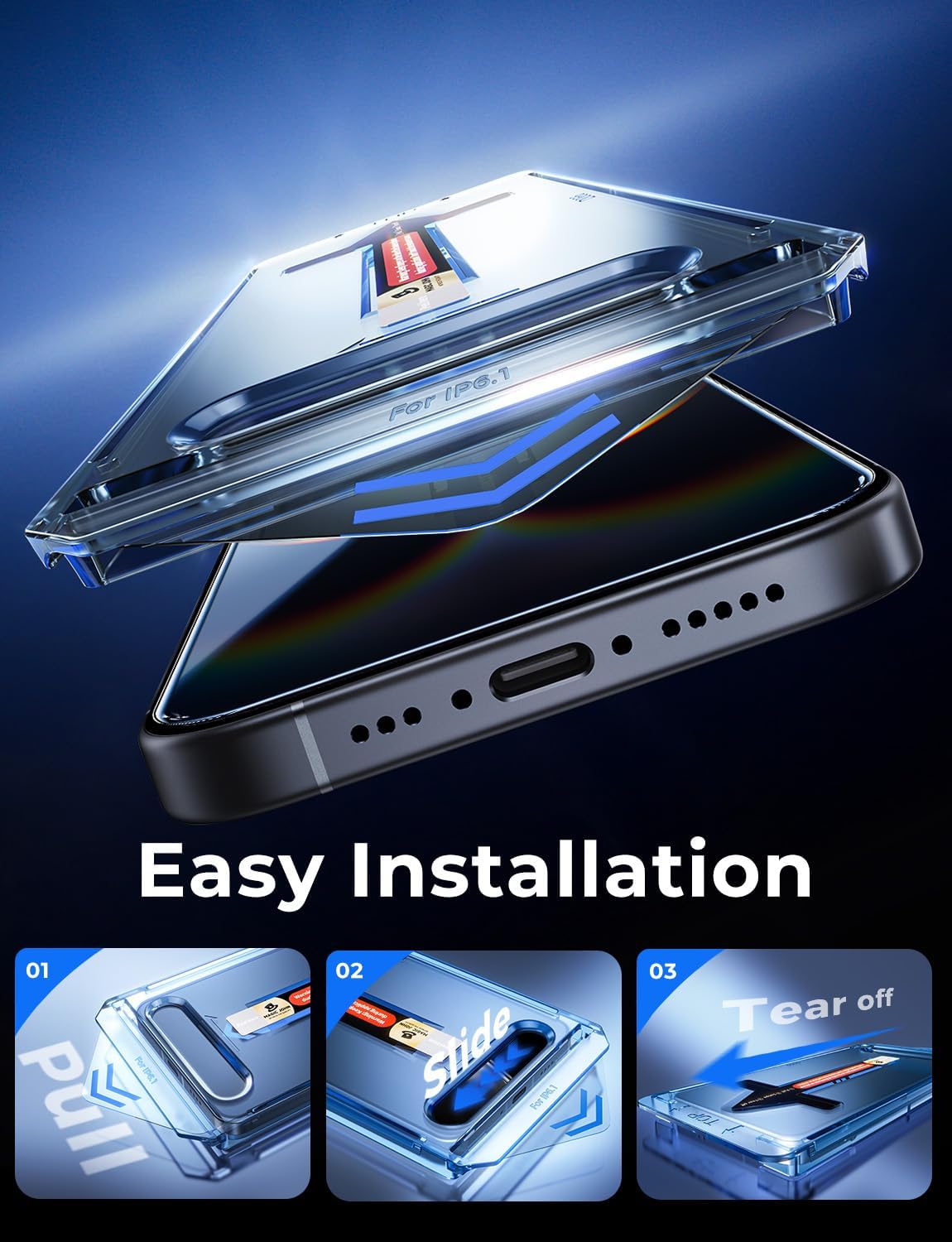
Image: The MAGIC JOHN screen protector installation kit, showing the phone being placed into the alignment tray.

Image: A close-up of the MAGIC JOHN screen protector installation, illustrating the dust removal film being pulled from the tray.
Official Installation Videos
Video: Official 'How to Install' guide for MAGIC JOHN screen protectors, demonstrating the automatic installation process.
Video: A detailed installation video for iPhone screen protectors, showcasing the dust-elimination feature and easy application.
Key Features
- Automatic Dust Removal Technology: The innovative design ensures dust is automatically removed during installation, preventing bubbles and trapped particles.
- Speaker Dust Cover: Integrated speaker dust cover provides protection against water and dust without affecting speaker volume or sound quality.
- High Compatibility: Specifically engineered for the iPhone 16e (6.1 inch), ensuring 100% touch accuracy and a perfect fit.
- Anti-Fingerprint Oleophobic Coating: Features an oleophobic coating that resists oil residue from fingerprints, keeping your screen clean and clear during long-term use.
- HD Clarity: Ultra-clear tempered glass maintains the original visual clarity of your screen, providing an optimal viewing experience and sensitive touch response.
- 9H Hardness: Constructed from 9H hardness tempered glass, offering superior scratch resistance and protection against impacts.

Image: Demonstrates the durability of the 9H+ Tempered Glass screen protector, showing it protecting the phone from keys.

Image: Illustrates the HD Clarity of the screen protector, providing a clear and vibrant display.

Image: Highlights the earpiece dust-proof feature, ensuring clear call volume and protection from elements.

Image: Compares the full coverage and bubble-free application of MAGIC JOHN with typical screen protectors that may leave gaps or bubbles.
Maintenance
To maintain the clarity and effectiveness of your MAGIC JOHN screen protector, follow these simple maintenance tips:
- Regularly wipe the screen with a clean, soft microfiber cloth to remove fingerprints and smudges.
- For stubborn marks, lightly dampen the microfiber cloth with water or a screen-safe cleaner. Avoid harsh chemicals.
- Avoid placing your phone with sharp objects (like keys or coins) in the same pocket or bag to prevent scratches to the screen protector.
- While the screen protector is highly durable, extreme impacts can still cause damage. Consider using a protective phone case in conjunction with the screen protector for maximum safety.
Troubleshooting
If you encounter any issues during or after installation, refer to the following common solutions:
- Bubbles After Installation: Small bubbles may disappear naturally within 24-48 hours. For larger or persistent bubbles, gently push them towards the nearest edge using the provided squeegee card or a soft, lint-free cloth. Do not use your fingernail directly on the screen protector.
- Dust Under the Screen Protector: The automatic dust removal system is highly effective. However, if dust particles are visible after installation, it may be necessary to carefully lift a corner of the screen protector (using a thin card) to remove the dust with a dust removal sticker, then re-apply. This should be done in a dust-free environment.
- Screen Protector Not Sticking Properly: Ensure the screen was thoroughly cleaned and free of oil or residue before installation. The application tray ensures proper alignment and adhesion. If the issue persists, ensure the phone model is correct for the screen protector.
- Reduced Touch Sensitivity: This is rare with MAGIC JOHN screen protectors due to their high sensitivity. Ensure the screen protector is fully adhered without any air gaps. If the issue persists, check your phone's touch sensitivity settings.
Warranty and Support
MAGIC JOHN products are designed for durability and performance. This screen protector comes with a 30-day warranty from the date of purchase, covering manufacturing defects. For warranty claims, technical support, or any inquiries, please contact MAGIC JOHN customer service through the retailer where you purchased the product.
Our products are also Verified by Transparency, meaning each item has a unique code that we verify before shipping, ensuring authenticity and quality.
For more information and support, visit the official MAGIC JOHN store: MAGIC JOHN Store.