1. Introduction
The OUKITEL P1000 Plus is a portable power station designed to provide reliable electricity for various applications, including home backup, outdoor camping, and RV use. It features a 1024Wh capacity and an 1800W AC output (3600W peak), powered by a durable LiFePO4 battery. This manual provides essential information for the safe and efficient operation of your device.

Image: OUKITEL P1000 Plus Solar Generator with accompanying solar panel and mobile application interface.
2. Safety Instructions
Please read and understand all safety instructions before operating the OUKITEL P1000 Plus. Failure to follow these instructions may result in electric shock, fire, or serious injury.
- Do not disassemble, repair, or modify the unit.
- Avoid exposure to rain or moisture.
- Keep away from heat sources, open flames, and flammable materials.
- Ensure proper ventilation during use and charging.
- Do not operate with damaged cables or connectors.
- Keep out of reach of children and pets.
- Use only approved accessories and charging methods.
3. What's in the Box
Verify that all items are present upon unpacking:
- OUKITEL P1000 Plus Solar Generator
- AC Charging Cable
- User Manual

Image: Packaging contents showing the P1000 Plus Solar Generator, AC charging cable, and user manual.
4. Product Features and Components
The OUKITEL P1000 Plus is equipped with multiple ports and features for versatile power delivery.
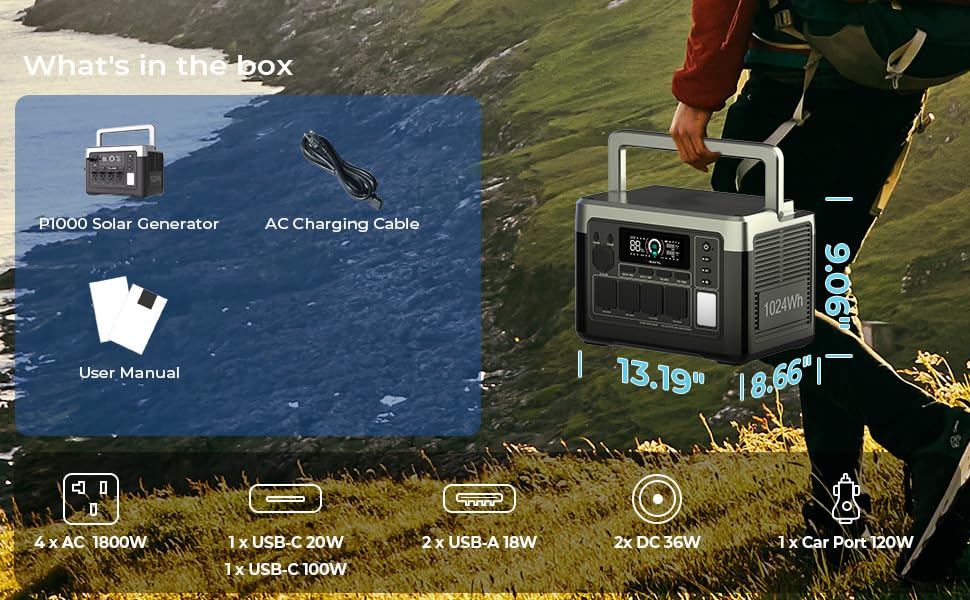
Image: Front and rear view of the P1000 Plus with labeled ports and controls.
Front Panel:
- DC5521 Output: 2 ports, 12-3A (36W total)
- Cigarette Lighter Output: 1 port, 12-10A (120W)
- USB-A Output: 2 ports, QC3.0 18W
- USB-C Output: 1 port PD100W, 1 port PD20W
- AC Output: 4 ports, 100V single port 2400W (1800W continuous, 3600W peak)
- LED Light: Integrated illumination.
- Display Screen: Shows battery level, input/output wattage, and status indicators.
Rear Panel:
- AC Input: For wall charging.
- XT60 Input: For solar panel charging.
- Protect Button: Circuit breaker reset.

Image: Illustration of the internal LiFePO4 battery and Battery Management System (BMS), indicating 3500+ lifecycle to 80% and 10 years supply.
The integrated Battery Management System (BMS) monitors and protects the battery, optimizing performance and extending lifespan.
5. Setup
Before first use, fully charge the OUKITEL P1000 Plus.
- Unpack: Remove the power station and all accessories from the packaging.
- Initial Charge (AC): Connect the AC charging cable to the AC input port on the rear of the power station, then plug it into a standard wall outlet. The display will indicate charging status.
- Full Charge: Allow the unit to charge until the display shows 100%. This typically takes approximately 1.5 hours for a full charge from 0% using 1200W fast AC charging.
6. Operating Instructions
6.1 Charging the Power Station
The P1000 Plus offers multiple charging options:

Image: Four charging methods for the P1000 Plus, including wall, solar, car, and combined AC+PV charging.
- AC Wall Charging: Connect the AC charging cable to the AC input port and a wall outlet. Supports up to 1200W fast charging, reaching 0-80% in approximately 39 minutes.
- Solar Charging: Connect compatible solar panels (up to 500W) to the XT60 input port. Ensure solar panels are placed in direct sunlight for optimal charging.
- Car Charging: Use a car charger (not included) connected to the XT60 input port.
- AC + Solar Charging: Combine AC wall charging with solar input for faster charging times.

Image: P1000 Plus connected to solar panels for charging in a camping environment.
6.2 Discharging and Powering Devices
The P1000 Plus provides 11 multi-function sockets to power a wide range of electronic devices.

Image: P1000 Plus powering a kitchen appliance, demonstrating its 11 multi-function sockets.
- AC Outlets: Press the AC power button to activate the four AC outlets. These can deliver up to 1800W continuous power, suitable for most household appliances.
- USB Ports: Press the USB power button to activate the USB-A and USB-C ports for charging smartphones, tablets, and other USB-powered devices.
- DC Ports: Press the DC power button to activate the DC5521 and cigarette lighter ports for compatible 12V devices.

Image: Examples of appliances powered by the P1000 Plus, illustrating its 1800W output capability.
6.3 Uninterruptible Power Supply (UPS) Function
The P1000 Plus can function as an Uninterruptible Power Supply (UPS) for critical devices.

Image: P1000 Plus providing UPS functionality during a power outage, ensuring continuous operation for connected devices.
When connected between a wall socket and an electrical appliance, the P1000 Plus will pass through AC power directly. In the event of a power outage, it automatically switches to battery power within 0.01 seconds, providing uninterrupted power. The maximum AC output in UPS mode is 1400W for US/JPN standards and 2000W for CN/UK/EU/KR standards. Exceeding these limits will trigger an overload warning.

Image: P1000 Plus providing backup power to a computer workstation.
6.4 APP Control
Control and monitor your P1000 Plus remotely using the dedicated smartphone application.

Image: Smartphone app interface for remote control and monitoring of the P1000 Plus.
- Download App: Scan the QR code in the manual or search for the OUKITEL app in your device's app store.
- Connect: Enable Bluetooth or Wi-Fi on your smartphone and follow the in-app instructions to connect to your P1000 Plus.
- Control: Manage power output, check real-time statistics, and adjust settings directly from your phone.
7. Maintenance
Proper maintenance ensures the longevity and optimal performance of your power station.
- Storage: Store the unit in a cool, dry place, away from direct sunlight and extreme temperatures. For long-term storage, charge the battery to 50-80% every 3-6 months.
- Cleaning: Use a dry, soft cloth to clean the exterior. Do not use abrasive cleaners or immerse the unit in water.
- Battery Care: Avoid fully discharging the battery frequently. LiFePO4 batteries perform best when kept within a moderate charge range.
- Ventilation: Ensure the ventilation vents are clear of obstructions during operation to prevent overheating.
8. Troubleshooting
If you encounter issues, refer to the following common solutions:
| Problem | Possible Cause | Solution |
|---|---|---|
| Unit not turning on | Low battery; Power button not pressed correctly | Charge the unit; Press and hold the power button for 3 seconds. |
| AC output not working | AC output not enabled; Overload; Low battery | Press the AC power button; Reduce load; Recharge the unit. |
| Slow charging | Charging source insufficient; High ambient temperature | Use a higher wattage charger/solar panel; Move to a cooler environment. |
| App not connecting | Bluetooth/Wi-Fi off; App not updated; Unit too far | Ensure Bluetooth/Wi-Fi is on; Update app; Move closer to the unit. |
If the problem persists, please contact customer support.
9. Specifications
| Feature | Specification |
|---|---|
| Brand | Keenergy |
| Model Number | Q2401 |
| Battery Capacity | 1024Wh |
| AC Output (Rated) | 1800W |
| AC Output (Peak) | 3600W |
| AC Input Charging | 1200W Fast Charging |
| Solar Input (Max) | 500W |
| USB-C Output | PD100W * 1, PD20W * 1 |
| USB-A Output | QC3.0 18W * 2 |
| DC5521 Output | 12-3A * 2 |
| Cigarette Lighter Output | 12-10A * 1 |
| UPS Switching Time | <0.01s |
| Battery Type | LiFePO4 |
| Dimensions (L x W x H) | 13.7" x 9" x 9.37" |
| Item Weight | 28 Pounds |
| UPC | 630130623444 |
10. Warranty and Support
The OUKITEL P1000 Plus comes with a 5-year coverage period, ensuring peace of mind for your investment.
For technical support, warranty claims, or any inquiries, please contact Keenergy customer service through the official website or your purchase platform. Please have your model number (Q2401) and proof of purchase ready when contacting support.