
Reebok RBK-BDST-K
Reebok Active Pack Smartwatch and Earbuds User Manual
Model: RBK-BDST-K | Brand: Reebok
1. Introduction
Welcome to the Reebok Active Pack. This comprehensive user manual provides detailed instructions for setting up, operating, maintaining, and troubleshooting your new smartwatch and wireless earbuds. Please read this manual carefully to ensure optimal performance and longevity of your devices.
2. Product Overview
The Reebok Active Pack combines a versatile smartwatch with high-quality wireless earbuds, designed to enhance your active lifestyle. Key features include:
- Ergonomic Design: Comfortable fit for extended wear.
- High-Quality Sound: Enjoy clear audio from your earbuds.
- Wide Compatibility: Works seamlessly with iPhone and Android devices.
- Durable Materials: Constructed with high-quality materials for long-term resistance and performance.
- Smartwatch Functions: Notifications, activity tracking, music player control, and time display.
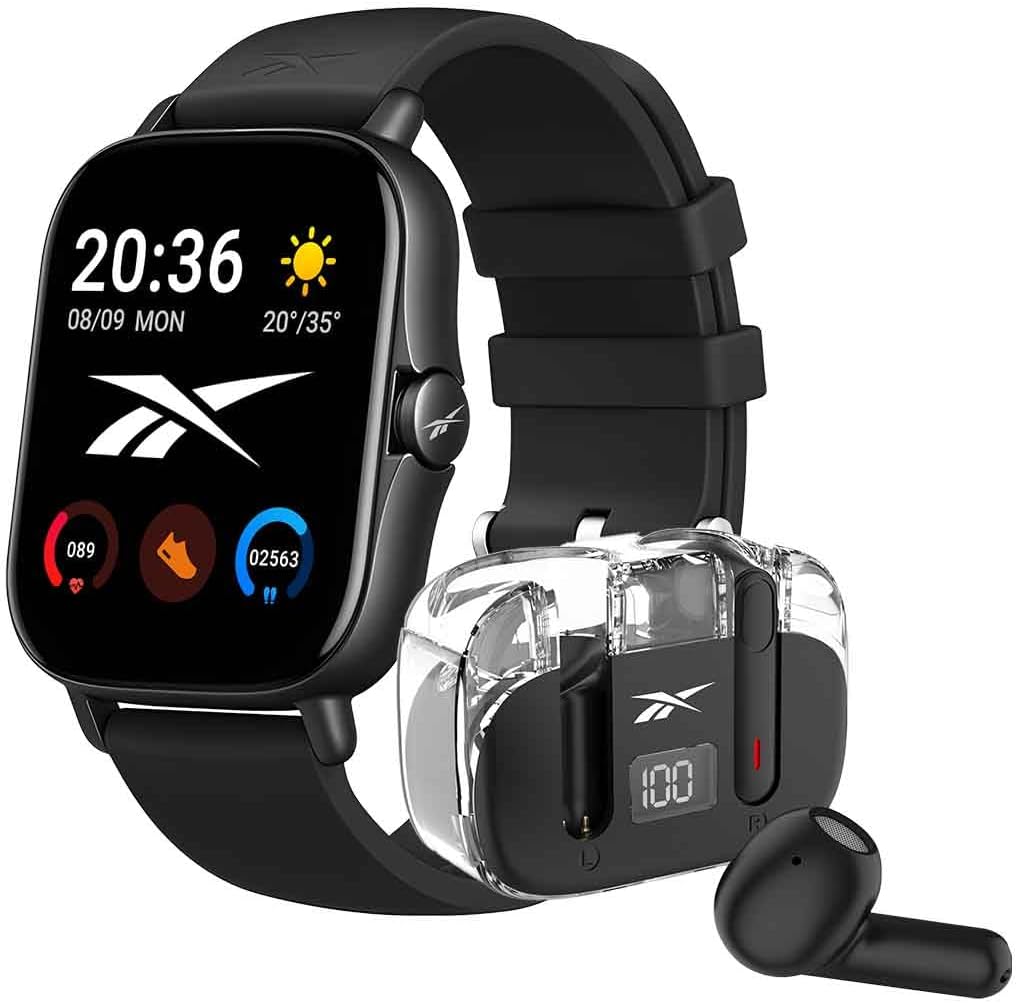
Figure 2.1: The Reebok Active Pack, featuring the smartwatch and its accompanying wireless earbuds in their charging case.

Figure 2.2: Front view of the Reebok Smartwatch, displaying its screen and side button.

Figure 2.3: The transparent charging case for the Reebok wireless earbuds, showing the earbuds inside and the digital battery indicator.
3. Setup
3.1 Smartwatch Setup
- Charging the Smartwatch:
Before first use, fully charge your smartwatch. Connect the included charging cable to the charging pins on the back of the smartwatch and to a USB power source. A full charge takes approximately 1 hour. The screen will indicate charging status.

Figure 3.1: Rear view of the Reebok Smartwatch, showing the charging pins and sensors.
- Powering On/Off:
To power on, press and hold the side button until the screen lights up. To power off, navigate to the settings menu on the smartwatch and select 'Power Off', or press and hold the side button and confirm power off.
- Pairing with Your Smartphone:
Download the official Reebok Active Pack app (or compatible fitness app) from your smartphone's app store (available for Android and iOS). Enable Bluetooth on your smartphone. Open the app, create an account if necessary, and follow the on-screen instructions to search for and pair with your smartwatch. Ensure the smartwatch is in pairing mode (usually indicated on the screen upon first power-on or via settings).
3.2 Earbuds Setup
- Charging the Earbuds:
Place the earbuds into their charging case. Connect the charging case to a USB power source using the provided cable. The digital display on the case will show the battery percentage. Ensure the earbuds are fully charged before first use.

Figure 3.2: The Reebok wireless earbuds securely placed within their charging case.
- Pairing the Earbuds:
Open the charging case. The earbuds will automatically enter pairing mode (indicated by flashing lights on the earbuds). On your smartphone, go to Bluetooth settings and select "Reebok Earbuds" (or similar name) from the list of available devices to connect.
4. Operating Instructions
4.1 Smartwatch Operation
- Navigation: The smartwatch features a responsive touch screen (1.83 inches). Swipe left/right, up/down to navigate through menus and features. Tap to select. The side button typically acts as a home button or a back button, and can be customized for quick access to certain functions.
- Activity Tracking: The smartwatch tracks various activities including steps, distance, calories burned, and heart rate. Access these features through the main menu or dedicated widgets. Ensure the watch is worn snugly on your wrist for accurate readings.
- Notifications: Once paired with your smartphone, the smartwatch will display notifications for calls, messages, and app alerts. Manage notification settings via the companion app on your phone.
- Music Control: Control music playback on your smartphone directly from your smartwatch. This includes play/pause, skip tracks, and volume adjustment.
- Time Display: Customize watch faces to display time and other information according to your preference.
- Battery Life: The smartwatch offers an average battery life of 18 hours on a single charge, depending on usage.
4.2 Earbuds Operation
- Automatic Connection: Once paired, the earbuds will automatically connect to your last connected device when removed from the charging case.
- Playback Controls: Use the touch-sensitive areas on the earbuds for music playback control (e.g., single tap for play/pause, double tap for next track). Refer to the specific instructions included in the earbuds' packaging for detailed touch controls.
- Call Handling: Answer or end calls by tapping the earbuds.
- Comfort and Fit: Ensure the earbuds are properly seated in your ears for optimal sound quality and to prevent them from falling out during activities.
5. Maintenance
- Cleaning: Regularly clean your smartwatch and earbuds with a soft, dry, lint-free cloth. For stubborn dirt, slightly dampen the cloth with water. Avoid using harsh chemicals or abrasive materials.
- Storage: When not in use, store the devices in a cool, dry place, away from direct sunlight and extreme temperatures. Keep the earbuds in their charging case to protect them and keep them charged.
- Water Exposure: Important: The smartwatch and earbuds are not designed for water immersion. Avoid exposing them to water, including showering, swimming, or heavy rain. Water damage can lead to device malfunction and is not covered under warranty. If the device accidentally gets wet, power it off immediately and allow it to dry completely before attempting to use it again.
6. Troubleshooting
| Problem | Possible Cause | Solution |
|---|---|---|
| Smartwatch/Earbuds won't turn on. | Low battery. | Charge the device fully. |
| Cannot pair with smartphone. | Bluetooth is off; device not in pairing mode; interference. | Ensure Bluetooth is on. Put device in pairing mode. Restart both devices. Move closer to the smartphone. |
| Smartwatch screen is unresponsive. | Software glitch; physical damage. | Restart the smartwatch. If problem persists, contact support. |
| Poor sound quality from earbuds. | Improper fit; low battery; interference. | Adjust earbuds for a snug fit. Charge earbuds. Move closer to the audio source. |
| Device malfunction after water exposure. | Water ingress. | The device is not waterproof. If exposed to water, power off immediately and allow to dry completely. Water damage is typically not covered by warranty. |
7. Specifications
| Feature | Detail |
|---|---|
| Brand | Reebok |
| Model Name | RBK-BDST-K |
| Smartwatch Display Size | 1.83 Inches |
| Smartwatch Display Type | RM |
| Operating System | Android Wear |
| Memory Storage Capacity | 120 MB |
| Connectivity Technology | Wireless (Bluetooth) |
| Wireless Communication Standard | Bluetooth |
| Compatible Devices | Smartphone, Tablet, Phones |
| Special Features | Notifications, Activity Tracker, Music Player, Time Display |
| Smartwatch Battery Capacity | 180 Milliamp Hours |
| Average Battery Duration | 18 Hours (Smartwatch) |
| Charging Time | 1 Hour (Smartwatch) |
| Earbuds Form Factor | True Wireless |
| Material Type | Plastic |
| Maximum Operating Distance | 10 Meters |
| Product Dimensions | 1.5 x 2 x 24 cm; 130 g |
8. Warranty and Support
For warranty information, please refer to the warranty card included in your product packaging or visit the official Reebok support website. Keep your proof of purchase for any warranty claims.
If you encounter any issues not covered in this manual, or require further assistance, please contact Reebok customer support through their official channels. Contact details can typically be found on the Reebok website or on the product packaging.
Ask a question about this manual
Ask about setup, troubleshooting, compatibility, parts, safety, or missing instructions. Manuals+ will review the question and use this page’s manual context to help answer it.