
1. Introduction
The COWAY Airmega 350 is an advanced air purification system designed to provide clean and fresh air in large indoor spaces. It features a multi-stage filtration process and intelligent operating modes to effectively remove various airborne pollutants, allergens, and odors. This manual will guide you through the proper use and maintenance of your air purifier.

Image 1.1: COWAY Airmega 350 with its core features.
2. Safety Instructions
Please read all safety instructions carefully before operating the appliance to prevent injury to yourself or others and to avoid damage to the product. Keep this manual for future reference.
- Ensure the power cord is securely plugged into a grounded electrical outlet.
- Do not operate the appliance with a damaged power cord or plug.
- Keep the air intake and outlet clear of obstructions.
- Do not immerse the appliance in water or other liquids.
- Unplug the appliance before cleaning or performing any maintenance.
- This appliance is not intended for use by persons (including children) with reduced physical, sensory or mental capabilities, or lack of experience and knowledge, unless they have been given supervision or instruction concerning use of the appliance by a person responsible for their safety.
3. Product Overview
3.1 Key Features
- HyperVortex System: Efficiently cleans air in spaces up to 2,640 ft² in 60 minutes.
- Advanced 3-in-1 Filtration: Combines a vacuumable pre-filter, activated carbon filter, and HEPA filter.
- Real-Time Air Quality Monitor: Continuously tracks air quality and detects PM 10 particles.
- Smart Modes: Includes Auto, Sleep, Turbo, and Eco modes for optimized performance.
- Quiet Operation: Operates as low as 21.6 dB in quiet settings.
- Energy Star Certified: Designed for energy efficiency.
3.2 HyperVortex Air Technology
The HyperVortex system utilizes advanced aerodynamic blades and a dimple duct design to create powerful airflow and volume, ensuring efficient air circulation and purification throughout the room.

Image 3.1: Components of the HyperVortex Air Technology.
3.3 3-Stage Filtration System
The Airmega 350 employs a comprehensive 3-stage filtration system to capture various airborne particles and odors:
- Vacuumable Pre-Filter: Captures larger particles like dust, pet hair, and dander. This filter is washable and reusable.
- Activated Carbon Filter: Reduces odors, volatile organic compounds (VOCs), and harmful gases.
- HEPA Filter: Captures up to 99.97% of particles as small as 0.3 microns, including pollen, allergens, and fine dust.
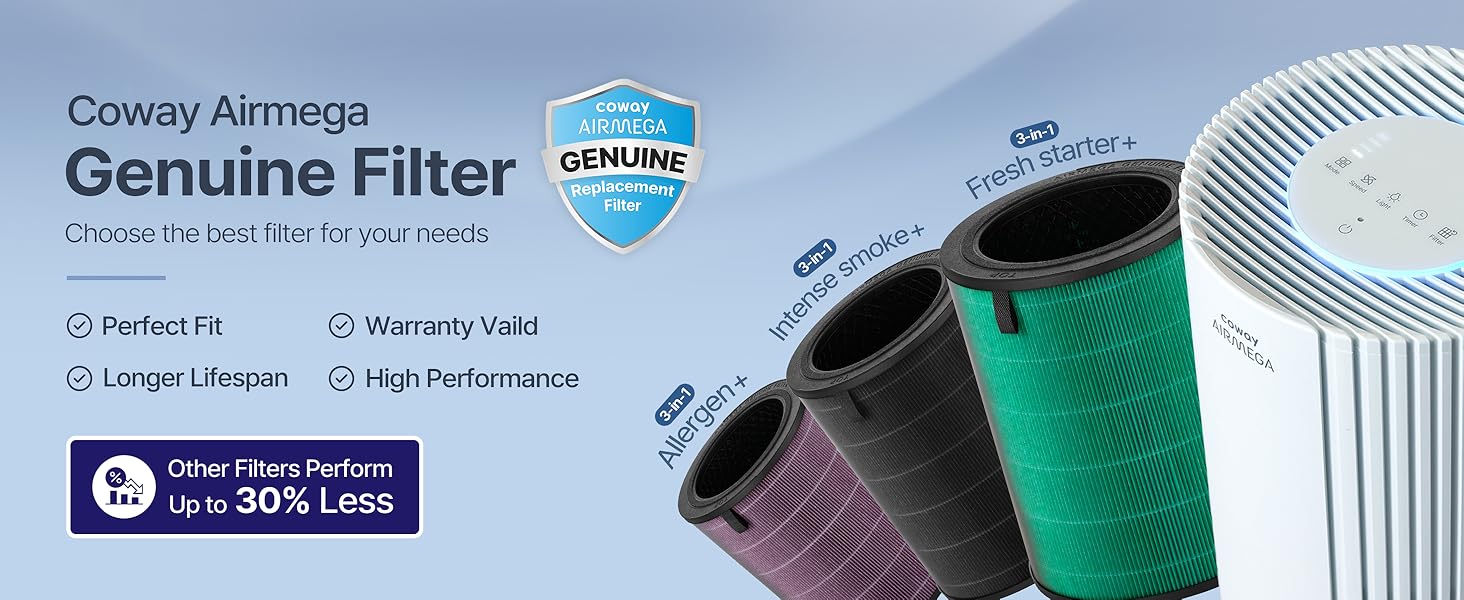
Image 3.2: The 3-Stage Filtration System.
3.4 Optional Custom Filters
Beyond the standard Fresh Starter+ Filter included, specialized filters are available for specific needs:
- Allergen+ Filter: Extra effective against pet dander, pollen, and mite matter allergens.
- Intense Smoke+ Filter: Enhanced carbon protection against wildfire smoke, gases, and VOCs.

Image 3.3: Available custom filter options.
4. Setup
Follow these steps to prepare your COWAY Airmega 350 for first use:
- Unpack the Air Purifier: Carefully remove the unit from its packaging.
- Remove Protective Film: Peel off any protective films or tapes from the unit and control panel.
- Access Filters: Open the filter cover by pulling the bottom corners on the right side of the product.
- Remove Filter Packaging: Take out the 3-in-1 filter and remove all plastic packaging. The unit will not operate if the filter is not unwrapped.
- Install Filters: Insert the unwrapped filter back into the unit, ensuring the 'TOP' indicator on the filter faces upwards.
- Close Filter Cover: Align the filter cover from the bottom and push it in until you hear a click.
- Plug In: Connect the power cord to a grounded electrical outlet.
Video 4.1: This video demonstrates the unboxing and filter installation process for the Airmega air purifier, showing how to remove packaging and correctly place the filters.
5. Operating Instructions
5.1 Control Panel Overview
The control panel is located on the top of the unit and features intuitive touch controls for various functions.

Image 5.1: The Airmega 350 control panel.
- Power Button: Turns the unit on or off.
- Mode Button: Cycles through operating modes (Auto, Sleep, Turbo, Eco).
- Speed Button: Manually adjusts fan speed (1, 2, 3).
- Light Button: Controls the display and ambient light.
- Timer Button: Sets the operating duration (1hr, 4hr, 8hr).
- Filter Button: Indicates filter status and resets filter life after replacement.
- Child Lock: Press and hold the light button for 3 seconds to activate/deactivate.
5.2 Operating Modes
The Airmega 350 offers four distinct operating modes:
- Auto Mode: Automatically adjusts fan speed based on real-time air quality. The light sensor detects ambient light and turns off the display light in dark environments.
- Sleep Mode: Operates at the lowest fan speed with all lights off for quiet operation during sleep.
- Turbo Mode: Runs the fan at maximum speed for rapid air purification.
- Eco Mode: Optimizes energy consumption by running the unit at a lower speed when air quality is good.

Image 5.2: The four smart operating modes.
Video 5.1: This video highlights the quiet operation and light-sensing features of the Airmega 350's Sleep Mode, ideal for undisturbed rest.
5.3 Air Quality Indicator
The LED light bar on the control panel indicates the current air quality:
- Blue: Good air quality.
- Green: Moderate air quality.
- Yellow: Unhealthy air quality.
- Red: Very unhealthy air quality.
Video 5.2: This video illustrates how the Airmega air purifier detects and responds to changes in air quality, such as smoke from burnt popcorn, by adjusting its operation.
6. Maintenance
Regular maintenance ensures the longevity and optimal performance of your air purifier.
6.1 Pre-Filter Cleaning
The pre-filter should be cleaned every 2-4 weeks, depending on usage and environment.
- Turn off and unplug the air purifier.
- Open the filter cover.
- Hold the filter handle and remove the pre-filter mesh.
- Remove dust using a vacuum cleaner or a dry cloth. The pre-filter can also be washed with water; ensure it is completely dry before reinstallation.
- Reinstall the pre-filter and close the cover.
6.2 Filter Replacement (Activated Carbon & HEPA)
The Activated Carbon and HEPA filters are combined into a single unit (Max2 filter) and should be replaced approximately once a year, or when the filter indicator light illuminates.
- Turn off and unplug the air purifier.
- Open the filter cover.
- Remove the used Max2 filter.
- Insert a new COWAY Airmega Genuine filter, ensuring it is correctly oriented.
- Close the filter cover.
- Plug in the air purifier. Press and hold the 'Filter' button for 3 seconds to reset the filter life indicator.

Image 6.1: Steps for filter replacement.
Video 6.1: This video demonstrates the benefits of the Allergen+ filter for pet owners and shows how to replace the filter.
7. Troubleshooting
If you encounter any issues with your COWAY Airmega 350, please refer to the following common troubleshooting tips:
- Unit does not turn on: Ensure the power cord is securely plugged into a working outlet. Check if the filter cover is properly closed.
- Reduced airflow or purification: Clean the pre-filter. Replace the Max2 filter if the filter indicator light is on.
- Unusual noise: Check for any obstructions in the air intake or outlet. Ensure filters are correctly installed.
- Air quality indicator always red/yellow: Ensure the unit is placed in an open area, not against a wall. Clean the air quality sensor if necessary (refer to the full online manual for sensor cleaning instructions).
- Control panel unresponsive: Check if Child Lock is activated. Deactivate by pressing and holding the light button for 3 seconds.
For more detailed troubleshooting, please consult the full online manual or contact customer support.
8. Specifications
| Specification | Detail |
|---|---|
| Model Number | AP-1924A |
| Brand | Coway |
| Color | Beige |
| Product Dimensions | 12"D x 12"W x 26.3"H |
| Item Weight | 17.2 Pounds |
| Power Source | Corded Electric |
| Control Method | Touch |
| Filter Type | HEPA Filter, Carbon Filter, Pre-Filter |
| Floor Area Coverage | Up to 2640 Square Feet |
| Noise Level | 21.5 Decibels (lowest setting) |
| Particle Retention Size | 0.3 Micron |
| Wattage | 62 watts |
| Contaminant Filtration | Dust, Odors, Pet Dander, Pollen, Volatile Organic Compounds (VOCs) |
| Certifications | CARB Certified, ETL Certified, Energy Star Certified |
9. Warranty and Support
The COWAY Airmega 350 Air Purifier comes with a 3-year manufacturer's limited warranty. This warranty covers defects in materials and workmanship under normal use.
For product registration, warranty claims, or technical support, please visit the official Coway website or contact their customer service. You can find more details and the full online manual by scanning the QR code below or visiting cowaymega.com/pages/air-purifiers.

Image 9.1: Scan for online manual and product registration.


