Download PDFFree PDF. The Save button below keeps a bookmark and private notes in your account.
ummz 10000mAh 5-in-1 Magnetic Portable Charger
Model: Q7
Introduction
This instruction manual provides detailed guidance for the ummz 10000mAh 5-in-1 Magnetic Portable Charger with Wall Plug, Model Q7. This versatile device is designed to keep your electronic devices charged on the go, offering multiple charging options and convenient features. Please read this manual thoroughly before using the product to ensure safe and optimal performance.
Key features include:
5-in-1 Charging: Supports wireless charging for iPhone, Apple Watch, and AirPods, along with wired charging via USB-C and USB-A ports.
Built-in Foldable AC Plug: Allows direct recharging of the power bank from a wall outlet without extra cables.
Fast Charging: Offers up to 15W wireless charging for smartphones (7.5W Max for iPhone 12-15 series), 5W for AirPods, 3W for Apple Watch, and 22.5W Max fast input/output via Type-C.
10000mAh Capacity: Provides substantial power for multiple charges.
360° Rotating Stand: Integrated stand for convenient viewing while charging.
Lanyard-Integrated USB-C Cable: A versatile cable that doubles as a lanyard for portability and can be used for wired charging.
Safety Features: Equipped with temperature control, overcharge protection, over-current and over-voltage protection, and foreign object detection.
Product Overview
Familiarize yourself with the components and features of your ummz portable charger.
Figure 1: The ummz 5-in-1 Magnetic Portable Charger demonstrating simultaneous wireless charging for an iPhone, Apple Watch, and AirPods. The image highlights the 15W Max output for iPhone, 2.5W Max output for Apple Watch, and 3W Max output for AirPods.
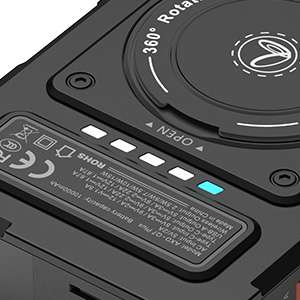
Figure 2: A close-up view of the LED indicator lights on the side of the power bank, showing the current battery level. These lights provide a quick visual reference for the remaining charge.
Figure 3: The portable charger attached to a smartphone, utilizing its 360° rotatable ring stand for hands-free viewing. The stand allows for various viewing angles in both portrait and landscape orientations.
Setup
Initial Charging of the Power Bank: Before first use, fully charge the power bank. You can do this by:
Using the Built-in AC Plug: Fold out the integrated AC plug and insert it directly into a standard wall outlet. The LED indicators will show charging progress. A full charge typically takes about 4 hours.
Using a USB-C Cable: Connect a USB-C cable to the Type-C IN/OUT port on the power bank and to a compatible USB wall adapter.
Checking Battery Level: Press the power button once to view the current battery level indicated by the LED lights.
Operating Instructions
Wireless Charging for Smartphones (MagSafe Compatible):
Ensure your smartphone is MagSafe compatible or has a magnetic case.
Align the back of your smartphone with the magnetic charging surface of the power bank. The magnets will snap into place, and charging will begin automatically.
The power bank supports up to 15W wireless charging for compatible smartphones (7.5W Max for iPhone 12-15 series).
Wireless Charging for Apple Watch:
Place your Apple Watch on the designated wireless charging area for Apple Watch.
Charging will start automatically, providing up to 3W.
Wireless Charging for AirPods:
Place your AirPods charging case on the designated wireless charging area for AirPods.
Charging will start automatically, providing up to 5W.
Wired Charging via USB-C Port:
Use the integrated USB-C to USB-C cable or another compatible USB-C cable.
Connect one end to the Type-C IN/OUT port on the power bank and the other end to your device.
The Type-C port supports 22.5W Max fast input/output charging.
Wired Charging via USB-A Port:
Connect a USB-A cable to the USB-A OUT port on the power bank and the other end to your device.
Using the 360° Rotating Stand:
Gently pull out the ring stand located on the back of the power bank.
Rotate it to your desired angle to prop up your phone for hands-free viewing during charging.
Using the Lanyard-Integrated Cable:
The short USB-C to USB-C cable integrated into the lanyard can be detached and used for wired charging.
Ensure the cable is securely fastened when used as a lanyard to prevent accidental drops.
Maintenance
Cleaning: Use a soft, dry cloth to clean the surface of the power bank. Avoid using harsh chemicals or abrasive materials.
Storage: Store the power bank in a cool, dry place away from direct sunlight, extreme temperatures, and moisture.
Safety Precautions:
Do not disassemble, crush, or puncture the device.
Keep away from fire, water, and corrosive liquids.
Avoid dropping the power bank or subjecting it to strong impacts.
Do not use if the device is damaged or swollen.
Ensure proper ventilation during charging.
Troubleshooting
Device Not Charging:
Ensure the power bank itself is charged. Check the LED indicators.
Verify that the charging cable is securely connected to both the power bank and your device.
For wireless charging, ensure your device is properly aligned with the charging coil and is MagSafe compatible (or has a magnetic case).
Try a different charging cable or port.
Slow Charging:
Ensure you are using a fast-charging compatible cable and adapter (if applicable).
Some devices may limit charging speed to protect battery health.
Avoid using the device heavily while it is charging.
Magnetic Attachment Issues:
Ensure your phone or case is MagSafe compatible. Non-magnetic cases will prevent proper attachment.
Remove any foreign objects between the power bank and your device.
Specifications
Feature
Detail
Product Dimensions
3.15 x 0.79 x 2.68 inches
Item Weight
9.1 ounces
Item Model Number
Q7
Batteries
1 Lithium Polymer batteries required (included)
Special Features
Built In Cable, Built In Wall Plug, Digital Display, Fast Charging, Wireless Charging
Other Display Features
Wireless
Color
Black
Manufacturer
Dongguan Ludian Technology limited company
Date First Available
December 27, 2024
Connector Type
Micro USB, USB Type C
Brand
ummz
Battery Capacity
10000 Milliamp Hours
Warranty and Support
For warranty information and customer support, please refer to the product packaging or contact ummz customer service directly. Keep your purchase receipt for warranty claims.
Ask a question about this manual
Ask about setup, troubleshooting, compatibility, parts, safety, or missing instructions. Manuals+ will review the question and use this page’s manual context to help answer it.