
JONR VC08 PRO
JONR VC08 Pro Cordless Vacuum Cleaner User Manual
Model: VC08 PRO
Brand: JONR
Important Safety Instructions
Please read this manual carefully before using the appliance. Keep it for future reference.
- Do not use the vacuum cleaner outdoors or on wet surfaces.
- Do not allow children to operate the vacuum cleaner. Close supervision is necessary when used near children.
- Do not pick up flammable or combustible liquids, such as gasoline, or use in areas where they may be present.
- Do not pick up anything that is burning or smoking, such as cigarettes, matches, or hot ashes.
- Do not use without dust bag and/or filters in place.
- Turn off the appliance before connecting or disconnecting the battery pack, or before performing any maintenance.
- Use only as described in this manual. Use only manufacturer's recommended attachments.
- If the appliance is not working as it should, has been dropped, damaged, left outdoors, or dropped into water, return it to a service center.
Product Overview
Familiarize yourself with the components of your JONR VC08 Pro Cordless Vacuum Cleaner and its Auto-Empty Station.
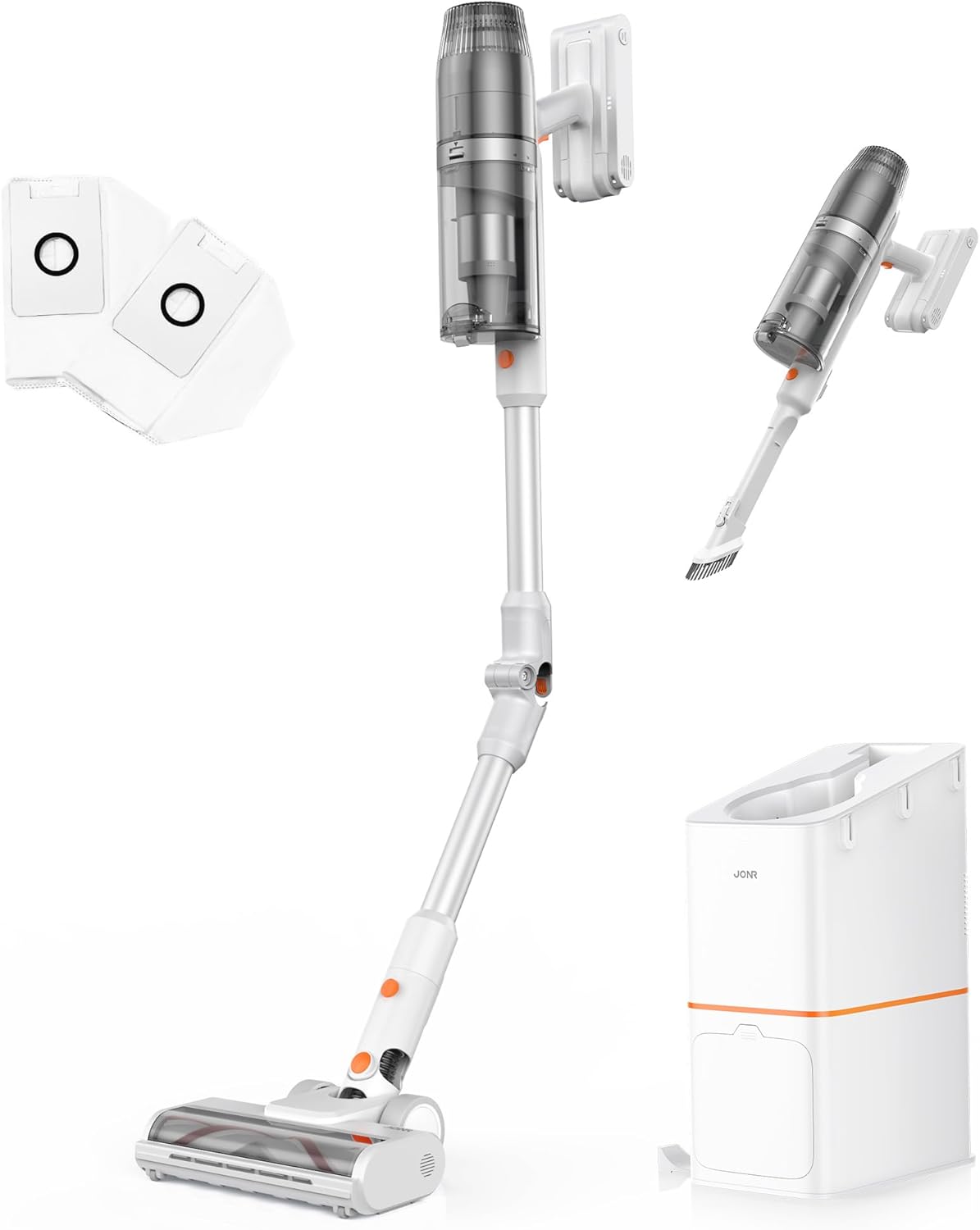
Figure 1: Overview of the JONR VC08 Pro Cordless Vacuum Cleaner, including the main unit, extension wand, floor brush, and the auto-empty docking station with additional dust bags and filters.
Main Components:
- Vacuum Main Unit: Contains the motor, dust cup, and battery.
- Extension Wand: Connects the main unit to the floor brush for upright cleaning. Features a 180° bendable joint for reaching under furniture.
- Floor Brush: Equipped with a tangle-free design for effective cleaning on carpets and hard floors.
- Auto-Empty Station: A 3-in-1 clean station that automatically empties the vacuum's dust cup, charges the vacuum, and provides storage.
- Dust Bags: 2.5L capacity disposable bags for the auto-empty station, designed for hygienic dust disposal.
- HEPA Filter: Advanced filtration system to capture fine dust and allergens.
- 2-in-1 Mini Handheld Brush: For cleaning smaller areas, upholstery, and tight spaces.

Figure 2: The All-in-one Docking Station provides fast dust emptying, automatic charging, and convenient one-stop storage for the vacuum cleaner.
Setup and Initial Use
1. Assembly
- Attach the Extension Wand: Insert the extension wand into the main vacuum unit until it clicks securely into place.
- Connect the Floor Brush: Attach the floor brush to the other end of the extension wand, ensuring it locks firmly.
- Prepare the Auto-Empty Station:
- Open the dust bag compartment on the auto-empty station.
- Insert one of the provided 2.5L dust bags into the compartment, ensuring it is properly seated.
- Close the compartment securely.
- Position the Station: Place the auto-empty station on a flat, stable surface near a power outlet. Ensure there is enough space around it for the vacuum cleaner.
2. Initial Charging
Before first use, fully charge the vacuum cleaner.
- Plug the auto-empty station into a power outlet.
- Place the assembled vacuum cleaner onto the auto-empty station. The vacuum will automatically begin charging.
- The charging indicator lights on the vacuum or station will illuminate. A full charge typically takes approximately 4 hours.

Figure 3: The vacuum automatically charges when docked in the auto-empty station, ensuring it's always ready for the next cleaning session.
Operating Instructions
1. Power On/Off and Mode Selection
- To turn on, press the power button on the main unit. The vacuum will start in Standard Mode.
- To switch to Powerful Mode, press the mode selection button. This provides increased suction for tougher messes.
- To turn off, press the power button again.
2. Cleaning Different Surfaces
The JONR VC08 Pro is designed for versatile cleaning across various floor types and surfaces.

Figure 4: The JONR VC08 Pro is suitable for cleaning short pile carpets, hardwood floors, and can be used as a handheld vacuum for furniture like sofas.
- Hard Floors: Use Standard Mode for daily cleaning. The soft roller brush is gentle on delicate surfaces.
- Carpets: Switch to Powerful Mode for deeper cleaning on short pile carpets. The brush roll effectively agitates dirt and pet hair.
- Under Furniture: Utilize the 180° bendable rod to easily reach under beds, tables, and sofas without excessive bending.

Figure 5: The flexible 180° bendable tube allows for easy cleaning in hard-to-reach areas like under sofas and beds.
- Handheld Cleaning: Detach the main unit from the extension wand and attach the 2-in-1 mini handheld brush for cleaning upholstery, car interiors, or tight corners.
3. Auto-Empty Function
When you return the vacuum cleaner to the auto-empty station after cleaning, it will automatically initiate the dust emptying process.
- Place the vacuum firmly into the docking port of the station.
- The station will automatically activate its suction to transfer dust and debris from the vacuum's dust cup into the sealed 2.5L dust bag. This process typically takes about 20 seconds.
- Once emptying is complete, the station will automatically begin charging the vacuum.

Figure 6: The auto-empty station quickly transfers dust from the vacuum's bin into a sealed bag, offering a hygienic disposal solution compared to manual emptying.
Maintenance
Regular maintenance ensures optimal performance and extends the lifespan of your JONR VC08 Pro.
1. Replacing the Dust Bag
The 2.5L dust bags in the auto-empty station can hold dust for up to 3 months, depending on usage.
- When the dust bag indicator on the station illuminates or you notice reduced emptying efficiency, it's time to replace the bag.
- Open the dust bag compartment on the auto-empty station.
- Carefully pull out the full dust bag. The bag is designed to seal automatically upon removal to prevent dust leakage.
- Dispose of the full dust bag in a trash bin.
- Insert a new 2.5L dust bag into the compartment, ensuring it is fully seated.
- Close the compartment securely.

Figure 7: Easily replace the large capacity dust bags in the auto-empty station for hygienic disposal of collected dust and debris.
2. Cleaning Filters
The HEPA filter and other filters in the vacuum unit should be cleaned regularly to maintain suction power.
- Turn off the vacuum cleaner and remove it from the charging station.
- Detach the dust cup from the main unit.
- Remove the HEPA filter and foam filter from the dust cup.
- Tap the filters gently over a trash can to remove loose dust.
- If necessary, rinse the filters under cold running water. Ensure they are completely dry (allow 24-48 hours) before reinserting them. Do not use a dryer or direct heat.
- Reassemble the filters and dust cup onto the main unit.

Figure 8: The sealed dust collection system and HEPA filter in the auto-empty station help to lock away dust and allergens, promoting a cleaner home environment.
3. Cleaning the Brush Roll
Periodically check the floor brush for tangled hair or debris.
- Turn off the vacuum and detach the floor brush.
- Use scissors or a cleaning tool to cut and remove any tangled hair or fibers from the brush roll.
- Ensure the brush roll spins freely before reattaching.
Troubleshooting
Refer to this section for common issues and their solutions.
| Problem | Possible Cause | Solution |
|---|---|---|
| Vacuum not turning on. | Battery is low or depleted. | Place the vacuum on the auto-empty station to charge. Ensure the station is plugged in. |
| Reduced suction power. | Dust cup full; Filters clogged; Brush roll tangled; Obstruction in nozzle/wand. | Empty the dust cup (via auto-empty station or manually). Clean or replace filters. Remove tangled hair/debris from brush roll. Check for and clear any obstructions. |
| Auto-empty station not emptying. | Dust bag full; Dust bag not installed correctly; Obstruction in station's suction path. | Replace the dust bag. Ensure the dust bag is correctly seated. Check the station's suction port for blockages. |
| Brush roll not spinning. | Tangled debris; Brush roll jammed; Incorrect mode. | Clear any tangled hair or debris from the brush roll. Ensure the brush roll is properly installed. Check if the vacuum is in a mode that activates the brush roll (e.g., not handheld mode without the brush attachment). |
Specifications
| Feature | Detail |
|---|---|
| Brand | JONR |
| Model Name | VC08 PRO |
| Special Feature | Auto-Empty, Cordless, Foldable, Headlight, Rechargeable |
| Filter Type | HEPA Filter |
| Included Components | VC08 Vacuum cleaner, Station, Dust Bag, User Manual, 2 in 1 Mini handheld brush |
| Is Cordless? | Yes |
| Dust Cup Capacity | 650 Milliliters |
| Dust Bag Capacity (Station) | 2.5 Liters (x2 included) |
| Wattage | 200 watts |
| Charging Time | 4 Hours |
| Form Factor | Stick |
| Color | While/Orange |
| Product Dimensions | 10.2"L x 7.1"W x 44"H |
| Noise Level | 80 dB |
| Amperage | 0.8 Amps |
| Item Weight | 7.04 pounds |
| Number of Power Levels | 2 (Standard, Powerful) |
Warranty and Support
For warranty information, technical support, or to purchase replacement parts and accessories, please contact JONR customer service.
- Online Support: Visit the official JONR website for FAQs and support resources.
- Customer Service: Refer to the contact information provided on the product packaging or the official JONR website.
- Replacement Parts: Genuine JONR dust bags and filters can be purchased from authorized retailers or the JONR official store.
Please retain your proof of purchase for warranty claims.
Related documentsVC08 PRO

Ask a question about this manual
Ask about setup, troubleshooting, compatibility, parts, safety, or missing instructions. Manuals+ will review the question and use this page’s manual context to help answer it.