
1. Introduction
The Anker SOLIX C200 DC Power Bank Station is a portable power solution designed for outdoor camping, traveling, and emergency situations. It features a 192Wh LiFePO4 battery and provides up to 200W of power output, including versatile USB-C and USB-A ports for charging multiple devices simultaneously.
What's in the Box
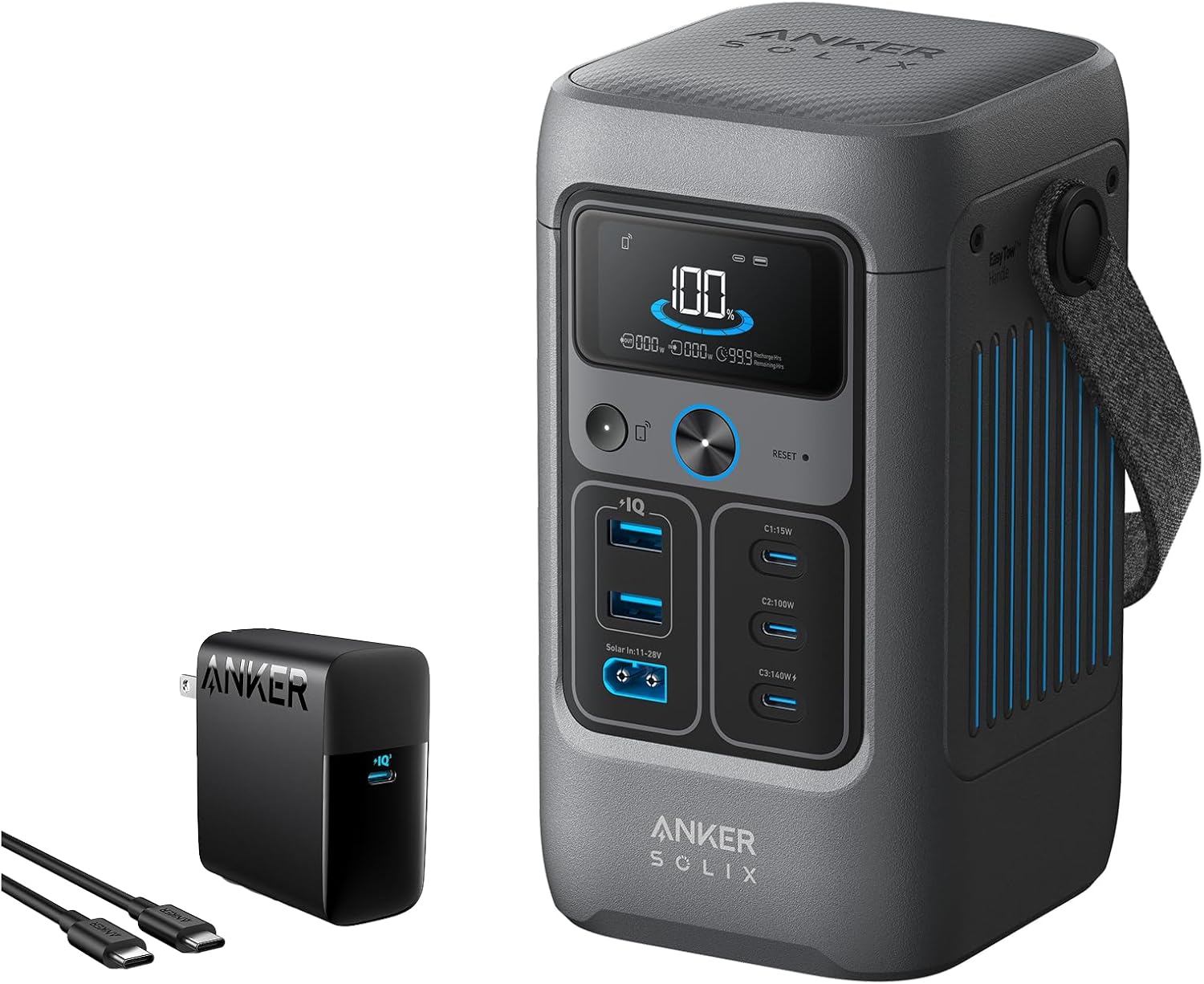
- Anker SOLIX C200 DC Portable Power Station
- Anker 317 Charger (100W)
- 5 ft / 1.5 m USB-C to USB-C cable
- 60cm 140W USB-C to C charging cable
- Safety Manual
- Warranty Info
2. Safety Instructions
Please read and understand all safety instructions before using the Anker SOLIX C200 DC Power Bank Station. Failure to follow these instructions may result in electric shock, fire, or serious injury.
- Do not disassemble, repair, or modify the unit.
- Do not expose the unit to fire or high temperatures.
- Keep the unit away from water and other liquids.
- Use only original or certified cables and chargers.
- Avoid dropping or subjecting the unit to strong impacts.
- Keep out of reach of children.
3. Product Overview
The Anker SOLIX C200 is designed for portability and efficiency, featuring a compact form factor and multiple charging ports.
Components and Ports
- Display Screen: Shows battery level, input/output power, and remaining charge/discharge time.
- Power Button: Turns the unit on/off.
- USB-C Ports:
- 1x 140W Two-Way USB-C (Input/Output)
- 1x 100W USB-C (Output)
- 1x 15W USB-C (Output)
- USB-A Ports: 2x 12W USB-A (Output).
- Solar Input: For connecting compatible solar panels (11-28V).
- Car Socket: For 12V DC output.


4. Setup
Initial Charging
Before first use, it is recommended to fully charge the Anker SOLIX C200. Use the included 100W Anker 317 Charger and USB-C to USB-C cable to connect the power station to a wall outlet. The display will indicate charging status.
Connecting Devices
To connect devices, simply plug your device's charging cable into the appropriate USB-C or USB-A port on the Anker SOLIX C200. The power station will automatically detect and begin charging your device.
5. Operating Instructions
Charging Your Devices
The Anker SOLIX C200 offers multiple output ports to charge a variety of electronics:
- 140W Two-Way USB-C Port: Ideal for fast-charging high-power devices like laptops. This port also supports input for recharging the power station.
- 100W USB-C Port: Provides rapid charging for compatible devices.
- 15W USB-C Port: Suitable for smaller devices.
- 12W USB-A Ports (x2): Standard USB ports for a wide range of devices.
Note: When 15W USB-C and 12W USB ports are used simultaneously, total output may be limited to 20W.


Recharging the Power Station
The Anker SOLIX C200 supports multiple recharging methods:
- 140W PD USB-C: Recharge the power station to 80% in approximately 1.3 hours using the 140W two-way USB-C port.
- 100W Solar Panels: For eco-friendly recharging, connect compatible 100W solar panels. Reaches 80% in approximately 1.6 hours.
- Car Socket: Recharge using your vehicle's car socket. Reaches 80% in approximately 1.6 hours.


6. Maintenance
Care and Cleaning
- Wipe the exterior with a soft, dry cloth.
- Do not use abrasive cleaners or solvents.
- Ensure all ports are free of dust and debris.
Storage
- Store the unit in a cool, dry place away from direct sunlight.
- For long-term storage, recharge the unit to 50-80% every 3-6 months to preserve battery life.
7. Troubleshooting
Common Issues and Solutions
| Issue | Possible Cause | Solution |
|---|---|---|
| Unit not turning on | Low battery; Power button not pressed correctly | Charge the unit; Press and hold the power button for 3 seconds |
| Device not charging | Cable issue; Port issue; Device not compatible | Try a different cable/port; Ensure device is compatible with port output |
| Slow charging | Using low-power port; Multiple devices connected | Use a higher-wattage port (e.g., 140W USB-C); Disconnect other devices |
If you encounter issues not listed here or if the problem persists, please contact customer support.
8. Specifications
- Model: Anker SOLIX C200 DC Power Bank Station
- Battery Capacity: 192Wh
- Battery Type: LiFePO4
- Total Output: 200W
- USB-C Ports: 1x 140W (Two-Way), 1x 100W, 1x 15W
- USB-A Ports: 2x 12W
- Recharging Methods: 140W PD USB-C, 100W Solar, Car Socket
- Dimensions: 39% smaller than similar designs (exact dimensions not provided in source)
- ASIN: B0DRP4TY4Z
- Date First Available: December 27, 2024
9. Warranty and Support
The Anker SOLIX C200 DC Power Bank Station comes with 3 years of protection, ensuring long-term reliability. For any inquiries, technical assistance, or warranty claims, please contact our friendly customer service.
You can find more information and support resources on the official Anker website: www.anker.com


