
1. Important Safety Instructions
Please read all instructions carefully before using the UMAY Under Desk Elliptical Machine. Retain this manual for future reference.
General Safety
- Ensure the machine is placed on a flat, stable surface during use.
- Do not stand on the elliptical machine. It is designed for seated use only.
- Keep children and pets away from the machine during operation.
- Do not insert any objects into the machine's openings.
- Unplug the machine from the power outlet when not in use or before cleaning.
- Use only the provided power adapter.
Medical Considerations
- Consult a physician before starting any new exercise program, especially if you have pre-existing medical conditions.
- Individuals with pacemakers should consult a medical professional before using this device.
- Stop exercising immediately if you feel faint, dizzy, or experience pain.
2. Product Overview
The UMAY Under Desk Elliptical Machine is an electric seated leg exerciser designed for use while sitting. It features both manual and automatic operating modes, 12 speed levels, and a mute function for quiet operation. This compact machine is suitable for individuals seeking to engage in leg exercise from a seated position, including seniors or those undergoing rehabilitation.

This image displays the UMAY Under Desk Elliptical Machine in its black finish, accompanied by two remote controls. The machine features two textured foot pedals and a central unit with a digital display.
Package Contents
- UMAY Under Desk Elliptical Machine (x1)
- Remote Control (x1)
- Power Cord (x1)
- Foot Straps (x2)
- Brush (for cleaning) (x1)
- Lubrication Oil (x1)
- User Manual (x1)

This image displays the complete contents of the product package, including two foot straps, one power cord, one remote control, one brush, one bottle of lubrication oil, and one user manual, laid out on a wooden surface.
3. Setup
The UMAY Under Desk Elliptical Machine comes fully assembled and ready for immediate use. No complex installation is required.

This image shows the UMAY elliptical machine positioned on a carpet, emphasizing that it requires no installation and is ready to use directly out of the box.
Initial Steps
- Placement: Place the elliptical machine on a firm, level surface in your desired location. Ensure there is enough space for comfortable leg movement.
- Power Connection: Connect the power cord to the machine's power input port and then plug it into a standard electrical outlet.
- Foot Straps (Optional): If desired, attach the foot straps to the pedals for added foot security during exercise.
4. Operating Instructions
Control Panel and Remote Control
The elliptical machine can be operated using either the integrated control panel or the included remote control. Familiarize yourself with the functions of each button:

This image presents a circular diagram overlaying the elliptical machine's control panel, pointing out the main functions: Speed (1-12 Levels), Mode (Switch Auto Mode P1-P12), Start/Stop (Start/Stop/Reset), Direction (Forward & Backward), and Function (Time/Distance/Speed/Count/Calorie).
- Power Button (⏻): Press to turn the machine on or off.
- Mode Button: Switches between Manual (HR) and Auto (P1-P12) modes.
- Speed Buttons (+/-): Adjusts the speed level in Manual mode.
- Direction Button (⇄): Changes the pedaling direction (forward or backward).
- Function Button (⟳): Cycles through the display metrics: Time, Distance, Count, and Calories burned.
- Start/Stop Button: Initiates or pauses the exercise. In Manual mode, pressing twice enters HR mode.
Operating Modes
Manual Mode (HR)
Manual mode allows for personalized workout settings, giving you full control over speed and direction.
- To enter Manual (HR) mode, press the Start/Stop button twice.
- Adjust the workout time between 15-30 minutes using the remote or control panel.
- Select from 12 adjustable speeds using the +/- buttons.
- Change the pedaling direction (forward or backward) using the Direction button.

This graphic details the 'HR Mode' (Manual Mode), indicating a 15-30 minute adjustable time, the need to press the Start/Stop button twice to enter HR mode, and the ability to manually adjust 12 speeds and direction. A visual scale illustrates the speed levels.
Auto Mode (P1-P12)
Auto mode provides pre-programmed workout routines with automatic adjustments to speed and direction.
- Press the Mode button to cycle through the 12 pre-programmed modes (P1-P12).
- In Auto mode, the speed changes every minute, and the direction changes every 3 minutes automatically.

This graphic explains the 'AUTO MODE (P1-P12)', instructing users to press the Mode button to activate it. It highlights 12 programmed modes (P1-P12) and indicates that speed and direction adjust automatically every 15 minutes.
Speed Settings
The machine offers 12 speed levels, categorized for different intensity levels:
- Levels 1-3: Walking Speed
- Levels 4-6: Jogging Speed
- Levels 7-9: Running Speed
- Levels 9-12: Fast Running Speed

This image visually categorizes the 12 adjustable speeds of the elliptical machine: Levels 1-3 for Walking Speed, Levels 4-6 for Jogging Speed, Levels 7-9 for Running Speed, and Levels 9-12 for Fast Running Speed, illustrated with images of people exercising.
Forward and Backward Motion
The elliptical supports both forward and backward pedaling. This feature allows for targeting different muscle groups in the legs and can help enhance circulation.

This image shows a person seated on a sofa, using the elliptical machine. Insets illustrate the machine's forward and reverse pedaling capabilities, emphasizing its ability to exercise both front and back thigh muscles and boost circulation.
Mute Function
The machine is equipped with a mute system for quiet operation, maintaining noise levels below 15dB.
- To Mute Sound: When the machine is plugged in, long press the Power button to turn off the screen. Then, long press the Direction button on the machine for 1.5 seconds. Two beeps will confirm that the sound prompt is canceled.
- To Restore Sound: Follow the same steps. After one beep, the normal sound prompt will be restored.
This graphic provides instructions for the mute setting. It explains how to mute the sound by long-pressing the Power button to turn off the screen, then long-pressing the Direction button for 1.5 seconds (two beeps for mute). It also shows how to restore normal sound (one beep).
5. Maintenance
Regular maintenance ensures the longevity and optimal performance of your elliptical machine.
- Cleaning: Use the provided brush or a soft, damp cloth to clean the machine regularly. Avoid abrasive cleaners or solvents.
- Lubrication: Apply the included lubrication oil to moving parts as needed to maintain smooth and quiet operation. Refer to the physical user manual for specific lubrication points.
- Storage: The compact design of the elliptical machine allows for easy storage. Store it in a dry, cool place away from direct sunlight.
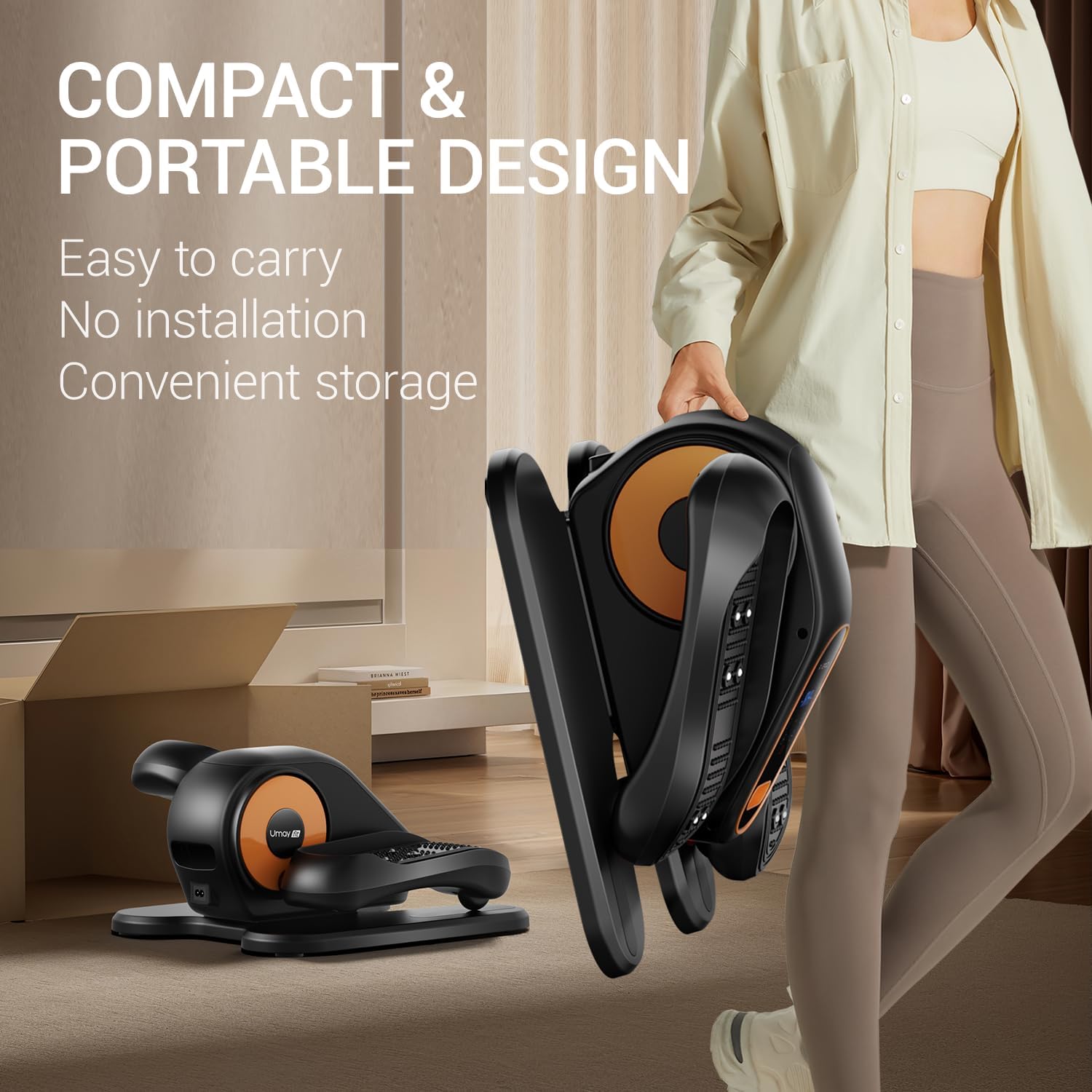
This image highlights the elliptical machine's compact and portable design. A person is shown easily carrying the folded machine by its built-in handle, demonstrating its ease of transport and convenient storage.
6. Troubleshooting
If you encounter any issues with your UMAY Under Desk Elliptical Machine, please refer to the following common problems and solutions:
- Machine not powering on:
- Ensure the power cord is securely plugged into both the machine and a working electrical outlet.
- Check if the main power switch (if present) is in the 'ON' position.
- Remote control not working:
- Check and replace the remote control battery if necessary.
- Ensure there is a clear line of sight between the remote control and the machine's sensor.
- Unusual noise during operation:
- Apply lubrication oil to moving parts as instructed in the maintenance section.
- Ensure the machine is placed on a flat, stable surface to prevent wobbling.
- Display not showing data:
- Ensure the machine is powered on and in an active operating mode (Manual or Auto).
- Press the Function button to cycle through the display metrics.
7. Specifications
| Feature | Detail |
|---|---|
| Model Name | U5-1 |
| Brand | UMAY |
| Color | Black |
| Material | Aluminum |
| Product Dimensions (LxWxH) | 16"D x 15"W x 9"H |
| Item Weight | 12 Pounds |
| Maximum Weight Recommendation | 300 Pounds |
| Maximum Stride Length | 12 Inches |
| Number of Speed Levels | 12 |
| Included Components | Remote Control, Foot Straps, Power Cord, Brush, Lubrication Oil, User Manual |
8. Warranty and Support
The UMAY Under Desk Elliptical Machine comes with a 1-year warranty from the date of purchase, covering manufacturing defects.
For warranty claims, technical support, or any questions regarding your product, please refer to the contact information provided in the physical user manual or visit the official UMAY website for assistance.
Please retain your proof of purchase for warranty validation.


