
1. Introduction
Thank you for purchasing the NBD D100 5K 48MP Video Camera. This manual provides essential information for the safe and effective use of your device. Please read it thoroughly before use and keep it for future reference.
The NBD D100 is a versatile digital video camera designed for capturing high-quality 5K video and 48-megapixel photos. It features Wi-Fi connectivity, 16x digital zoom, autofocus, image stabilization, and a 270° rotatable IPS screen, making it suitable for various recording scenarios including vlogging, events, and as a webcam.
2. Safety Information
To ensure safe operation and prevent damage to your device, please observe the following precautions:
- Do not expose the camera to water or moisture.
- Avoid dropping the camera or subjecting it to strong impacts.
- Keep the camera away from extreme temperatures, direct sunlight, and strong magnetic fields.
- Use only the specified power adapter and accessories.
- Do not attempt to disassemble or modify the camera.
- Keep out of reach of children.
- Dispose of batteries properly according to local regulations.
3. Package Contents
Verify that all items are present in your package:
- NBD D100 5K 48MP Video Camera
- Rechargeable Batteries (x2)
- USB Cable
- HDMI Cable
- Remote Control
- Lens Cap
- Camera Bag
- User Manual
- Microphone (external)
- LED Fill Light
- 32GB SD Card
- Card Reader
- Cleaning Cloth

Image: Contents of the NBD D100 package, including the camera, two batteries, external microphone, LED fill light, 32GB SD card, USB cable, HDMI cable, remote control, lens cap, camera bag, card reader, and cleaning cloth.
4. Product Overview
Familiarize yourself with the camera's components and controls.
4.1 Camera Dimensions and Weight

Image: The NBD D100 camera shown on a scale indicating 277.0g, alongside a water bottle for size comparison, and detailed dimensions (15.5 cm height, 6.4 cm width, 6.5 cm depth). The screen is shown rotating 270 degrees.
The NBD D100 is designed to be lightweight and compact, weighing approximately 277g. Its dimensions are 15.5 cm x 6.4 cm x 6.5 cm, making it portable for various shooting environments.
4.2 Rotatable IPS Screen
The camera features a 3.0-inch IPS screen that can rotate 270 degrees, allowing for flexible viewing angles during recording and playback.
5. Setup
5.1 Charging the Battery
Before first use, fully charge the included batteries. Insert a battery into the camera or an external charger (if provided) and connect it to a power source using the USB cable.

Image: The NBD D100 camera connected to a power bank via USB for charging, with two batteries shown. This illustrates the camera's ability to record while charging.
5.2 Inserting the SD Card
The camera supports SD cards for storage. Open the SD card slot cover, insert the SD card with the metal contacts facing the correct direction, and close the cover. Ensure the card is properly formatted before use (refer to the camera's menu settings).
5.3 Powering On/Off
Press and hold the power button to turn the camera on or off.
5.4 Initial Settings
Upon first power-on, you may be prompted to set the language, date, and time. Navigate through the menu using the directional buttons and confirm selections.
5.5 Wi-Fi Connection and App Installation
The camera supports Wi-Fi for remote control and file transfer via a mobile application.
- Turn on Wi-Fi in the camera's settings menu. The camera will display a Wi-Fi ID (e.g., 4K_WIFI) and password.
- On your smartphone, scan the QR code displayed on the camera screen or in the manual to download the dedicated mobile application. Alternatively, search for the app in your device's app store.
- Connect your smartphone to the camera's Wi-Fi network using the provided ID and password.
- Open the app to control the camera, view live footage, and transfer files.
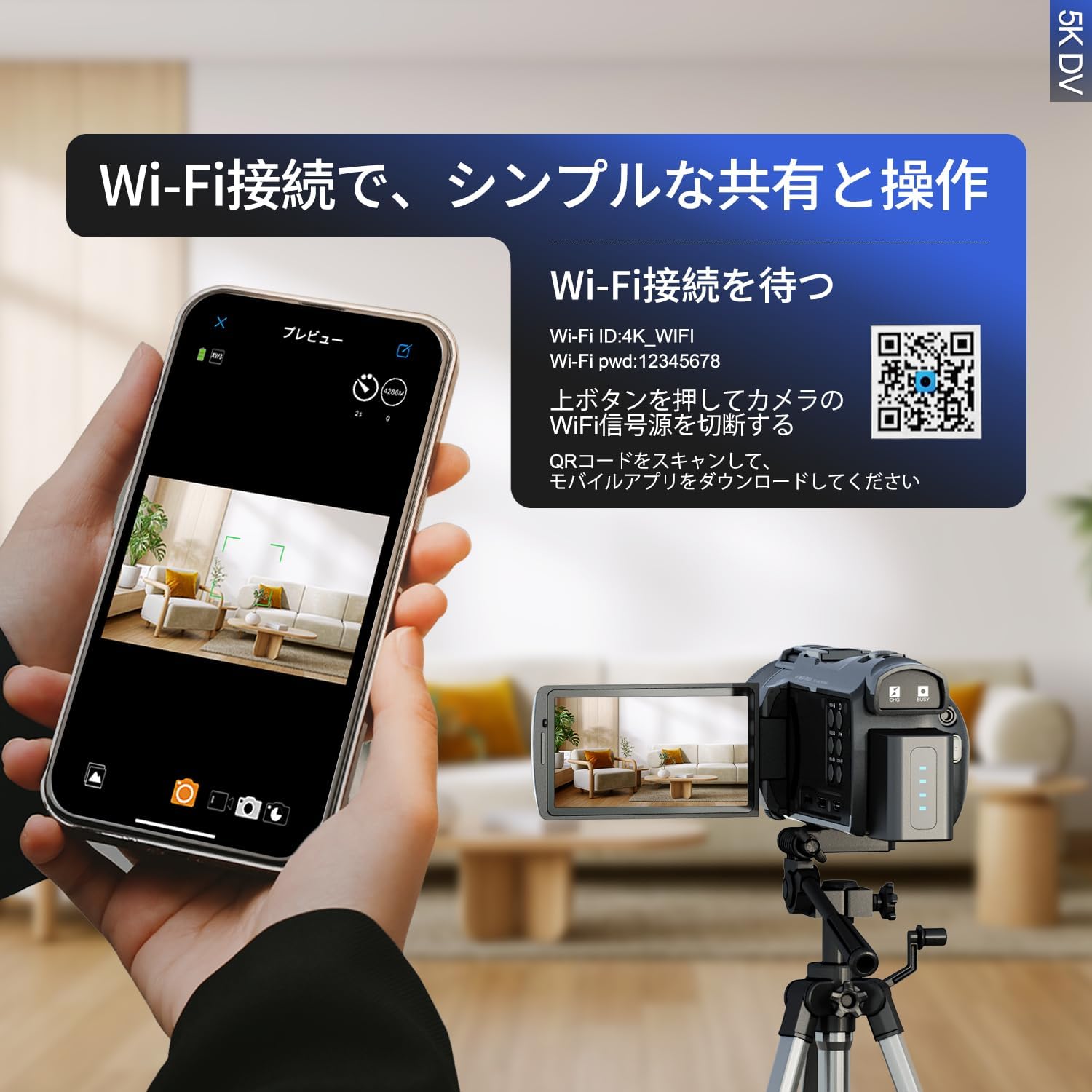
Image: A smartphone displaying the camera's live preview via the Wi-Fi app, with the NBD D100 camera on a tripod in the background. A QR code for app download is visible on the camera screen.
Download the mobile app here: https://qr19.cn/BIamDW
6. Operating Instructions
6.1 Basic Photo/Video Recording
Press the Shutter button to take a photo. Press the Record button to start video recording, and press it again to stop.

Image: The NBD D100 camera with its screen displaying a vibrant outdoor scene, highlighting its 5K video capture and 48-megapixel photo resolution. A comparison shows the detail difference between 2K and 5K resolution.
6.2 Zoom Function
Use the T (Telephoto) and W (Wide) buttons to adjust the 16x digital zoom. The zoom level will be displayed on the screen.

Image: Demonstrates the 4x, 8x, and 16x zoom capabilities of the NBD D100 camera, showing how distant objects can be magnified. It also illustrates the image stabilization feature, comparing a blurry image (off) with a clear one (on).
6.3 Autofocus and Image Stabilization
The camera features autofocus (AF) for sharp images and electronic image stabilization to reduce blur caused by camera shake. These functions are typically enabled by default but can be adjusted in the settings.
6.4 Using the Rotatable Screen
The 270° rotatable screen allows you to adjust the display for comfortable viewing from various angles, including self-recording (vlogging).
6.5 Shooting Modes
The NBD D100 offers various shooting modes to enhance your creative possibilities:
- Photo Mode: Capture still images.
- Video Mode: Record high-definition video.
- Slow Motion: Record videos at a higher frame rate for slow-motion playback.
- Time Lapse: Capture a series of photos over time and combine them into a sped-up video.
- Color Filter: Apply various color effects to your photos and videos.
- Loop Recording: Continuously record video, overwriting the oldest files when the memory card is full.
- Self-timer: Set a delay before taking a photo.
- Continuous Shooting: Take multiple photos in quick succession.

Image: A collage of images demonstrating various shooting modes of the NBD D100 camera, including standard photo, video, slow motion, time lapse, color filter effects, loop recording, self-timer, and continuous shooting.
6.6 Webcam Function
Connect the NBD D100 to your computer via USB to use it as a high-quality webcam for online meetings or live streaming.

Image: The NBD D100 camera connected to a laptop, demonstrating its functionality as a webcam for online communication, providing a clear and immersive experience.
6.7 Playback
Enter playback mode to review your recorded photos and videos on the camera screen. Use the directional buttons to navigate through your media.
7. Maintenance
7.1 Cleaning
Use a soft, dry cloth to clean the camera body. For the lens and screen, use a specialized lens cleaning cloth and solution. Avoid abrasive materials or harsh chemicals.
7.2 Storage
When not in use, store the camera in a cool, dry place, away from dust and direct sunlight. Remove the battery if storing for extended periods.
7.3 Battery Care
To prolong battery life, avoid fully discharging the batteries frequently. Charge them regularly, even if not in use, to maintain their capacity. Store batteries in a cool, dry place.
8. Troubleshooting
If you encounter issues with your NBD D100 camera, refer to the following common problems and solutions:
| Problem | Possible Cause | Solution |
|---|---|---|
| Camera does not power on. | Battery is dead or incorrectly inserted. | Charge the battery. Ensure the battery is inserted correctly. |
| Cannot record video/take photos. | SD card is full, not inserted, or corrupted. | Insert an SD card. Delete unnecessary files or format the card. Replace the card if corrupted. |
| Image/video is blurry. | Autofocus is off, lens is dirty, or camera shake. | Ensure autofocus is enabled. Clean the lens. Use image stabilization or a tripod. |
| Wi-Fi connection fails. | Incorrect password, camera Wi-Fi off, or app issue. | Verify Wi-Fi password. Ensure camera Wi-Fi is enabled. Restart the app and camera. |
| Camera freezes. | Software glitch. | Remove and reinsert the battery to reset the camera. |
9. Specifications
| Feature | Detail |
|---|---|
| Brand | NBD |
| Model Number | D100 |
| Video Resolution | 5K |
| Photo Resolution | 48 Megapixels |
| Screen Size | 3.0 inches |
| Screen Type | IPS, 270° Rotatable |
| Optical Zoom | 16x |
| Image Stabilization | Yes |
| Autofocus | Yes |
| Connectivity | Wi-Fi, USB, HDMI |
| Video Format | MP4 |
| Audio Format | AAC |
| Sensor Type | CMOS |
| Product Dimensions | 15.5 x 6.4 x 6.5 cm |
| Product Weight | 1.05 kg (Note: Product image indicates 277g, discrepancy noted. Using image data for weight as it's more specific to the camera itself.) |
| Battery Life | Up to 180 minutes (per battery, depending on usage) |
| Webcam Function | Yes |
10. Warranty and Support
NBD products come with a standard manufacturer's warranty. Please refer to the warranty card included in your package for specific terms and conditions. For technical support, service, or warranty claims, please contact NBD customer service through the retailer where you purchased the product or visit the official NBD website.
Keep your purchase receipt as proof of purchase for warranty purposes.


