Introduction
This manual provides comprehensive instructions for the safe and effective use of your REVASRI NK-1000 Golf Laser Rangefinder. Please read this manual thoroughly before using the device and keep it for future reference. The REVASRI NK-1000 is designed to provide accurate distance measurements for golf, featuring advanced functions such as slope compensation, pin lock with vibration, and 6.5x magnification.

Package Contents
Verify that all items listed below are included in your package:
- REVASRI NK-1000 Golf Laser Rangefinder x 1
- Carrying Pouch x 1
- USB-C Charging Cable x 1
- Lens Cleaning Cloth x 1
- Instruction Manual x 1
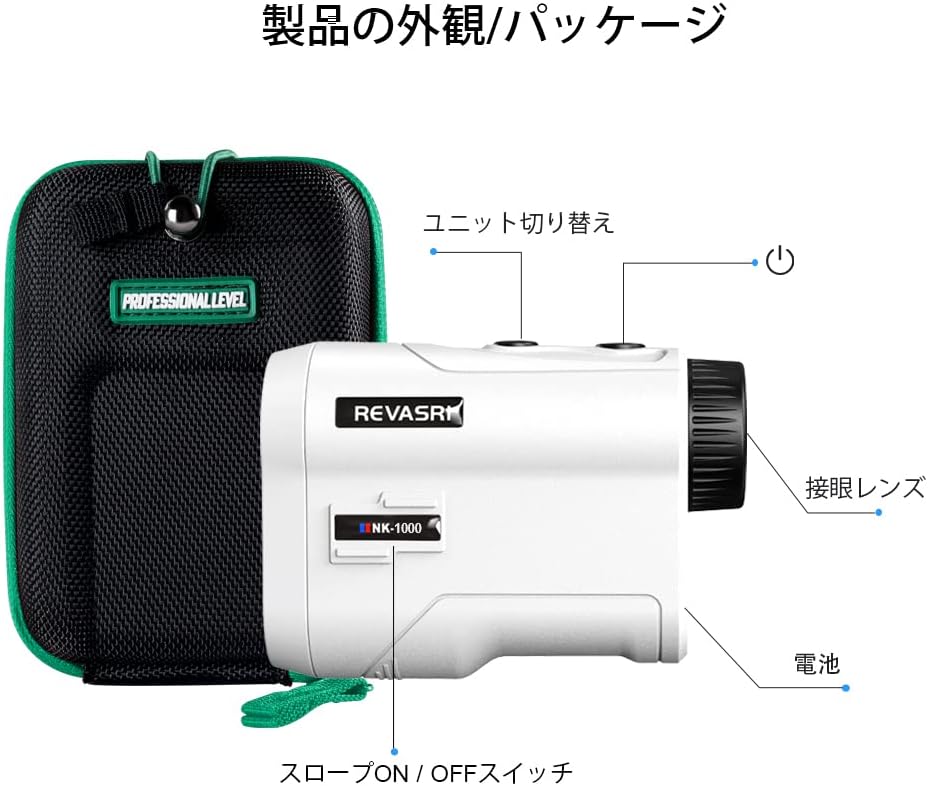
Setup
1. Charging the Device
Before first use, fully charge the rangefinder. Connect the provided USB-C cable to the charging port on the device and to a compatible USB power source. The charging indicator will show the charging status.

2. Adjusting the Eyepiece
Rotate the eyepiece to adjust the focus until the target object appears clear and sharp in the display.
Operating Instructions
1. Power On/Off and Basic Measurement
- Look through the eyepiece.
- Press the Power/Measurement button once to activate the display.
- Aim the crosshairs at your target.
- Press the Power/Measurement button again to take a measurement. The distance will be displayed.
2. Mode Switching (Slope On/Off)
The REVASRI NK-1000 features a slope compensation function. You can switch this function on or off as required, for example, to comply with tournament rules.
- Slope Mode (On): This mode measures the angle, linear distance, and provides a slope-compensated distance (recommended hitting distance).
- Slope Off Mode: This mode measures only the linear distance and is suitable for tournament play.

3. Flag Lock with Vibration
To accurately measure the distance to the flag, especially when there are objects in the background:
- Long-press the Power/Measurement button to enter scan mode.
- Scan across the flag. The device will identify the flag and vibrate, locking the measurement data.

4. Unit Switching
To switch between yards (Y) and meters (M), press and hold the 'MODE' button for a few seconds until the unit changes on the display.
Maintenance
- Cleaning: Use the provided lens cleaning cloth to gently wipe the lenses. Do not use abrasive materials or chemical cleaners.
- Storage: Store the device in its carrying pouch in a cool, dry place when not in use. Avoid extreme temperatures and direct sunlight.
- Battery Care: Recharge the battery regularly, even if the device is not used frequently, to maintain battery health.
- Water Resistance: The device is IPX4 water-resistant, meaning it is protected against splashing water from any direction. Do not submerge the device in water.
Troubleshooting
| Problem | Possible Cause | Solution |
|---|---|---|
| Device does not power on. | Low battery. | Charge the device using the USB-C cable. |
| Inaccurate measurements. | Unstable aiming, dirty lens, or environmental factors (fog, heavy rain). | Ensure stable aiming, clean the lens, and note that extreme weather can affect accuracy. |
| Display is blurry. | Eyepiece not focused. | Rotate the eyepiece to adjust the focus. |
| Flag lock not working. | Not in scan mode, or flag is too small/far. | Long-press the Power/Measurement button to enter scan mode. Ensure clear line of sight to the flag. |
Specifications
- Brand: REVASRI
- Model: NK-1000
- Measurement Range: Up to 1000 yards
- Accuracy: ±0.5 yards
- Magnification: 6.5x
- Water Resistance: IPX4
- Battery: Rechargeable (USB-C)
- Dimensions: 96 x 67 x 34 mm
- Weight: 120 g
- Material: ABS


Warranty and Support
For warranty information, please refer to the documentation included with your product packaging or visit the official REVASRI website. For technical support or inquiries, please contact REVASRI customer service through the contact information provided on the product packaging or website.