
1. Introduction
Thank you for choosing the XIIW 100mm Bathroom Exhaust Fan, Model LFWW-09QT. This fan is designed to provide efficient and quiet ventilation for various rooms, including bathrooms, toilets, kitchens, bedrooms, and offices. It features an adjustable timer, a humidity sensor, and a backdraft shutter for enhanced functionality and comfort. This manual provides essential information for safe installation, operation, and maintenance of your new fan.
2. Safety Information
- Read all instructions carefully before installation and operation.
- Installation must be performed by a qualified electrician in accordance with local wiring regulations.
- Ensure the power supply is disconnected before any installation, maintenance, or repair work.
- This appliance is not intended for use by persons (including children) with reduced physical, sensory, or mental capabilities, or lack of experience and knowledge, unless they have been given supervision or instruction concerning use of the appliance by a person responsible for their safety.
- Do not insert fingers or foreign objects into the fan blades or openings.
- The fan is IPX4 splash-proof, suitable for zones where splashing water may occur, but not for direct water jets or submersion.
- Do not use the fan in environments with explosive or flammable gases.
- This fan does not require a grounding cable.
3. Product Overview
The XIIW LFWW-09QT is a high-performance exhaust fan designed for optimal air circulation and humidity control. Key features include:
- Adjustable Timer: Allows the fan to continue operating for a set period after the light switch is turned off (1-30 minutes).
- Humidity Sensor: Automatically activates the fan when humidity levels exceed a set threshold (adjustable 60-90% RH).
- Backdraft Shutter: Prevents cold air, odors, and insects from entering the room when the fan is off.
- Quiet Operation: Equipped with a bearing motor for low noise levels (<34 dB).
- Durable Construction: Made from weather-resistant, UV-resistant (non-yellowing) plastic with IPX4 splash protection.
Product Dimensions and Specifications

Image: Detailed diagram illustrating the fan's dimensions (150mm x 150mm face, 100mm duct diameter, 90mm depth) and a table of technical specifications.
Key Components
Humidity Sensor and Timer Adjustment

Image: A circuit board showing the humidity sensor (Feuchtesensor) and LED timer adjustment points. The humidity threshold can be set from 20% to 90% Relative Humidity (RH), and LED indicators show activation thresholds (60%, 70%, 80%, 90%).
Backdraft Shutter Mechanism

Image: A cutaway view of the fan showing the backdraft shutter. This mechanism prevents insects and cold/damp air from entering the room when the fan is not operating. The shutter opens up to 45 degrees during operation.
Overheat Protection

Image: A detailed view of the fan's motor, highlighting the integrated overheat protection. This safety feature automatically shuts off the fan if the internal temperature exceeds 130 °C, preventing damage.
Fan Functionality Diagram

Image: A graph demonstrating the fan's operational logic. It shows how the motor starts when humidity (RH) rises above a set threshold (e.g., 60%), continues to run, and then delays shutdown after humidity drops below the threshold, eventually turning off after the set timer duration (e.g., 30 minutes).
Fan Blades and Airflow Performance
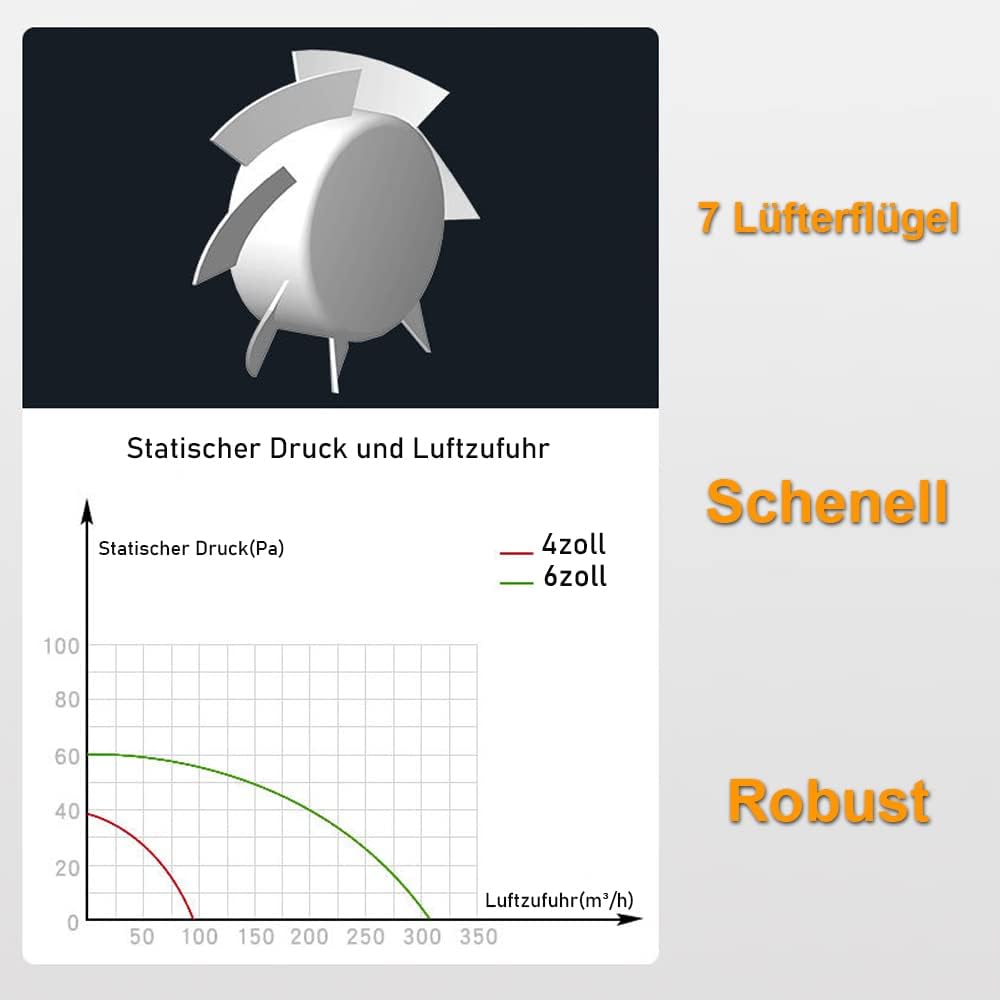
Image: A visual representation of the fan's 7 impeller blades, designed for efficient airflow. Below it, a chart displays static pressure versus airflow, indicating the fan's robust performance characteristics.
4. Setup
The XIIW LFWW-09QT fan is designed for wall or ceiling installation. Ensure the installation area is clear and accessible for wiring.
4.1 Wall Installation
For wall installation, the fan is typically mounted directly into a duct opening. The backdraft shutter is beneficial in this configuration to prevent external elements from entering.

Image: Step-by-step diagram illustrating how to install the fan on a wall. It shows the fan panel, screws, motor housing, ducting, and wall outlet.
4.2 Ceiling Installation
When installing the fan on the ceiling, it is important to remove the backdraft valve (shutter) to ensure proper operation and airflow.

Image: Diagram illustrating the process of installing the fan in a ceiling. It highlights the need to remove the backdraft valve for ceiling-mounted exhaust fans and shows the components like the ceiling, wooden frame, panel, motor, and ducting.
4.3 Electrical Wiring
The fan operates on 220V-240V / 50Hz. It does not require a grounding cable. Connect the live and neutral wires to the designated terminals on the fan's circuit board. For safety and proper functionality, it is highly recommended that electrical wiring be performed by a certified professional.
4.4 Timer and Humidity Sensor Adjustment
The fan's timer and humidity sensor settings can be adjusted via potentiometers on the internal circuit board. Access the circuit board by carefully removing the front cover of the fan.
- Timer Adjustment: Use a small screwdriver to turn the potentiometer labeled 'TIMER'. Turning it clockwise increases the run-on time (up to 30 minutes), while turning it counter-clockwise decreases it (minimum 1 minute).
- Humidity Sensor Adjustment: Use a small screwdriver to turn the potentiometer labeled 'Feuchtesensor' (Humidity Sensor). Turning it clockwise increases the humidity threshold (up to 90% RH) at which the fan activates, and counter-clockwise decreases it (down to 60% RH). The LED indicators provide a visual guide for the set humidity activation threshold.
5. Operating Instructions
The XIIW LFWW-09QT fan offers two primary modes of operation: manual activation with timer run-on and automatic activation via humidity sensor.
- Manual Activation with Timer: When connected to a light switch or a separate switch, the fan will turn on simultaneously with the switch. When the switch is turned off, the fan will continue to operate for the duration set on the timer (1-30 minutes) before automatically shutting off.
- Automatic Humidity Control: If the humidity sensor is enabled and the ambient humidity level rises above the set threshold (e.g., 60% RH), the fan will automatically activate. It will continue to run until the humidity drops below the threshold and then for the set timer duration before turning off.
The fan operates at a single speed, providing a consistent airflow of 95 m³/h.
6. Maintenance
Regular maintenance ensures optimal performance and longevity of your fan.
- Cleaning: Periodically clean the fan's front cover and blades to prevent dust and debris buildup. Disconnect power before cleaning. Use a soft, damp cloth. Do not use abrasive cleaners or solvents.
- Inspection: Annually inspect the fan for any signs of wear, damage, or loose connections. If any issues are found, consult a qualified technician.
- Motor: The fan uses a bearing motor that typically does not require lubrication.
7. Troubleshooting
If you encounter issues with your XIIW LFWW-09QT fan, refer to the following troubleshooting guide:
| Problem | Possible Cause | Solution |
|---|---|---|
| Fan does not turn on | No power supply Incorrect wiring Overheat protection activated | Check power connection and circuit breaker. Verify wiring connections (consult electrician). Allow fan to cool down; check for obstructions. |
| Fan runs continuously | Timer set too long Humidity sensor threshold too low Constant live connection | Adjust timer setting to a shorter duration. Increase humidity sensor threshold. Ensure fan is wired to a switched live connection. |
| Fan is too noisy | Loose mounting Obstruction in duct or fan blades Damaged motor/bearings | Check and tighten mounting screws. Disconnect power and remove any obstructions. Contact support for inspection/replacement. |
| Poor airflow | Blocked ducting Dirty fan blades Backdraft shutter stuck | Check ducting for blockages. Clean fan blades (disconnect power first). Inspect backdraft shutter for free movement. |
If the problem persists after attempting these solutions, please contact customer support.
8. Specifications
| Feature | Specification |
|---|---|
| Brand | XIIW |
| Model Number | LFWW-09QT |
| Power Consumption | 12 Watt |
| Operating Voltage | 220V - 240V / 50Hz |
| RPM (Rotations Per Minute) | 2400 min⁻¹ |
| Duct Diameter | Ø 105-110mm |
| Noise Level | 34 dB (at 3m) |
| Airflow Capacity | 95 m³/h |
| Protection Class | IPX4 (Splash-proof) |
| Timer Control | Adjustable 1 to 30 minutes |
| Humidity Activation | Adjustable 60% to 90% RH |
| Speed Levels | 1 |
| Number of Blades | 7 |
| Ventilation System | Exhaust Fan |
| Static Pressure | 50 Pa |
| Material | Plastic (Weather-resistant, UV-resistant, non-yellowing) |
| Product Dimensions (Depth x Width x Height) | 15cm x 16cm x 13cm (approximate, based on image) |
| Weight | 0.5 - 1.5 kg |
| Operating Temperature | -15 °C to 40 °C |
| Ideal Room Sizes | Toilet: 3-4 m² Bathroom: 3-9 m² Bedroom: 7-13 m² Kitchen: 3-7 m² Office: 5-13 m² |
9. Warranty and Support
This product comes with a standard manufacturer's warranty. Please refer to your purchase documentation for specific warranty terms and conditions. For technical support, troubleshooting assistance, or warranty claims, please contact the retailer or XIIW customer service through the contact information provided at the point of purchase.