
Dreo DR-HCF004S Black
Dreo 52 Inch Smart Black Ceiling Fan User Manual
Model: DR-HCF004S Black
1. Introduction
Thank you for choosing the Dreo 52 Inch Smart Black Ceiling Fan. This manual provides essential information for the safe operation, installation, and maintenance of your new ceiling fan. Please read it thoroughly before use and retain it for future reference.
This smart ceiling fan offers advanced features including 12 speeds, 3 fan modes, stepless color tones, dimmable LED light, and a 1-12 hour timer. It can be controlled via remote, the Dreo app, Alexa, or a wall switch, providing versatile comfort and lighting solutions for your home.

Image: The Dreo 52 Inch Smart Black Ceiling Fan, showcasing the fan unit, remote control, smartphone app interface, an Amazon Echo device, and the reversible black and wood grain fan blades.
2. Important Safety Instructions
Always follow basic safety precautions when using electrical appliances to reduce the risk of fire, electric shock, and injury.
- Read all instructions before installing and operating the fan.
- Ensure the installation location is suitable for a ceiling fan and can support the fan's weight.
- All wiring must be in accordance with national and local electrical codes. If unsure, consult a qualified electrician.
- Disconnect power at the circuit breaker before installation or servicing.
- Do not operate the fan with a damaged cord or plug.
- Keep hands, hair, and clothing away from moving parts of the fan.
- Do not attempt to repair or modify the fan yourself. Contact customer support for assistance.
- This appliance is not intended for use by persons (including children) with reduced physical, sensory or mental capabilities, or lack of experience and knowledge, unless they have been given supervision or instruction concerning use of the appliance by a person responsible for their safety.
WARNING: To reduce the risk of fire or electric shock, do not use this fan with any solid-state speed control device.
3. Product Overview
Components
- Main Fan Unit (Motor Housing, Downrod, Ceiling Canopy)
- Fan Blades (Reversible: Black and Wood Grain)
- LED Light Kit with Crystal Light Cover
- Remote Control
- Mounting Hardware

Image: A diagram illustrating the dimensions of the Dreo 52 Inch Smart Black Ceiling Fan, including a 52-inch diameter, 13.2-inch height, 6-inch downrod height, and 10.2-inch light diameter. Also shows the crystal light cover and reversible blade design.
4. Setup and Installation
The Dreo Smart Ceiling Fan is designed for easy installation, with many components pre-assembled and pre-wired to simplify the process. Installation typically takes less than 20 minutes.
4.1 Before You Begin
- Turn off power at the circuit breaker.
- Ensure you have all necessary tools (screwdriver, wire strippers, ladder, etc.).
- Verify all parts are present according to the packing list.
4.2 Installation Steps (Simplified)
- Mount the Ceiling Bracket: Securely attach the mounting bracket to the ceiling junction box.
- Assemble the Fan: Attach the downrod to the main fan unit and connect the fan blades. The blades are reversible, allowing you to choose between black and wood grain finishes.
- Wire the Fan: Connect the fan's electrical wires to your household wiring. The pre-wired connections minimize manual wiring.
- Attach the Light Kit: Secure the LED light kit and crystal light cover to the fan unit.
- Secure the Canopy: Slide the canopy up to the ceiling bracket and secure it.

Image: An exploded view diagram showing the modular design of the Dreo ceiling fan, highlighting the main unit, downrod, ceiling bracket, light diffuser, and fan blades, indicating fast assembly.

Image: A comparison showing the Dreo fan's simplified installation with fewer screws, less wiring, and less assembly compared to traditional ceiling fans.
For detailed step-by-step instructions, refer to the included installation guide or visit the official Dreo support website.
5. Operating Instructions
Your Dreo Smart Ceiling Fan offers multiple control options for convenience.
5.1 Remote Control
The included remote control allows you to adjust fan speeds (6 speeds), turn the light on/off, and set the timer.
- Fan Speed: Use the fan speed buttons to cycle through available speeds.
- Light Control: Press the light button to toggle the light.
- Timer: Set the fan to turn off automatically after a set period (1-12 hours).
- Direction Reversal: Use the dedicated button to switch between summer (downward airflow) and winter (upward airflow) modes.

Image: An illustration detailing the multiple control options for the Dreo ceiling fan, including the DREO app, voice control via Alexa and Google Home, the physical remote control, and compatibility with a non-dimmable wall switch (not included).
5.2 Dreo App Control
For full functionality, download the Dreo app from your smartphone's app store. The app provides access to 12 fan speeds, 3 fan modes (Normal, Auto, Sleep), stepless brightness (5%-100%), and stepless color temperature (2700-6500K).
- Download App: Search for "Dreo" in the App Store or Google Play.
- Pair Device: Follow in-app instructions to connect your fan to the app.
- Control Features:
- Adjust fan speed (1-12) and modes.
- Set light brightness (5%-100%) and color temperature (2700K-6500K).
- Create custom schedules and scenes (e.g., sunrise/sunset).
- Reverse fan direction for seasonal comfort.

Image: A visual representation of the Dreo app interface, demonstrating comprehensive control over fan settings, light brightness, color temperature, and scheduling from anywhere.

Image: The Dreo app's scheduling feature, allowing users to set specific times for the fan and light to turn on or off, and to activate different modes or scenes.
5.3 Voice Control (Alexa & Google Home)
Integrate your Dreo fan with Amazon Alexa or Google Home for hands-free control.
- Enable Skill/Action: In the Alexa or Google Home app, enable the "Dreo" skill or action.
- Discover Devices: Allow the voice assistant to discover your new fan.
- Voice Commands: Use commands like:
- "Alexa, turn on the ceiling fan."
- "Hey Google, set ceiling fan speed to 5."
- "Alexa, turn off the ceiling fan light."
5.4 Seasonal Operation (Direction Reversal)
The fan's direction can be reversed to optimize comfort year-round, either via the remote or the Dreo app.
- Summer Mode: Downward airflow creates a cooling breeze.
- Winter Mode: Upward airflow circulates warm air trapped near the ceiling, improving heating efficiency.
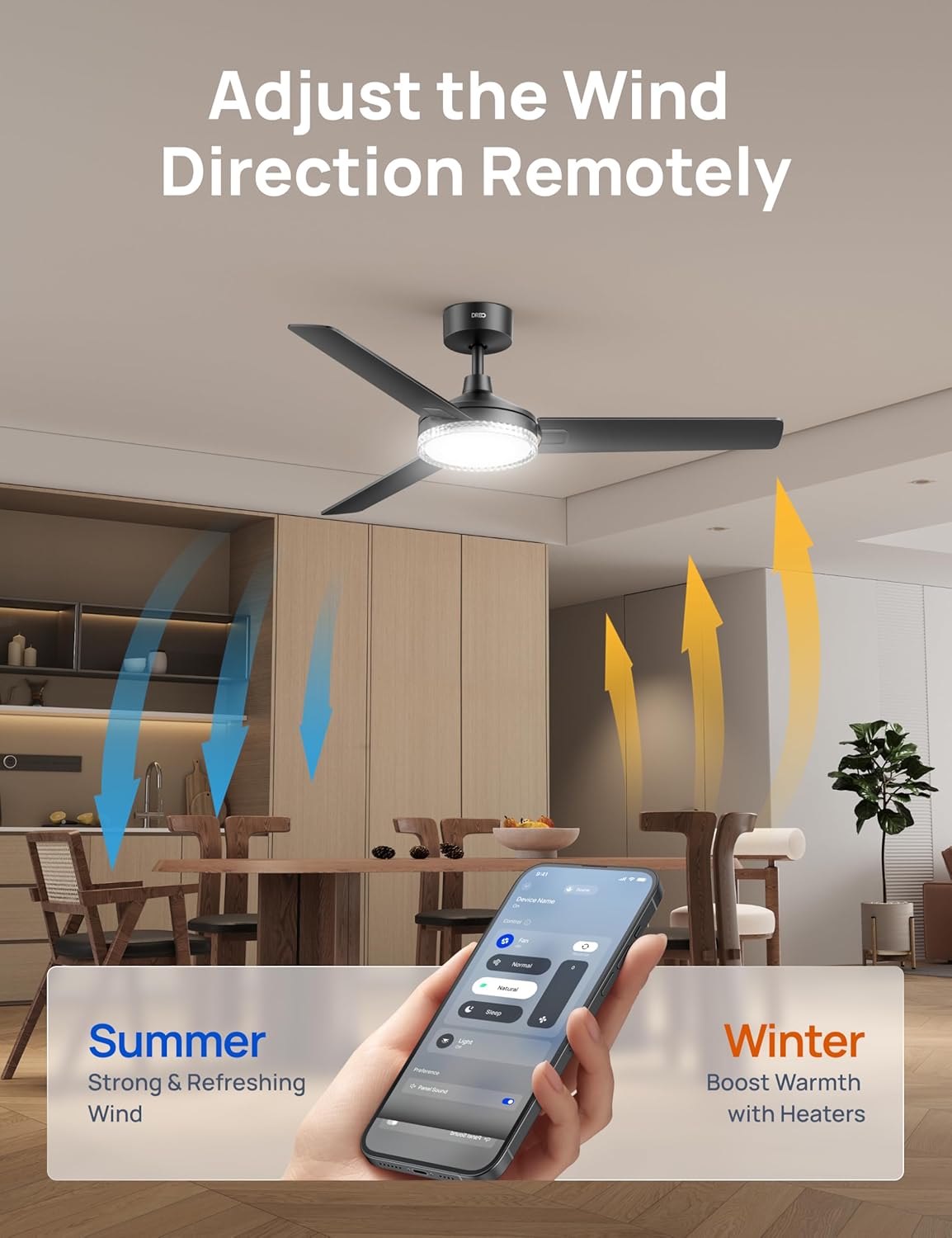
Image: A visual representation of the fan's reversible airflow, showing blue arrows for downward summer wind and orange arrows for upward winter air circulation, controlled remotely via the app.
6. Maintenance
Regular maintenance ensures optimal performance and longevity of your ceiling fan.
- Cleaning:
- Before cleaning, ensure the power is turned off at the circuit breaker.
- Wipe the fan blades and motor housing with a soft, damp cloth. Do not use abrasive cleaners or solvents.
- Clean the light cover gently with a soft, dry cloth.
- Blade Balance: If the fan wobbles, check that all blade screws are tightened and blades are properly balanced.
- Light Source: The integrated LED light is designed for long life and is not user-replaceable. Contact customer support if the light fails.
7. Troubleshooting
If you encounter issues with your Dreo Smart Ceiling Fan, refer to the following common problems and solutions:
| Problem | Possible Cause | Solution |
|---|---|---|
| Fan does not turn on. | No power; loose wiring; remote battery dead. | Check circuit breaker; ensure all wiring connections are secure; replace remote battery. |
| Light does not turn on. | Light switch off; loose connection; LED failure. | Ensure light is switched on via remote/app; check wiring; contact support if LED is faulty. |
| Fan wobbles. | Loose blades; unbalanced blades; loose mounting bracket. | Tighten all blade screws; use balancing kit (if included) to balance blades; ensure mounting bracket is secure. |
| Remote control not working. | Dead battery; out of range; interference. | Replace remote battery; ensure you are within range; minimize interference from other devices. |
| App control not working. | No Wi-Fi connection; fan not paired; app outdated. | Check Wi-Fi connectivity; re-pair the fan in the app; update the Dreo app to the latest version. |
If the problem persists after trying these solutions, please contact Dreo Customer Support.
8. Specifications
| Feature | Detail |
|---|---|
| Brand | Dreo |
| Model Name | DR-HCF004S Black |
| Color | Black |
| Design | Ceiling Fan with Light |
| Power Source | DC Motor |
| Connectivity | Wi-Fi (App Control), Remote Control, Voice Control (Alexa, Google Home) |
| Product Dimensions | 52.05"D x 52.05"W x 13.2"H |
| Fan Speeds | 12 (via App), 6 (via Remote) |
| Fan Modes | Normal, Auto, Sleep (via App) |
| Airflow (Max) | 5189 CFM |
| Noise Level | Quieter than 31dB (Sleep Mode) |
| Light Type | Integrated LED |
| Light Brightness | 2400lm (5%-100% Dimmable) |
| Color Temperature | 2700K-6500K (Stepless) |
| Timer | 1-12 Hours |
| Certifications | ETL, DOE, FCC |
| Assembly Required | Yes (Pre-assembled for quick setup) |
| Batteries Required (for main unit) | No |

Image: An overview of additional features, including the fan's dimensions (52" diameter, 13.2" height), 1-12 hour timer, 15° slope mount capability, and ETL, DOE, and FCC certifications. Also notes wall switch compatibility.
9. Warranty and Customer Support
Dreo provides free tech support and replacement parts for peace of mind. For warranty information or technical assistance, please contact Dreo Customer Support.
- Website: Visit the official Dreo website for FAQs and support resources.
- Email: Contact support via email for detailed inquiries.
- Phone: Call the customer service hotline during business hours.
Please have your model number (DR-HCF004S Black) and purchase information ready when contacting support.
Related documentsDR-HCF004S Black


Ask a question about this manual
Ask about setup, troubleshooting, compatibility, parts, safety, or missing instructions. Manuals+ will review the question and use this page’s manual context to help answer it.