
1. Introduction
Thank you for choosing the Kuulaa KL-YD71 5000mAh Ultra-Slim Magnetic Wireless Power Bank. This device is designed to provide convenient and efficient charging for your compatible mobile devices, featuring both magnetic wireless charging and USB-C wired fast charging capabilities. Its ultra-slim design makes it highly portable for everyday use and travel.
2. Important Safety Information
Please read all safety instructions carefully before using this product. Failure to follow these instructions may result in electric shock, fire, or injury.
- Do not expose the power bank to extreme temperatures, direct sunlight, or high humidity.
- Do not disassemble, modify, or attempt to repair the device.
- Keep out of reach of children.
- Avoid dropping or subjecting the power bank to strong impacts.
- Use only original or certified charging cables and adapters.
- If the power bank swells, emits an odor, or becomes excessively hot, discontinue use immediately.
- Dispose of the product responsibly according to local regulations.
3. Package Contents
Verify that all items are present in your package:
- Kuulaa 5000mAh MagSafe Power Bank (Model: KL-YD71)
- USB-C Charging Cable
- User Manual
4. Product Overview
The Kuulaa KL-YD71 power bank features an ultra-slim design with a durable tempered glass finish. It integrates strong magnets for secure attachment to MagSafe-compatible devices and offers both wireless and wired charging options.
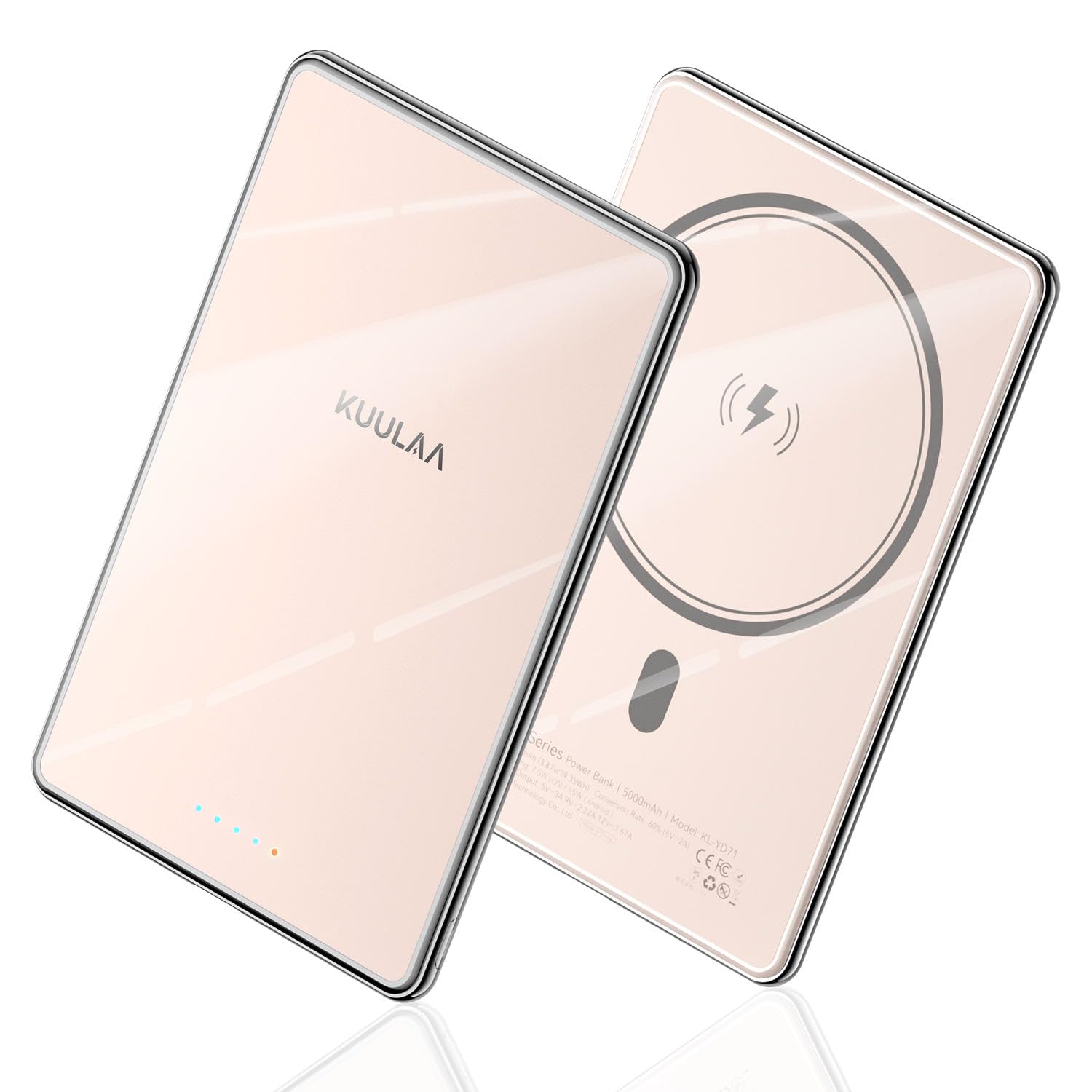
Figure 4.1: Kuulaa KL-YD71 5000mAh Magnetic Wireless Power Bank.
4.1. Ultra-Slim Design
Measuring only 0.27 inches (6.9 mm) thick and weighing 110g, this power bank is designed for maximum portability, easily fitting into pockets or small bags.

Figure 4.2: The ultra-slim profile of the Kuulaa power bank, highlighting its compact size.
4.2. LED Indicators
The power bank features LED lights to indicate its battery level and charging status.

Figure 4.3: LED indicators displaying battery charge status.
- 4 Blue LEDs: Indicate remaining battery capacity (25% per LED).
- Red LED: Indicates charging status (flashing while charging, solid when fully charged).
5. Setup
5.1. Charging the Power Bank
Before first use, fully charge the power bank. Connect the provided USB-C cable to the power bank's USB-C port and plug the other end into a compatible USB power adapter (not included). The LED indicators will show the charging progress.
Video 5.1: Demonstrates the ultra-slim design and magnetic attachment of the power bank, along with its charging capabilities. This video is provided by KuulaaUS.
6. Operating Instructions
6.1. Magnetic Wireless Charging
The power bank supports magnetic wireless charging for iPhone 12/13/14/15/16 series and devices with MagSafe-compatible cases. Simply align the power bank with the back of your device; the magnets will snap it into place, and charging will begin automatically.

Figure 6.1: Magnetic attachment for wireless charging.
6.2. Wired Charging (USB-C PD 20W)
For wired fast charging, connect your device to the power bank's USB-C port using a compatible USB-C to USB-C or USB-C to Lightning cable. The USB-C port supports Power Delivery (PD) 20W fast charging.

Figure 6.2: Both wireless and wired charging options.
6.3. Simultaneous Charging
The power bank can charge two devices simultaneously: one wirelessly via MagSafe and another via the USB-C port.
6.4. Compatibility
The magnetic charging function is compatible with iPhone 12/13/14/15/16 series and magnetic cases. It is not recommended for use with iPhone 12 mini and iPhone 13 mini due to size differences. The USB-C port is universally compatible with most USB-C devices.
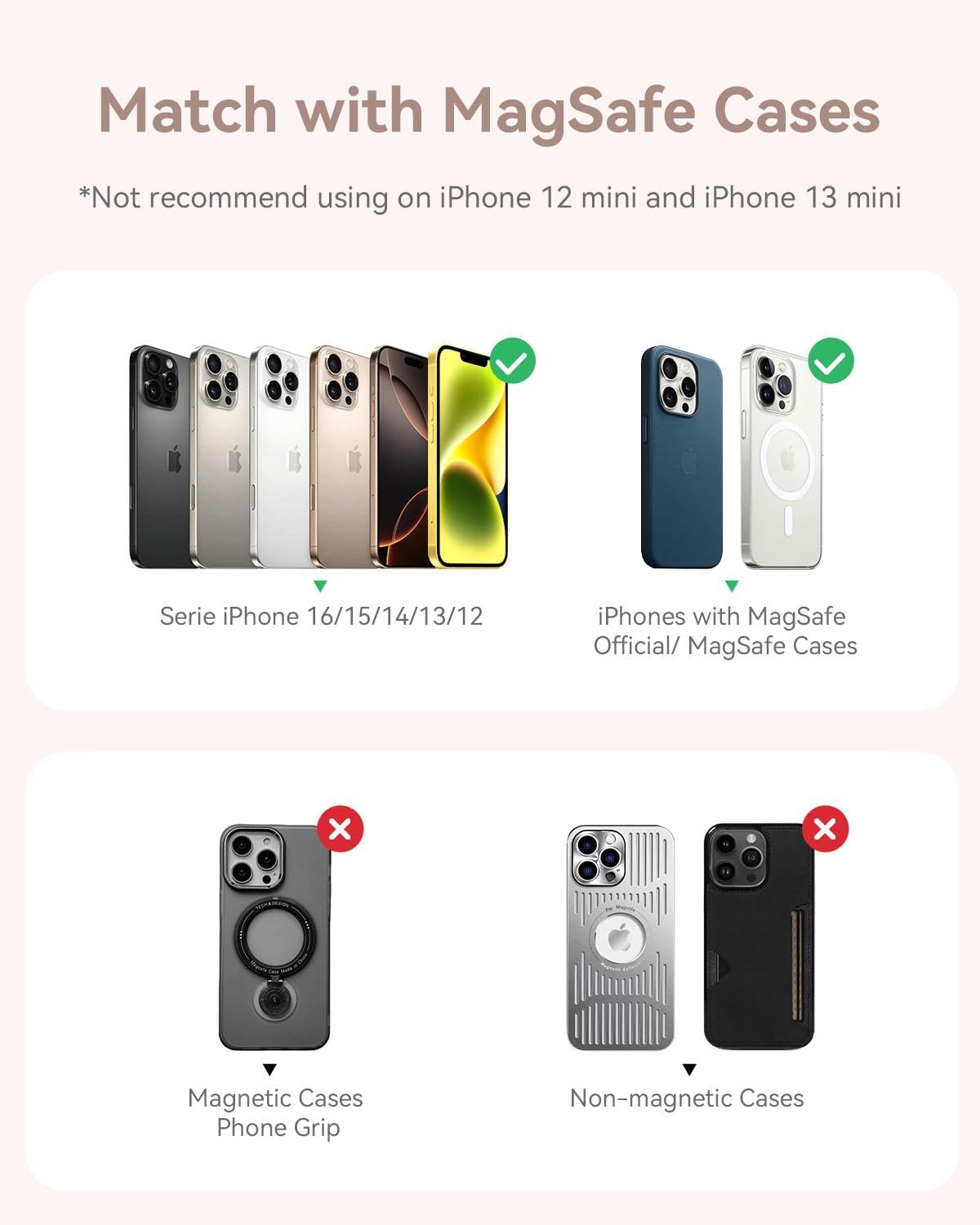
Figure 6.3: Device compatibility with MagSafe and non-MagSafe cases.
7. Maintenance
- Cleaning: Use a soft, dry cloth to clean the power bank. Do not use harsh chemicals or abrasive materials.
- Storage: Store the power bank in a cool, dry place away from direct sunlight and extreme temperatures.
- Battery Care: To prolong battery life, fully charge and discharge the power bank at least once every three months if not in regular use.
8. Troubleshooting
| Problem | Possible Cause | Solution |
|---|---|---|
| Power bank not charging | Charging cable or adapter faulty; Power bank fully charged. | Try a different cable/adapter; Check LED indicators for full charge. |
| Device not charging wirelessly | Misalignment; Non-MagSafe device/case; Obstruction. | Realign device; Ensure MagSafe compatibility; Remove thick cases or metal objects. |
| Device not charging via USB-C | Cable faulty; Device not compatible with PD charging. | Try a different USB-C cable; Check device's charging requirements. |
| Slow charging | Using non-fast charging adapter/cable; Device drawing less power. | Use a PD-compatible adapter/cable; Charging speed depends on device. |
9. Specifications
| Feature | Detail |
|---|---|
| Product Dimensions | 4.1 x 2.7 x 0.27 inches |
| Item Weight | 5.3 ounces |
| Model Number | KL-YD71 |
| Battery Capacity | 5000 Milliamp Hours (5000mAh) |
| Connector Type | USB Type C |
| Special Features | Auto Shut-Off, Pocket Size, Slim, Wireless Charging |
| Manufacturer | Shenzhen Kula Technology Co., Ltd. |
10. Warranty and Support
This product comes with a 24-month warranty from the date of purchase. For warranty claims or technical support, please contact Kuulaa customer service through the retailer where the product was purchased or visit the official Kuulaa website for contact information.
Video 10.1: Overview of the slim MagSafe power bank for iPhone, highlighting its features. This video is provided by KuulaaUS.