1. Introduction
This manual provides essential information for the safe and efficient operation, installation, and maintenance of your CIPU 0.35HP Pool Pump with Timer, Model CSPP717. This pump is designed for water circulation in above-ground swimming pools, hot tubs, and spas, offering stable performance, low noise, and energy efficiency. Please read this manual thoroughly before installation and use, and retain it for future reference.
2. Safety Information
WARNING: To reduce the risk of injury, do not permit children to use this product unless they are closely supervised at all times. This appliance is not intended for use by persons (including children) with reduced physical, sensory or mental capabilities, or lack of experience and knowledge, unless they have been given supervision or instruction concerning use of the appliance by a person responsible for their safety.
- Always disconnect power before servicing or cleaning the pump.
- Ensure the pump is installed on a solid, level surface to prevent vibration and noise.
- Do not operate the pump dry. Ensure the pump is primed with water before starting.
- All electrical connections must be performed by a qualified electrician and comply with local codes.
- The power cord is 6 feet long. Do not use extension cords.
- Protect the pump from direct sunlight and extreme weather conditions.
3. Package Contents
Verify that all items are present in the package:
- CIPU 0.35HP Pool Pump with Filter Basket and Timer
- 2 x Hose Adapters (for 1-1/4" and 1-1/2" hoses)
- Instruction Manual
4. Product Overview

Figure 4.1: The CIPU 0.35HP Pool Pump, showing the main unit, transparent filter basket cover, and included hose adapters.

Figure 4.2: Close-up view of the pump's control panel, featuring the ON/OFF button, Timer button, Timer indicator lights (2h, 4h, 6h, 8h, 10h, 12h, 16h, 24h), and a Single Cycle indicator.

Figure 4.3: Diagram illustrating the product dimensions (16.5 inches L x 5.9 inches W x 9.2 inches H) and the included 1-1/4 inch and 1-1/2 inch hose adapters, along with the 6-foot power cord.
5. Specifications
| Feature | Specification |
|---|---|
| Model | CSPP717 |
| Horsepower (HP) | 0.35 HP |
| Voltage | 115 Volts |
| Frequency | 60 Hz |
| Amperage | 3.6 Amps |
| Maximum Flow Rate | 45 Gallons Per Minute (2700 GPH) |
| Maximum Total Head | 10 Feet |
| Product Dimensions (L x W x H) | 16.5" x 5.9" x 9.2" |
| Item Weight | 11 Pounds |
| Material | Plastic |
| Power Source | Electric |
6. Setup and Installation
This pump is designed for easy installation with above-ground pool filter systems. It includes adapters for common hose sizes.
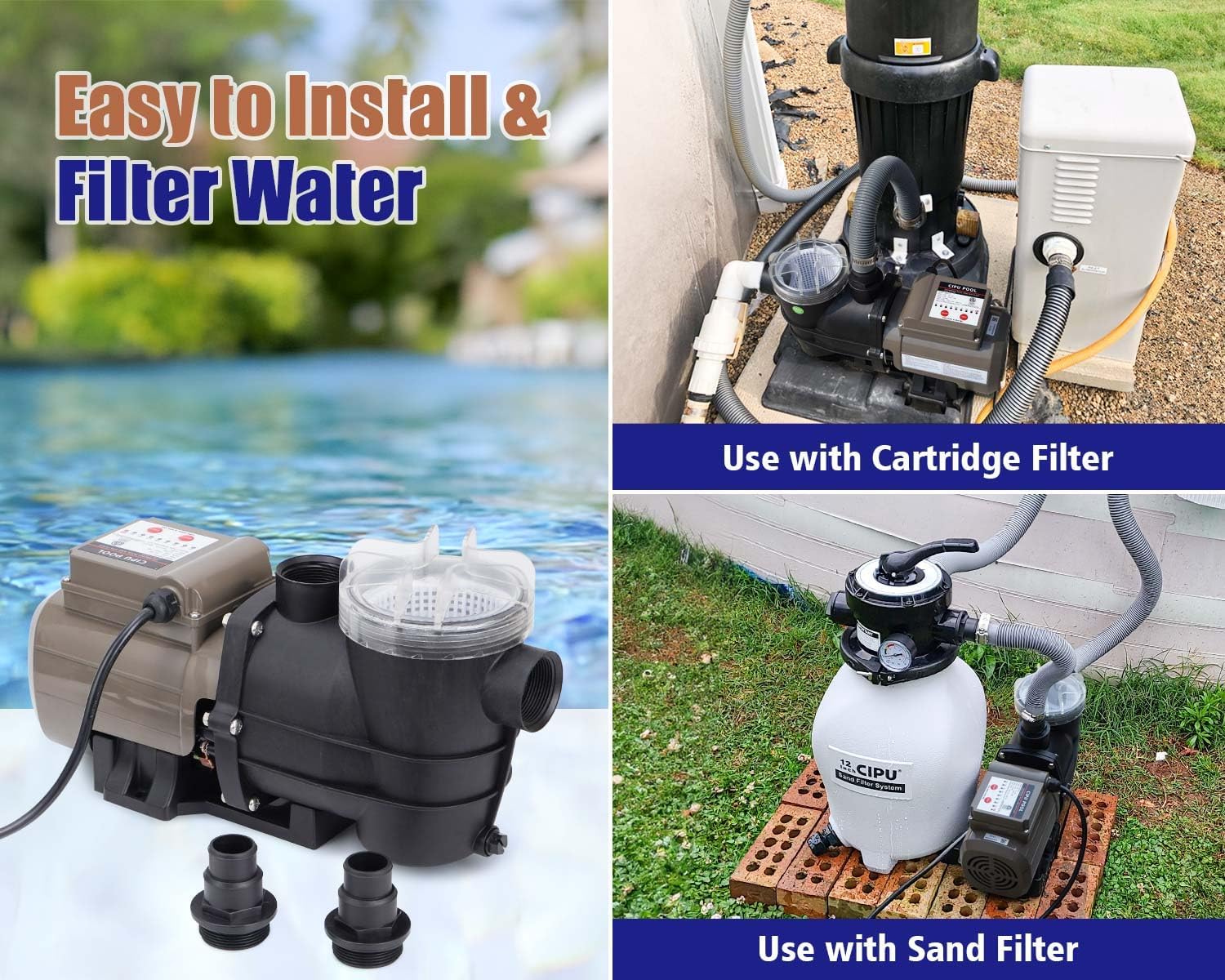
Figure 6.1: Examples of the CIPU pool pump installed with a sand filter system (left) and a cartridge filter system (right).
- Placement: Position the pump on a stable, level surface near your pool and filter system. Ensure it is protected from direct weather exposure.
- Hose Connection:
- Identify the correct adapter for your pool hoses (1-1/4" or 1-1/2").
- Attach the adapters to the pump's inlet and outlet ports. Ensure a tight seal.
- Connect your pool hoses to the adapters. Use thread tape and ensure the included flat rubber gaskets are properly seated to prevent leaks.
- Priming the Pump: Before starting the pump, ensure it is filled with water. This is crucial to prevent dry running and damage to the motor.
- Electrical Connection: Plug the 6-foot power cord into a grounded 115V electrical outlet. Ensure the outlet is protected by a Ground Fault Circuit Interrupter (GFCI).
7. Operating Instructions
The CIPU pool pump features a user-friendly control panel with timer functions.
Figure 7.1: The pump's control panel, showing the ON/OFF button, Timer button, and various timer indicator lights.
7.1 Continuous Mode
- After connecting the pump to power, the default setting is 24 hours continuous operation (the 24h indicator light will flash).
- To set a desired operation period, press the Timer button. The indicator lights will cycle through 2h, 4h, 6h, 8h, 10h, 12h, 16h, and 24h. Select your desired duration.
- Press the ON/OFF button to start the pump. The pump will run for the selected time period indicated by the illuminated timer light.
7.2 Single Cycle Mode
- To activate Single Cycle Mode, press and hold the Timer button for more than ten seconds. The 'Single Cycle' indicator light will flash.
- In Single Cycle Mode, after pressing the ON/OFF button, the pump will operate for the set time and then stop. It will not restart automatically until the power supply is reconnected or the mode is changed.
- To change the setting time within Single Cycle Mode, press the Timer button to cycle through the available durations (2h, 4h, 6h, 8h, 10h, 12h, 16h, 24h).
8. Maintenance
Regular maintenance ensures the longevity and efficient operation of your pool pump.
8.1 Filter Basket Cleaning

Figure 8.1: The detachable filter basket, designed to collect debris such as leaves, hair, and grit, making it easy to check and clean.
- The pump is equipped with a transparent cover, allowing you to visually inspect the filter basket.
- When the basket appears full of debris (leaves, hair, coarse particles), it needs cleaning.
- Before cleaning, always disconnect the pump from the power supply.
- Remove the transparent cover and lift out the filter basket.
- Empty the debris and rinse the basket thoroughly with water.
- Reinsert the clean basket and secure the transparent cover tightly.
8.2 General Cleaning
- Wipe the exterior of the pump with a damp cloth as needed.
- Do not use harsh chemicals or abrasive cleaners.
9. Troubleshooting
If you encounter issues with your pump, refer to the following common problems and solutions:
| Problem | Possible Cause | Solution |
|---|---|---|
| Pump does not start | No power; tripped GFCI; motor overload; timer setting. | Check power connection and GFCI. Reset if tripped. Ensure timer is set correctly. If motor is hot, allow to cool. |
| Low water flow | Clogged filter basket; air leak in suction line; pump not primed; restricted plumbing. | Clean filter basket. Check all connections for air leaks. Ensure pump is properly primed. Inspect hoses for kinks or blockages. |
| Pump is noisy | Air in system; cavitation; debris in impeller; improper installation. | Bleed air from the system. Ensure adequate water supply. Check for debris in the impeller (disconnect power first). Verify pump is on a stable surface. |
| Water leaks from connections | Loose connections; damaged O-rings/gaskets; incorrect adapter use. | Tighten all connections. Inspect and replace any damaged O-rings or gaskets. Ensure correct adapters are used and properly seated. |
If the problem persists after attempting these solutions, please contact customer support.
10. Warranty and Support
CIPU provides a 12-month worry-free guarantee from the date of purchase. This warranty covers defects in materials and workmanship under normal use.
For warranty claims, technical assistance, or any questions regarding your CIPU pool pump, please contact CIPU customer support through the retailer where the product was purchased or visit the official CIPU website for contact information.
Please have your model number (CSPP717) and proof of purchase ready when contacting support.


