
1. Product Overview
This manual provides essential information for the assembly, safe operation, and maintenance of your HOMCOM 2 Drawer Vertical File Cabinet. Please read all instructions carefully before assembly and use to ensure proper function and longevity of the product.

Image 1.1: The HOMCOM 2 Drawer Vertical File Cabinet in a typical office environment.
Key Features:
- Rustic Farmhouse Design: Features barn doors and black metal accents.
- Two Spacious Drawers: Designed for organizing A4 and letter-sized files.
- Silent Slides: Ensures smooth and quiet drawer operation.
- Anti-Tipping Device: Enhances stability and safety.
- Durable Construction: Crafted from quality particleboard with a scratch-resistant surface.
2. Safety Information
Please adhere to the following safety guidelines to prevent injury or damage to the product.
- Weight Capacity: The cabinet can support up to 77 lbs (35 kg). Do not exceed this weight limit.
- Anti-Tipping Device: Always install the included anti-tipping device to secure the cabinet to a wall. This prevents accidental tipping, especially in households with children or pets.
- Assembly: Ensure all components are correctly assembled and fasteners are tightened according to the assembly instructions. Periodically check all connections for tightness.
- Placement: Place the cabinet on a flat, stable surface. Avoid placing it in areas with high humidity or direct sunlight.
- Children: Do not allow children to climb on or play with the cabinet or its drawers.

Image 2.1: Illustration of the anti-tipping device installation for enhanced safety.
3. Package Contents
Verify that all parts are present before beginning assembly. Refer to the separate assembly manual for a detailed list of components and hardware.

Image 3.1: The product is delivered in one package.
4. Assembly Instructions
Assembly is required for this product. A detailed, step-by-step assembly manual with diagrams is included in the product packaging. Please follow those instructions carefully. It is recommended to have two people for assembly.
Before Assembly:
- Clear a spacious area for assembly.
- Lay out all components and hardware on a soft, clean surface to prevent scratches.
- Identify each part using the provided labels in the assembly manual.
- Gather necessary tools (e.g., screwdriver, hammer) as indicated in the assembly manual.
5. Setup and Installation
Anti-Tipping Device Installation:
- Once the cabinet is fully assembled and placed in its desired location, identify the wall attachment points on the back of the cabinet.
- Mark the corresponding positions on the wall. Ensure the marks are level and at an appropriate height.
- Drill pilot holes into the wall at the marked positions. Use appropriate wall anchors if drilling into drywall.
- Attach the anti-tipping bracket to the wall using the provided screws.
- Secure the cabinet to the bracket using the remaining hardware. Ensure the connection is firm and stable.
6. Operating Instructions
Drawer Usage:
- The cabinet features two drawers designed for smooth and quiet operation. Pull the handles gently to open and push to close.
- Avoid forcing the drawers open or closed, as this may damage the silent slides.
- Do not overload the drawers. Distribute weight evenly to maintain balance and prevent strain on the slides.

Image 6.1: The two drawers provide ample storage for office essentials.
Adjustable Hanging Bars:
The drawers are equipped with adjustable hanging bars to accommodate both A4 and letter-sized files.
- To adjust the bars, locate the adjustment holes on the inner sides of the drawer.
- Slide the bars to the desired position to fit your file size (Letter or A4).
- Ensure both bars are securely seated in the corresponding holes to support hanging files properly.

Image 6.2: Adjustable hanging bars for Letter and A4 size files.
7. Maintenance
Cleaning:
- Wipe the cabinet surfaces with a soft, damp cloth.
- Avoid using harsh chemicals, abrasive cleaners, or polishes, as these can damage the distressed finish.
- Promptly clean up any spills to prevent staining.
General Care:
- Periodically check all screws and fasteners to ensure they remain tight. Retighten if necessary.
- Keep the cabinet away from direct heat sources and excessive moisture.
- Avoid dragging the cabinet when moving it; lift it to prevent damage to the legs and floor.
8. Troubleshooting
Drawers Not Sliding Smoothly:
- Check if the drawers are overloaded or if items are obstructing the slides.
- Ensure all screws securing the drawer slides are properly tightened.
- Verify that the cabinet is placed on a level surface. Uneven surfaces can affect drawer alignment.
Cabinet Wobbles:
- Confirm that all assembly screws are fully tightened.
- Ensure the cabinet is on a flat and stable floor. Use shims if necessary to level it.
- Verify that the anti-tipping device is correctly installed and securely fastened to both the cabinet and the wall.
9. Specifications
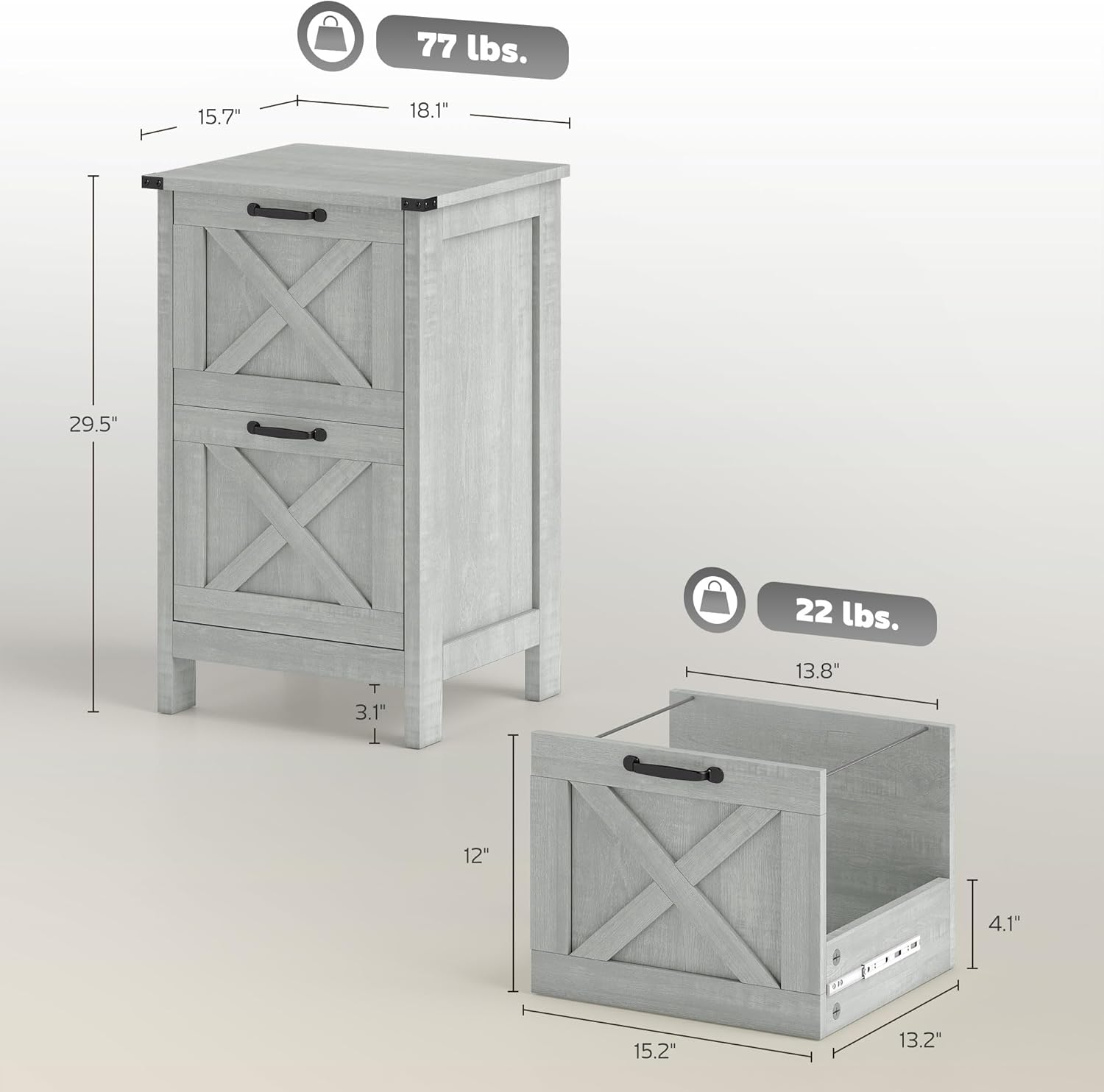
Image 9.1: Product dimensions and weight capacity.
| Feature | Detail |
|---|---|
| Brand | HOMCOM |
| Model Number | 924-098V80LG |
| Color | Distressed Light Gray |
| Material | Engineered Wood |
| Product Dimensions (D x W x H) | 15.7" x 18.1" x 29.5" |
| Item Weight | 34 lbs (15.4 kg) |
| Weight Limit | 77 lbs (35 kg) |
| Number of Drawers | 2 |
| File Sizes Supported | A4, Letter Size |
| Special Features | Anti-Tipping, Scratch Resistant, Silent Drawer Slides |
| Assembly Required | Yes |
10. Warranty and Support
For warranty information or technical support, please refer to the documentation included with your purchase or contact HOMCOM customer service directly. Keep your purchase receipt for warranty claims.