1. Introduction
The 3i P10 Ultra Robot Vacuum and Mop Combo is designed to provide a comprehensive and hands-free cleaning experience for your home. Featuring an innovative auto-extending mop, powerful suction, and an intelligent all-in-one station, this device simplifies floor maintenance. Its advanced navigation and AI capabilities ensure efficient and thorough cleaning across various floor types.
Key features include:
- UltraReach Mop: Auto-extending mop for complete edge and corner cleaning.
- 18000Pa Suction: Powerful suction for deep cleaning on both hard floors and carpets.
- All-in-One Automated Station: Supports hot-water mop washing, hot air drying, solution adding, and 70-day hands-free dust collection.
- Advanced Navigation: Utilizes LiDAR, 3D structured light, and AI camera for precise mapping and obstacle avoidance.
- AI-Powered DirtScan: Identifies over 100 household objects and customizes cleaning methods.
- Hair-Free Maintenance: Anti-tangle brushes and TangleCut blade prevent hair wrapping.
- Smart Control: Compatible with the 3i app, Alexa, and Google Assistant.
2. Setup
Follow these steps to set up your 3i P10 Ultra Robot Vacuum and Mop Combo:
2.1 Unboxing and Component Check
Carefully remove all components from the packaging and ensure all items are present:
- 1 x Robot Vacuum
- 1 x Base Station
- 2 x Cleaning Pads
- 2 x Side Brushes
- 1 x Cleaning Solution
- 1 x User Manual
- 1 x Power Cord
- 1 x Movable Base

Figure 2.1: The 3i P10 Ultra Robot Vacuum and its accompanying Base Station, shown with a smartphone displaying the control app.
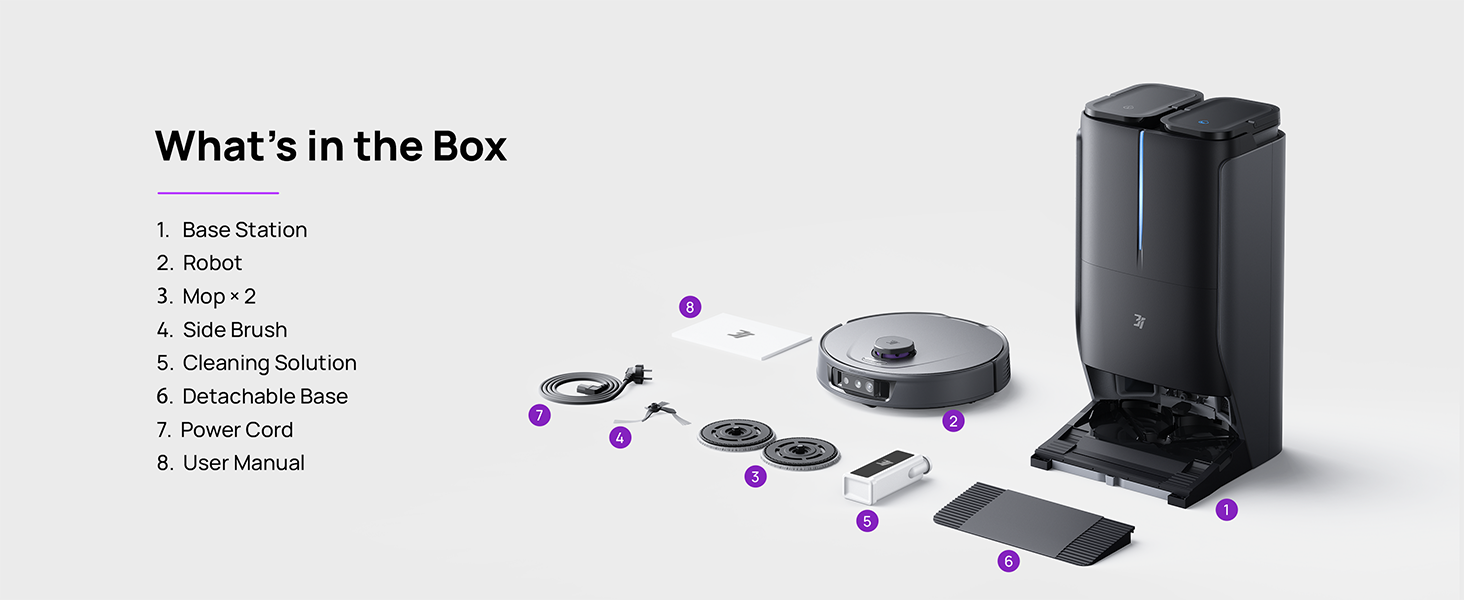
Figure 2.2: Visual representation of all items included in the product packaging, including the robot, base station, cleaning pads, brushes, solution, and manual.
2.2 Base Station Placement
Place the base station on a hard, flat surface against a wall, ensuring there is at least 0.5 meters (1.6 feet) of clear space on both sides and 1.5 meters (4.9 feet) in front. Plug the power cord into the base station and a wall outlet. Ensure the clean water tank and wastewater tank are correctly installed and the cleaning solution is filled.
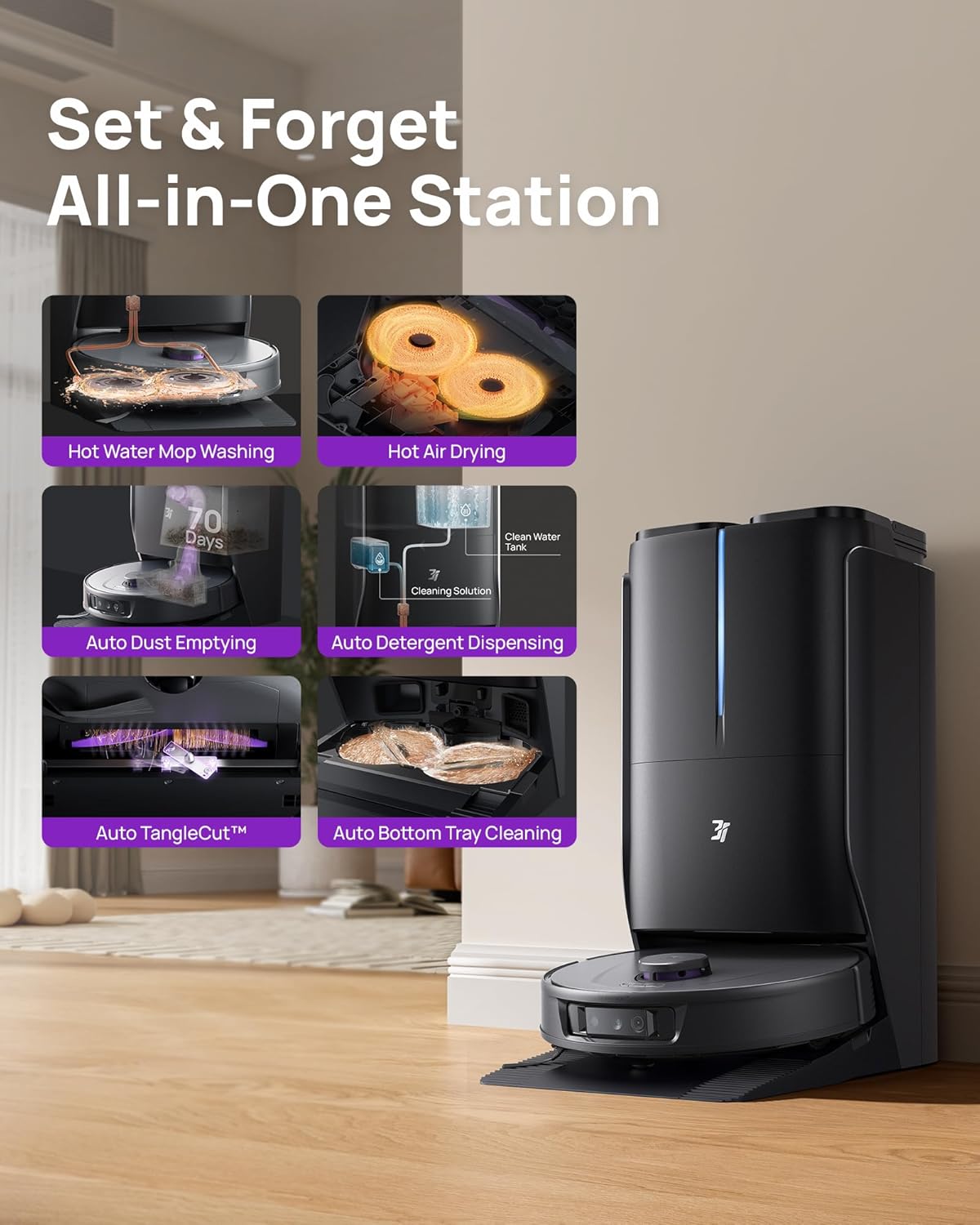
Figure 2.3: The All-in-One Station provides automated functions such as hot water mop washing, hot air drying, auto dust emptying, and auto detergent dispensing.
2.3 Initial Charging and App Connection
Place the robot vacuum onto the base station to begin charging. For optimal performance, fully charge the robot before its first use. Download the '3i' app from your smartphone's app store. Follow the in-app instructions to connect your robot to your home Wi-Fi network (supports both 2.4G and 5G Wi-Fi) and complete the initial mapping of your home.
3. Operating Instructions
The 3i P10 Ultra offers various cleaning modes and intelligent navigation for efficient operation.
3.1 Cleaning Modes and Suction Power
Select desired cleaning modes (Vacuum, Mop, Vacuum & Mop, AI Auto, Custom) and adjust suction power (Quiet, Medium, Strong, Max) and water level (Low, Medium, High) via the 3i app. The robot automatically boosts suction on carpets and lifts the mop to prevent wetting.

Figure 3.1: The robot vacuum demonstrates its 18000 Pa suction power, effectively lifting dirt from carpet fibers.
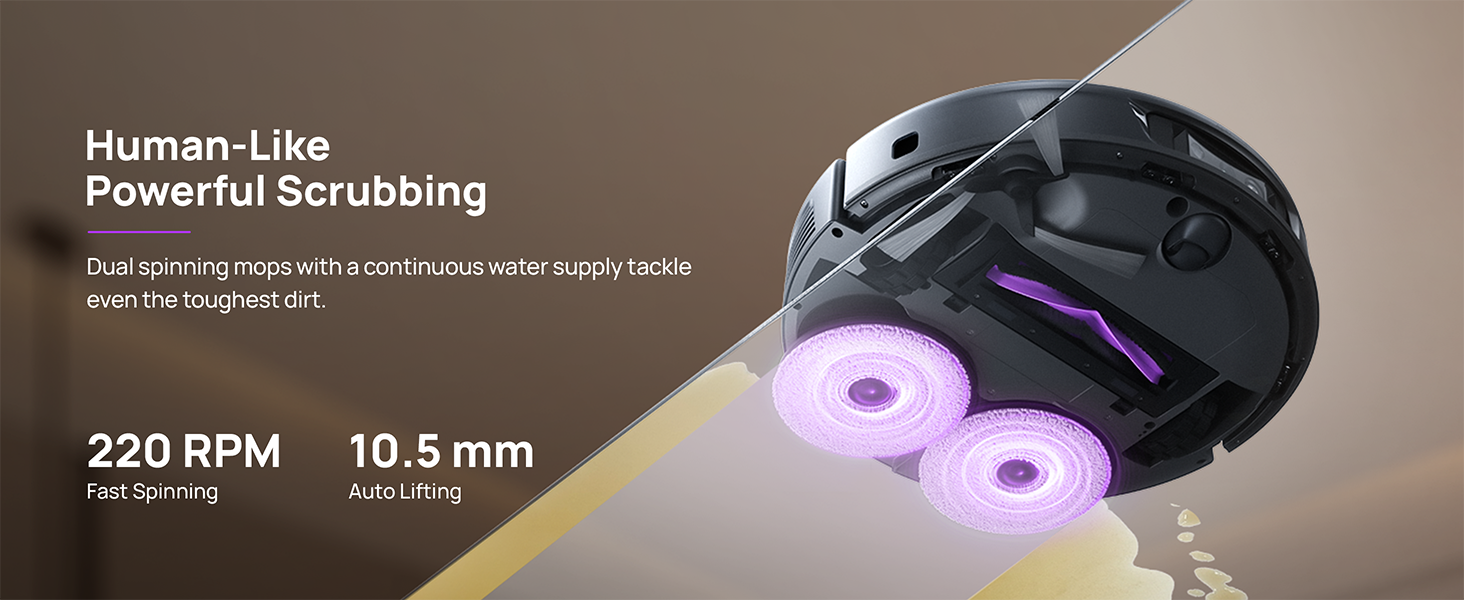
Figure 3.2: The robot's dual spinning mops operate at 220 RPM for powerful scrubbing, with an auto-lifting feature of 10.5 mm.
3.2 Navigation and Obstacle Avoidance
The P10 Ultra uses LiDAR for 360° scanning and 3D mapping, combined with dual 3D structured light and an AI camera. This allows it to intelligently navigate your home, avoid obstacles like cables and slippers, cross thresholds up to 20mm, and resist collisions. The AI-Powered DirtScan identifies over 100 objects and messes, even in darkness, ensuring comprehensive cleaning.

Figure 3.3: The robot uses its AI camera and 3D structured light to navigate complex layouts and avoid various household objects.

Figure 3.4: DirtScan technology allows the robot to identify over 100 types of dirt and messes, adapting its cleaning strategy accordingly, such as repeated mopping for stubborn stains or increased suction for large debris.
3.3 App Control and Voice Commands
Manage your P10 Ultra through the dedicated 3i app. Features include:
- Setting cleaning schedules.
- Selecting specific rooms or zones to clean.
- Creating no-go zones and virtual walls.
- Customizing cleaning settings per room.
- Viewing 3D maps and cleaning history.
- Pet recognition and live monitoring (optional).
The robot is also compatible with Alexa and Google Assistant for convenient voice control. Simply use commands like "Hey Google, start vacuuming" to initiate cleaning.
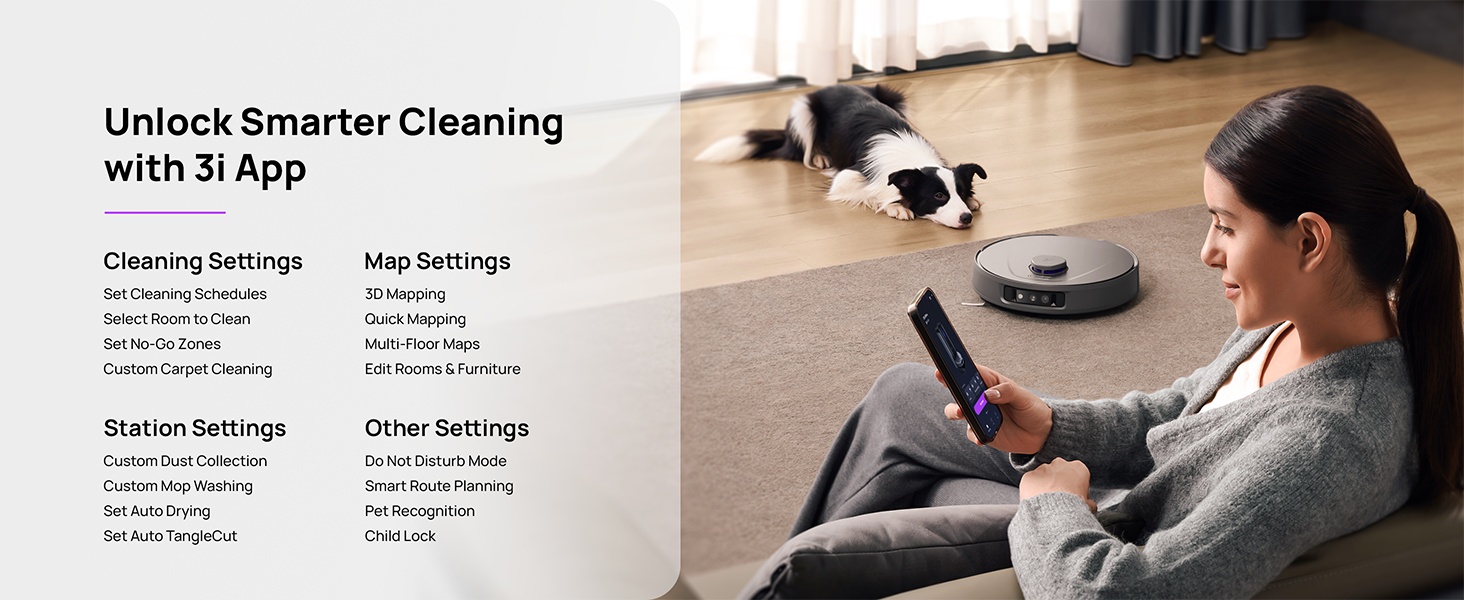
Figure 3.5: The 3i app provides comprehensive control over cleaning settings, map management, and other advanced features.
4. Maintenance
Regular maintenance ensures optimal performance and longevity of your 3i P10 Ultra.
4.1 All-in-One Station Maintenance
The automated station significantly reduces manual maintenance:
- Self-Emptying: The robot automatically empties its dustbin into a spacious 3L bag in the base station, providing up to 70 days of hands-free dust collection.
- Mop Washing & Drying: The station uses 140°F / 60°C hot water to wash the mop pads and then hot air dries them, preventing odors and ensuring they are ready for the next use.
- Auto Tank Refilling & Wastewater Collection: The extra-large 4L clean water tank automatically refills the robot, and dirty water is collected into the wastewater tank, keeping the base station clean.
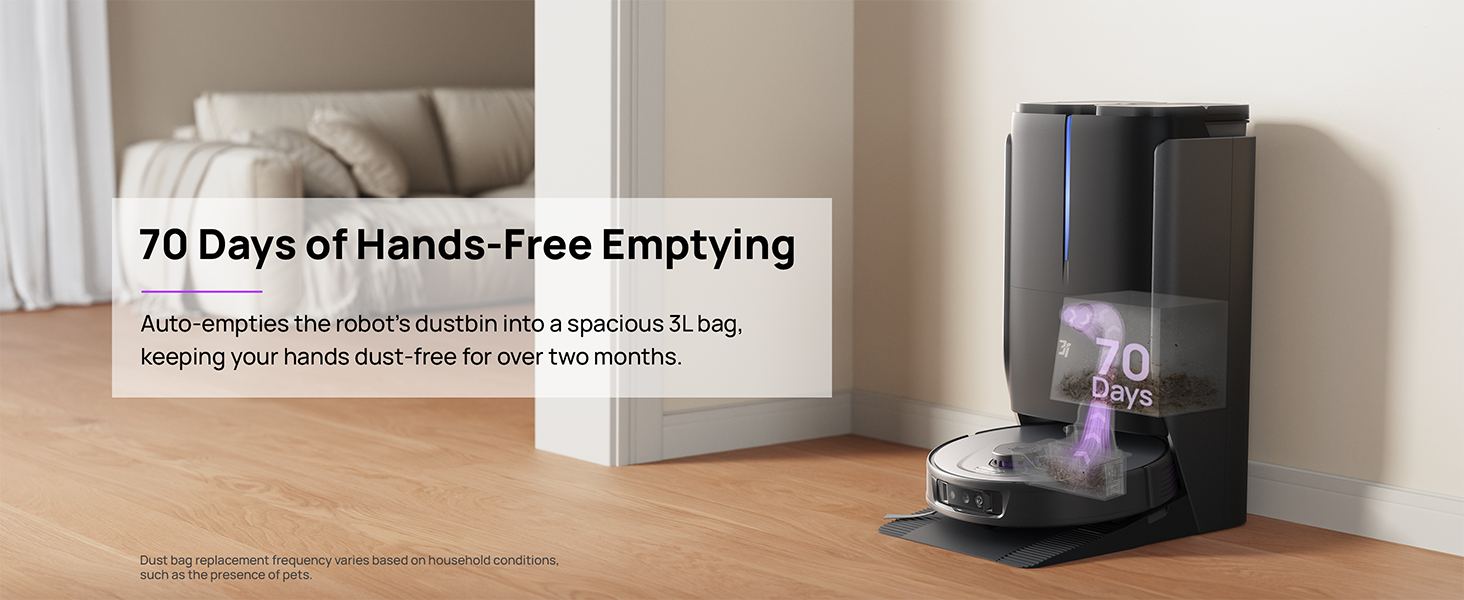
Figure 4.1: The base station automatically empties the robot's dustbin into a 3L bag, providing up to 70 days of hands-free operation.
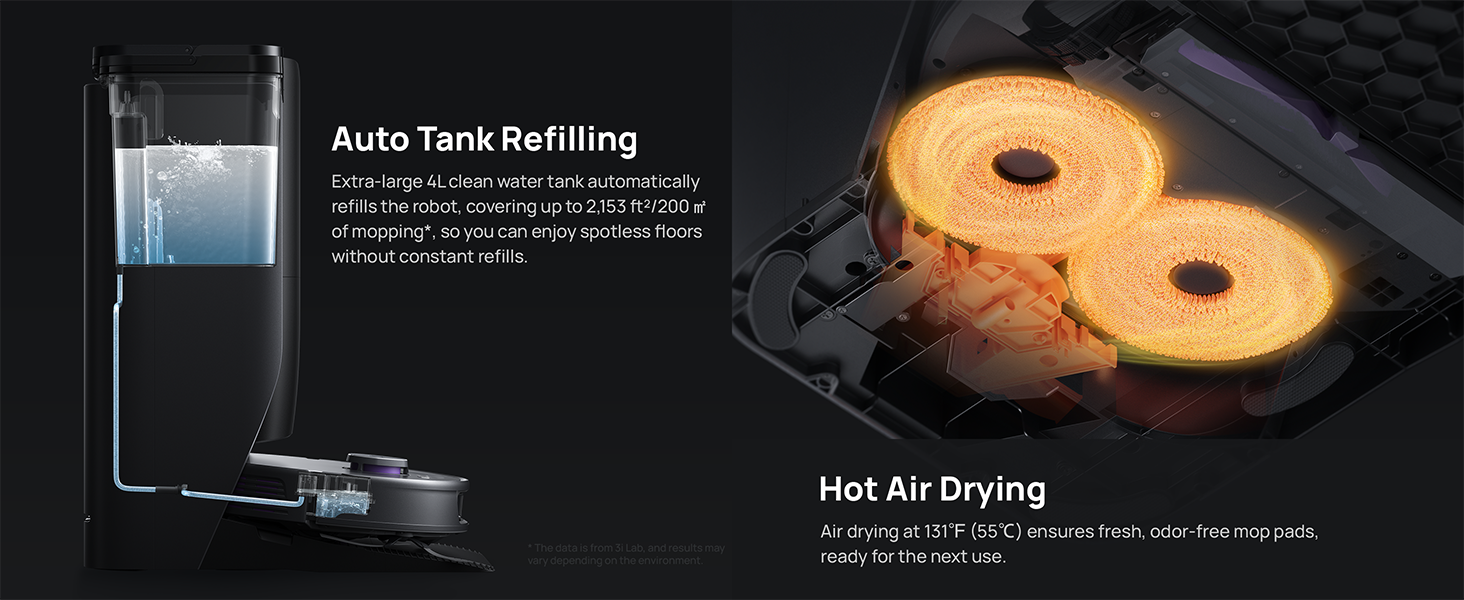
Figure 4.2: The base station automatically refills the robot's water tank and dries the mop pads with hot air at 131°F (55°C).
4.2 Robot Maintenance
Periodically check and clean the following components on the robot:
- Anti-tangle Brushes: The dual anti-tangle design and hidden TangleCut blade minimize hair wrapping. However, occasional inspection and removal of any remaining tangled hair are recommended.
- Sensors: Wipe all sensors (LDS lidar, 3D structured light, AI camera) with a clean, dry cloth to ensure accurate navigation.
- Washable Filter: Clean or replace the washable filter as needed to maintain optimal suction performance.

Figure 4.3: The robot features an anti-tangle brush and a TangleCut™ blade to prevent hair from wrapping, reducing manual maintenance.
5. Troubleshooting
If you encounter issues with your 3i P10 Ultra, try the following common troubleshooting steps:
- Robot not charging: Ensure the base station is plugged in and the robot is correctly docked. Clean the charging contacts on both the robot and the base station.
- Poor cleaning performance: Check if the dustbin is full or the water tanks are empty. Clean the main brush, side brushes, and mop pads. Ensure sensors are clean.
- Navigation errors: Clean all sensors on the robot. Ensure there are no new obstacles or changes in the environment that might confuse the robot. Restart the robot and the app.
- App connectivity issues: Ensure your Wi-Fi is stable and the robot is within range. Restart your router, the robot, and the app. Verify the app is updated to the latest version.
- Unusual noises: Check for any foreign objects caught in the brushes or wheels.
For persistent issues, refer to the in-app help section or contact 3i customer support.
6. Specifications

Figure 6.1: Dimensions of the 3i P10 Ultra Robot and its Base Station.
| Feature | Specification |
|---|---|
| Brand | 3i |
| Model Name | 3i P10 Ultra Robot Vacuum |
| Product Dimensions (L x W x H) | Robot: 13.78"L x 13.78"W x 3.94"H Station: 18.43"L x 12.21"W x 25.24"H |
| Item Weight | 38.2 pounds |
| Suction Power | 18000 Pa |
| Battery Life | 180 minutes |
| Control Method | App, Voice (Alexa, Google Assistant) |
| Filter Type | Washable |
| Color | Grey/Black |
| Date First Available | December 26, 2024 |
7. Warranty and Support
For warranty information and customer support, please refer to the official 3i website or contact their customer service directly. Details can typically be found in the included User Manual or on the product packaging.