Introduction
This manual provides detailed instructions for the safe and proper use of your HOMCOM Loft Bed. Please read all instructions carefully before assembly and use. Retain this manual for future reference.

Image 1: Overview of the HOMCOM Loft Bed with integrated desk, LED lighting, and charging station.
Safety Information
Your safety is paramount. Adhere to the following guidelines:
- Always use the ladder carefully to avoid falls.
- Do not exceed the maximum weight capacity of 400 lbs.
- Ensure the bed is securely assembled and the anti-tip kit is properly attached to the wall to prevent tipping.
- Always supervise children when they are using the loft bed.
- This product meets ASTM F1427-21 standard.
Setup and Assembly
Assembly requires two people. All necessary accessories and clear instructions are included. No box spring is needed.
Dimensions and Mattress Requirements
- Overall Dimensions: 78" W x 41.3" D x 72" H
- Suitable Mattress Size: 39" W x 74.8" D (Twin Size)
- Recommended Mattress Thickness: 4-6 inches.
- Important: Ensure the top of the mattress is at least 5 inches below the edge of the guardrail for safety.
- Space Underneath: Approximately 59.1 inches.
- Desk Length: 77.2 inches.
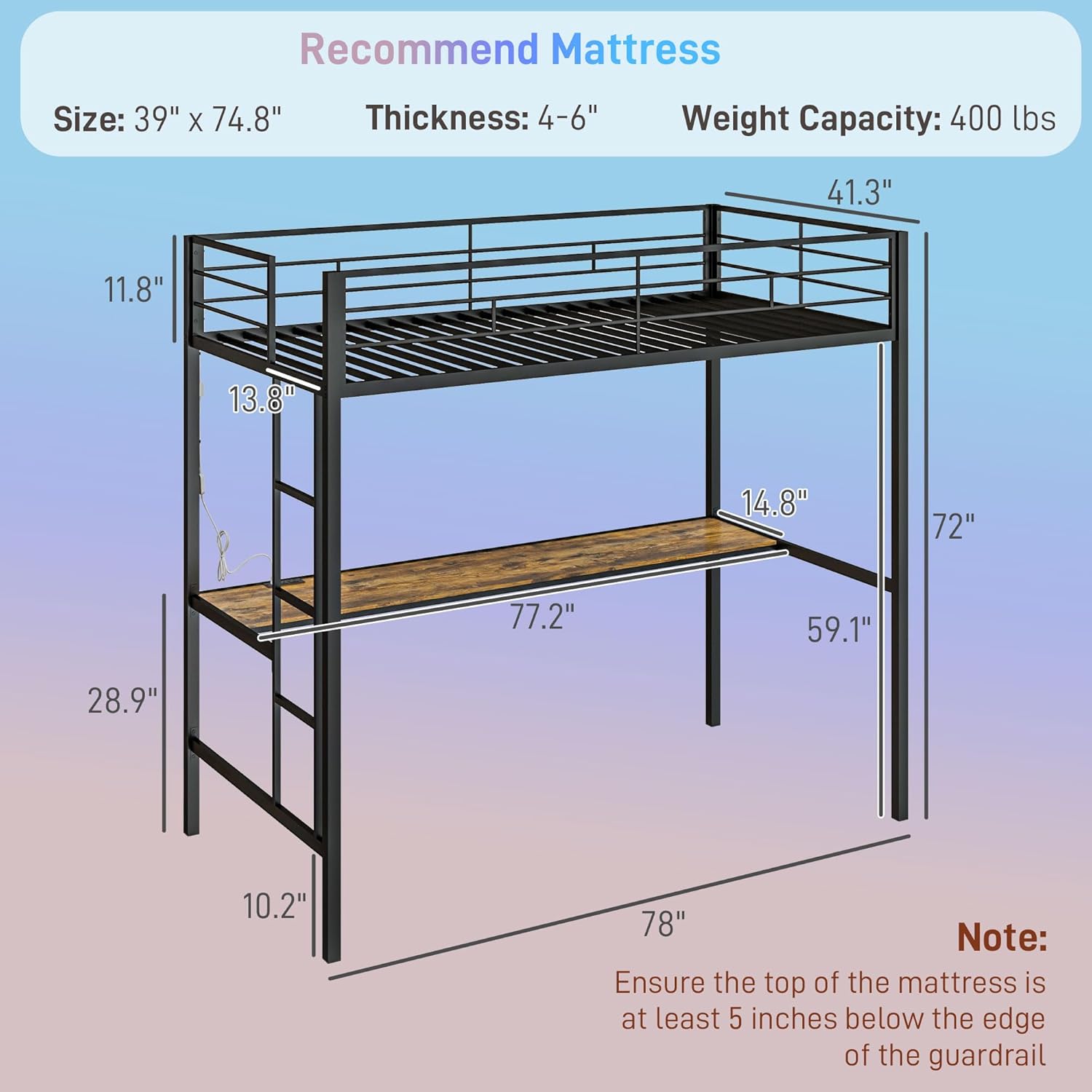
Image 2: Detailed dimensions of the loft bed, including mattress size recommendations and safety notes.
Key Assembly Features
- Heavy-Duty Steel Frame: Constructed with a stronger square steel frame for durability.
- 22 Robust Steel Slats: Fixed with mute buckles to ensure a noise-free, restful sleep.
- Anti-Tip Kits: Securely fasten the bed to the wall for enhanced stability.
- Anti-Slip Foot Pads: Prevent the bed from sliding.
- Convenient Ladder: Designed for easy and safe access to the loft bed.
- Guardrails: Three-layer raised guardrails provide falling protection.

Image 3: Visual representation of the anti-tipping kits, guardrails, ladder, and anti-slip foot pads.

Image 4: Illustration of the 22 steel slats with mute buckles, emphasizing durability and quiet operation.
Operating Instructions
LED Lights Operation
The integrated RGB LED lights can be customized for various ambiances.
- Control Methods: Adjust brightness, colors, modes, and set timers via a dedicated mobile application (APP Control) or using the one-touch power switch on the cord (Key Control).
- Features: Over 60,000 colors, Music Mode, Mic Mode, Brightness Adjustment, Timing Function, Custom Style.

Image 5: Controls for the RGB LED lights, illustrating both physical key control and mobile application control.
Charging Station Usage
The built-in charging station provides convenient power access for your electronic devices.
- Components: Includes 2 AC Outlets (125V / 12A) and 2 USB Ports (5V / 2A).
- Power Cord: Features a 6.2-foot power cord for flexible placement.
- Functionality: Allows simultaneous charging of multiple devices such as laptops, tablets, and smartphones.

Image 6: The integrated charging station, demonstrating its AC outlets and USB ports in use.
Desk Usage
The spacious desk provides ample room for work or study.
- Dimensions: 77.2 inches long, offering significant workspace.
- Versatility: Suitable for laptops, books, and other personal items.

Image 7: The spacious desk area beneath the loft bed, configured for work or study.
Maintenance
To ensure the longevity and proper function of your loft bed, follow these maintenance guidelines:
- Cleaning: Wipe clean with a damp cloth. Avoid harsh chemicals that may damage the finish.
- Regular Checks: Periodically inspect all bolts, screws, and connections to ensure they are tight. Re-tighten as necessary.
- Anti-Tip Kit: Verify that the anti-tip kit remains securely fastened to the wall.
- Weight Capacity: Do not exceed the stated weight limit of 400 lbs.
Troubleshooting
If you encounter issues with your HOMCOM Loft Bed, refer to the following common solutions:
| Problem | Possible Cause | Solution |
|---|---|---|
| Bed feels unstable or wobbly. | Loose connections or improper anti-tip kit installation. | Check and tighten all bolts and screws. Ensure the anti-tip kit is correctly installed and secured to a wall stud. |
| LED lights are not working. | Power connection issue or faulty control. | Verify the power cord is securely plugged into an outlet. Check the one-touch power switch. If using the app, ensure Bluetooth connection is active and the app is updated. |
| Charging station is not providing power. | Power connection issue or overloaded circuit. | Ensure the charging station's power cord is fully plugged into a functional wall outlet. Avoid overloading the outlets with high-power devices. |
| Squeaking noises from the bed frame. | Loose slats or frame connections. | Inspect all steel slats and frame connections. Tighten any loose bolts. The mute buckles on the slats are designed to prevent noise, ensure they are properly seated. |
Product Specifications
| Feature | Detail |
|---|---|
| Brand | HOMCOM |
| Model Number | 831-964V80BK |
| Type | Loft Bed |
| Size | Twin |
| Color | Black |
| Frame Material | Alloy Steel |
| Product Dimensions | 78" L x 41.3" W x 72" H |
| Weight Limit | 400 Pounds |
| Item Weight | 96 Pounds |
| Special Features | Integrated Desk, LED Lights, Charging Station (2 AC Outlets, 2 USB Ports), Guardrails, Ladder |
| Assembly Required | Yes |
| Product Care Instructions | Wipe Clean |
| Safety Standard | Meets ASTM F1427-21 |
Warranty and Support
HOMCOM products typically come with a limited warranty. For specific warranty details, claims, or technical support, please refer to the documentation included with your purchase or contact HOMCOM customer service directly.
You can also visit the official HOMCOM store for more information: HOMCOM Store on Amazon.
Product Overview Video
Video 1: An official overview of the HOMCOM 831-964V80BK Loft Bed, showcasing its features and design. This video is provided by Aosom Direct (Seller).


