Introduction
Thank you for choosing the Lulive Fluted 3-Drawer Nightstand. This modern side table is designed to enhance your bedroom or living space with its elegant fluted design and practical features, including an integrated charging station. This manual provides detailed instructions for assembly, operation, maintenance, and safety to ensure you get the most out of your new furniture.
Safety Information
Please read and understand all instructions before assembly and use. Keep these instructions for future reference.
- Anti-Tip Safety: To prevent serious injury, this furniture must be securely attached to the wall using the provided anti-tip hardware. Always ensure the dresser is stable and cannot tip over, especially in households with children.
- Weight Capacity: Do not overload drawers or the top surface. Refer to specifications for maximum weight limits.
- Assembly: Assembly should be performed by two adults. Ensure all fasteners are tightened securely before use. Periodically check and re-tighten fasteners as needed.
- Electrical Safety: The integrated charging station is for indoor use only. Do not expose to moisture. Ensure the power cord is not pinched or damaged.
- Corner Protectors: Optional corner protectors are included to prevent accidental bumps and scratches.
Package Contents
Verify that all components listed below are present before beginning assembly. If any parts are missing or damaged, please contact customer service.

Figure 1: All components included in the package, laid out for inspection.
The package includes various wooden panels, drawer slides, hardware (screws, dowels, cam locks), wooden legs, a power strip with USB ports, and an assembly guide. A screwdriver and Allen wrench are typically provided.
Assembly Instructions
Follow these steps carefully for proper assembly. An assembly video is provided for visual guidance.
Video 1: Detailed assembly steps for the Lulive 3-Drawer Nightstand, provided by the manufacturer.
Step 1: Prepare Drawer Slides
Separate the inner and outer parts of the drawer slides. Locate the latch position, press it, and split the slide into two sections. You will have 3 sets of slides, each with an inner (J1) and outer (J2) part.
Step 2: Attach Outer Slides to Side Panels
Attach the outer parts of the drawer slides (J1) to the designated side panels (labeled 1 and 2) using screws (C). Ensure they are aligned correctly with the pre-drilled holes.
Step 3: Connect Side Panels
Insert wooden dowels (K) and cam lock screws (A) into the side panels (1 and 2). Connect the middle support panel (labeled 3) between the two side panels using cam locks (B). Turn the cam locks 160-180 degrees to tighten.
Step 4: Attach Bottom Panel
Secure the bottom panel (labeled 5) to the assembled frame using cam lock screws (N) and cam locks (L). Ensure the panel is oriented correctly.
Step 5: Install Wooden Legs
Attach the four wooden legs (H) to the metal plates on the bottom panel (5). Twist them clockwise until securely fastened.
Step 6: Attach Top Panel
Place the top panel (labeled 7) onto the frame. Secure it using cam lock screws (A) and cam locks (B). Ensure the cutout for the charging station is at the back.
Step 7: Install Charging Station
Insert the power strip (F) into the cutout on the top panel. Secure it with screws (C). Route the power cord through the circular hole in the back panel. Use the adhesive covers (M) to conceal visible screw heads.
Step 8: Assemble Drawers
For each of the three drawers: Connect the side panels (8, 9, 10) and the bottom panel (11) using screws (I). Attach the fluted front panel (12) to the drawer box using cam lock screws (A) and cam locks (B). Secure the metal handles (G) to the front panels with screws (C).
Step 9: Insert Drawers
Attach the inner parts of the drawer slides (J2) to the sides of each assembled drawer. Carefully align the drawer slides with the corresponding slides in the main frame and push the drawers in until they click into place.
Video 2: Demonstration of drawer slide adjustment and smooth operation.
Step 10: Anti-Tip Installation
Attach the anti-tip brackets to the back of the nightstand and to a wall stud using appropriate hardware. This is a critical safety step.
Operating Instructions
Using the Charging Station
The integrated power panel features 2 standard AC outlets (125V/12A) and 2 USB ports (5V/2.1A). Plug the nightstand's main power cord into a wall outlet. You can then plug in and charge multiple devices directly from the top surface of the nightstand.

Figure 2: The integrated charging station provides convenient power access for various devices.
Drawer Operation
The drawers are equipped with 3-section full extension ball-bearing slides, ensuring smooth and silent operation. To open, gently pull the metal handle. To close, push the drawer firmly until it is fully recessed.

Figure 3: Spacious drawers with smooth and silent sliding mechanisms.
Maintenance and Care
To maintain the appearance and longevity of your Lulive nightstand, follow these care instructions:
- Cleaning: Wipe surfaces with a damp cloth, then dry immediately with a clean, dry cloth. Avoid abrasive cleaners or harsh chemicals.
- Spills: Clean up spills immediately to prevent staining or damage to the wood finish.
- Heat and Moisture: Avoid placing hot items directly on the surface. Use coasters under drinks to prevent water rings.
- Sunlight: Prolonged exposure to direct sunlight may cause fading or discoloration.
Troubleshooting
If you encounter any issues with your nightstand, refer to the following common solutions:
- Drawers not sliding smoothly: Check that the drawer slides are correctly installed and free of obstructions. Ensure all screws on the slides are tightened.
- Drawers misaligned: Verify that the main frame is assembled squarely and that the drawer front panels are attached evenly. Adjust the drawer slides as shown in Video 2 if necessary.
- Charging station not working: Ensure the main power cord is securely plugged into a functional wall outlet. Check that devices are properly connected to the USB ports or AC outlets.
- Wobbling: Ensure all assembly screws and cam locks are fully tightened. Check that the wooden legs are securely attached.
Specifications
- Brand: Lulive
- Model Name: HI1519
- Product Dimensions: 15"D x 19.7"W x 26.3"H
- Number of Drawers: 3
- Material: Wood, Metal (FSC-certified panels)
- Color: White
- Finish Type: Polished
- Power Strip: 2 AC Outlets (125V/12A), 2 USB Ports (5V/2.1A)
- Power Cord Length: 4.9 ft
- Mounting Type: Floor Mount
- Additional Features: Space Saving, Fluted Design
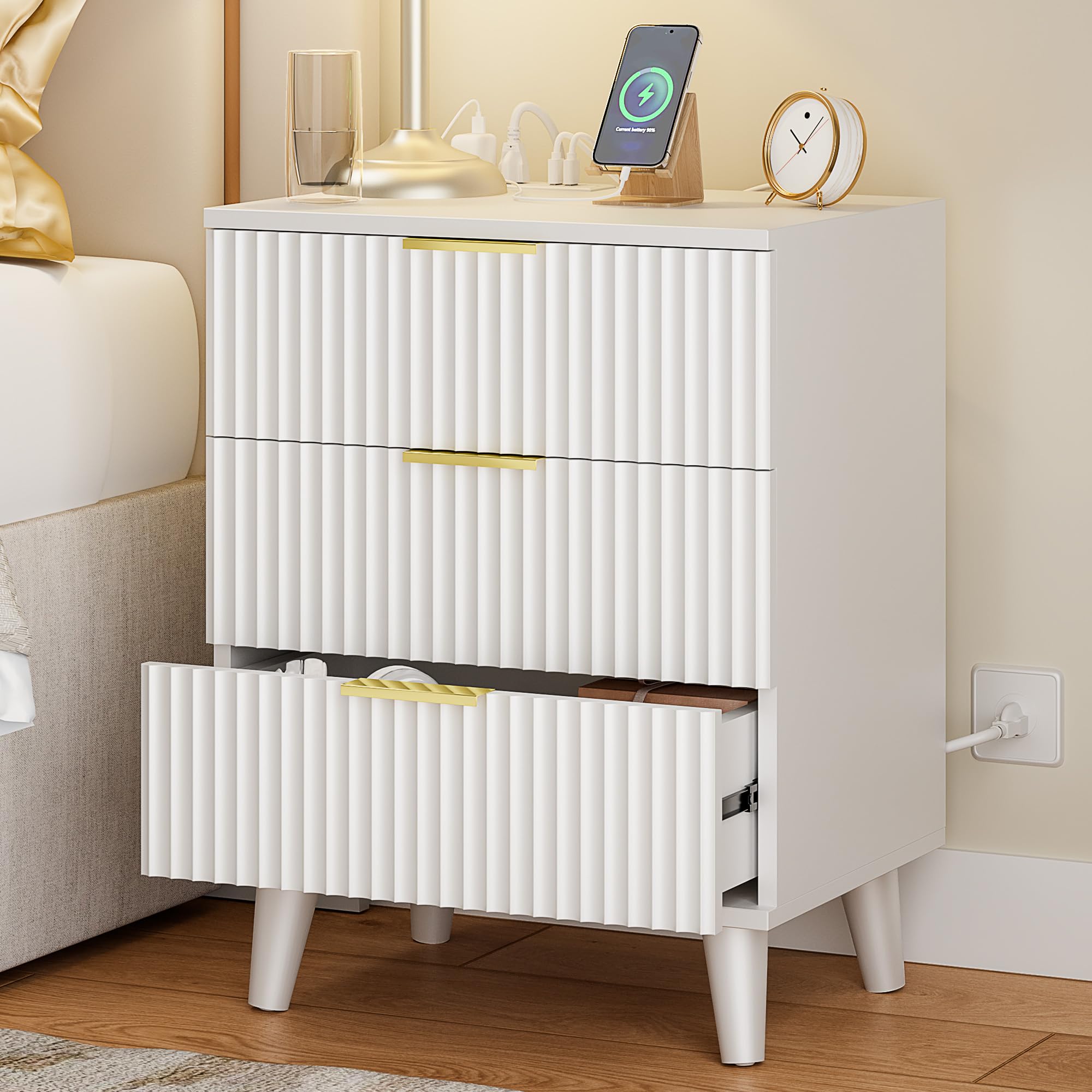
Figure 4: Key product dimensions and features.
Warranty and Support
Lulive products come with a 1-Year Warranty against manufacturing defects. For any questions, missing parts, or assistance with assembly, please contact our customer service team.
- Customer Service Hours: Mon-Fri 9am-6pm (PST)
- Phone: 1-833-449-5777
- Email: VIPService68@outlook.com

Figure 5: Lulive Customer Support and Warranty Information.