
1. Introduction
This manual provides detailed instructions for the proper setup, operation, and maintenance of your TOLEBLID 6.1 Cu ft Extra Large Home Safe. This safe is designed to provide secure storage for your valuables, documents, cash, firearms, and other important items, featuring fireproof and waterproof capabilities, a digital keypad, and robust anti-theft construction.

The TOLEBLID 6.1 Cu ft Home Safe, featuring a digital keypad and a spacious interior with adjustable shelving for various valuables.
2. Safety Information
- Always keep emergency keys in a secure location away from the safe.
- Do not store the emergency keys inside the safe.
- Ensure the safe is placed on a stable, level surface or securely mounted to prevent tipping.
- Keep the digital keypad dry and clean.
- This safe is designed to be fire and water resistant. While it offers significant protection, it is not impervious to all extreme conditions.

This image highlights the robust construction of the TOLEBLID safe, emphasizing its resistance to fire, water, drilling, prying, and collision, along with its micro-seam design.

Detail of the safe's robust construction, featuring 67mm pry-resistant solid steel bolts and an all-steel body for enhanced anti-drilling and burglar-proof protection.
3. Package Contents
Please check the package contents upon receipt to ensure all items are present:
- 1 x TOLEBLID 6.1 Cu ft Home Safe
- 2 x Emergency Keys
- 4 x Expansion Screws (for mounting)
- 1 x User Manual
- 1 x Floor Mat
4. Setup
4.1 Initial Access and Battery Installation
- Locate the emergency keyhole, usually concealed behind the keypad cover or a small panel.
- Insert one of the emergency keys and turn it to unlock the safe.
- Open the safe door. Inside, locate the battery compartment (typically on the back of the keypad assembly on the inside of the door).
- Install the required batteries (not included) into the compartment, ensuring correct polarity.
4.2 Setting Your Digital Passcode
Your safe can be programmed with a 3-8 digit PIN number.
- With the safe door open, press the red reset button located on the inside of the safe door, near the hinge. A beep will sound, and the indicator light on the keypad will flash.
- Enter your desired 3-8 digit passcode on the keypad.
- Confirm the passcode by pressing the '#' or '*' button. A confirmation beep will sound, indicating the new passcode is set.
- Test the new passcode with the door open to ensure it works correctly before closing the safe.

This diagram illustrates the three primary methods for accessing your TOLEBLID safe: using the digital passcode, the emergency key, or the emergency battery box in case of low battery.
4.3 Mounting the Safe (Optional)
For enhanced security, the safe can be mounted to a floor or wall using the pre-drilled holes and included expansion screws.
- Choose a suitable location for mounting.
- Mark the drilling points through the pre-drilled holes at the back or bottom of the safe onto the wall or floor.
- Drill holes at the marked points using an appropriate drill bit.
- Align the safe with the drilled holes and insert the expansion screws.
- Tighten the screws securely to fix the safe in place.
Instructions for securely mounting the safe to a wall or floor using the pre-drilled holes and included expansion screws.
5. Operating Instructions
5.1 Opening the Safe
There are three methods to open your TOLEBLID safe:
- Method 1: Digital Passcode
Enter your 3-8 digit passcode on the keypad, then press '#' or '*'. Turn the knob clockwise to open the door. - Method 2: Emergency Key
Insert the emergency key into the keyhole and turn it. Simultaneously, turn the knob clockwise to open the door. This method is primarily for first-time operation, forgotten passcodes, or dead batteries. - Method 3: Emergency Battery Box (for low/dead batteries)
If the batteries are dead, connect the emergency battery box (not included, but typically a small external battery pack) to the external power port on the keypad. Enter your passcode, then turn the knob clockwise to open the door.

This graphic illustrates the three secure methods for accessing your TOLEBLID safe: using the digital keypad, the emergency keys, or the emergency battery box for power.
5.2 Internal Lock Box
The safe includes a smaller internal lock box, providing an additional layer of security for smaller, highly sensitive items. This lock box typically has its own key.
5.3 LED Light
A built-in LED light illuminates the interior of the safe, allowing for quick and easy access to your items, especially in low-light conditions.
5.4 Removable Shelves
The safe features multiple removable shelves, allowing you to customize the interior space to accommodate items of various sizes, such as documents, jewelry, or firearms.

The safe features removable shelves, allowing for flexible storage configurations to accommodate items of various sizes, from documents to gold bars.
5.5 Smart Alarm System
For added security, the safe is equipped with a smart alarm system. If three consecutive incorrect passcodes are entered, the alarm will activate, deterring unauthorized access.

The safe is equipped with a smart alarm system that activates if three consecutive incorrect passcodes are entered, providing an additional layer of security.
6. Maintenance
- Battery Replacement: Replace batteries when the low battery indicator appears or if the keypad becomes unresponsive. Use the emergency key or external battery box if batteries are completely drained.
- Cleaning: Wipe the exterior of the safe with a soft, damp cloth. Avoid using abrasive cleaners or solvents that could damage the finish or keypad.
- Key Maintenance: Keep emergency keys clean and free from debris. Do not force keys into the lock.
7. Troubleshooting
- Safe will not open with passcode:
- Ensure batteries are not low or dead. Replace if necessary.
- Re-enter the passcode carefully. Ensure no numbers are skipped or pressed incorrectly.
- If passcode is forgotten, use the emergency key to open the safe and reset the passcode. - Keypad is unresponsive:
- Check battery levels. Replace batteries.
- If batteries are completely dead, use the emergency battery box to power the keypad temporarily. - Alarm activates unexpectedly:
- This typically occurs after three consecutive incorrect passcode entries. Enter the correct passcode to disarm the alarm. - Door does not close properly:
- Check for any obstructions preventing the door from fully closing.
- Ensure the locking bolts are fully retracted before attempting to close.
8. Specifications
| Feature | Detail |
|---|---|
| Brand | TOLEBLID |
| Model Number | UDNEW |
| Capacity | 6.1 Cubic Feet |
| External Dimensions (D x W x H) | 12.21" x 13.78" x 27.56" (31cm x 35cm x 70cm) |
| Interior Dimensions (D x W x H) | 11.42" x 13.05" x 26.80" |
| Net Weight | 54.23 lbs (24.6 kg) |
| Lock Type | Electronic Combination Lock, Key |
| Material | Alloy Steel, Metal |
| Color | Black |
| Special Features | Anti-Theft, Combination Lock, Fireproof, Sensor Light, Waterproof |
| Mounting Type | Wall Mount / Floor Mount |
| Water Resistance Level | Water Repellent |
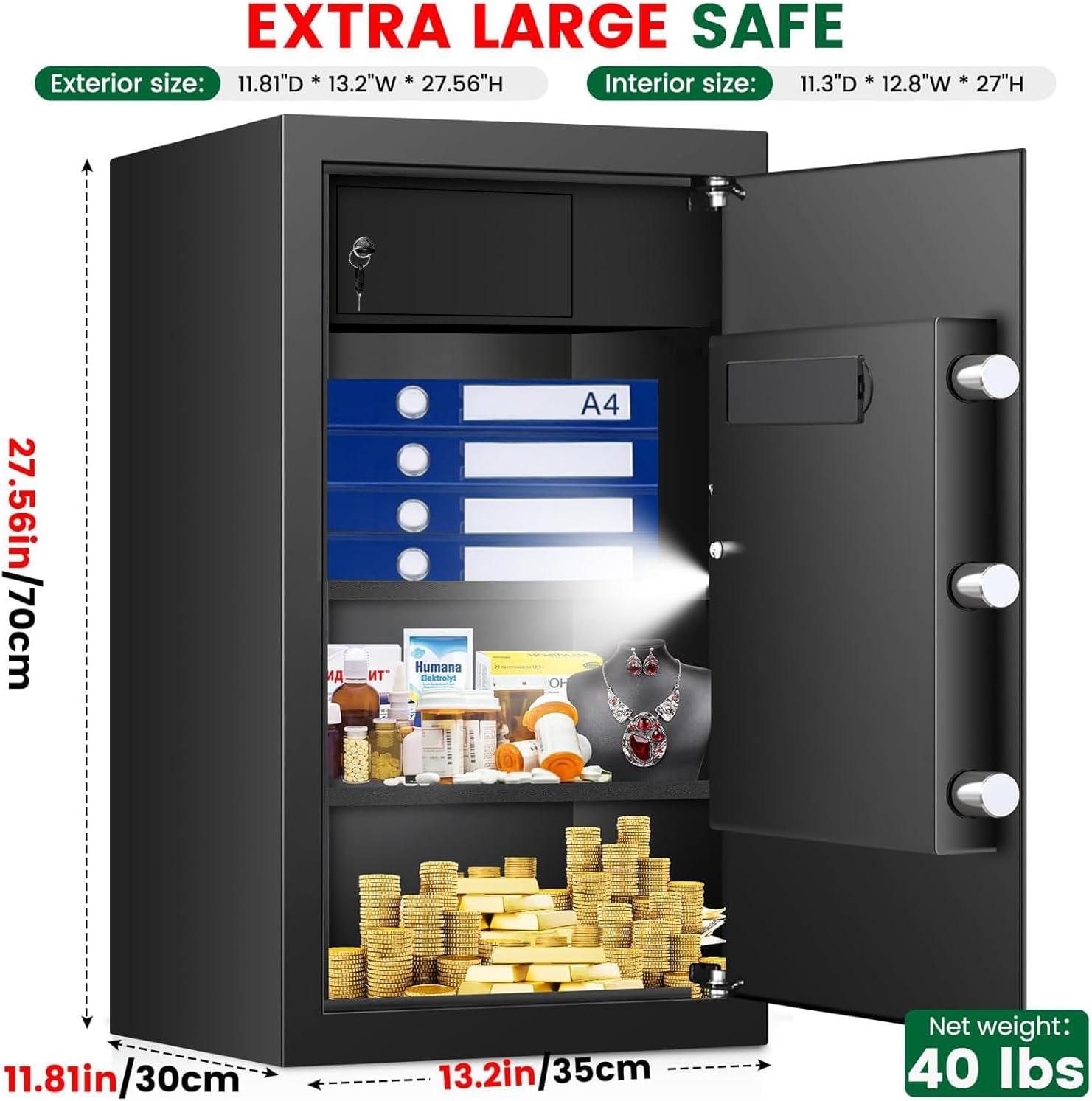
A detailed view of the safe's dimensions, illustrating its extra-large capacity suitable for documents, laptops, and other valuables. External: 12.21"D x 13.78"W x 27.56"H. Internal: 11.42"D x 13.05"W x 26.80"H.
9. Warranty and Support
TOLEBLID provides a lifetime warranty for this product. We are committed to ensuring your satisfaction and the long-term performance of your safe.
- Online Service: We offer 24-hour online service for any inquiries or assistance you may need.
- Returns/Exchanges: A 120-day return or exchange service is available from the date of purchase.
- Replacement Keys: In the event you lose your emergency keys, please contact TOLEBLID customer support to receive a FREE replacement key.
For support, please refer to the contact information provided on the TOLEBLID official website or your purchase documentation.