
Introduction
Thank you for choosing the Xega 4G Cellular 2K PTZ Outdoor Security Camera, Model XG-18. This manual provides detailed instructions for the setup, operation, and maintenance of your camera. Please read this manual carefully before use and retain it for future reference.
Package Contents
Verify that all items listed below are included in your package:
- Xega 4G Cellular 2K PTZ Outdoor Security Camera
- Power Adapter
- Mounting Stand
- Mounting Screws
- Instruction Manual
- SIM Card (with 300MB test data for 30 days)

Figure 1: Contents of the Xega 4G Camera package.
Setup
1. SIM Card Insertion and 4G Connectivity
This camera operates on 4G LTE networks, making it suitable for areas without Wi-Fi access. A SIM card is included with 300MB of test data valid for 30 days. For continuous use, an unlimited data plan is recommended (e.g., 12.9€/30 days, or plans from EE, SKY, Vodafone).
- Locate the SIM card slot on the camera.
- Insert the provided SIM card or your preferred 4G SIM card into the slot. Ensure it is inserted correctly according to the diagram on the camera or in the quick start guide.
- The camera will automatically attempt to connect to the 4G network upon power-up.
2. Power Supply
The XG-18 camera is wired and requires continuous power. It does not contain a battery and does not support Wi-Fi connectivity.
- Connect the 3-meter power cable to the camera.
- Plug the power adapter into a standard electrical outlet.
- Ensure the power connection is secure for uninterrupted operation.
3. App Installation and Initial Configuration
The camera is controlled via the Ubox application, available for iOS and Android devices.
- Download the Ubox app from your device's app store (Apple App Store for iOS, Google Play Store for Android).
- Register for an account or log in if you already have one.
- Follow the in-app instructions to add your new camera. This typically involves scanning a QR code on the camera or manually entering its ID.
- Once connected, you can view the live feed and configure camera settings.
4. Physical Installation
The camera is designed for outdoor use and can be mounted on a wall.
- Choose a suitable location for mounting, ensuring good 4G signal reception and proximity to a power source.
- Use the provided mounting stand and screws to securely attach the camera to a wall or other stable surface.
- Adjust the camera's angle to cover the desired surveillance area.

Figure 2: Xega 4G Camera installed outdoors, highlighting 4G LTE connectivity.
Operating the Camera
1. 24/7 Continuous Recording
The XG-18 supports continuous 24/7 video recording, ensuring constant surveillance of your property.
- The camera records continuously as long as it is powered.
- Recorded footage can be accessed and played back remotely via the Ubox app.

Figure 3: Continuous 24/7 recording capability.
2. AI Human Detection and Automatic Tracking
The camera features advanced AI human detection to minimize false alarms and automatic tracking to keep subjects in view.
- When human motion is detected, you will receive an instant alert notification on your iOS/Android device via the Ubox app.
- The camera will automatically track the detected person's movement.
- This feature helps conserve 4G data and storage space by focusing on relevant events.

Figure 4: AI Human Detection and Instant Alert in action.
3. 2K Super HD Resolution and PTZ Functionality
Capture clear, detailed footage with 2K HD resolution and monitor a wide area with Pan-Tilt-Zoom (PTZ) capabilities.
- The camera provides 2K (3MP) Super HD video, offering enhanced visual detail.
- It can rotate 350° horizontally (Pan) and 100° vertically (Tilt), providing comprehensive coverage.
- Control the pan, tilt, and 4X digital zoom (no optical zoom) remotely through the Ubox app from anywhere in the world.
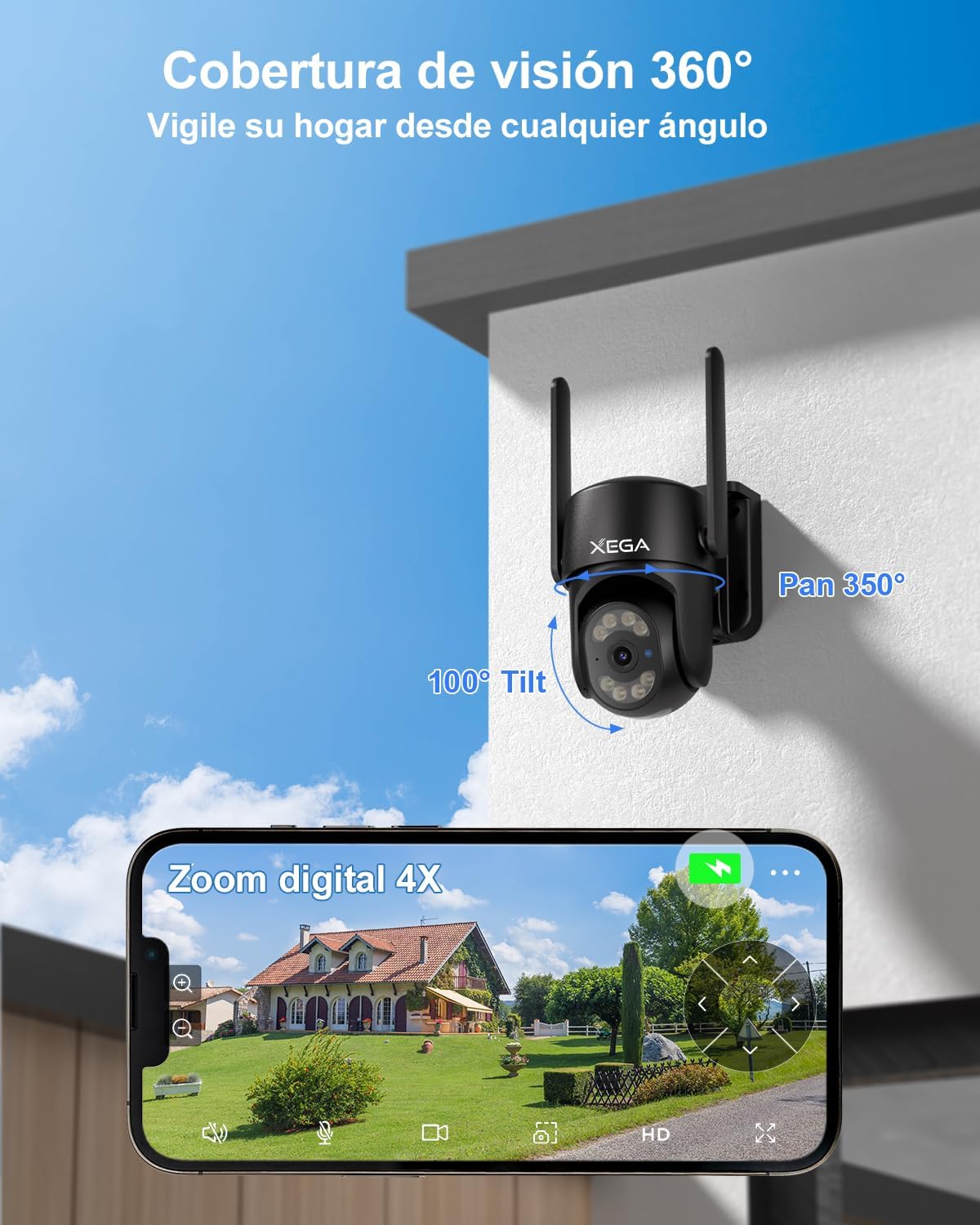
Figure 5: 360° coverage and 4X digital zoom via the Ubox app.
4. Night Vision Modes
The camera offers versatile night vision options for clear monitoring in low-light conditions.
- Color Night Vision: With the spotlight on, the camera can capture full-color video at night, providing more detail.
- Infrared Night Vision: With the spotlight off, the camera uses infrared LEDs for clear black-and-white footage in complete darkness.
- Night vision range extends up to 20 meters (approximately 80 feet).

Figure 6: Comparison of 2K Super HD Color Night Vision and Infrared Night Vision.
5. Two-Way Audio
The integrated microphone and speaker allow for two-way communication.
- Use the Ubox app to listen to audio from the camera's location.
- Speak through the app to communicate with individuals near the camera.
Maintenance
1. Weather Resistance (IP66)
The XG-18 camera has an IP66 rating, ensuring its durability against various weather conditions.
- The camera is resistant to dust and powerful water jets, making it suitable for use in sunny, rainy, or snowy conditions.
- Operating temperature range: -30°C to 60°C.

Figure 7: IP66 weather resistance in adverse conditions.
2. Storage Options
The camera offers flexible storage solutions for your recordings.
- TF Card Storage: Supports TF cards up to 128GB (not included). The camera will automatically record and overwrite old videos when the card is full.
- Cloud Storage: Optional military-grade cloud storage is available. A 30-day free trial is offered, with subscription options thereafter (e.g., approximately 1.99€/month). Cloud storage ensures data security even if the camera is stolen or damaged.
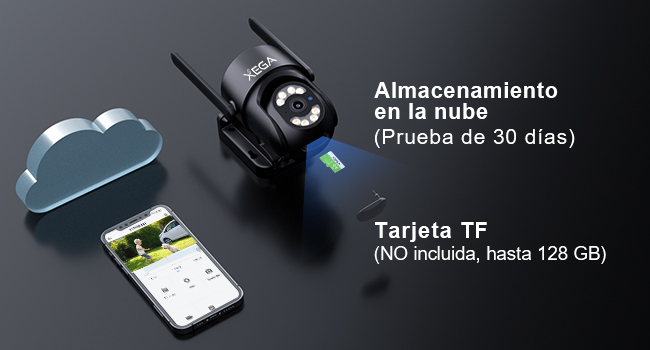
Figure 8: TF card and cloud storage options.
3. Cleaning
To ensure optimal performance, periodically clean the camera lens and housing.
- Use a soft, damp cloth to wipe the camera's exterior.
- For the lens, use a specialized lens cleaning cloth and solution to avoid scratches.
- Do not use harsh chemicals or abrasive cleaners.
Troubleshooting
If you encounter issues with your Xega 4G Camera, refer to the following common problems and solutions:
| Problem | Possible Cause | Solution |
|---|---|---|
| Camera is disconnected / Offline | No 4G signal, SIM card issue, power loss. | Check 4G signal strength at the camera's location. Verify SIM card is correctly inserted and has an active data plan. Ensure the camera is receiving continuous power. |
| No notifications received on mobile | App notification settings, phone settings, network issues. | Ensure notifications are enabled in the Ubox app settings. Check your phone's system settings to allow notifications from the Ubox app. Verify stable 4G connection for both camera and phone. |
| Poor image quality | Dirty lens, low network bandwidth, app settings. | Clean the camera lens. Ensure sufficient 4G bandwidth. In the Ubox app, switch from SD to HD quality if available (note: setting may revert to SD). |
| Motion detection not working | Detection settings, environmental factors. | Check motion detection sensitivity and area settings in the Ubox app. Ensure no obstructions are blocking the camera's view. |
| Camera does not turn on | No power, faulty adapter. | Verify the power adapter is securely connected to both the camera and the power outlet. Test the outlet with another device. |
If these solutions do not resolve the issue, please contact Xega customer support for further assistance.
Specifications
| Feature | Detail |
|---|---|
| Model Number | XG-18 |
| Dimensions | 18 x 16 x 12 cm |
| Weight | 660 g |
| Connectivity Technology | Wired (Power), Cellular (4G LTE) |
| Video Resolution | 2K (1920p) |
| Pan Angle | 350 Degrees |
| Tilt Angle | 100 Degrees |
| Digital Zoom | 4X |
| Night Vision Range | 20 Meters (approx. 80 feet) |
| Night Vision Type | Color Night Vision, Infrared Night Vision |
| Special Features | Two-Way Audio, HD Resolution, Motion Sensor, PTZ Technology, Night Vision, AI Human Detection, Auto Tracking |
| Weather Resistance | IP66 (Waterproof) |
| Storage Options | TF Card (up to 128GB), Cloud Storage |
| Compatible Devices | Smartphone (Android, iOS) |
| Power Source | Electric Cable |
| Material | Acrylonitrile Butadiene Styrene (ABS) |
Warranty and Support
For any questions, technical assistance, or warranty inquiries, please contact Xega customer support.
- Xega offers 24/7 online customer support.
- Refer to the contact information provided with your product packaging or on the official Xega website for support channels.

Figure 9: Xega 24/7 Online Customer Support.


