
1. Important Safety Instructions
Before operating the Twotrees TTC450 Pro CNC Router Machine, please read and understand all safety instructions. Failure to follow these instructions may result in injury or damage to the machine.
- Emergency Stop: Familiarize yourself with the emergency stop button and its location. Press it immediately in case of any malfunction or unsafe condition.
- Limit Switches: The machine is equipped with XYZ-axis limit switches. Do not bypass or tamper with these safety features.
- Spindle Protective Cover: Ensure the spindle protective cover is properly installed during operation to prevent contact with moving parts and reduce the risk of burns.
- Eye Protection: Always wear appropriate eye protection (safety glasses or goggles) when operating the machine, especially during cutting or engraving operations.
- Work Area: Keep the work area clean, well-lit, and free of obstructions. Ensure proper ventilation, especially when working with materials that produce dust or fumes.
- Material Safety: Understand the properties of the materials you are working with. Some materials may produce hazardous dust or fumes.
- Power Supply: Ensure the machine is properly grounded and connected to a stable power supply. Disconnect power before performing any maintenance or adjustments.
- Supervision: Never leave the machine operating unattended.
2. Setup and Assembly
The Twotrees TTC450 Pro is designed for easy setup, with 95% of main components pre-assembled. Detailed assembly guides and video tutorials are provided to assist you.
2.1 Unpacking and Inspection
- Carefully unpack all components from the packaging.
- Verify that all parts listed in the packing list are present and undamaged. Contact customer support immediately if any parts are missing or damaged.
2.2 Assembly Steps
Follow the provided quick start guide or video tutorial for detailed assembly instructions. The general steps include:
- Attach the gantry to the base frame.
- Install the spindle motor or laser module (if applicable).
- Connect the control panel and all necessary cables.
- Secure the work material clamps.

Figure 2.1: The Twotrees TTC450 Pro with 95% pre-assembly, highlighting the ease of installation for the screen, spindle, and side panels.

Figure 2.2: Illustration of the 95% pre-assembled state of the TTC450 Pro, showing the main frame, gantry, control panel, and tools ready for quick setup.
2.3 Initial Power-On and Calibration
- Connect the power adapter and turn on the machine.
- Perform initial axis homing as per the on-screen instructions or software guide.
- Calibrate the Z-axis height for your specific tool and material.
3. Operating Instructions
The TTC450 Pro is compatible with GRBL software and supports various operating systems including Windows and Mac OS. It features a 3.5-inch color touchscreen for intuitive control.
3.1 Software and Connectivity
- Install the recommended GRBL-compatible software on your computer.
- Connect the machine to your computer via USB or use the offline work mode.
- Load your G-code files into the software or directly via USB in offline mode.
3.2 Work Area and Precision
The effective working area of the TTC450 Pro is 460 x 460 x 80 mm (18.10 x 18.10 x 3.14 inches), providing ample space for various projects. It offers a positioning accuracy of 0.05 mm for high-precision engraving and cutting.

Figure 3.1: The large working area of the TTC450 Pro, measuring 460x460x80mm, providing ample space for diverse projects.
3.3 Module Compatibility and Switching
The TTC450 Pro supports various modules, including a wood router machine, 500W spindle motor, and 20W laser module (sold separately). It also supports a 4th-axis rotary module for complex 3D engraving.

Figure 3.2: The TTC450 Pro supports various module combinations, including a wood router, 500W spindle motor, and 20W laser module, to meet diverse functional requirements.
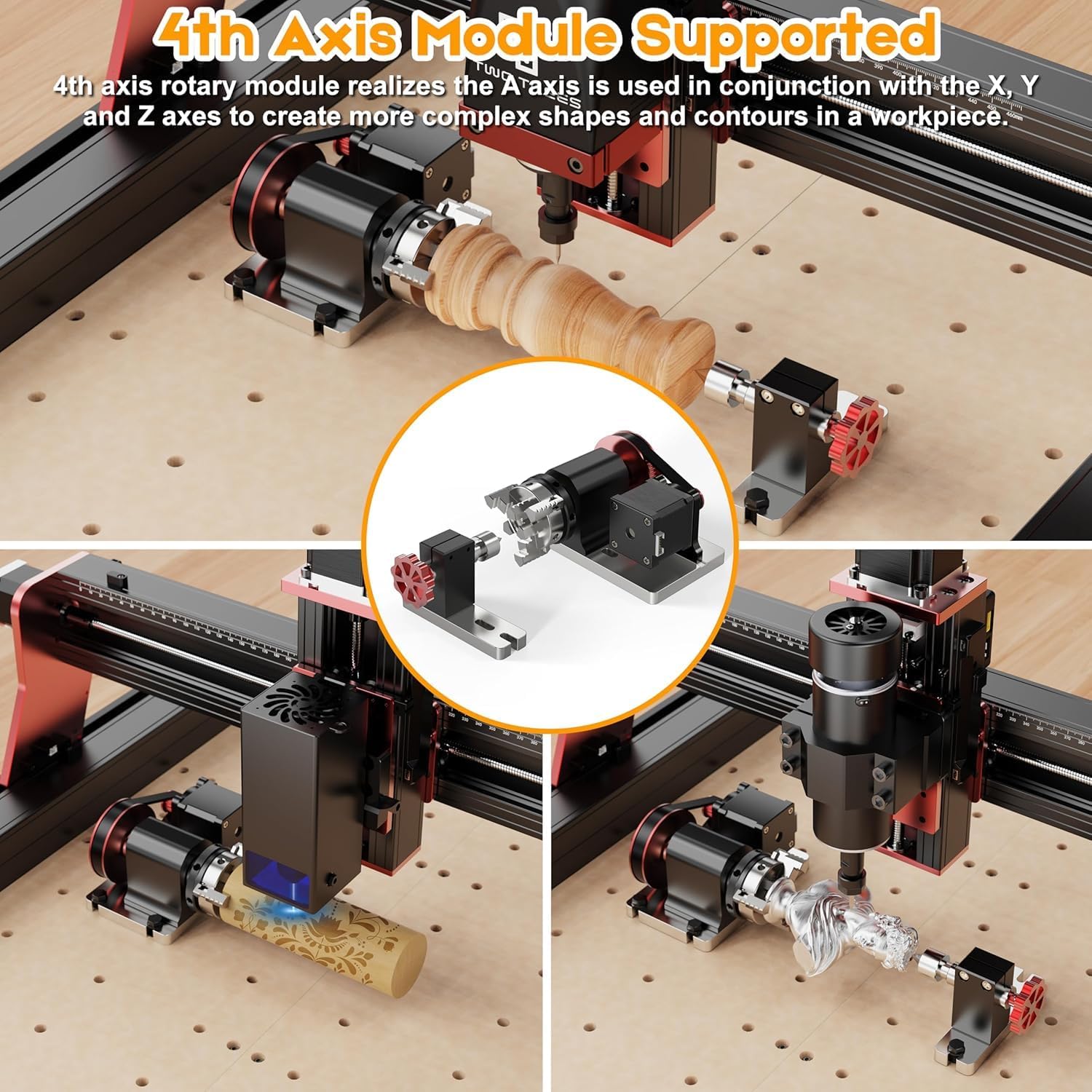
Figure 3.3: The 4th axis rotary module for the TTC450 Pro, enabling complex shapes and contours on workpieces by coordinating with X, Y, and Z axes.
To switch between CNC routing and laser engraving modes, simply replace the accessory (spindle or laser) and select the corresponding mode on the control panel.

Figure 3.4: Detailed view of the TTC450 Pro's control panel, power input (DC24V, 500W Motor), Z-axis probe connection, and rotary switch for different modes.

Figure 3.5: The one-key switch mode on the TTC450 Pro's control panel allows easy toggling between CNC and laser engraving functions.
3.4 Starting a Job
- Secure your material firmly to the workbed.
- Set the origin point (X, Y, Z zero) for your job using the control panel or software.
- Perform a dry run (air cut) if necessary to verify the tool path.
- Start the job from the software or control panel. Monitor the machine closely during operation.
4. Maintenance
Regular maintenance ensures the longevity and optimal performance of your Twotrees TTC450 Pro.
- Cleaning: After each use, clean the work area, lead screws, and guide rails to remove dust, chips, and debris. Use a soft brush or vacuum cleaner.
- Lubrication: Periodically lubricate the lead screws and linear guides with appropriate machine oil to ensure smooth movement. Refer to the detailed manual for recommended lubrication points and frequency.
- Tightness Check: Regularly check all screws and fasteners for tightness. Tighten any loose components to maintain machine rigidity and accuracy.
- Cable Inspection: Inspect all cables for wear, damage, or loose connections. Replace damaged cables immediately.
- Spindle/Laser Maintenance: Follow the manufacturer's guidelines for maintenance of the spindle motor or laser module. This may include cleaning cooling fins or optics.
5. Troubleshooting
This section provides solutions to common issues you might encounter.
5.1 Machine Not Powering On
- Check if the power adapter is securely connected to both the machine and the power outlet.
- Ensure the power switch on the machine is in the 'ON' position.
- Verify that the power outlet is functional.
5.2 Software Connection Issues
- Ensure the USB cable is securely connected to both the machine and the computer.
- Check if the correct COM port is selected in your GRBL software.
- Install or update the necessary USB drivers for the machine.
- Restart both the machine and your computer.
5.3 Inaccurate Engraving/Cutting
- Check for loose belts or lead screw couplings. Tighten if necessary.
- Ensure the material is securely clamped and not shifting during operation.
- Verify that the correct tool diameter and Z-height are set in your CAM software.
- Inspect the cutting bit/laser lens for wear or damage. Replace if needed.
- Reduce cutting speed or depth of cut if the machine is experiencing excessive vibration or deflection.
5.4 Machine Stops Mid-Job
- Check for emergency stop activation.
- Ensure there are no physical obstructions preventing axis movement.
- Verify that the G-code file is valid and complete.
- Check for overheating of motors or control board. Allow the machine to cool down.
6. Specifications
Detailed technical specifications for the Twotrees TTC450 Pro CNC Router Machine.
| Feature | Specification |
|---|---|
| Brand | Twotrees |
| Model | TTC450 Pro |
| Material | Aluminum and Plastic |
| Effective Working Area | 460 x 460 x 80 mm (18.10 x 18.10 x 3.14 inches) |
| Positioning Accuracy | 0.05 mm |
| Spindle Motor | 80W (Standard), supports 500W upgrade |
| Spindle Speed Range | 1 - 8,000 RPM (Max 12,000 RPM) |
| Max Machine Speed | 800 mm/min |
| Control Software | GRBL-compatible |
| Operating Systems | Windows, Mac OS |
| Control Panel | 3.5-inch Color Touchscreen |
| Connectivity | USB, Offline Work Support |
| Safety Features | XYZ-axis Limit Switches, Emergency Stop Button, Spindle Protective Cover |
| Pre-assembly Rate | 95% |
7. Warranty and Support
Twotrees provides customer support for the TTC450 Pro CNC Router Machine. For warranty information, technical assistance, or service requests, please refer to the official Twotrees website or contact their customer service department.
- Online Resources: Visit the official Twotrees website for FAQs, software downloads, and video tutorials.
- Contact Support: If you encounter issues not covered in this manual, please contact Twotrees customer support with your product model and serial number.