1. Introduction
Thank you for choosing the RUYAGE RY18 Walkie Talkie. This manual provides essential information for the safe and efficient operation of your two-way radio. Please read it thoroughly before use and retain it for future reference.

Figure 1: RUYAGE RY18 Walkie Talkie views and typical usage scenarios.
2. What's in the Box
Your RUYAGE RY18 package should contain the following items:
- RUYAGE RY18 Walkie Talkie Unit
- USB Charging Cable
- Power Adapter
- User Manual
- Belt Clip

Figure 2: Package contents of the RUYAGE RY18 Walkie Talkie.
3. Parts of the Radio
Familiarize yourself with the various parts of your RY18 Walkie Talkie:
- Antenna: For transmitting and receiving signals.
- Power/Volume Knob: Turns the radio on/off and adjusts volume.
- Channel Selector Knob: Selects one of the 16 available channels.
- PTT (Push-to-Talk) Button: Press and hold to transmit, release to receive.
- Monitor Button: Used to listen for weak signals.
- Scan Button: Initiates channel scanning.
- Speaker/Microphone: For audio output and input.
- Charging Port: USB port for recharging the battery.
- Belt Clip: For attaching the radio to clothing or a belt.

Figure 3: Side view highlighting the PTT and control buttons.

Figure 4: Side view showing the attached belt clip.
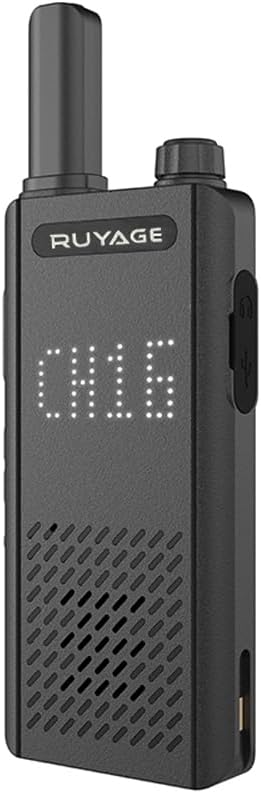
Figure 5: Front view displaying the current channel.
4. Setup
4.1 Charging the Battery
The RY18 Walkie Talkie features a rechargeable battery. Before first use, fully charge the radio.
- Connect the USB charging cable to the radio's charging port.
- Connect the other end of the USB cable to the provided power adapter or a compatible USB power source (e.g., power bank, car charger).
- The charging indicator will illuminate. Once fully charged, the indicator may change color or turn off depending on the unit.
- A full charge typically takes several hours.
4.2 Attaching the Belt Clip
To attach the belt clip:
- Align the belt clip with the screw holes on the back of the radio.
- Secure the clip using the provided screws (if applicable) or by sliding it into place until it clicks.
5. Operating Instructions
5.1 Power On/Off and Volume Adjustment
- To power on the radio, rotate the Power/Volume knob clockwise until you hear a click.
- Continue rotating the knob clockwise to increase the volume, and counter-clockwise to decrease it.
- To power off, rotate the knob counter-clockwise until you hear a click.
5.2 Selecting a Channel
The RY18 Walkie Talkie has 16 FRS channels.
- Rotate the Channel Selector knob to choose your desired channel (1-16).
- Ensure all radios you wish to communicate with are set to the same channel.
5.3 Transmitting and Receiving
- To transmit, press and hold the PTT (Push-to-Talk) button located on the side of the radio.
- Speak clearly into the microphone, holding the radio approximately 2-3 inches from your mouth.
- Release the PTT button to stop transmitting and return to receive mode.
- When receiving a signal, the radio will automatically output the audio through the speaker.
5.4 VOX Function (Hands-Free Operation)
The VOX (Voice Operated Exchange) function allows for hands-free transmission without pressing the PTT button. This feature may require programming.
- The RY18 supports 3 sensitivity levels for VOX.
- When VOX is enabled, the radio will automatically transmit when it detects your voice.
- Adjust the VOX sensitivity to prevent accidental transmissions from background noise or to ensure your voice is detected reliably.
5.5 Range Information
The effective communication range varies significantly based on terrain and obstructions:
- Open Air (without obstruction): More than 10 miles
- Woods: 4-5 miles
- Town or City: 2-3 miles
Optimal range is achieved in open, flat areas with no interference.
6. Maintenance
6.1 Cleaning
- Wipe the radio's surface with a soft, damp cloth.
- Do not use harsh chemicals or abrasive cleaners.
- Ensure the charging port is free of dust and debris.
6.2 Battery Care
- Avoid fully discharging the battery frequently to prolong its lifespan.
- Charge the battery regularly, even if the radio is not in use for extended periods.
- Do not expose the battery to extreme temperatures.
6.3 Storage
- Store the radio in a cool, dry place away from direct sunlight.
- Keep the radio away from moisture. Note: This product is not water resistant.
7. Troubleshooting
| Problem | Possible Cause | Solution |
|---|---|---|
| Radio does not power on | Battery is depleted or not charged | Charge the battery fully. |
| Cannot transmit or receive | Incorrect channel selected | Ensure all radios are on the same channel. |
| Short communication range | Obstructions (buildings, trees) or interference | Move to a more open area. Reduce obstructions. |
| VOX not working | VOX disabled or sensitivity too low | Check VOX settings (may require programming). Adjust sensitivity. |
8. Specifications
| Feature | Specification |
|---|---|
| Model Number | RY18 |
| Brand | RUYAGE |
| Color | Black |
| Number of Channels | 16 (FRS) |
| Frequency Range | 462 MHz |
| Talking Range Maximum | 10 Miles (open air) |
| Voltage | 3.7 Volts (DC) |
| Product Dimensions | 0.5"D x 2.1"W x 4.3"H (1.27 x 5.33 x 10.92 cm) |
| Water Resistance Level | Not Water Resistant |
| Special Feature | Lightweight, Hands-free VOX |
9. Warranty and Support
9.1 Warranty Information
For specific warranty details, please refer to the warranty card included with your product or contact the seller/manufacturer directly. Warranty terms may vary by region and retailer.
9.2 Customer Support
If you encounter any issues or have questions regarding your RUYAGE RY18 Walkie Talkie, please contact the seller through your purchase platform or visit the official RUYAGE website for support information.