
ECONTROLLY RC-897M
ECONTROLLY RC-897M Replacement Remote Control User Manual
Model: RC-897M
1. Introduction
This manual provides detailed instructions for the ECONTROLLY RC-897M Replacement Remote Control. This remote is designed as a direct replacement for various Philips and Onkyo AV Receiver models, offering full functionality without the need for programming or pairing.
2. Compatible Models
The RC-897M remote control is compatible with a wide range of Philips and Onkyo AV Receiver models, including but not limited to:
- RC-837M
- RC-897M
- RC-863M
- RC-836M
- RC-803M
- AVR-882
- HT-R494
- HTR494
- TX-SR343
- TXSR343
- HT-S5800
- HTS5800
- RC-840M
- HT-S5600
- HT-RC560
- HT-S7805
- HT-S3800
- TX-SR444
If your specific model is not listed, please refer to the product description or contact customer support for compatibility verification.
3. Key Features
- Direct replacement for original remote controls.
- No programming or pairing required; ready to use out of the box.
- Constructed from durable ABS material for wear resistance and longevity.
- Infrared (IR) technology for reliable communication with your AV receiver.
4. Setup
4.1. Package Contents
- 1 x ECONTROLLY RC-897M Replacement Remote Control
4.2. Battery Installation
The remote control requires two AAA batteries (not included) for operation.
- Locate the battery compartment on the back of the remote control.
- Slide the battery compartment cover downwards to open it.
- Insert two AAA batteries, ensuring the positive (+) and negative (-) terminals align correctly with the markings inside the compartment.
- Slide the battery compartment cover back into place until it clicks securely.

Figure 1: Battery compartment with cover removed.

Figure 2: Battery compartment with cover closed.
5. Operating Instructions
The RC-897M remote control is designed to replicate the functions of your original AV receiver remote. Simply point the remote at your AV receiver and press the desired button.

Figure 3: Front view of the RC-897M remote control.
5.1. Common Button Functions
| Button | Function |
|---|---|
| POWER (RECEIVER/SOURCE) | Turns the AV receiver or selected source component on/off. |
| INPUT SELECTOR (BD/DVD, CBL/SAT, GAME1, etc.) | Selects the audio/video input source. |
| VOL +/- | Adjusts the master volume level. |
| MUTE | Mutes or unmutes the audio output. |
| NAVIGATION (UP/DOWN/LEFT/RIGHT, ENTER) | Navigates through menus and confirms selections. |
| HOME/SETUP/RETURN | Accesses the main menu, setup menu, or returns to the previous screen. |
| PLAYBACK CONTROLS (PLAY, PAUSE, STOP, SKIP) | Controls media playback for connected devices. |
| NUMBER BUTTONS (0-9) | Direct input for channel selection or other numerical entries. |
| DIMMER/DISPLAY | Adjusts display brightness or cycles through display modes. |
For specific functions related to your AV receiver model, please refer to your receiver's original user manual.
6. Maintenance
- Cleaning: Wipe the remote control with a soft, dry cloth. Do not use abrasive cleaners or solvents.
- Battery Replacement: Replace batteries when the remote's response becomes sluggish or stops working. Always replace both batteries at the same time with new ones of the same type.
- Storage: If the remote will not be used for an extended period, remove the batteries to prevent leakage and potential damage.
- Avoid Exposure: Keep the remote away from direct sunlight, high temperatures, humidity, and liquids.
7. Troubleshooting
| Problem | Possible Solution |
|---|---|
| Remote is not working. |
|
| Some buttons do not respond. |
|
| Remote range is poor. |
|
8. Specifications
- Model: RC-897M
- Brand: ECONTROLLY
- Material: ABS
- Color: Black
- Power Source: 2 x AAA Batteries (not included)
- Product Dimensions: 5 x 1 x 0.5 inches (approximately 12.7 x 2.54 x 1.27 cm)
- Item Weight: 1 ounce (approximately 28 grams)
- Special Feature: No Programming Required
- Max Number of Supported Devices: 15 (referring to the range of compatible models, not simultaneous control)
- Compatible Devices: AV Receiver

Figure 4: Side view of the RC-897M remote control.
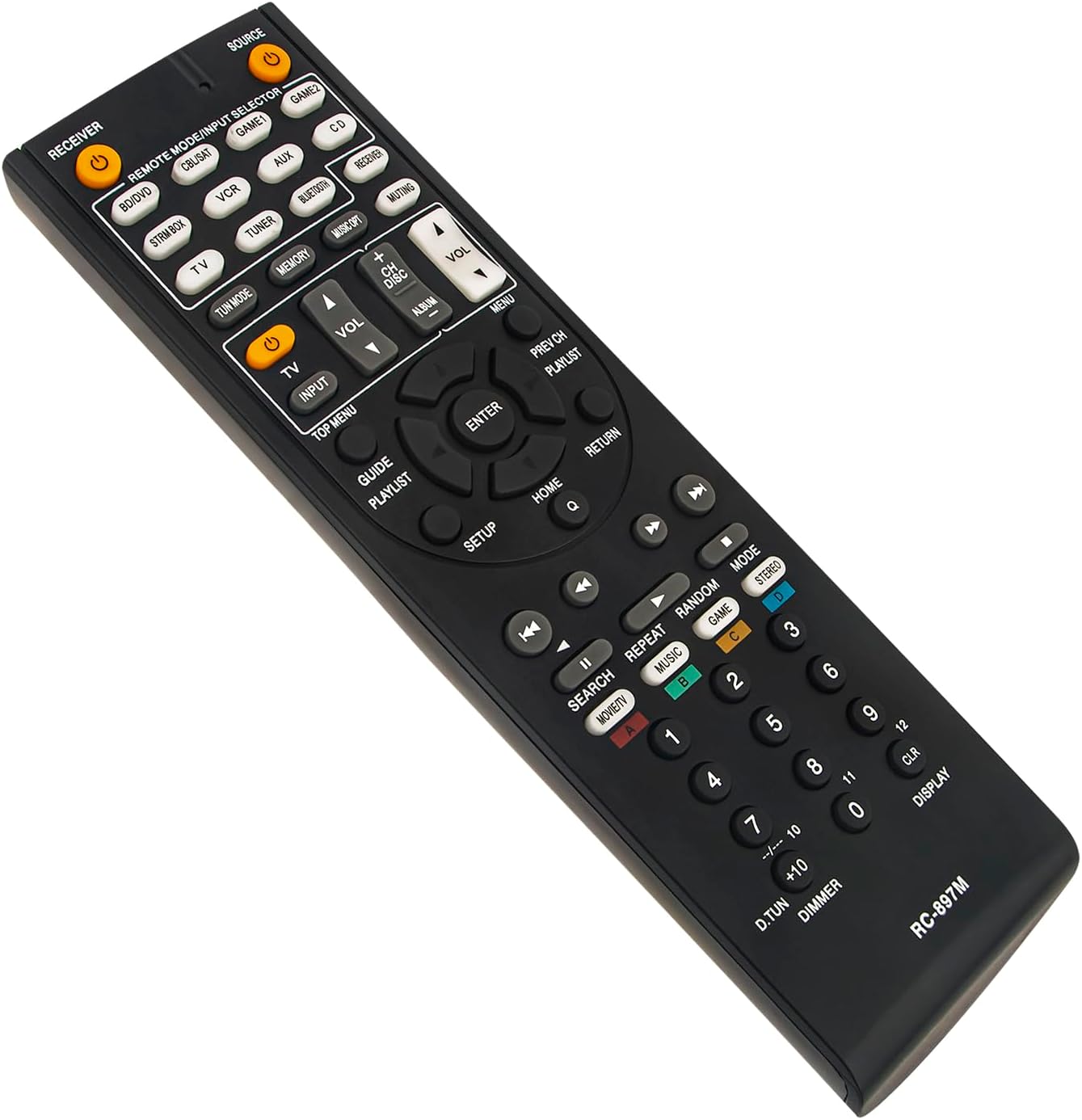
Figure 5: Angled view of the RC-897M remote control.

Figure 6: Alternative angled view of the RC-897M remote control.
9. Important Notes
- This is a replacement remote control and may not have all the advanced features of some original remotes (e.g., voice control, backlighting) if those features rely on specific hardware not present in this universal replacement.
- Always ensure a clear line of sight between the remote's IR emitter and the AV receiver's IR sensor for optimal performance.
- If you are unsure about compatibility or encounter any issues, please refer to the product listing or contact the manufacturer's customer support.
10. Support
For any questions, concerns, or technical assistance, please contact ECONTROLLY customer support through the platform where you purchased the product. We are committed to ensuring your satisfaction.
Ask a question about this manual
Ask about setup, troubleshooting, compatibility, parts, safety, or missing instructions. Manuals+ will review the question and use this page’s manual context to help answer it.