
BSMOOM B06
BSMOOM Car Jump Starter User Manual
Model: B06
1. Introduction
The BSMOOM Car Jump Starter (Model B06) is a portable, multi-functional device designed to provide emergency jump-starting for vehicles with dead batteries. It also functions as a power bank for electronic devices and features an integrated LED flashlight for various situations. This manual provides essential information for safe and effective use, maintenance, and troubleshooting of your jump starter.

Image: The BSMOOM Car Jump Starter, showing the main unit, jumper cables, USB-C charging cable, and user manual.
2. Safety Information
Read all safety warnings and instructions before using this product. Failure to follow the warnings and instructions may result in electric shock, fire, or serious injury.
General Safety Precautions:
- Keep out of reach of children.
- Do not expose the product to rain or wet conditions.
- Do not operate the product if it has been damaged in any way.
- Ensure proper ventilation during use.
- Do not disassemble the unit. Refer all servicing to qualified personnel.
- Store in a cool, dry place when not in use.
Jump Starting Safety:
- Ensure the jump starter's power level is above 50% before attempting a jump start.
- Connect the red clamp to the positive (+) terminal of the vehicle battery and the black clamp to the negative (-) terminal or a suitable ground point on the vehicle chassis.
- Do not touch the red and black clamps together.
- Do not attempt to jump start a frozen battery.
- Remove the jump starter within 30 seconds after the vehicle starts.

Image: Visual representation of the 8 built-in safety protections, including over-temperature, over-voltage, over-charge, short circuit, over-discharge, reverse polarity, over-current, and anti-interference protection.
3. What's in the Box
Verify that all items are present and in good condition upon opening the package:
- 1 x BSMOOM Car Jump Starter (Model B06)
- 1 x Heavy-Duty Jumper Cables with Smart Clamp
- 1 x USB-C Charging Cable
- 1 x User Manual

Image: A flat lay showing the BSMOOM jump starter unit, smart jumper clamps, USB-C cable, and user manual, clearly indicating "What's in the Box".
4. Product Features
- Ultra-Powerful Jump Start Performance: 5000A peak current for 10.0L gas and 8.0L diesel engines.
- Dual USB Power Bank: Equipped with Dual USB Quick Charge ports (9V/2A) for charging smartphones, laptops, and other USB devices.
- Advanced 8-Layer Safety Protection: Includes spark-proof, reverse polarity, short circuit, overcharge, over-voltage, over-current, low-temperature, and high-temperature protections.
- 400-Lumen Emergency LED Lights: Features Flashlight, Strobe, and SOS modes for various lighting needs.
- Extreme Durability: Crafted with military-grade materials, resistant to drops and water splashes.
- Long Standby Time: Maintains standby power for up to 24 months.
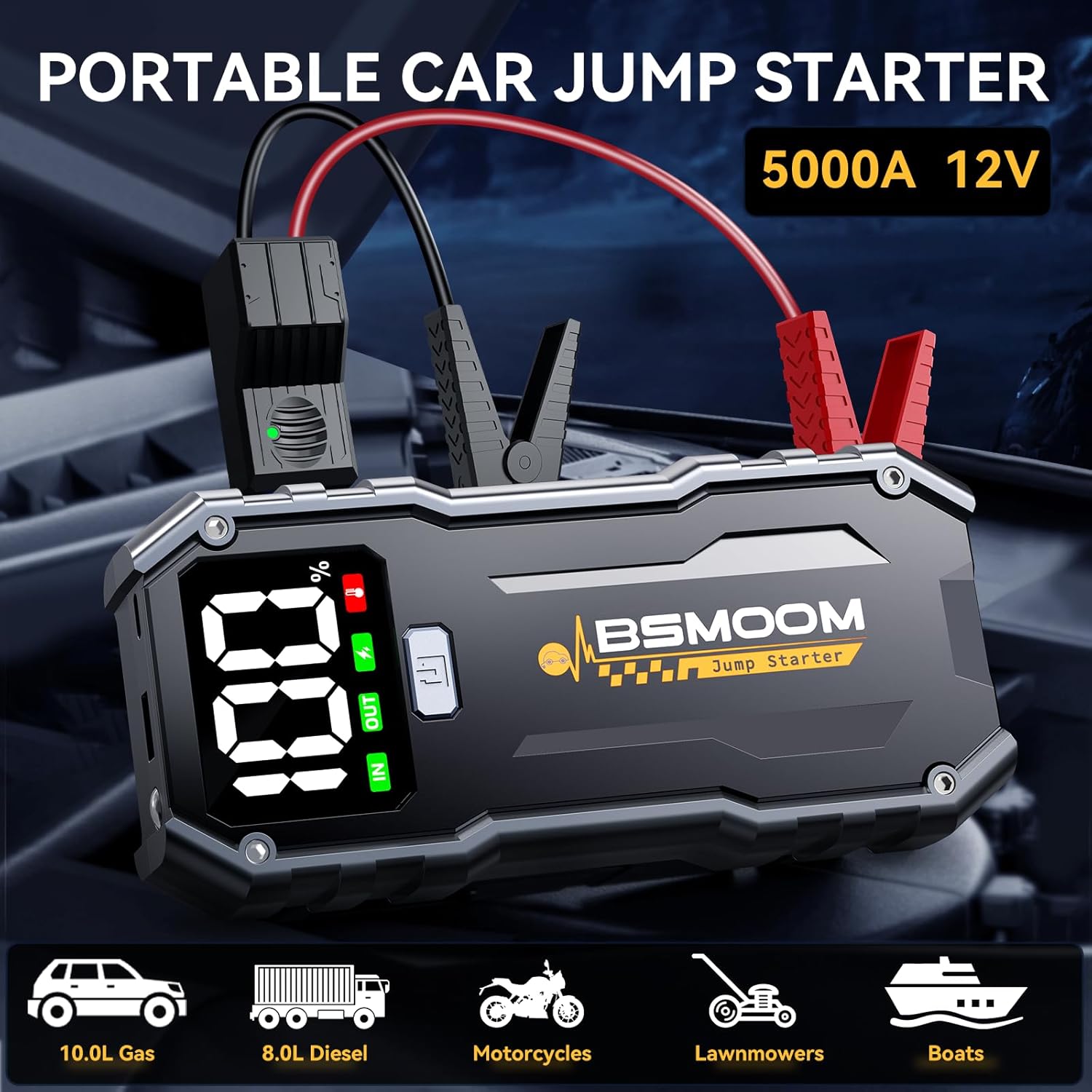
Image: The portable car jump starter unit, highlighting its 5000A 12V capability and compatibility with 10.0L Gas, 8.0L Diesel engines, motorcycles, lawnmowers, and boats.
5. Setup and Initial Charge
Before first use, fully charge the BSMOOM Car Jump Starter.
- Connect the included USB-C charging cable to the jump starter's input port.
- Connect the other end of the USB-C cable to a USB wall adapter (not included) or a powered USB port.
- The digital display will show the charging progress. Charge until the display indicates 100%.
- A full charge typically takes several hours.
Important: For optimal battery health, recharge the unit every 2-3 months if stored for long periods.
6. Operating Instructions
6.1. Jump Starting a Vehicle
Follow these steps carefully to jump start your vehicle:
- Ensure the jump starter has at least 50% charge.
- Turn off the vehicle's ignition and all accessories (lights, radio, A/C).
- Connect the blue end of the smart jumper cables to the jump starter's port. Ensure a tight connection.
- Connect the red (+) clamp to the positive (+) terminal of the vehicle's battery.
- Connect the black (-) clamp to the negative (-) terminal of the vehicle's battery or a solid, unpainted metal part of the engine block/chassis.
- Once connected, the smart clamp will indicate a ready status (usually a solid green light). If an error is detected (e.g., reverse polarity), an audible alarm and flashing lights will activate. Correct the connection if this occurs.
- Return to the vehicle and start the engine.
- Once the engine starts, immediately disconnect the smart clamp from the vehicle battery's negative (-) terminal first, then the positive (+) terminal.
- Finally, disconnect the smart clamp from the jump starter unit.
Video: A demonstration of how to properly connect the BSMOOM jump starter to a car battery and initiate a jump start. It shows connecting the clamps, checking the unit's display, and starting the vehicle.
6.2. Using as a Portable Power Bank
The BSMOOM Car Jump Starter can charge various electronic devices via its USB ports.
- Connect your device's USB charging cable to one of the jump starter's USB output ports (USB or Type-C).
- The jump starter will automatically begin charging your device.
- The digital display will show the remaining battery percentage of the jump starter.

Image: The BSMOOM jump starter connected via USB-C to a smartphone, demonstrating its function as a portable power bank. The image also shows compatibility with phones, tablets, headsets, cameras, and watches.
6.3. Using the LED Flashlight
The built-in 400-lumen LED flashlight offers three modes:
- Flashlight Mode: Press the power button once to turn on the steady light.
- Strobe Mode: Press the power button again to activate the strobe light.
- SOS Mode: Press the power button a third time for the SOS signal.
- Press the power button a fourth time to turn off the flashlight.

Image: The BSMOOM jump starter's integrated LED flashlight illuminating a dark area, with icons indicating its flashlight, SOS, and Strobe functions. Examples of use include outdoor camping, roadside emergencies, and car breakdowns.
7. Maintenance
Proper maintenance ensures the longevity and performance of your BSMOOM Car Jump Starter:
- Cleaning: Wipe the unit with a soft, dry cloth. Do not use harsh chemicals or abrasive cleaners.
- Storage: Store the jump starter in a cool, dry place away from direct sunlight and extreme temperatures.
- Recharging: For long-term storage, recharge the unit every 2-3 months to maintain battery health and prevent deep discharge.
- Temperature: Avoid exposing the unit to temperatures outside its operating range (-4°F to 140°F / -20°C to 60°C).

Image: The BSMOOM jump starter depicted in both cold (-4°F/-20°C) and hot (140°F/60°C) weather environments, illustrating its wide range of working temperatures.
8. Troubleshooting
If you encounter issues with your BSMOOM Car Jump Starter, refer to the table below:
| Problem | Possible Cause | Solution |
|---|---|---|
| Unit does not turn on. | Battery is completely drained. | Charge the unit fully before use. |
| Vehicle does not jump start. | Incorrect clamp connection; Jump starter charge too low; Vehicle battery severely damaged. | Ensure clamps are connected correctly (red to +, black to -); Recharge jump starter to over 50%; Consult a mechanic for vehicle battery inspection. |
| Smart clamp alarm sounds/flashes. | Reverse polarity connection; Short circuit; Over-current. | Disconnect clamps and re-connect correctly; Check for any short circuits; Ensure vehicle engine size is within supported limits. |
| Device not charging from USB ports. | USB cable faulty; Jump starter battery low. | Try a different USB cable; Recharge the jump starter. |
9. Specifications
| Feature | Detail |
|---|---|
| Model | B06 |
| Peak Current | 5000 Amps |
| Engine Compatibility | Up to 10.0L Gas / 8.0L Diesel |
| USB Output 1 | 9V/2A (Quick Charge) |
| USB Output 2 (Type-C) | 5V/3A |
| LED Flashlight Brightness | 400 Lumens |
| Operating Temperature | -4°F to 140°F (-20°C to 60°C) |
| Item Weight | 1.55 Pounds |
| Product Dimensions | 5.2"D x 8.78"W x 3.88"H |
| Battery Type | Lithium Polymer |
10. Warranty and Support
The BSMOOM Car Jump Starter (Model B06) comes with a 2-Year Warranty from the date of purchase, covering manufacturing defects and workmanship. This warranty does not cover damage caused by misuse, accident, unauthorized modification, or natural disasters.
For technical support, warranty claims, or any questions regarding your product, please contact BSMOOM customer service:
- Email: [Insert Manufacturer Email Here, if available]
- Phone: [Insert Manufacturer Phone Here, if available]
- Website: [Insert Manufacturer Website Here, if available]
Please have your purchase receipt and product model number (B06) ready when contacting support.
Related documentsB06

Ask a question about this manual
Ask about setup, troubleshooting, compatibility, parts, safety, or missing instructions. Manuals+ will review the question and use this page’s manual context to help answer it.