
NICRON B200
NICRON B200 Rechargeable Flashlight User Manual
Model: B200
1. Introduction
Thank you for choosing the NICRON B200 Rechargeable Flashlight. This manual provides essential information for the safe and efficient operation, maintenance, and troubleshooting of your device. Please read this manual thoroughly before use and retain it for future reference.

Image 1.1: The NICRON B200 Rechargeable Flashlight. This image displays the flashlight from a slight angle, highlighting its black anodized aluminum body, textured grip, and the main lens. The NICRON brand and B200 model number are visible on the side.

Image 1.2: The NICRON B200 demonstrating its long beam capability. The flashlight illuminates a distant landscape, showcasing its 1000-meter illumination distance and 1600 lumens output.
2. Safety Information
Please observe the following safety precautions to prevent injury or damage to the flashlight:
- Do not shine the light directly into eyes. The high lumen output can cause temporary vision impairment.
- Keep out of reach of children.
- Do not disassemble the flashlight head or battery compartment. This may damage the device and void the warranty.
- Use only the provided charging cable or a certified Type-C cable for charging.
- Avoid exposing the flashlight to extreme temperatures or direct sunlight for prolonged periods.
- Ensure the charging port cover is securely closed before exposing the flashlight to water to maintain its IPX8 waterproof rating.
3. Package Contents
Verify that all items are present in your package:
- NICRON B200 Flashlight (x1)
- Rechargeable Lithium-Ion Battery (pre-installed) (x1)
- USB Type-C Charging Cable (x1)
- Lanyard (x1)
- User Manual (x1)

Image 3.1: Contents of the NICRON B200 package. This image shows the retail box, the flashlight itself, a USB-C charging cable, a lanyard, and the user manual, laid out neatly.
4. Product Overview
Familiarize yourself with the main components of your NICRON B200 flashlight:
- Head: Contains the LED emitter and reflector.
- Body: Main housing, providing grip and protecting internal components.
- Side Switch: Controls power and mode selection.
- Charging Port: USB Type-C port for recharging the internal battery.
- Charging Indicator Light: Displays charging status.
- Tail Cap: End cap, often with a lanyard hole.

Image 4.1: Close-up view of the NICRON B200 flashlight's head, showing the high-performance LED and the side switch with its integrated charging indicator light.
5. Setup
5.1 Initial Charging
Your NICRON B200 flashlight comes with a pre-installed rechargeable Lithium-Ion battery. For optimal performance, fully charge the flashlight before first use.
- Locate the USB Type-C charging port on the flashlight body.
- Open the rubber cover protecting the charging port.
- Connect the provided USB Type-C cable to the flashlight and plug the other end into a USB power source (e.g., computer, wall adapter, power bank).
- The charging indicator light on the side switch will illuminate RED during charging.
- Once fully charged, the indicator light will turn GREEN.
- Disconnect the charging cable and securely close the rubber cover to maintain water resistance.

Image 5.1: The NICRON B200 flashlight connected to a USB Type-C charging cable, with a close-up showing the Type-C port and the green charging indicator light.
6. Operating Instructions
6.1 Power On/Off
- To Turn On: Press and hold the side switch for approximately 0.5 seconds. The flashlight will turn on in the last used mode (memory function).
- To Turn Off: Press and hold the side switch for approximately 0.5 seconds.
6.2 Changing Lighting Modes
The NICRON B200 features 6 lighting modes: High, Medium, Low, Moonlight, Strobe, and SOS.
- Normal Modes (High, Medium, Low, Moonlight): While the flashlight is on, single-click the side switch to cycle through modes in the order: High → Medium → Low → Moonlight → High.
- Strobe Mode: From any normal mode, double-click the side switch to activate Strobe mode.
- SOS Mode: From Strobe mode, double-click the side switch again to activate SOS mode.
- Return to Normal Modes: From Strobe or SOS mode, single-click the side switch to return to the last used normal mode.
6.3 Lockout Function
To prevent accidental activation, the B200 features a lockout function:
- To Lock: While the flashlight is off, press and hold the side switch for 3 seconds. The flashlight will flash twice to indicate it is locked.
- To Unlock: While the flashlight is locked, press and hold the side switch for 3 seconds. The flashlight will flash once to indicate it is unlocked and will turn on in Moonlight mode.

Image 6.1: An overview of the NICRON B200's key features, including max output (1600 lumens), runtime (648 hours), beam distance (1000 meters), and waterproof rating (IP68), with illustrative icons.
7. Applications
The NICRON B200 flashlight is designed for a wide range of uses, including:
- Emergencies: Providing reliable light during power outages or unexpected situations.
- Outdoor Activities: Ideal for camping, hiking, searching, and prospecting.
- Professional Use: Suitable for search and rescue operations, car repair, and general inspection tasks.
- Home Use: Everyday tasks requiring bright, focused illumination.

Image 7.1: Various usage scenarios for the NICRON B200 flashlight, including search and rescue, outdoor searching, checking bicycle components, and car repair, demonstrating its versatility.
8. Maintenance
8.1 Cleaning
- Wipe the flashlight body with a clean, soft cloth.
- For stubborn dirt, use a slightly damp cloth. Do not use harsh chemicals or abrasive cleaners.
- Keep the lens clean for optimal light output. Use a lens cleaning cloth if necessary.
8.2 Battery Care
- Recharge the battery regularly, even if the flashlight is not in frequent use, to maintain battery health.
- Avoid fully discharging the battery for extended periods.
- If storing for a long time, charge the battery to approximately 50% capacity.
8.3 Storage
- Store the flashlight in a cool, dry place, away from direct sunlight and extreme temperatures.
- Ensure the lockout function is activated during storage to prevent accidental activation.
9. Troubleshooting
| Problem | Possible Cause | Solution |
|---|---|---|
| Flashlight does not turn on. | Battery is depleted. Flashlight is in lockout mode. | Charge the battery. Unlock the flashlight (press and hold side switch for 3 seconds). |
| Light output is dim or flickers. | Low battery. Dirty lens. | Recharge the battery. Clean the lens with a soft cloth. |
| Flashlight does not charge. | Charging cable is faulty or not properly connected. USB power source is not active. | Ensure cable is securely connected; try a different cable. Try a different USB power source. |
| Water ingress after exposure. | Charging port cover not securely closed. | Ensure the rubber cover for the charging port is fully sealed before water exposure. If water has entered, discontinue use and contact support. |
10. Specifications
Detailed technical parameters for the NICRON B200 Flashlight:
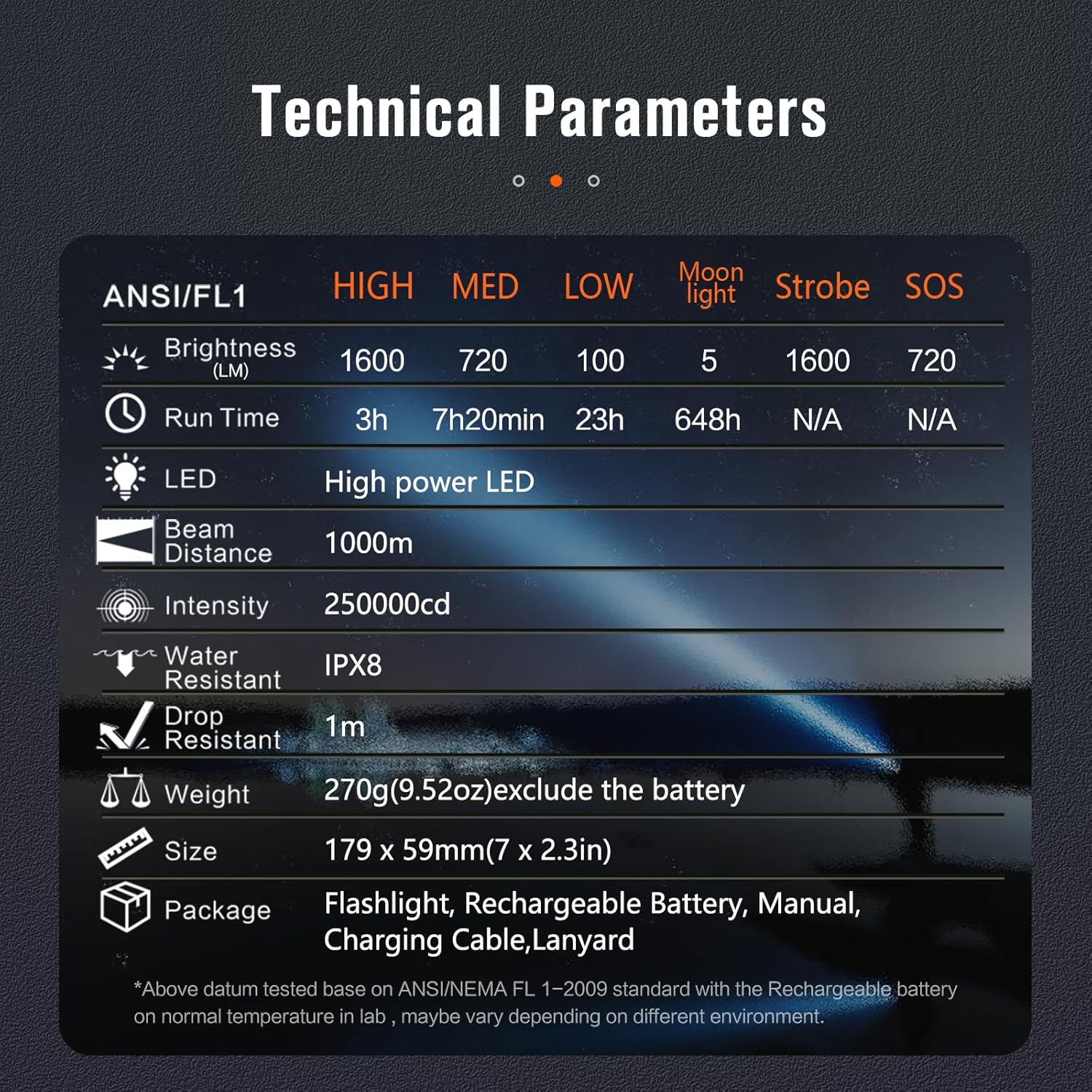
Image 10.1: A table detailing the technical specifications of the NICRON B200, including brightness levels, runtimes, LED type, beam distance, intensity, water resistance, drop resistance, weight, and size.

Image 10.2: The NICRON B200 flashlight submerged in water, illustrating its IPX8 waterproof rating, capable of being submerged up to 2 meters.

Image 10.3: A visual comparison of the NICRON B200 flashlight's size next to a smartphone, along with its weight, providing a clear understanding of its dimensions and portability.
| Feature | Detail |
|---|---|
| Model | B200 |
| Light Source | High Power LED |
| Max Brightness | 1600 Lumens |
| Max Beam Distance | 1000 meters (3280 feet) |
| Lighting Modes | High, Medium, Low, Moonlight, Strobe, SOS |
| Max Runtime | 648 hours (Moonlight mode) |
| Battery Type | 1x Lithium Ion (included, rechargeable) |
| Charging Port | USB Type-C |
| Water Resistance | IPX8 (Submersible up to 2 meters) |
| Drop Resistance | 1 meter |
| Material | Anodized Aluminum |
| Dimensions | 1.63"D x 1.61"W x 6.05"H (approx. 41.4 x 40.9 x 153.7 mm) |
| Weight | 9.4 ounces (approx. 267 grams) excluding battery |
Note: All data is based on NICRON laboratory testing. Actual performance may vary depending on environmental conditions and usage.
11. Warranty and Support
11.1 Warranty Policy
NICRON offers a One-Year product replacement policy for any quality problems with the LED flashlight. This warranty covers manufacturing defects and issues arising from normal use.
The warranty does not cover damage caused by misuse, unauthorized modification, disassembly, negligence, accidents, or use in conditions beyond the product's specifications.
11.2 Customer Support
If you encounter any issues or have questions regarding your NICRON B200 flashlight, please contact our support team. For assistance, navigate to your order history on Amazon and click “Get Help With Order” under your order ID. Our support team aims to resolve your problems within 24 hours.
For general inquiries or to learn more about NICRON products, visit the official NICRON store on Amazon: NICRON Store.
Related documentsB200


Ask a question about this manual
Ask about setup, troubleshooting, compatibility, parts, safety, or missing instructions. Manuals+ will review the question and use this page’s manual context to help answer it.