
GEKRONE A290-Silver
GEKRONE Smart Fingerprint Lock User Manual
Model: A290-Silver
1. Introduction
The GEKRONE Smart Fingerprint Lock offers advanced security and convenience for your home or office. This intelligent lock provides multiple unlocking methods, including fingerprint, password, IC card, mechanical key, and control via the TUYA application. Designed for ease of use and robust protection, it integrates seamlessly into modern living spaces.
This manual will guide you through the installation process, explain the various operating modes, provide essential maintenance tips, and offer solutions to common issues.

Figure 1: GEKRONE Smart Fingerprint Lock with Lever Handle (Silver)
2. Product Features
- Advanced 5-in-1 Unlocking Methods: Unlock your door using fingerprints, passwords, IC cards, mechanical keys, or the TUYA mobile application (supports iOS and Android). This provides flexible access options for various situations.
- Intelligent Fingerprint Recognition: The enlarged fingerprint sensor allows for quick recognition within 0.5 seconds. It supports up to 50 different fingerprints, enabling easy authorization for family and friends.
- Numerical Keypad Management: Manage access logs, set regular or temporary passwords, authorize sub-account fingerprints, and check battery levels via the app. The lock also features a doorbell reminder and an indoor electronic deadbolt.
- Anti-Peeping Unlock: Enter your password with peace of mind. You can freely enter random numbers before and after your actual password to prevent it from being leaked.
- Emergency Power and Mechanical Key: In case of battery depletion, a USB port is available for emergency power supply (not for charging). Two mechanical keys are also provided for traditional unlocking.
- Automatic Locking: The lock can be set to automatically lock within 5-10 seconds after closing, providing added security and peace of mind.

Figure 2: Five convenient unlocking methods for the smart lock.
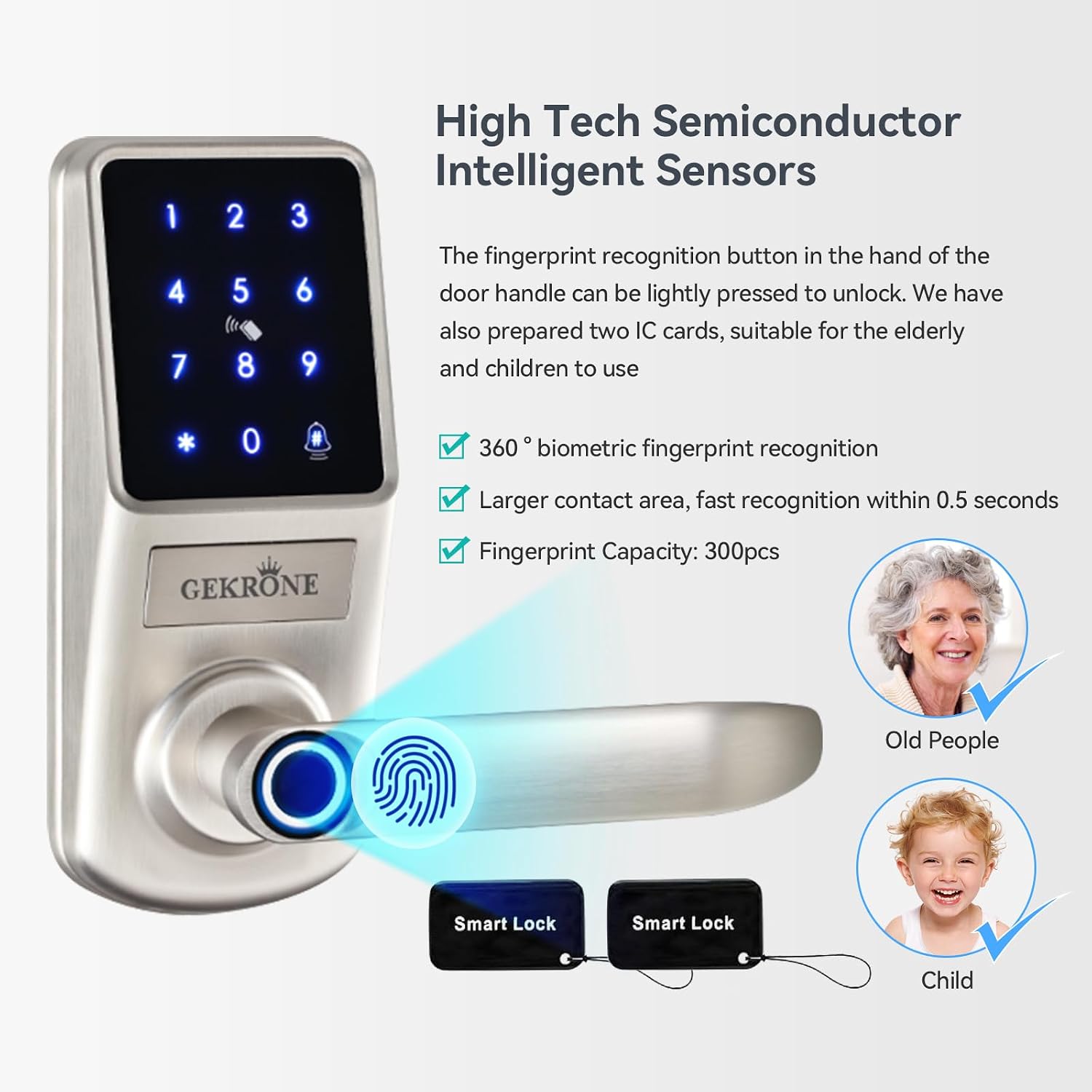
Figure 3: High-tech semiconductor intelligent sensors for fast and accurate fingerprint recognition.

Figure 4: Multi-functional smart lock features for enhanced convenience and security.

Figure 5: Anti-peeping unlock feature for enhanced password security.

Figure 6: USB Emergency Power Port and Mechanical Key Unlocking options.

Figure 7: Overview of key features including auto-lock.
3. Installation Guide (Setup)
The GEKRONE Smart Fingerprint Lock is designed for easy installation, typically taking about 30 minutes with basic tools. No wiring is required.
3.1. Pre-Installation Checks
- Ensure your door thickness is between 1-3/8 inches to 2-1/8 inches (35mm-54mm).
- Verify the adjustable lock buckle (latch) can be set to 2-3/8 inches (60mm) or 2-1/8 inches (70mm).
- The handle is reversible, supporting both left and right door opening methods.

Figure 8: Product dimensions and compatibility.
3.2. Installation Steps
For a detailed visual guide, please refer to the official installation video below:
Video 1: Installation of the GEKRONE Smart Lock. This video provides a step-by-step guide to installing the lock on a door.
Key steps include:
- Install the lock core (latch) into the door.
- Adjust the handle direction (left or right) as needed. Refer to the video below for guidance.
- Insert the square shaft into the middle slot of the front panel.
- Pass the power cord through the door and align the front lock panel.
- Install the upper back plate and secure it with screws.
- Connect the power connector and secure the battery cover.
- Insert 4 AA alkaline batteries (not included).
Video 2: Adjusting the left and right handles of the smart lock. This video demonstrates how to correctly orient the handle for your door's opening direction.

Figure 9: Reversible handle and simplified installation process.
4. Operating Instructions
4.1. Unlocking Methods
- Fingerprint: Place your registered finger on the sensor. The lock will unlock within 0.5 seconds.
- Password: Enter your registered password on the touchscreen keypad. You can add random digits before or after your actual password for privacy.
- IC Card: Tap the registered IC card on the designated sensing area.
- TUYA App: Use the TUYA app on your smartphone to remotely unlock the door. The app allows for online and offline password generation, ideal for guests or service providers.
- Mechanical Key: Insert and turn the mechanical key in the keyhole for traditional unlocking.

Figure 10: Setting temporary passwords via the TUYA app.
4.2. App Control Features
The TUYA app provides extensive control over your smart lock:
- Access Logs: View a history of all lock and unlock events.
- User Management: Add or remove fingerprints, passwords, and IC cards for different users.
- Temporary Passwords: Generate time-limited or one-time passwords for visitors.
- Remote Unlocking: Unlock the door from anywhere via Wi-Fi (no gateway required).
- Battery Level Check: Monitor the current battery status.
- Doorbell Function: The lock is equipped with a doorbell feature.
- Privacy Button: An indoor privacy button allows you to prevent external access when activated.

Figure 11: Direct Wi-Fi connection for remote unlocking.

Figure 12: Doorbell button on the smart lock.

Figure 13: Indoor privacy button.
5. Maintenance
5.1. Battery Requirements
The smart lock requires 4 AA dry batteries (not included). For optimal performance and to prevent malfunctions, only use alkaline dry batteries (LR6/LR06). Do not use carbon batteries, as they can cause unstable internal voltage.

Figure 14: Recommended alkaline batteries for the smart lock.
Batteries typically last for 10-12 months. The lock is equipped with a low battery reminder.
5.2. Environmental Considerations
To ensure the longevity of your smart lock, avoid installing it in locations exposed to prolonged direct sunlight or high moisture. High temperatures or rainwater erosion can damage the internal components.

Figure 15: Environmental operating conditions for the smart lock.
6. Troubleshooting
- Lock Malfunctions: If the lock experiences unstable operation, check the batteries. Ensure you are using alkaline dry batteries, as carbon batteries can cause voltage issues.
- Alarm Sounds: The lock will sound a beep alarm if someone attempts to pry it open or if there are multiple failed unlock attempts. This is a security feature.
- Fingerprint Recognition Issues: Ensure your finger is clean and dry. The sensor is designed for quick recognition, but extreme conditions or improper placement can affect performance.

Figure 16: Anti-pry warning system.
7. Specifications
| Attribute | Value |
|---|---|
| Brand | GEKRONE |
| Model Name | A290 |
| Item Model Number | A290-Silver |
| Lock Type | Keypad |
| Special Feature | Lockable |
| Material | Aluminum |
| Color | Silver |
| Item Dimensions L x W x H | 14.17 x 7.87 x 4.72 inches |
| Item Weight | 3.9 pounds |
| Connectivity Protocol | Wi-Fi |
| Control Method | App |
| Batteries Required? | Yes (4 AA Alkaline) |
| Door Thickness Range | 1-3/8 inches to 2-1/8 inches (35mm-54mm) |
| Adjustable Lock Buckle | 2-3/8 inches (60mm) to 2-1/8 inches (70mm) |
Figure 17: Product Specifications.
8. Warranty and Support
GEKRONE is committed to providing reliable products and excellent customer service. We value your user experience and are dedicated to timely and serious handling of every inquiry.
For any questions, technical support, or warranty claims, please contact GEKRONE customer service through the platform where you purchased the product. Please have your model number (A290-Silver) and purchase details ready for faster assistance.
Ask a question about this manual
Ask about setup, troubleshooting, compatibility, parts, safety, or missing instructions. Manuals+ will review the question and use this page’s manual context to help answer it.