
Introduction
Thank you for choosing the Verbatim UTA-09 GaN III Universal Travel Adapter 70W. This adapter is designed to provide a compact and versatile charging solution for your electronic devices while traveling globally. It supports over 180 countries with multiple plug options and features advanced GaN III technology for efficient power delivery. Please read this manual thoroughly before using the product to ensure safe and optimal operation.
Product Overview
Key Features:
- Global compatibility in over 180 countries with GaN III technology.
- Supports 70W Power Delivery (PD) and Quick Charge (QC) for fast charging.
- Simultaneous charging of up to six devices via AC socket, USB-A, and USB-C ports.
- Compact size for convenient portability, includes a travel pouch.
- Integrated shutter safety function to prevent foreign objects from being inserted into sockets.
Components:
The Verbatim UTA-09 adapter features a universal AC output socket, multiple USB charging ports, and retractable plugs for various regions.
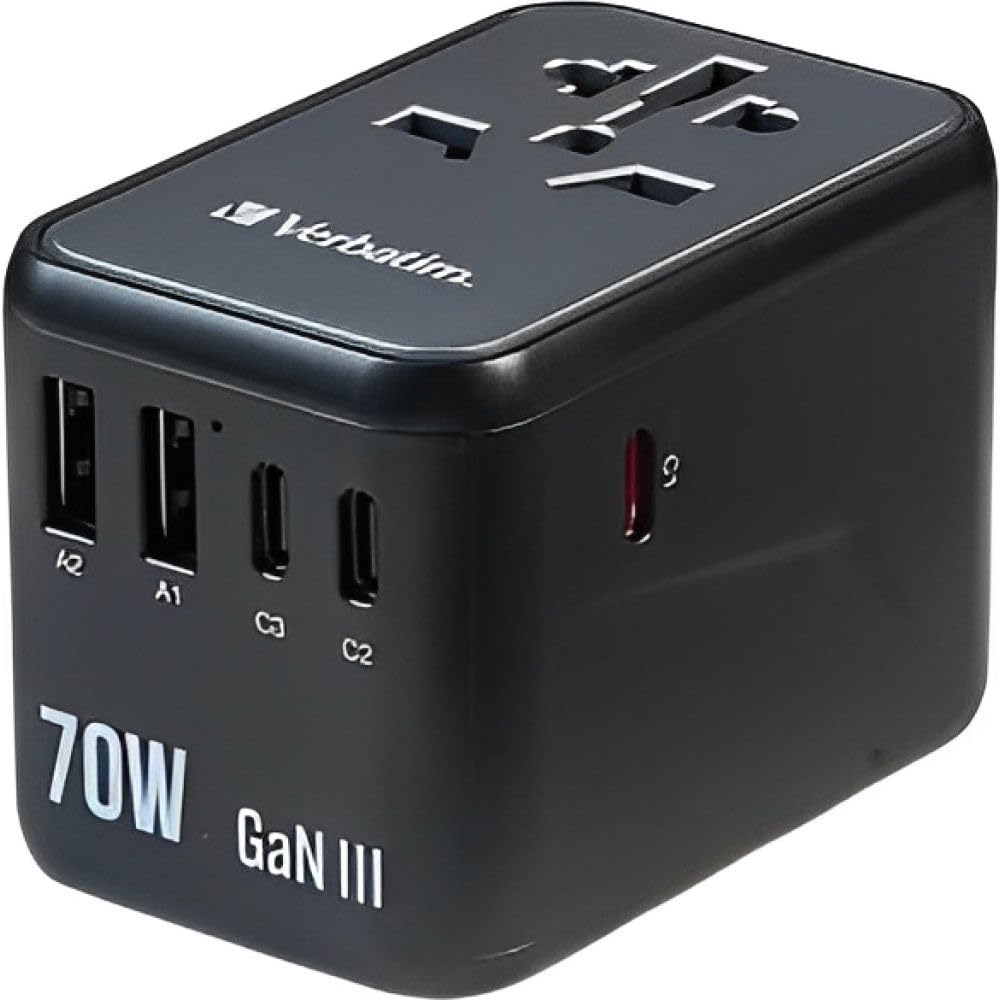
Image 1: Front view of the Verbatim UTA-09 Universal Travel Adapter. This image displays the universal AC output socket at the top, two USB-A ports labeled A1 and A2, and two USB-C ports labeled C2 and C3 on the front face. The main USB-C port (C1) is located on the side, not fully visible in this angle. The adapter is black with "70W GaN III" printed on the front.
- Universal AC Socket: Accepts plugs from various countries.
- USB-C Ports (C1, C2, C3): For charging USB-C compatible devices. C1 supports Power Delivery 3.0 and Quick Charge 4+.
- USB-A Ports (A1, A2): For charging USB-A compatible devices.
- Retractable Plugs: Integrated slide-out plugs for EU, UK, US/AU/CN regions.
Setup and First Use
Before connecting any devices, ensure the adapter is correctly configured for the region you are in.
Selecting the Correct Plug:
- Identify the appropriate plug type for your destination (EU, UK, US/AU/CN).
- Locate the corresponding slider on the side of the adapter.
- Slide the button forward to extend the required plug pins. Ensure the pins are fully extended and locked into place before use.
- To retract the plug, press the release button (if present) and slide the pins back into the adapter body.
Note: Only one plug type can be extended at a time. Do not force plugs if they do not extend or retract smoothly.
Operating Instructions
The Verbatim UTA-09 allows you to charge multiple devices simultaneously.
Using the AC Socket:
- Extend the appropriate regional plug from the adapter.
- Plug the adapter into a wall outlet.
- Insert your device's power plug into the universal AC socket on the adapter. Ensure it is firmly seated.
- The AC socket is designed for low-power devices. Refer to the specifications section for maximum wattage.
Using the USB Charging Ports:
The adapter features one USB-C port (C1) with Power Delivery 3.0 and Quick Charge 4+ support, two additional USB-C ports (C2, C3), and two USB-A ports (A1, A2).
- Connect your device's USB charging cable to the appropriate USB-C or USB-A port on the adapter.
- Connect the other end of the cable to your device.
- The adapter will automatically detect your device and deliver the optimal charging current.
- For fast charging, use the USB-C1 port with compatible devices and cables to utilize Power Delivery 3.0 or Quick Charge 4+ up to 70W.
Simultaneous Charging: You can charge up to six devices concurrently (one via AC socket and five via USB ports), provided the total power consumption does not exceed the adapter's maximum output.

Image 2: Back view of the Verbatim UTA-09 Universal Travel Adapter. This image displays the retractable plug mechanisms for different regions (AUS, USA/JP, UK, CA, EU) and detailed electrical specifications. Key information includes AC Input: 100-250V~, 50/60Hz, and various USB output modes for USB-C1 (PD 3.0 & QC 4+ up to 70W), USB-C2/C3 (up to 15W each), and USB-A1/A2 (up to 12W each). The total DC output is 70W Max.
Safety Information
To ensure safe operation and prevent damage to the adapter or connected devices, please observe the following safety precautions:
- Indoor Use Only: This adapter is designed for indoor use in dry locations. Do not expose it to rain, moisture, or extreme temperatures.
- Avoid Overloading: Do not exceed the maximum power rating of the adapter (refer to specifications). Overloading can cause overheating and damage.
- Not a Voltage Converter: This product is a travel adapter, not a voltage converter. It does not convert voltage. Ensure your devices are compatible with the local voltage (100-250V).
- High-Power Appliances: Do not use this adapter with high-power appliances such as hair dryers, curling irons, electric kettles, or coffee makers. These devices typically exceed the adapter's wattage limits.
- Children and Pets: Keep out of reach of children and pets. The shutter safety function helps prevent accidental insertion of foreign objects.
- Damage: Do not use the adapter if it is damaged, wet, or has exposed wiring. Contact support immediately.
- Disassembly: Do not attempt to disassemble, repair, or modify the adapter. This will void the warranty and may pose a safety risk.
- Ventilation: Ensure adequate ventilation around the adapter during use. Do not cover it with cloths or other materials.
Maintenance
Proper care and maintenance will extend the life of your Verbatim UTA-09 adapter.
- Cleaning: Disconnect the adapter from the power outlet and all devices before cleaning. Use a soft, dry cloth to wipe the surface. Do not use liquid cleaners or solvents.
- Storage: When not in use, retract all plugs and store the adapter in a cool, dry place, preferably in its travel pouch.
- Fuse Replacement: The adapter may contain a replaceable fuse. If the adapter stops working, check the fuse. Refer to the markings on the adapter for fuse specifications and replacement instructions. Always replace with a fuse of the same type and rating.
Troubleshooting
If you encounter issues with your Verbatim UTA-09 adapter, please refer to the following common solutions:
- Adapter Not Charging Devices:
- Ensure the adapter is firmly plugged into a live wall outlet.
- Verify that the correct regional plug is fully extended and locked.
- Check if your device's charging cable is securely connected to both the adapter and your device.
- Try a different wall outlet or a different charging cable.
- Confirm your device is compatible with the adapter's output specifications.
- Slow Charging:
- Ensure you are using a high-quality cable that supports fast charging (e.g., PD or QC).
- If charging multiple devices, the total output power is shared. Disconnect some devices to see if charging speed improves for others.
- Verify your device supports the fast charging protocols (PD, QC) offered by the adapter.
- No Power from AC Socket:
- Check if the appliance plugged into the AC socket exceeds the adapter's maximum wattage.
- The internal fuse might have blown. Refer to the Maintenance section for fuse replacement.
- Adapter Overheating:
- Disconnect all devices and unplug the adapter from the wall. Allow it to cool down.
- Ensure the adapter is not covered and has adequate ventilation.
- Reduce the number of devices being charged simultaneously or the power draw of connected devices.
If the issue persists after trying these steps, please contact Verbatim customer support.
Specifications
| Feature | Detail |
|---|---|
| Model Number | UTA-09 (32124) |
| AC Input | 100-250V~, 50/60Hz |
| USB-C1 Output (PD 3.0 & QC 4+) | 3.3-11V # 5A, 5V # 2.4A, 9V # 3A, 12V # 3A, 15V # 3A, 20V # 3.25A (70W Max) |
| USB-C2/C3 Output | 5V # 3A (15W Max) each |
| USB-A1/A2 Output | 5V # 2.4A (12W Max) each |
| Total DC Output | 70W Max |
| Supported Protocols | PD3.0, QC 4+, FCP, AFC, PPS, BC1-2 and more. |
| Product Dimensions (L x W x H) | 5 x 4 x 3 inches (12.7 x 10.16 x 7.62 cm) |
| Item Weight | 8.2 ounces (0.23 kg) |
| Manufacturer | Verbatim |
| ASIN | B0DRDLF6BF |
| GTIN | 00023942321248 |
Warranty and Support
The Verbatim UTA-09 GaN III Universal Travel Adapter 70W comes with a 2-year Limited Lifetime warranty from the date of purchase.
This warranty covers defects in materials and workmanship under normal use. It does not cover damage resulting from misuse, abuse, unauthorized modification, or natural disasters.
For warranty claims or technical support, please contact Verbatim customer service through their official website or the retailer where the product was purchased. Please have your proof of purchase and product model number (UTA-09 or 32124) ready.


