
1. Product Overview
The EZVALO Cordless Table Lamp is a versatile, rechargeable LED lamp designed for both indoor and outdoor use. It features IP65 waterproofing, a 4500mAh battery, touch-sensitive dimming, and three adjustable color temperatures. This manual provides instructions for assembly, operation, maintenance, and troubleshooting.

Image 1: Two EZVALO Cordless Table Lamps in a living room setting.
2. Package Contents
Please verify that all components are present in your package:
- 2 x 360° All-Around Glow Lamp Heads
- 4 x 3.6-inch Wood-Grain Metal Rods
- 2 x Non-slip Rubber Bases
- 2 x USB-C Charging Cables
- 1 x User Manual (this document)

Image 2: Contents of the EZVALO Cordless Table Lamp package.
3. Setup and Assembly
Follow these steps to assemble your EZVALO Cordless Table Lamp:
- Attach the First Rod: Screw one of the wood-grain metal rods clockwise into the threaded hole on the center of the non-slip rubber base until secure.
- Attach the Second Rod (Optional for taller height): If a taller lamp is desired, screw a second wood-grain metal rod clockwise onto the top of the first rod.
- Install the Lamp Head: Carefully align the lamp head with the top of the assembled rod(s) and screw it clockwise until it is firmly attached. Ensure the connection is stable.

Image 3: Easy installation steps for the lamp.
Initial Charging
Before first use, fully charge the lamp. Locate the USB-C charging port on the underside of the lamp head. Connect the provided USB-C cable to the lamp and a 5V/2A power adapter (not included). A full charge takes approximately 4 hours.
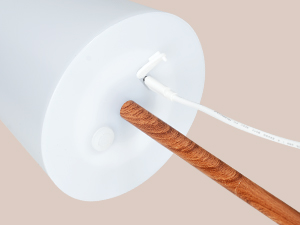
Image 4: USB-C charging port on the lamp head.
4. Operating Instructions
The EZVALO lamp features a touch-sensitive switch for easy control.
Power On/Off and Brightness Adjustment
- Power On/Off: Briefly touch the power icon on the top of the lamp head to turn the lamp on or off.
- Brightness Adjustment: While the lamp is on, press and hold the power icon to smoothly adjust the brightness from 5% to 100%. Release your finger when the desired brightness is reached.

Image 5: Touch control for brightness adjustment.
Color Temperature Selection
The lamp offers three color temperature options:
- Switching Color Temperatures: Double-tap the power icon on the top of the lamp head to cycle through the three available color temperatures: 3000K Warm White, 4200K Natural Light, and 6000K Cool White.

Image 6: Adjusting color temperatures by double-tapping.
Battery Life
A fully charged 4500mAh battery provides approximately 9-16 hours of usage, depending on the brightness level and color temperature selected.
5. Maintenance
To ensure the longevity and optimal performance of your EZVALO Cordless Table Lamp, follow these maintenance guidelines:
- Cleaning: Wipe the lamp with a soft, damp cloth. Avoid using abrasive cleaners or solvents, as these can damage the finish. Ensure the USB port cover is closed when cleaning.
- Battery Care: For best battery life, avoid completely draining the battery frequently. Recharge the lamp when the light becomes dim or before extended storage.
- Storage: Store the lamp in a cool, dry place when not in use for prolonged periods.
- Waterproof Feature: While the lamp is IP65 waterproof, it is designed to withstand splashes and rain. Do not submerge the lamp in water. Ensure the rubber tap protecting the USB port is securely closed for outdoor use.
6. Troubleshooting
If you encounter issues with your EZVALO Cordless Table Lamp, refer to the following common solutions:
| Problem | Possible Cause | Solution |
|---|---|---|
| Lamp does not turn on. | Battery is depleted. | Charge the lamp for at least 4 hours using the provided USB-C cable. |
| Lamp does not charge. | Faulty cable or power adapter. | Try a different USB-C cable or a different 5V/2A power adapter. Ensure the cable is fully inserted. |
| Brightness adjustment or color temperature change is unresponsive. | Touch sensor issue or low battery. | Ensure your finger is making full contact with the touch sensor. Charge the lamp fully. |
| Lamp flickers or turns off unexpectedly. | Low battery or unstable connection. | Recharge the lamp. Ensure all rod connections are tight. |
7. Specifications
| Feature | Detail |
|---|---|
| Brand | EZVALO |
| Model | B0DRCP9X5D |
| Product Dimensions | 4.7"D x 4.7"W x 11.6"H |
| Item Weight | 2.53 Pounds |
| Lamp Type | Table Lamp |
| Shade Material | Plastic |
| Shade Color | Ivory |
| Switch Type | Touch |
| Special Feature | Cordless, Dimmable, Rechargeable, Waterproof |
| Light Source Type | LED |
| Material | Acrylonitrile Butadiene Styrene (ABS) |
| Power Source | Battery Powered |
| Battery Capacity | 4500 mAh Lithium Ion (included) |
| Charging Time | Approx. 4 hours (with 5V/2A adapter) |
| Usage Time | 9-16 hours (depending on brightness) |
| Light Color Temperatures | 3000K Warm White, 4200K Natural Light, 6000K Cool White |
| Brightness | 200 Lumen |
| Voltage | 3.7 Volts |
| Water Resistance Level | IP65 Waterproof |
| Average Life | 50,000 Hours |
| Assembly Required | Yes |
| Included Components | Lamp Heads, Metal Rods, Rubber Bases, USB-C Cables, User Manual |
8. Warranty and Support
EZVALO is committed to providing quality products. If your product arrives damaged or if you experience any quality issues, please contact EZVALO directly for assistance. We are dedicated to providing a satisfactory solution and ensuring a positive customer experience.
For support, please refer to the contact information provided with your purchase or visit the official EZVALO website.