
X88 H96MAX2025
H96 Max 2025 Android 14.0 ATV Box User Manual
Model: H96MAX2025 | Brand: X88
Introduction
The H96 Max 2025 Android 14.0 ATV Box is a powerful and versatile smart home player designed to enhance your entertainment experience. Featuring the latest Android 14.0 OS, a robust H313 Quad-Core processor, and advanced connectivity options like WiFi 6 and Bluetooth 5.0, this device delivers stunning 4K AV1 Ultra HD video quality and intuitive voice control. This manual provides essential information for setting up, operating, and maintaining your device.

Image: The H96 Max 2025 Android TV Box, a compact white square device, shown alongside its white voice remote control. The remote features a circular navigation pad and dedicated buttons for popular streaming services.
What's in the Box
Upon opening your H96 Max 2025 package, please verify that all the following items are included:
- H96 Max 2025 TV Box
- Voice Remote Control
- HD Cable
- Power Adapter
- User Guide (this manual)
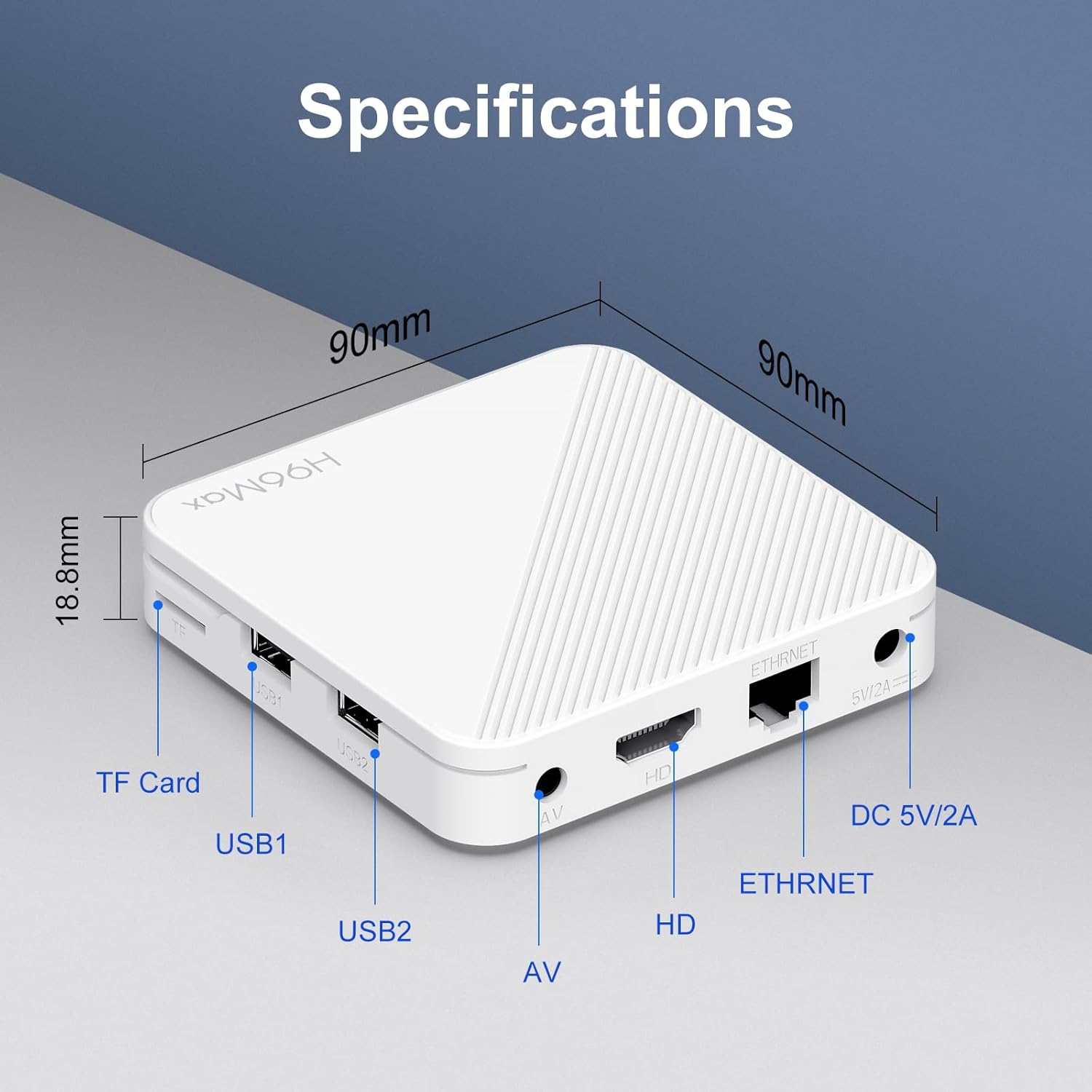
Image: A flat lay showing the contents of the H96 Max 2025 package, including the TV box, remote control, power adapter, HD cable, and user manual, all neatly arranged.
Setup Guide
Follow these simple steps to get your H96 Max 2025 Android TV Box up and running:
- Connect TV Box to TV: Use the provided HD cable to connect the HDMI port on the TV Box to an available HDMI input on your television.
- Connect Power: Plug the power adapter into the DC 5V/2A port on the TV Box, then plug the adapter into a wall outlet.
- Connect to Internet: For optimal performance, connect the TV Box to your home network. You can use either an Ethernet cable (recommended for stable connection) or connect wirelessly via Wi-Fi. Navigate to Network settings on the device to configure Wi-Fi.
- Initial Setup: Power on your TV and select the correct HDMI input. Follow the on-screen instructions to complete the initial setup, which may include language selection, network configuration, and Google account sign-in.
- Start Streaming: Once setup is complete, you can begin downloading your favorite apps from the Google Play Store and enjoy streaming content.

Image: A visual guide illustrating the three simple steps for setup: 1. Connect TV Box to TV, 2. Connect to internet (via Wi-Fi symbol), and 3. Start streaming (showing a TV screen with app icons).
Video: An unboxing and overview of the H96 Max 2025 Android 14.0 ATV Box, demonstrating the contents of the package and showcasing the device's various ports and design.
Operating Instructions
Navigating the Interface
The H96 Max 2025 runs on Android 14.0 ATV OS, providing a user-friendly interface optimized for television screens. Use the included voice remote control to navigate menus, select apps, and control playback.

Image: A person comfortably seated, using the remote control to navigate the H96 Max 2025 interface displayed on a large television screen, showing various app icons.
Key Features
Android 14.0 OS & ATV OS
Equipped with the latest Android 14.0 OS, this TV Box offers a faster, more efficient, and stable user experience compared to previous versions. It supports multi-app video playback and a wide range of applications.

Image: A graphic illustrating the progression of Android versions, highlighting Android 14.0 as the latest and most efficient, with the H96 Max device shown alongside.
Powerful H313 Chipset
The integrated H313 Quad Core Cortex-A53 CPU provides powerful processing capabilities, ensuring smooth performance for all your applications and media consumption.

Image: A collage of features including the AllWinner H313 Chipset, support for Netflix and Disney+, Dolby Vision and Atmos, BT5.0, WiFi 5.8, AV1 and 4K HDR decoding, and Chromecast built-in with Google Assistant.
Storage and Memory
With 2GB DDR3 RAM and 16GB eMMC ROM, the device allows for smooth software operation and ample space for large movies and games. Storage can be expanded via an external hard drive, USB device, or microSD card.
2.4G/5.8Ghz WiFi 6 & BT 5.0
Experience stable and reliable network performance with dual-band WiFi 6 and 100M Ethernet. Built-in Bluetooth 5.0 allows for easy connection to multimedia devices, mice, speakers, or headsets. The mirroring cast function enables screen sharing from your phone or tablet to your TV.


Image: Logos for Wi-Fi 6 and Bluetooth 5.0, indicating advanced wireless connectivity.

Image: A visual comparison demonstrating faster speeds and reduced network congestion with Wi-Fi 6 compared to Wi-Fi 5, featuring a race car on a screen.
4K AV1 Ultra HD & 3D Support
Enjoy stunning visual experiences with support for 4K AV1 ultra-high-definition content. The device also supports 3D movies, bringing a cinematic experience to your home.

Image: A vibrant 4K Ultra HD image of a flamingo on a TV screen, emphasizing the clarity and realism provided by the device.

Image: A split image showing 3D content (an astronaut in space) and multi-screen interaction features like Airplay, DLNA, and Miracast, with a race car on screen.
Voice Remote Control & Chromecast
The included voice remote control allows for natural interaction and easy navigation. With built-in Chromecast, you can effortlessly cast content from your mobile devices to your TV screen.

Image: A hand holding the voice remote control, with speech bubbles on the TV screen demonstrating voice commands like "Hey Google, workout music" and "Hey Google, Please play an action movie."

Image: A smartphone screen mirroring a game to a large TV screen, highlighting the Google Play Games and Chromecast built-in features.
Specifications
Detailed technical specifications for the H96 Max 2025 Android 14.0 ATV Box:
| Feature | Detail |
|---|---|
| Brand | X88 |
| Model Number | H96MAX2025 |
| Operating System | Android 14.0 ATV OS |
| Processor | H313 Quad Core Cortex-A53 |
| RAM | 2GB DDR3 |
| Internal Storage | 16GB eMMC |
| Expandable Storage | Supports External Hard Drive, USB device, microSD card |
| Wi-Fi Connectivity | 2.4GHz/5.8GHz Dual-band WiFi 6 |
| Bluetooth | BT 5.0 |
| Ethernet | 100M Ethernet |
| Video Output | 4K AV1 Ultra HD, 3D support |
| Ports | HDMI, USB (2x), TF Card, AV, Ethernet, DC 5V/2A |
| Special Features | Voice Remote Control, Chromecast built-in, Mirroring Cast |
| Dimensions | 3.6 x 3.6 x 0.67 inches (90 x 90 x 18.8 mm) |
| Item Weight | 10.4 ounces |

Image: A diagram showing the dimensions (90mm x 90mm x 18.8mm) and port layout of the H96 Max 2025, including TF Card, USB1, USB2, AV, HD, Ethernet, and DC 5V/2A ports.
Troubleshooting
If you encounter issues with your H96 Max 2025, refer to the following common problems and solutions:
- No Power:
- Ensure the power adapter is securely connected to the TV Box and a working power outlet.
- Verify the power outlet is active.
- No Picture/Signal:
- Check if the HDMI cable is securely connected to both the TV Box and the TV.
- Ensure your TV is set to the correct HDMI input source.
- Try a different HDMI port on your TV or a different HDMI cable.
- No Sound:
- Check the volume levels on both the TV Box and your television.
- Ensure audio settings on the TV Box are correctly configured (e.g., HDMI audio output).
- Wi-Fi Connection Issues:
- Ensure your Wi-Fi router is on and functioning correctly.
- Restart the TV Box and your Wi-Fi router.
- Check if the Wi-Fi password entered is correct.
- Move the TV Box closer to the router to improve signal strength.
- Remote Control Not Responding:
- Check and replace the batteries in the remote control.
- Ensure there are no obstructions between the remote and the TV Box.
- For voice control, ensure the remote is properly paired via Bluetooth (if applicable).
- System Freezing/Lagging:
- Close unnecessary background applications.
- Clear cache for problematic apps.
- Ensure sufficient free storage space.
- Perform a factory reset as a last resort (note: this will erase all data).
Maintenance
To ensure the longevity and optimal performance of your H96 Max 2025 Android TV Box, follow these maintenance guidelines:
- Cleaning: Use a soft, dry cloth to clean the exterior of the device. Avoid using liquid cleaners or abrasive materials.
- Ventilation: Ensure the device is placed in a well-ventilated area to prevent overheating. Do not block the ventilation holes.
- Power Off When Not in Use: For extended periods of inactivity, it is recommended to power off the device and unplug it from the power outlet.
- Software Updates: Regularly check for and install system software updates to ensure you have the latest features and security patches.
- Avoid Extreme Conditions: Do not expose the device to extreme temperatures, humidity, or direct sunlight.
Warranty and Support
For warranty information and technical support, please refer to the contact details provided by your retailer or the manufacturer's official website. Keep your purchase receipt as proof of purchase for warranty claims.
This product is Verified by Transparency, meaning each item has a unique code that can be verified before shipping to ensure authenticity.
Related documentsH96MAX2025


Ask a question about this manual
Ask about setup, troubleshooting, compatibility, parts, safety, or missing instructions. Manuals+ will review the question and use this page’s manual context to help answer it.