Introduction
The M-VAVE Tank Mini is a compact and versatile multi-effects processor designed for both guitar and bass. It integrates a wide range of effects, amplifier simulations, and cabinet simulations, offering extensive sound shaping capabilities. Key features include third-party IR support, OTG recording, a built-in tuner, and wireless Bluetooth music functionality. With its portable design and long battery life, the Tank Mini is suitable for practice, recording, and live performance.
Setup
Powering the Device
The M-VAVE Tank Mini can be powered via its USB Type-C port (5V) or its internal battery. The internal battery provides approximately 7 hours of continuous use. To charge the device, connect a standard USB 5V power adapter to the Type-C port. The charging current limit is about 400 mA.

Image: The M-VAVE Tank Mini pedal with a USB Type-C cable connected, illustrating the power and data connection.
Connecting Your Instrument and Amplifier
- Connect your guitar or bass to the IN (Standard 1/4" jack MONO/TS) port on the Tank Mini.
- Connect the OUT (Standard 1/4" jack MONO/TS) port of the Tank Mini to your amplifier, mixer, or audio interface.
- For silent practice or monitoring, connect headphones to the 1/8" Stereo Headphone Monitoring Interface.

Image: Top and front views of the M-VAVE Tank Mini, highlighting the input, output, USB, and headphone jacks for various connections.
Software Installation
The M-VAVE Tank Mini supports mobile and computer software for deeper editing and management of effects. Visit the official M-VAVE website to download the latest software compatible with WINDOWS, MAC, iOS, and Android operating systems. This software allows for importing third-party IRs, managing presets, and customizing effect chains.
Operating Instructions
Basic Controls
The Tank Mini features three footswitches (A, B, C) for navigating presets and engaging effects, along with a volume knob. The footswitches often have LED rings indicating their status.

Image: Top view of the M-VAVE Tank Mini, showing the three footswitches with illuminated rings, indicating active status.
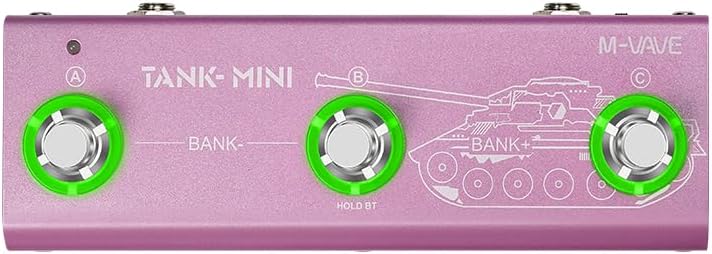
Image: The M-VAVE Tank Mini with green circles highlighting the three footswitches, indicating their primary control points.
Effect Modules and Chains
The Tank Mini allows for the simultaneous use of 6+1 effects. The effect modules (FX, AMP, MOD, DLY, REV, CAB) can be freely moved and arranged within the M-EFCS software to create custom effect chains. The FX module offers Noise Gate, NG+Boost, or NG+Compress combinations.

Image: A diagram illustrating the six independently movable effect modules (FX, AMP, MOD, DLY, REV, CAB) and their signal flow, emphasizing customization.
The pedal features over 60 effects in total, categorized as follows:
- FX Module: Noise Gate, NG+Boost, NG+Compress
- AMP Module: 1-15 for Guitar Amp Simulation, 16-20 for Bass Amp Simulation
- MOD Module: Chorus, Phaser, Tremolo, Flanger, Vibrato, Univibe, Autofilter
- DLY Module: Analog, Ducking, dTape, Dual, Lofi
- REV Module: Room, Hall, SWELL, Spring, Shimmer, Cloud
- CAB Module: 1-15 for Electric Guitar Cabinet Simulation, 16-20 for Bass Cabinet Simulation

Image: A chart providing a detailed breakdown of the over 60 effects available, categorized by their respective modules (FX, AMP, MOD, DLY, REV, CAB). The image also shows the M-VAVE Tank Mini pedal resting on a guitar, visually representing the application of classic speaker simulations.
Presets and Tuner
The Tank Mini comes with 21 factory presets. These can be recalled and customized. The built-in tuner function assists in accurate instrument tuning.
OTG Recording and Bluetooth Music
The pedal supports Mobile Phone OTG Recording Function, allowing direct recording to compatible mobile devices. It also features Wireless BT Music Function, enabling audio playback through the pedal for practice or jamming.
ANN Audio Modeling Algorithm
The Tank Mini utilizes ANN (Audio Neural Network) Audio Modeling Technology. This technology allows the pedal to learn and accurately reproduce the sound characteristics of various amps, single pedals, or cabinets, achieving high-fidelity timbre sharing. This enables the Tank series to restore sound details of different devices.

Image: A diagram illustrating the ANN Digital Reproduction Technology, showcasing its software interface for audio modeling and reproduction.
How to Achieve Sound Cloning:
- Connect a classic monoblock (or similar device) to the sound card. The left channel is the original sound, and the right channel is connected to the classic monoblock. Generate audio through the host recording software.
- Use the official ANN software to model, learn, replicate, and imitate this audio, generating an AM2 format file.
- AM2 files can be loaded and imported into Tank series products for use.

Image: A diagram illustrating the sound cloning process, showing original, simulated, and combined sound waveforms for comparison.
Maintenance
Cleaning
To clean the M-VAVE Tank Mini, use a soft, dry cloth. Do not use abrasive cleaners, waxes, or solvents, as these can damage the finish and internal components. Ensure the device is powered off and disconnected from all cables before cleaning.
Battery Care
The internal battery is designed for long life. To maximize battery lifespan, avoid fully discharging the battery frequently. Recharge the device when the battery indicator shows low power. Store the device in a cool, dry place if not used for extended periods, ensuring the battery has some charge (e.g., 50%).
Software Updates
Periodically check the official M-VAVE website for software and firmware updates. Keeping your device updated ensures optimal performance, new features, and bug fixes.
Troubleshooting
No Sound Output
- Ensure all cables (instrument, output to amp/mixer) are securely connected.
- Check the volume knob on the Tank Mini and your amplifier/mixer.
- Verify that the correct input/output settings are selected on your connected devices.
- If using headphones, ensure they are fully plugged into the 1/8" jack.
Device Not Powering On
- Confirm the USB power source is active and providing 5V.
- If using battery power, ensure the battery is charged. Connect the USB cable to charge the device.
Software Connectivity Issues
- Ensure the USB cable is connected for data transfer.
- Check if the correct drivers are installed on your computer (if applicable).
- Restart both the Tank Mini and your computer/mobile device.
- Verify that the software is the latest version.
Specifications

Image: A detailed chart outlining the technical specifications of the M-VAVE Tank Mini, including input/output, sample rate, size, weight, and power details.
| Feature | Detail |
|---|---|
| Input | Standard 1/4" jack MONO/TS |
| Output | Standard 1/4" jack MONO/TS, 1/8" Stereo jack |
| Sample rate | 44.1KHz/24bit |
| Size | 165(L)x60(W)x40(H)mm |
| Weight | About 325g |
| Power supply & USB data transmit | Type-C, 5V≥300mA |
| Battery capacity | 1450mAh |
| Battery Model/Type | 102840 |
| Battery Nominal Voltage | 3.7V |
| Battery life | 7 hours |
| Charging current limit | About 400 mA |
| Dynamic Range | 105dB |
| Total effects | 60+ |
| Effects Slots/Effects Modules | Total of 6+1 simultaneous effects slots, it can customized the order |
| Presets amount | 21 |
| USB AUDIO(OTG) | 44.1K/24Bit, support Loopback ON/OFF |
| BT music | Support |
| Software support | WINDOWS,MAC,IOS,Android |
| IR processing | 44.1K/24Bit Mono WAV files, 1024 sampling points |
| Power supply | Built-in battery or USB 5V |
| AMP modeler | Totally 20 (1-15 is electric guitar preamp, 16-20 for bass preamp) |
| IR slots | Totally 20 (1-15 is electric guitar CAB, 16-20 for bass CAB) |
| Working current | About 250 mA |
| Attachment | USB cablex1 |
Warranty and Support
Warranty Information
M-VAVE products are typically covered by a limited manufacturer's warranty. Please refer to the warranty card included with your product or visit the official M-VAVE website for detailed warranty terms and conditions specific to the Tank Mini pedal. Keep your proof of purchase for warranty claims.
Customer Support
For technical assistance, troubleshooting, or service inquiries, please contact M-VAVE customer support through their official website. You may find FAQs, software downloads, and contact forms available online.


