
LUOTWO V1-8000
LUOTWO V1-8000 Global Walkie Talkie User Manual
Model: V1-8000
1. Introduction
This manual provides comprehensive instructions for the operation, maintenance, and troubleshooting of the LUOTWO V1-8000 Global Walkie Talkie. Please read this manual thoroughly before using the device to ensure proper functionality and safety.
The LUOTWO V1-8000 is a state-of-the-art global walkie talkie designed for reliable communication across vast distances using advanced 4G PoC (Push-to-Talk Over Cellular) technology. It features a robust IP67 waterproof design, a long-lasting 6000mAh battery, and integrated GPS capabilities, making it suitable for various professional and outdoor environments.
2. Package Contents
Verify that all items are present in the package:
- 1 x LUOTWO V1-8000 National Intercom Walkie Talkie
- 1 x Battery
- 1 x Rear Clip
- 1 x Charger
- 1 x Lanyard
- 1 x User Manual
3. Product Overview
3.1 Device Layout
Familiarize yourself with the main components and controls of the V1-8000 walkie talkie.

Image: Front view of the LUOTWO V1-8000 walkie talkie with key components labeled, including Aerial, Indicator light, Power switch, Type-C interface, Speaker, Headphone jack, PTT key, Side key 1, Side key 2, LCD display screen, Menu button, Return key, Member key, Group key, and Select key.
- Aerial: For signal transmission and reception.
- Indicator Light: Displays device status (e.g., charging, transmitting).
- Power Switch: Turns the device on/off and adjusts volume.
- Type-C Interface: For charging and data connection.
- Speaker: Audio output.
- Headphone Jack: For connecting external audio accessories.
- PTT Key (Push-to-Talk): Press and hold to transmit voice.
- Side Key 1 & 2: Programmable function keys.
- LCD Display Screen: Shows status, menu, and other information.
- Menu Button: Accesses the device menu.
- Return Key: Navigates back in menus.
- Member Key (P1): Typically for accessing contact lists or specific groups.
- Group Key (P2): Typically for selecting communication groups.
- Select Key (Up/Down Arrows): Navigates through menu options.
4. Setup
4.1 Battery Installation and Charging
The V1-8000 comes with a 6000mAh rechargeable lithium-ion battery. Ensure the battery is fully charged before first use.
- Install Battery: Align the battery with the compartment on the back of the walkie talkie and press firmly until it clicks into place.
- Attach Rear Clip: If desired, attach the rear clip to the designated slot on the back of the device.
- Charge Battery: Connect the Type-C charging cable to the device's Type-C interface and the other end to the provided charger. Plug the charger into a power outlet. The indicator light will show charging status.

Image: The LUOTWO V1-8000 walkie talkie shown with its detachable battery and rear clip, illustrating how they connect to the main unit.
4.2 Initial Power On
To power on the device, rotate the Power switch/volume knob clockwise until the screen illuminates. The device will perform a self-check and connect to the network.
5. Operating Instructions
5.1 Basic Communication
- Select Group/Contact: Use the Menu button and navigation keys to select the desired communication group or individual contact.
- Transmit: Press and hold the PTT (Push-to-Talk) key on the side of the device. Speak clearly into the microphone. Release the PTT key to listen.
- Receive: When another user transmits, the audio will be heard through the speaker.
5.2 Network Connectivity (4G PoC)
The V1-8000 utilizes 4G PoC technology for global communication. It requires a compatible SIM card (not included) and a data plan for network access. Ensure the device has a strong 4G signal for optimal performance.

Image: A global map with illuminated network connections, symbolizing the extensive reach of 4G PoC technology for seamless worldwide communication.
5.3 GPS Functionality
The integrated GPS module allows for precise location tracking and route mapping. Access GPS features through the device menu. This is particularly useful for outdoor adventures and professional expeditions.
5.4 App Integration (Starlink Connectivity)
The device supports integration with a dedicated application for enhanced features, including potential Starlink satellite connectivity for extended range and reliability in remote areas. This allows for communication even where traditional cellular networks are unavailable.
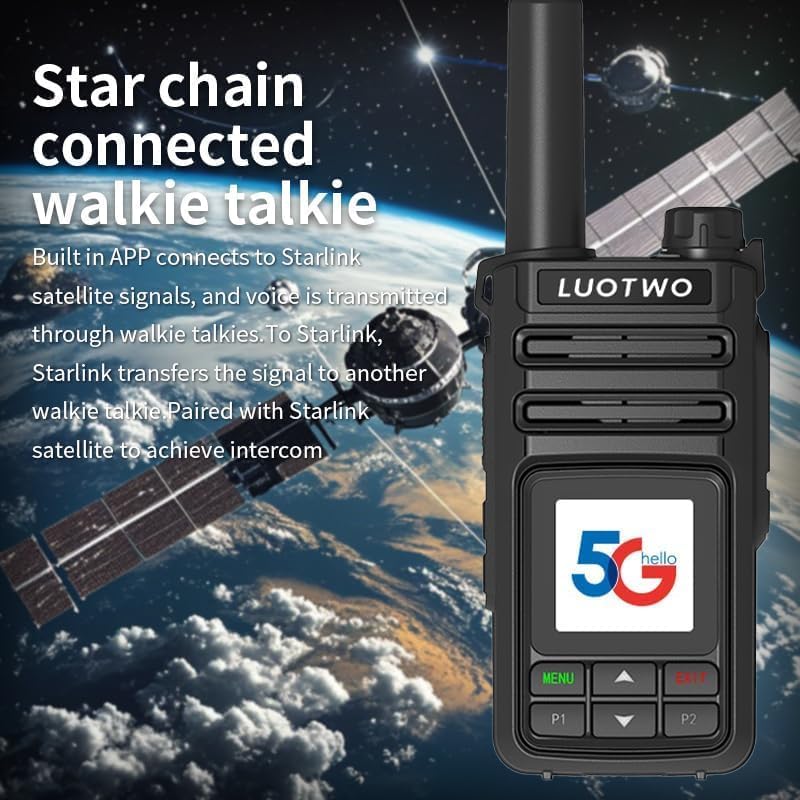
Image: A LUOTWO V1-8000 walkie talkie depicted with a Starlink satellite and ground receiver, illustrating its capability to connect and communicate via the Starlink network for long-distance intercom.

Image: A LUOTWO V1-8000 walkie talkie with a Starlink satellite in the background, emphasizing its built-in app connectivity to Starlink signals for voice transmission and intercom capabilities.
6. Maintenance
6.1 Cleaning
Regularly clean the device with a soft, damp cloth. Do not use harsh chemicals or abrasive cleaners. Ensure the Type-C port and headphone jack are free of dust and debris.
6.2 Battery Care
- Avoid fully discharging the battery frequently.
- Store the device and battery in a cool, dry place when not in use for extended periods.
- Use only the provided charger and cable.
6.3 Waterproofing (IP67)
The V1-8000 is IP67 waterproof, meaning it is protected from dust ingress and can withstand immersion in water up to 1 meter for 30 minutes. Ensure all port covers are securely closed before exposing the device to water.

Image: A LUOTWO V1-8000 walkie talkie shown in splashing water, demonstrating its IP67 waterproof rating and suitability for outdoor use in various weather conditions.
7. Troubleshooting
| Problem | Possible Cause | Solution |
|---|---|---|
| Device does not power on. | Battery is low or not installed correctly. | Charge the battery. Ensure the battery is properly seated. |
| No network signal. | Out of 4G coverage area; SIM card issue. | Move to an area with better signal. Check SIM card installation and data plan. |
| Cannot transmit or receive. | Incorrect group/contact selected; PTT key not pressed correctly. | Verify selected group/contact. Ensure PTT key is fully pressed during transmission. |
| Poor audio quality. | Weak signal; microphone/speaker obstructed. | Move to an area with better signal. Clean microphone and speaker areas. |
8. Specifications
| Feature | Detail |
|---|---|
| Model Number | LUOTWO V1-8000 |
| Communication Technology | 4G PoC (Push-to-Talk Over Cellular) |
| Battery Capacity | 6000mAh Lithium-ion |
| Water Resistance | IP67 Waterproof |
| GPS | Integrated GPS Support |
| Charging Port | Type-C |
| Color | Black |
| Talking Range Maximum | 5000 Kilometer (Network Dependent) |
| Included Components | Walkie Talkie, Battery, Rear Clip, Charger, Lanyard, Manual |
Note: Battery capacity information is based on product feature bullets.
9. Warranty and Support
For warranty information and technical support, please refer to the official LUOTWO website or contact their customer service directly. Keep your purchase receipt as proof of purchase for warranty claims.
Manufacturer: LUOTWO
Brand: LUOTWO
For further assistance, visit the LUOTWO Store on Amazon.
Ask a question about this manual
Ask about setup, troubleshooting, compatibility, parts, safety, or missing instructions. Manuals+ will review the question and use this page’s manual context to help answer it.