
Introduction
This manual provides instructions for the setup, operation, and maintenance of the ECONTROLLY 00084A replacement infrared remote control. This remote is designed to be compatible with specific Samsung DVD Recorder VHS Combo models, including DVD-VR370, DVD-VR375, and DVD-VR375A. Please read this manual thoroughly before use to ensure proper functionality.
Product Overview
The ECONTROLLY 00084A remote control is a direct replacement for the original AK59-00084A remote. It features a standard layout for controlling DVD and VCR functions, as well as basic TV controls. No programming is required for use with compatible devices.
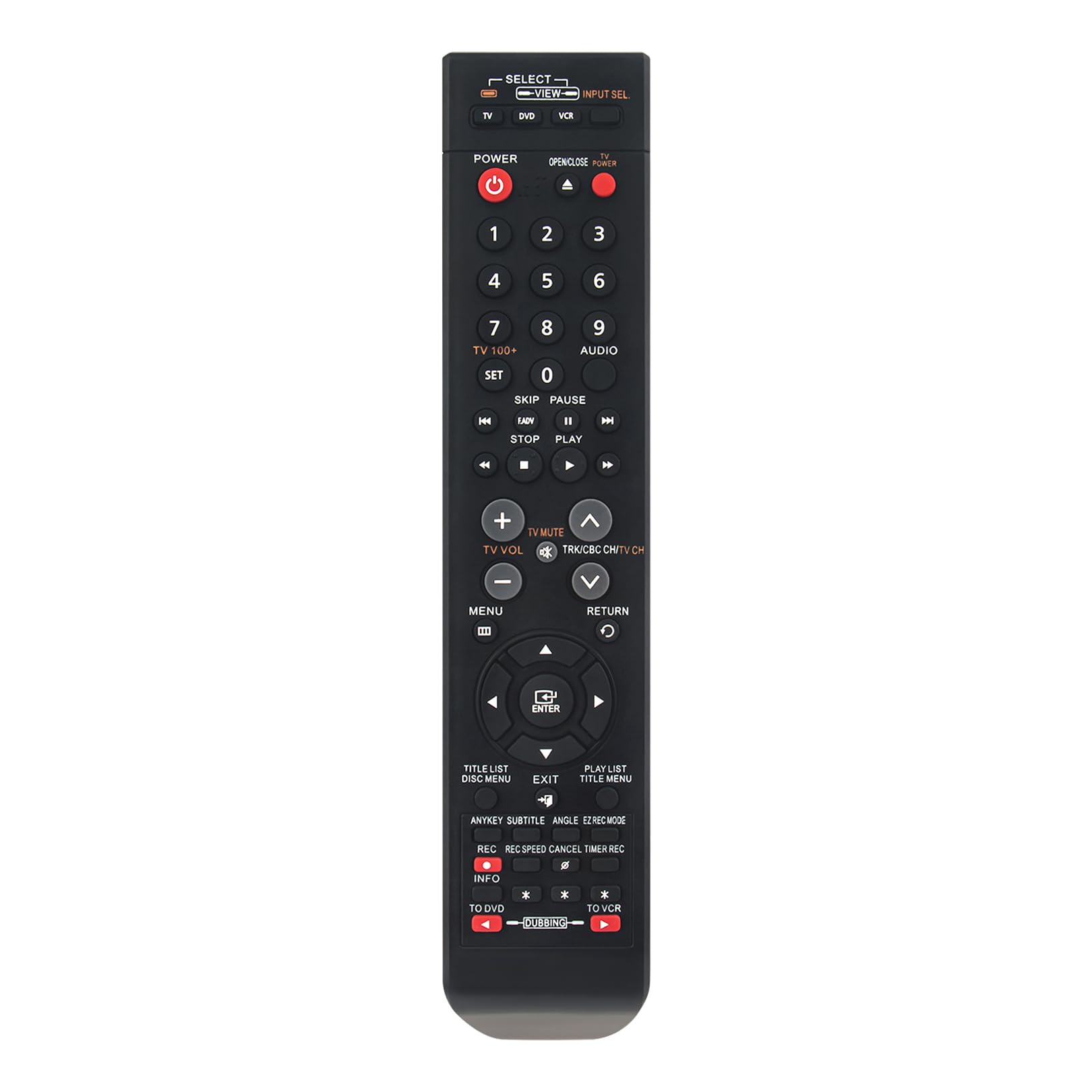
Figure 1: Front view of the ECONTROLLY 00084A remote control, displaying all buttons and their labels.

Figure 2: Angled view of the remote control, highlighting its ergonomic design.

Figure 3: Image illustrating the physical dimensions of the remote control (approximately 9.53 x 1.91 x 0.56 inches).
Setup: Battery Installation
To begin using your remote control, you must install batteries. Follow these steps:
- Locate the battery compartment on the back of the remote control.
- Slide the battery compartment cover downwards or in the direction indicated by an arrow to open it.
- Insert two (2) AAA ALKALINE batteries, ensuring the positive (+) and negative (-) terminals match the diagrams inside the compartment.
- Close the battery compartment cover by sliding it back into place until it clicks securely.
Important: Use only AAA ALKALINE batteries. Do not use rechargeable batteries, as they may not provide sufficient power or could damage the remote. Batteries are not included with the remote control.
Operating Instructions
This remote control is pre-programmed and requires no additional setup for compatible Samsung DVD Recorder VHS Combo units. Simply point the remote at your device and press the desired button.
Basic Functions
- POWER: Turns the connected device (TV, DVD, VCR) on or off.
- Number Buttons (0-9): Used for direct channel selection or inputting numerical values.
- PLAY (►), PAUSE (▐▐), STOP (■), REWIND (◀◀), FAST FORWARD (►►): Control media playback.
- TV VOL (+/-): Adjusts the television volume.
- TV MUTE: Mutes the television audio.
- TRK/CBC CH/TV CH (+/-): Changes television channels or tracks/chapters on media.
- MENU: Accesses the main menu of the DVD/VCR.
- ENTER: Confirms selections within menus.
- Navigation Buttons (Up, Down, Left, Right): Navigate through menus and options.
- RETURN: Returns to the previous screen or menu.
Device Selection and Specific Functions
- SELECT VIEW / INPUT SEL (TV, DVD, VCR): Use these buttons at the top of the remote to switch control between your TV, DVD player, or VCR. Ensure the correct mode is selected for the desired operation.
- REC (●): Initiates recording on the VCR or DVD recorder.
- TO DVD / TO VCR: Switches the recording destination or playback source between DVD and VCR modes.
- DUBBING: Initiates the dubbing process between DVD and VCR.
- TITLE LIST / DISC MENU: Accesses the DVD title list or disc menu.
- PLAY LIST / TITLE MENU: Accesses the DVD playlist or title menu.
- ANYKEY / SUBTITLE / ANGLE / EZ REC MODE: Provides access to various DVD/VCR functions as labeled.
Compatibility
This remote control is compatible with the following Samsung DVD Recorder VHS Combo models:
- Samsung DVD-VR370
- Samsung DVD-VR375
- Samsung DVD-VR375A
- Replaces original remote model AK59-00084A
Maintenance
- Cleaning: Wipe the remote control with a soft, dry cloth. Do not use liquid cleaners or abrasive materials.
- Battery Replacement: Replace batteries when the remote's response becomes sluggish or stops working. Always replace both batteries at the same time with new AAA ALKALINE batteries. Remove batteries if the remote will not be used for an extended period to prevent leakage.
- Storage: Store the remote in a cool, dry place away from direct sunlight and extreme temperatures.
Troubleshooting
- Remote not working:
- Ensure batteries are installed correctly with the correct polarity.
- Replace old batteries with new AAA ALKALINE batteries.
- Check for any obstructions between the remote control and the device's infrared sensor.
- Ensure you are within the effective range of the device.
- Verify that the correct device mode (TV, DVD, VCR) is selected on the remote.
- Buttons not responding:
- Clean the remote control surface, especially around the buttons, to remove any dirt or debris.
- If only specific buttons are not working, the remote may be damaged and require replacement.
Specifications
| Model Number | AK59-00084A |
| Product Dimensions | 9.53 x 1.91 x 0.56 inches |
| Item Weight | 1.76 ounces |
| Color | Black |
| Special Feature | Pre Programmed |
| Max Number of Supported Devices | 1 (for primary control, with TV functions) |
| Compatible Devices | Samsung DVD-VR370, DVD-VR375, DVD-VR375A DVD Recorder VHS Combo |
| Power Source | 2 x AAA ALKALINE Batteries (not included) |
Warranty and Support
Specific warranty information for this product is not provided in the available documentation. For any questions regarding product functionality, troubleshooting, or warranty claims, please contact the seller or manufacturer directly through your purchase platform.
