
GODOX V1-N
Contents
Godox V1N Round Head Flash Instruction Manual
Model: V1-N
Brand: GODOX
Product Overview
The Godox V1N Round Head Flash is a versatile and powerful speedlight designed for Nikon cameras, offering studio-quality soft and even light. It features full TTL functionality, high-speed sync (HSS) up to 1/8000s, and a robust 2980mAh lithium battery for extended use. Its integrated 2.4G wireless X system ensures seamless compatibility with other Godox products, providing flexible control for various photographic scenarios.
Key Features
- Studio-Quality Soft Light: Provides even illumination with smooth transitions from center to edges.
- Full TTL Functionality: Supports TTL auto flash, manual flash, 1/8000s HSS, flash exposure compensation, flash exposure lockout, and double curtain sync.
- Powerful Lithium Battery: 7.2V/2600mAh battery offers 1.5s recycle time and 480 full-power flashes.
- Built-in 2.4G Wireless X System: Enables remote control and triggering with other Godox X system devices.
- Flexible Flash Head: Rotates 0-330° horizontally and -7-120° vertically for versatile light positioning.
- Adjustable LED Modeling Lamp: Integrated LED lamp with 1 to 10 step adjustable power.
- User-friendly LCD Display: Clear display for easy setting adjustments and firmware upgrades.
- Quick Lock Hot Shoe: Secure and convenient mounting to your camera.
What's in the Box
- Flash Unit x1
- Protection Bag x1
- Li-ion Battery x1
- USB-C Charging Cable x1
- CF-20 Color Chip x1
- Mini Stand x1
- Charger x1
- White Diffuser x1

Image: The Godox V1N flash unit with its complete set of accessories, including the battery, charger, USB-C cable, mini stand, protection bag, white diffuser, and a set of CF-20 color chips.
Setup
Battery Installation and Charging
Before first use, fully charge the included 7.2V/2600mAh Li-ion battery. Insert the battery into the dedicated charging cradle and connect the charger to a power outlet. The charging indicator will show progress. Once fully charged, insert the battery into the battery compartment on the flash unit, ensuring it clicks securely into place.

Image: The Godox V1N flash unit alongside its high-performance Li-ion battery and charging dock, illustrating the charging process.
Mounting the Flash
Align the flash's hot shoe with your camera's hot shoe mount. Slide the flash forward until it is fully seated. Use the quick lock mechanism to secure the flash firmly to the camera. Ensure the flash is securely attached to prevent accidental detachment during use.

Image: Close-up view of the Godox V1N's quick release hot shoe mechanism, demonstrating how it securely attaches to a camera.
Operating Instructions
Power On/Off
To power on the flash, press and hold the power button until the LCD screen illuminates. To power off, press and hold the power button again until the screen turns off.
Basic Flash Modes (TTL, Manual, Multi)
The Godox V1N supports various flash modes for different shooting needs:
- TTL (Through-The-Lens) Auto Flash: The flash automatically adjusts its output for correct exposure. Ideal for quick shooting and changing light conditions.
- Manual Flash (M): Allows you to manually set the flash output from 1/1 to 1/256 in 1/3-stop increments. Provides precise control over lighting.
- Multi Flash (Stroboscopic): Fires a series of rapid flashes during a single exposure to capture multiple movements of a subject.

Image: Examples of various creative flash modes, including Flash Exposure Compensation, Front Curtain Sync, 1/8000 HSS, Auto Flash, Manual Flash, and Multi Flash.
High-Speed Sync (HSS)
HSS allows the flash to synchronize with shutter speeds faster than the camera's native sync speed, up to 1/8000s. This is useful for shooting with wide apertures in bright conditions or for freezing fast motion.
LED Modeling Lamp
The built-in LED modeling lamp can be adjusted from 1 to 10 steps, providing continuous light for focusing in low-light conditions or for pre-visualizing lighting effects. This feature is particularly useful when a quick flash is not sufficient for visibility.
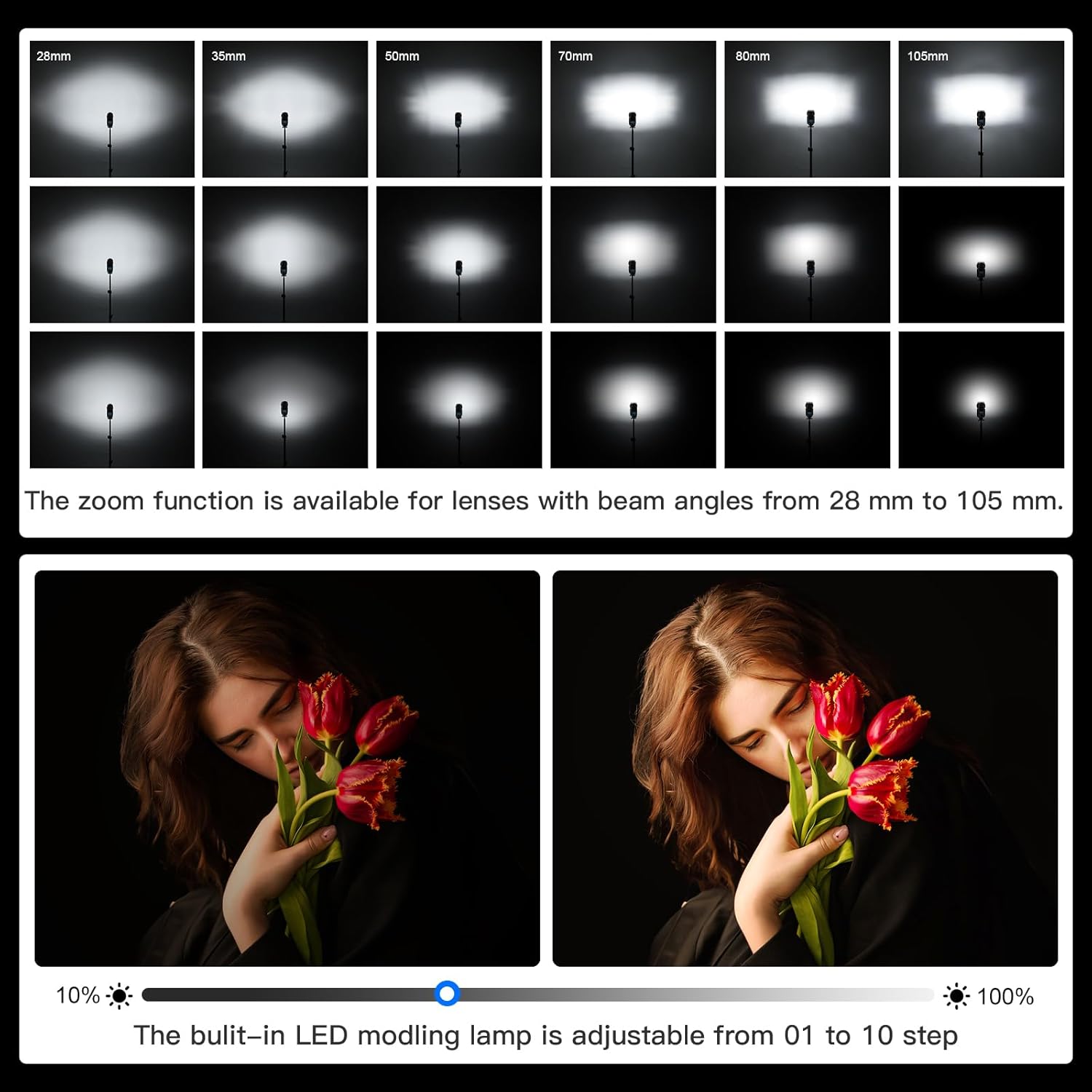
Image: Illustration of the Godox V1N's zoom function for lenses from 28mm to 105mm, and the adjustable LED modeling lamp from 10% to 100% power.
Wireless Control (2.4G X System)
The V1N integrates with Godox's 2.4G wireless X system, allowing it to be controlled remotely by compatible Godox transmitters (e.g., X2, X3, Xpro, Xproll). This enables off-camera flash setups and multi-flash configurations for complex lighting. Ensure your transmitter and flash are set to the same channel and group.
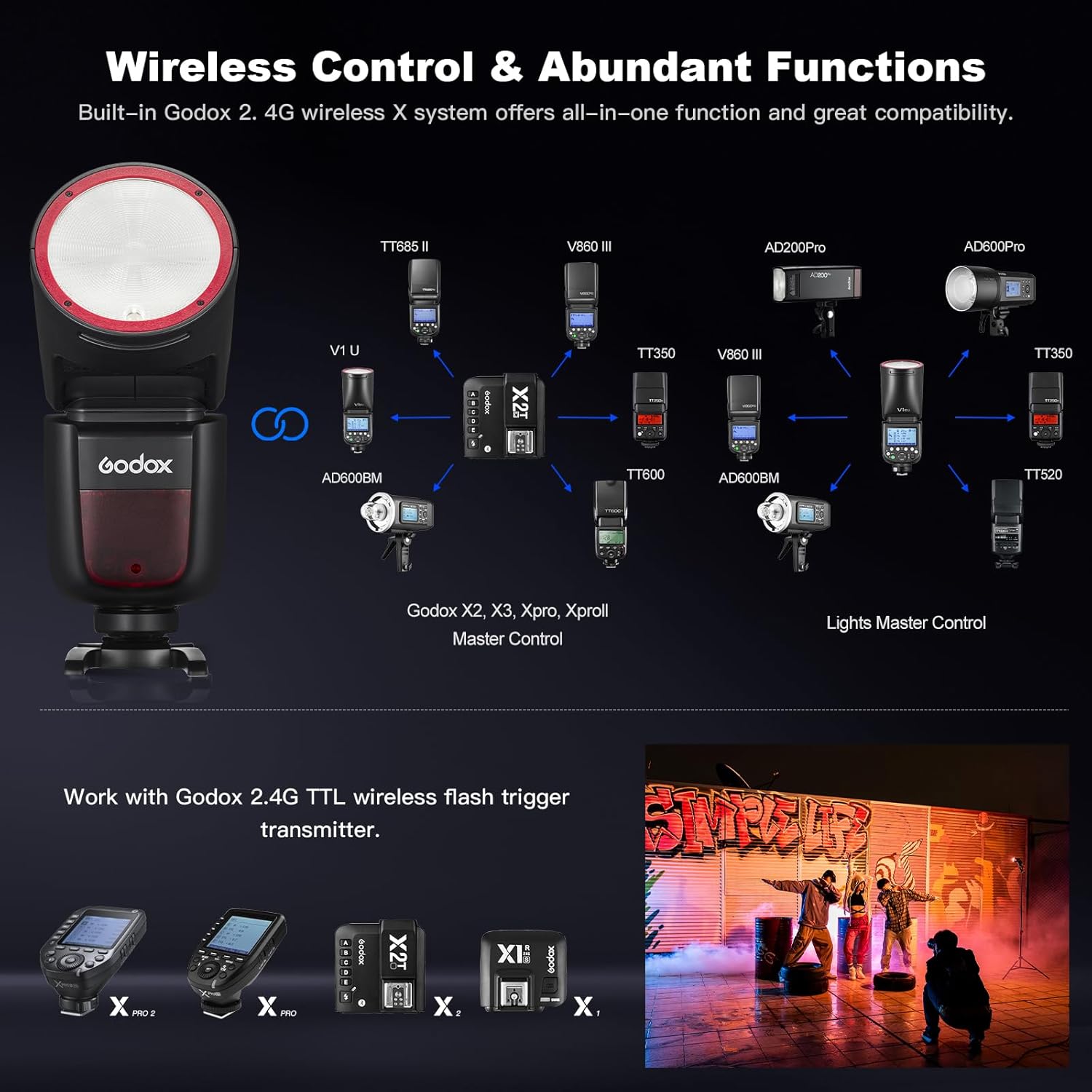
Image: A diagram illustrating the Godox 2.4G Wireless X System, showing how the V1N integrates with various Godox flashes and triggers for comprehensive wireless control.
Flexible Flash Head Rotation
The flash head offers extensive flexibility, rotating 0-330 degrees horizontally and tilting -7 to 120 degrees vertically. This allows for bounce flash techniques, directing light off ceilings or walls for softer, more natural illumination, and adapting to various shooting angles.

Image: A visual representation of the Godox V1N's flexible flash head, demonstrating its 0-330° horizontal rotation and -7-120° vertical tilt capabilities.
Using Color Filters and Diffusers
The V1N comes with a white diffuser and CF-20 color chips. The white diffuser softens the light output, creating a broader and more even spread. The color chips can be attached to the flash head to add creative color effects to your lighting, allowing for artistic expression and mood setting.
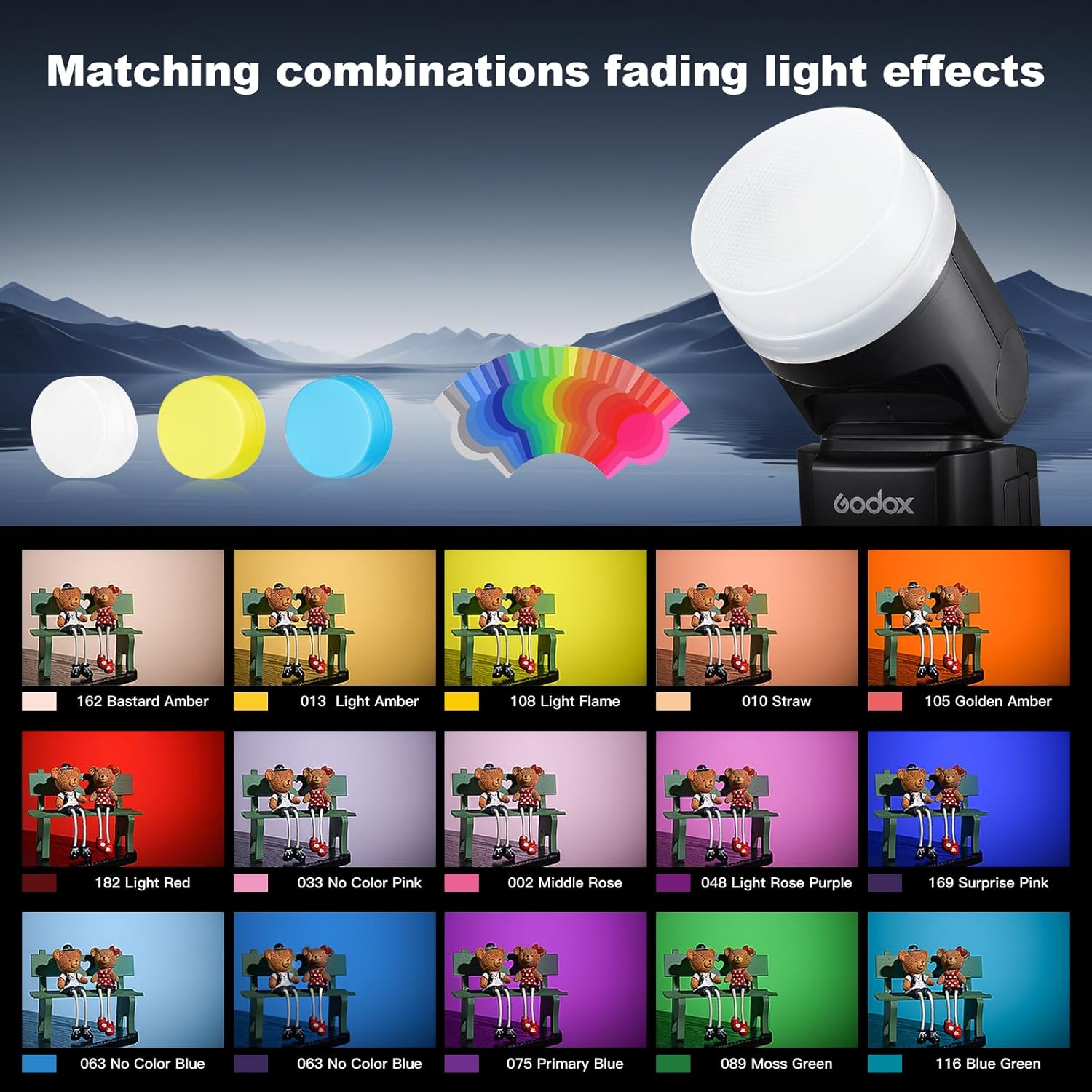
Image: The Godox V1N flash head shown with various color filters and diffusers, illustrating how they can be used to create different lighting effects and moods.
Maintenance
Cleaning
Regularly clean the flash unit with a soft, dry cloth. For stubborn dirt, use a slightly damp cloth and then dry thoroughly. Avoid using harsh chemicals or abrasive materials, which can damage the finish or electronic components. Keep the hot shoe contacts clean to ensure reliable communication with your camera.
Storage
When not in use, store the flash in its protective bag in a cool, dry place away from direct sunlight and extreme temperatures. Remove the battery if storing for extended periods to prevent leakage and damage. Ensure the flash head is in its neutral, folded position for compact storage.
Troubleshooting
Common Issues and Solutions
- Flash Not Firing:
- Check if the flash is securely mounted on the camera's hot shoe.
- Ensure the battery is fully charged and correctly inserted.
- Verify that the flash is powered on and not in sleep mode.
- Check camera flash settings and ensure external flash is enabled.
- Inconsistent Flash Output:
- Ensure TTL mode is selected for automatic exposure, or adjust manual power settings.
- Check for obstructions between the flash and subject.
- Verify that the flash head is positioned correctly for bounce or direct flash.
- Wireless Triggering Issues:
- Confirm that the flash and trigger are on the same channel and group.
- Check battery levels on both the flash and the wireless trigger.
- Ensure there are no significant obstacles blocking the wireless signal.
- Overheating Warning:
- If the flash is used continuously at high power, it may trigger an overheating protection. Allow the unit to cool down before resuming use.
- Reduce flash power or increase intervals between shots to prevent overheating.
For more detailed troubleshooting or specific error codes, please refer to the comprehensive guide on the official Godox website or contact customer support.
Specifications
| Feature | Detail |
|---|---|
| Model Number | V1-N |
| Package Dimensions | 8.9 x 8.27 x 4.06 inches |
| Item Weight | 2.48 pounds |
| Battery Type | 7.2V/2600mAh Lithium Battery |
| Recycle Time | Approx. 1.5 seconds |
| Full Power Flashes | Approx. 480 |
| Flash Sync Speed | Up to 1/8000s (HSS) |
| Wireless System | Godox 2.4G Wireless X System |
| Flash Head Rotation | Horizontal: 0-330°, Vertical: -7-120° |
| LED Modeling Lamp | Adjustable 1-10 steps |
| Compatible Mountings | Nikon 1, Sony Alpha |
Warranty and Support
The Godox V1N flash comes with a manufacturer's warranty. Please refer to the warranty card included with your product or visit the official Godox website for detailed warranty terms and conditions.
For technical support, service, or further inquiries, please visit the Official GODOX Store on Amazon or contact Godox customer service directly.
Ask a question about this manual
Ask about setup, troubleshooting, compatibility, parts, safety, or missing instructions. Manuals+ will review the question and use this page’s manual context to help answer it.