
1. Introduction
Thank you for choosing the i Cafilas Coffee Max 4-in-1 Electric Coffee Machine. This versatile appliance is designed to deliver a professional coffee experience at home, offering compatibility with ground coffee, Nespresso, Dolce Gusto, and K-Cup capsules. With a powerful 19-bar pressure system and 1400W heating element, it ensures optimal extraction and a rich, creamy result. This manual provides essential information for safe operation, setup, maintenance, and troubleshooting to help you enjoy your coffee machine for years to come.

Image 1: The i Cafilas Coffee Max machine showcasing its key features and ease of use.
2. Safety Instructions
Please read all safety instructions carefully before using the appliance to prevent injury or damage.
- Ensure the voltage indicated on the appliance corresponds to your local mains voltage before connecting.
- Do not immerse the appliance, power cord, or plug in water or any other liquid.
- Keep the appliance out of reach of children.
- Always unplug the appliance from the power outlet before cleaning and when not in use.
- Do not operate the appliance if the power cord or plug is damaged, or if the appliance malfunctions or has been damaged in any way.
- Use only manufacturer-recommended accessories.
- Avoid contact with hot surfaces. Use handles or knobs.
- Place the coffee machine on a stable, flat, heat-resistant surface, away from edges.
- Never fill the water tank with hot water or other liquids like milk.
3. Package Contents
Verify that all items are present and in good condition upon unpacking:
- i Cafilas Coffee Max Electric Coffee Machine
- Ground Coffee Adapter (14g)
- Dolce Gusto Capsule Adapter
- Nespresso Capsule Adapter
- K-Cup Capsule Adapter
- Removable Water Tank (800ml)
- Removable Drip Tray
- User Manual

Image 2: The i Cafilas Coffee Max machine and its four compatible adapters.
4. Setup
Follow these steps for initial setup:
- Unpack: Carefully remove all packaging materials and place the machine on a stable, flat surface.
- Clean: Wash the water tank, drip tray, and all adapters with warm, soapy water. Rinse thoroughly and dry.
- Fill Water Tank: Fill the 800ml water tank with fresh, cold drinking water up to the MAX level. Place it securely back into the machine.
- First Use (Priming): Before brewing coffee, perform a priming cycle. Plug in the machine. It will heat up in approximately 20 seconds. Place an empty cup under the dispenser. Select the largest cup size (240ml water dispenser mode) and press the brew button. Let the hot water run through the system. Repeat this process 2-3 times to clean the internal components and prime the pump.
5. Operating Instructions
The i Cafilas Coffee Max offers flexible brewing options:

Image 3: The 4-in-1 coffee machine showing compatibility with various coffee types.
- Prepare Coffee:
- For Ground Coffee: Fill the ground coffee adapter with up to 14g of your preferred ground coffee. Tamp lightly.
- For Capsules (Nespresso, Dolce Gusto, K-Cup): Insert the desired capsule into its corresponding adapter.
- Insert Adapter: Place the filled adapter into the machine's brewing chamber. Ensure it is securely locked in place.
- Fill Water Tank: Ensure the water tank is filled with fresh, cold water.
- Power On & Heat: Plug in the machine. It will automatically begin heating, indicated by a light. Heating takes approximately 20 seconds.
- Select Cup Size: Use the Smart Touch function to select your desired cup size. Available modes include: 50ml Espresso, 100ml Espresso, 190ml Americano, and 240ml Water Dispenser.
- Start Brewing: Press the brew button corresponding to your selected cup size. The machine will start extracting coffee.
- Automatic Stop: The machine will automatically stop brewing once the selected volume is dispensed.
- Enjoy: Remove your cup and enjoy your freshly brewed coffee.
- Automatic Shut-off: For safety and energy saving, the machine will automatically shut off after 10 minutes of inactivity.
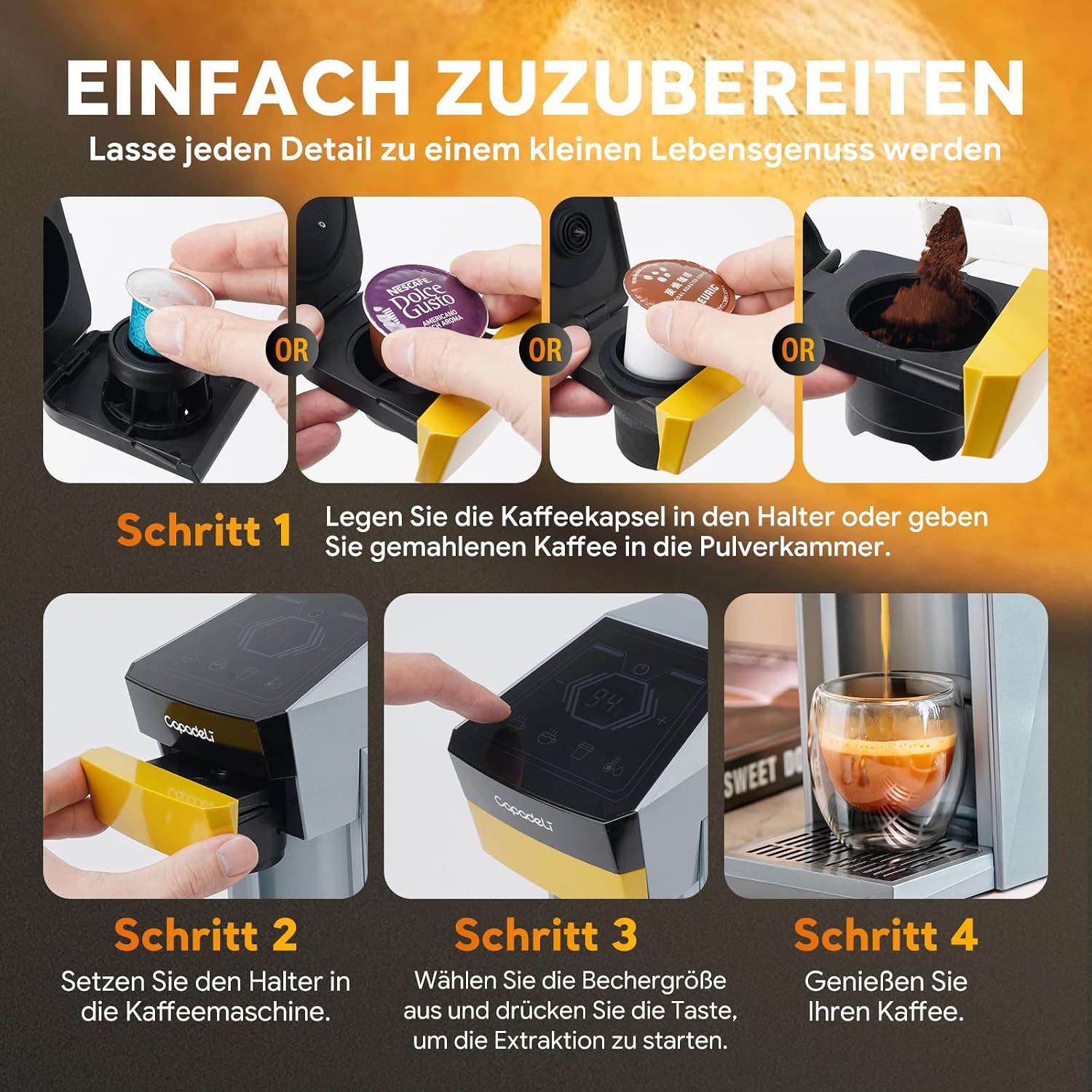
Image 4: Step-by-step guide for preparing coffee with the i Cafilas Coffee Max.
6. Maintenance and Cleaning
Regular cleaning and maintenance ensure optimal performance and longevity of your coffee machine.
- Daily Cleaning: After each use, remove and empty the drip tray. Wash it with warm, soapy water and rinse.
- Water Tank: Clean the water tank regularly with warm, soapy water. Rinse thoroughly to remove any soap residue.
- Adapters: After each use, remove the coffee grounds or capsule from the adapter and rinse it under running water.
- Exterior: Wipe the exterior of the machine with a soft, damp cloth. Do not use abrasive cleaners or scourers.
- Descaling: To minimize the risk of leaks and ensure consistent water distribution, it is recommended to descale the machine regularly. The frequency depends on water hardness and usage. Use a descaling solution specifically designed for coffee machines and follow the product's instructions. Alternatively, rinse thoroughly with a special espresso machine cleaner.
7. Troubleshooting
Refer to the table below for common issues and their solutions:
| Problem | Possible Cause | Solution |
|---|---|---|
| Machine does not turn on | Not plugged in; Power outlet fault | Check power cord connection; Try a different outlet |
| No coffee dispensed | Water tank empty; Air in pump; Clogged nozzle; Machine not primed | Fill water tank; Perform priming cycle (Section 4); Descale the machine |
| Coffee is weak or watery | Insufficient coffee grounds/capsule; Incorrect grind size (for ground coffee); Clogged nozzle | Ensure proper amount of coffee/capsule; Use finer grind; Descale the machine |
| Water leaking from machine | Water tank not seated correctly; Drip tray full; Internal blockage/seal issue | Re-seat water tank; Empty drip tray; Descale the machine; Contact support if issue persists |
| Coffee not hot enough | Machine not fully heated; Descaling needed | Wait for heating indicator; Descale the machine |
8. Specifications
Detailed technical specifications for the i Cafilas Coffee Max machine:
| Feature | Detail |
|---|---|
| Brand | i Cafilas |
| Model Number | ME2406MAX-GREY |
| Color | Grey |
| Product Dimensions (L x W x H) | 26.4 x 12 x 30.4 cm (10.4 x 4.7 x 12 inches) |
| Item Weight | 4.37 Kilograms (9.63 lbs) |
| Water Tank Capacity | 800 Milliliters |
| Power | 1400 Watts |
| Voltage | 220 Volts |
| Pressure | 19 Bar |
| Material | Acrylonitrile Butadiene Styrene (ABS), Stainless Steel |
| Heating Time | Approx. 20 seconds |
| Automatic Shut-off | Yes (after 10 minutes of inactivity) |
| Special Features | 4-in-1 compatibility, One-Touch Control, Removable Water Tank |

Image 5: Product parameter diagram with dimensions and technical details.
9. Warranty and Support
For warranty information and customer support, please refer to the documentation provided with your purchase or contact the seller directly. Keep your proof of purchase for any warranty claims.