
1. Introduction
Thank you for choosing the LinkTech LT Watch S90 Premium Smart Watch. This manual provides essential information for setting up, operating, maintaining, and troubleshooting your device. Please read this manual carefully before using the watch to ensure optimal performance and longevity.
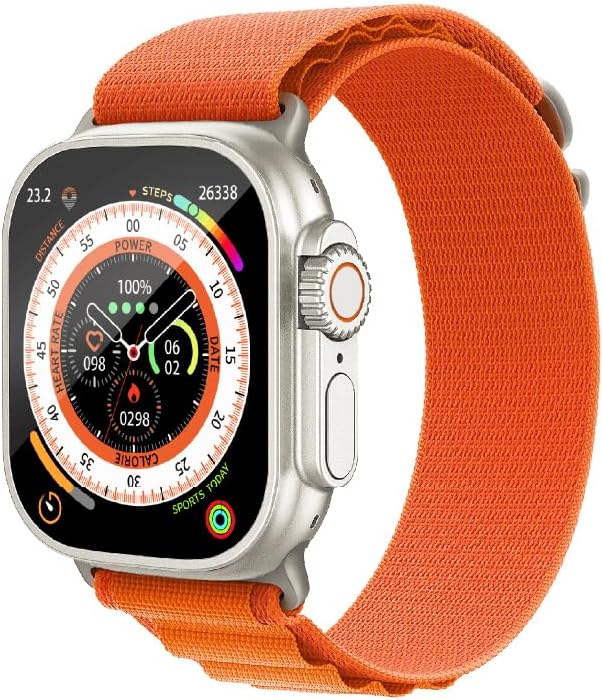
Image 1.1: Front view of the LinkTech LT Watch S90 Premium Smart Watch, showcasing its vibrant display with various health and activity tracking indicators.
2. Setup
2.1 What's in the Box
- LinkTech LT Watch S90 Premium Smart Watch
- Orange Sport Strap
- Charging Cable
- User Manual
2.2 Attaching the Strap
Align the strap with the watch lugs and slide it in until you hear a click, indicating it is securely fastened. Ensure both sides of the strap are firmly attached before wearing.

Image 2.1: The orange sport strap, designed for secure and comfortable attachment to the LinkTech LT Watch S90 Premium.
2.3 Charging the Device
Before first use, fully charge your smart watch. Connect the magnetic charging cable to the charging points on the back of the watch and plug the USB end into a compatible power adapter (not included) or a computer's USB port. The watch display will indicate charging status.
2.4 Initial Power On and Pairing
- Press and hold the side button to power on the watch.
- On your smartphone, download the official LinkTech companion app (refer to the packaging or quick start guide for app name).
- Enable Bluetooth on your smartphone and open the LinkTech app.
- Follow the on-screen instructions in the app to search for and pair with your LT Watch S90 Premium.
- Once paired, synchronize your personal data and preferences through the app.
3. Operating Instructions
3.1 Basic Navigation
- Touchscreen: Swipe left/right, up/down to navigate through menus and widgets. Tap to select.
- Side Button: Press to return to the home screen or wake the display. Long press for power options.
- Rotary Crown: Rotate to scroll through lists or zoom in/out (functionality may vary by watch face/app).
3.2 Health Monitoring
The LT Watch S90 Premium is equipped with advanced sensors to monitor various health metrics:
- Heart Rate: Continuous or on-demand heart rate monitoring. View your heart rate zones and historical data in the app.
- Steps & Calories: Tracks your daily steps, distance, and estimated calories burned.
- Sleep Tracking: Monitors your sleep patterns, including deep, light, and REM sleep stages.
3.3 Sports Modes
Select from a variety of pre-loaded sports modes to track your workouts accurately. Each mode provides specific metrics relevant to the activity, such as duration, distance, pace, and heart rate zones.
3.4 GPS and Navigation
Utilize the built-in GPS for accurate outdoor activity tracking and navigation. The watch can display real-time location data and compass readings.
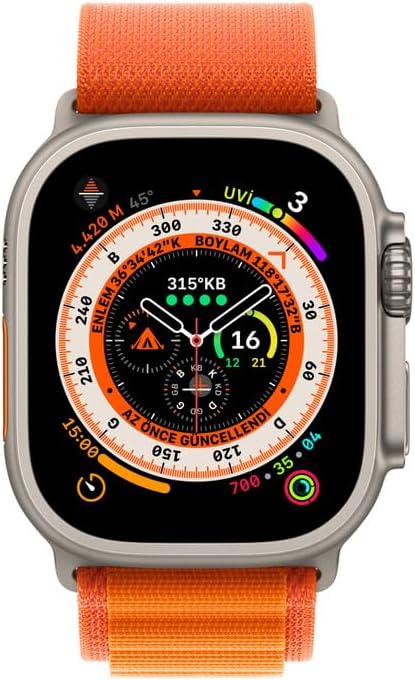
Image 3.1: The LinkTech LT Watch S90 Premium displaying its compass and navigation features, useful for outdoor activities.
3.5 Notifications and Calls
Once paired with your smartphone, the watch will display notifications for incoming calls, messages, and app alerts. You can answer or reject calls directly from the watch (if supported by the model) and view message previews.
4. Maintenance
4.1 Cleaning Your Watch
Regularly clean your watch and strap to prevent skin irritation and maintain device performance. Use a soft, lint-free cloth. For stubborn dirt, slightly dampen the cloth with water. Avoid harsh chemicals or abrasive materials.
4.2 Water Resistance
The LT Watch S90 Premium is rated WATER RESISTANT 3ATM. This means it is resistant to splashes, rain, and brief immersion in water. It is not suitable for swimming, diving, or high-pressure water activities. Avoid exposing the watch to hot water or steam.
4.3 Software Updates
Periodically check for software updates through the LinkTech companion app. Updates provide new features, performance improvements, and bug fixes. Ensure your watch is sufficiently charged before initiating an update.
4.4 Storage and Care
When not in use for extended periods, store the watch in a cool, dry place. Avoid extreme temperatures and direct sunlight. Charge the watch periodically (e.g., every few months) to prevent deep discharge of the battery.
5. Troubleshooting
| Problem | Possible Cause | Solution |
|---|---|---|
| Watch does not power on | Low battery; device crash | Charge the watch for at least 30 minutes. Perform a force restart by holding the side button for 10-15 seconds. |
| Cannot pair with smartphone | Bluetooth off; app issue; watch not in pairing mode | Ensure Bluetooth is on. Restart both watch and phone. Reinstall the companion app. Ensure watch is discoverable. |
| Inaccurate health data | Improper fit; sensor obstruction | Ensure the watch is snug but comfortable on your wrist. Clean the sensors on the back of the watch. |
| Notifications not received | App permissions; Bluetooth connection lost | Check app notification permissions on your phone. Verify Bluetooth connection. Ensure 'Do Not Disturb' mode is off on both devices. |
5.1 Factory Reset
If issues persist, a factory reset may resolve them. This will erase all data on the watch and restore it to its original settings. Navigate to 'Settings' on your watch, then 'System' or 'About', and select 'Factory Reset'. Confirm the action when prompted.
6. Specifications
| Feature | Description |
|---|---|
| Model | LT Watch S90 Premium |
| Connectivity | Bluetooth (version may vary) |
| Water Resistance | 3ATM (Splash, Rain Resistant) |
| Sensors | Heart Rate Sensor, Accelerometer, Gyroscope, GPS |
| Compatibility | Android and iOS (specific versions may apply) |
| Battery Life | Varies based on usage (typically several days) |

Image 6.1: Rear view of the LinkTech LT Watch S90 Premium, highlighting the optical heart rate sensors and product labeling including 'WATER RESISTANT 3ATM'.
7. Warranty Information
The LinkTech LT Watch S90 Premium Smart Watch comes with a standard manufacturer's warranty. Please refer to the warranty card included in your product packaging or visit the official LinkTech website for detailed terms and conditions regarding warranty coverage, duration, and claims process.
Please retain your proof of purchase for warranty claims.
8. Support
For further assistance, technical support, or service inquiries, please contact LinkTech customer support through the following channels:
- Official Website: www.linktech.com.tr (Please check for the most current contact information)
- Email Support: Refer to the official website for support email addresses.
- Phone Support: Refer to the official website for regional phone numbers.
Before contacting support, please ensure you have your product model number (LT Watch S90 Premium) and a description of the issue ready.


