1. Introduction
The Sper Scientific 850017 Integrating Sound Datalogger is designed to measure sound pressure levels (SPL) and calculate cumulative sound exposure (LEQ) over a specified period. This device is suitable for workplace noise monitoring and analysis, complying with IEC 61672:2013 Class 2 and ANSI S1.4:2014 Type 2 standards. It features a wide dynamic range, selectable frequency and time weightings, and extensive data logging capabilities.

Figure 1.1: Front view of the Sper Scientific 850017 Integrating Sound Datalogger. This image shows the device with its microphone, display, and control buttons.
2. Package Contents
Upon unpacking, please verify that all items listed below are present and in good condition:
- Sper Scientific 850017 Integrating Sound Datalogger
- Foam-lined protective carrying case
- Windscreen
- USB computer connection cable
- Software CD (or download instructions)
- Instruction manual
- Calibration tool
- Recorder output plug
- 4 AA batteries
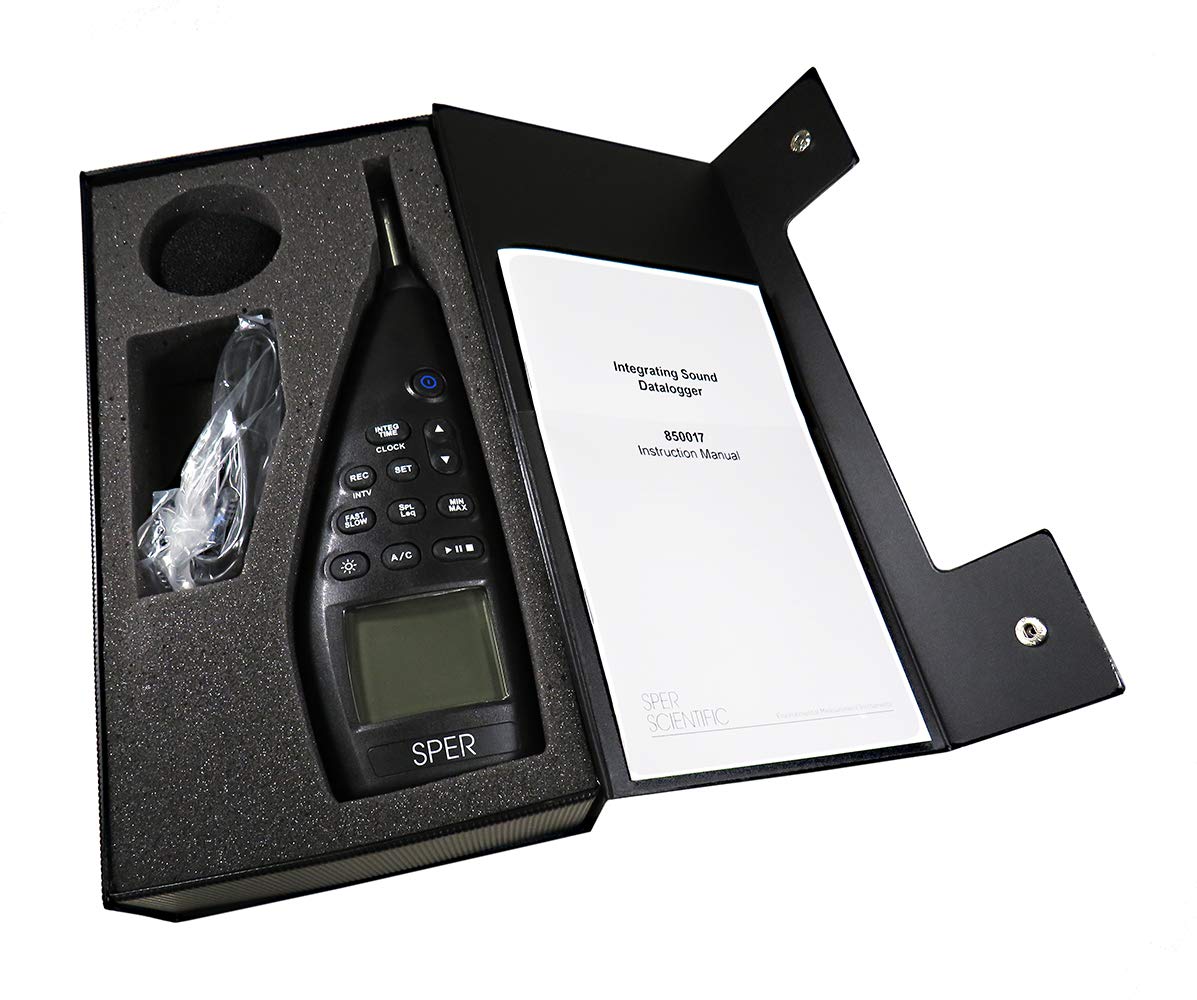
Figure 2.1: The Sper Scientific 850017 Integrating Sound Datalogger and its accessories neatly arranged within the foam-lined protective carrying case.
3. Setup
3.1 Battery Installation
- Locate the battery compartment on the back of the device.
- Open the battery compartment cover.
- Insert four (4) AA batteries, ensuring correct polarity (+/-).
- Close the battery compartment cover securely.
3.2 Windscreen Attachment
Gently slide the foam windscreen over the microphone at the top of the device. The windscreen helps to reduce wind noise during outdoor measurements and protects the microphone.
3.3 Software and USB Connection
To utilize the data logging and analysis features, install the included software on your computer. Connect the datalogger to your computer using the provided USB cable. Refer to the software's specific instructions for installation and data transfer procedures.
4. Operation
4.1 Power On/Off
- To power on the device, press and hold the POWER button.
- To power off, press and hold the POWER button again until the display turns off.
4.2 Display Overview
The large, backlit display simultaneously shows test parameters, including SPL and LEQ readings, time, and date. A bar graph provides a visual representation of sound levels. Readings are displayed with 0.1 dB resolution.
4.3 Measurement Modes
- SPL (Sound Pressure Level): Measures instantaneous sound levels.
- LEQ (Equivalent Continuous Sound Level): Integrates weighted SPL over a set period to calculate cumulative sound exposure.
4.4 Frequency Weighting (A/C)
Press the A/C button to toggle between A-weighting and C-weighting:
- A-weighting: Mimics the human ear's response to sound, commonly used for environmental and occupational noise measurements.
- C-weighting: Provides a flatter response, useful for measuring peak sound levels or mechanical noise.
4.5 Time Weighting (Fast/Slow)
Press the FAST/SLOW button to select the response time:
- Fast: 125 ms response time, suitable for capturing rapidly changing noise levels.
- Slow: 1 second response time, provides a more averaged reading for stable noise levels.
4.6 Data Logging
The device can store up to 64,000 data records. Use the REC button to start/stop recording. Recorded data can be transferred to a computer via USB for detailed analysis using the included software.
4.7 Alarms
The datalogger supports over-limit and under-limit alarms. Refer to the detailed software instructions for setting specific alarm thresholds.
4.8 Calibration
For compliance with standards such as OSHA, the device should be calibrated regularly. The Sper Scientific Acoustical Calibrator 850016 is recommended for this purpose. Follow the calibration tool's instructions for proper procedure.
5. Maintenance
5.1 Cleaning
Wipe the device with a soft, dry cloth. Do not use abrasive cleaners or solvents, as these may damage the casing or display. Ensure the microphone and display are free from dust and debris.
5.2 Battery Replacement
Replace batteries when the low battery indicator appears on the display. Always use fresh AA batteries and dispose of old batteries responsibly.
5.3 Storage
When not in use, store the datalogger in its foam-lined protective carrying case in a cool, dry place, away from direct sunlight and extreme temperatures. Remove batteries if storing for extended periods to prevent leakage.
6. Troubleshooting
- Device does not power on:
Check battery installation and ensure batteries are fresh. If using an external power source (if applicable), verify the connection. - Inaccurate readings:
Ensure the windscreen is properly attached. Verify that the device has been calibrated recently. Avoid measuring in strong wind or near sources of electromagnetic interference. - Data transfer issues:
Ensure the USB cable is securely connected to both the device and the computer. Verify that the software is correctly installed and updated. Restart both the device and the computer if necessary. - Display is dim or unreadable:
Check battery level. Adjust backlight settings if available.
7. Specifications
| Parameter | Value |
|---|---|
| Measurement Range | 30 to 130 dB |
| Resolution | 0.1 dB |
| Accuracy | ±1.0 dB |
| Frequency Weighting | A and C |
| Time Weighting | Fast and Slow |
| Data Logging Capacity | Up to 64,000 records |
| Interface | USB |
| Power Source | 4 AA batteries (approx. 30 hours of use) |
| Dimensions | 10.75" × 3.5" × 1.5" (273 × 89 × 38 mm) |
| Weight | 14.6 oz (414 g) |
| Standards Compliance | IEC 61672:2013 Class 2, ANSI S1.4:2014 Type 2 |

Figure 7.1: Visual representation of key specifications for the Sper Scientific 850017 Integrating Sound Datalogger.
8. Warranty
Sper Scientific provides a 5-year manufacturer warranty for this product. This warranty covers defects in materials and workmanship under normal use. Please retain your proof of purchase for warranty claims. For detailed warranty terms and conditions, refer to the documentation included with your product or contact Sper Scientific customer support.
9. Support
If you encounter any issues or have questions regarding the operation, maintenance, or specifications of your Sper Scientific 850017 Integrating Sound Datalogger that are not covered in this manual, please contact Sper Scientific customer support. Contact information can typically be found on the manufacturer's website or on the product packaging.


