
1. Introduction
This manual provides detailed instructions for the installation, operation, and maintenance of your EWAY Safety License Plate Backup Reverse Camera. This camera system is specifically designed to enhance rear visibility for Jeep Wrangler JK and JKU models manufactured between 2007 and 2018. Please read this manual thoroughly before installation and use to ensure proper function and safety.
2. Product Overview
The EWAY Safety License Plate Backup Reverse Camera integrates a high-performance camera into a replacement license plate light housing. It offers a wide viewing angle and robust construction for reliable use in various conditions.
- Vehicle Compatibility: Designed for Jeep Wrangler JK and JKU models from 2007 to 2018.
- Wide View Angle: Features a 150° wide-angle lens (1.7mm) for extensive rear coverage.
- Night Vision: Equipped with excellent night vision capabilities for low-light conditions.
- Durability: IP68 waterproof rating, shockproof, anti-interference, and resistant to high/low temperatures.
- Parking Lines: Includes parking assist lines to aid in reversing. These lines may be removable depending on the display unit.
- Easy Mounting: Designed to replace the OEM license plate tag light holder for a clean, integrated installation.

The EWAY backup camera replaces the existing license plate light, providing illumination for the license plate while integrating the camera discreetly.

This camera is specifically designed for Jeep Wrangler JK and JKU models manufactured between 2007 and 2018, ensuring a custom fit and optimal performance.
3. Package Contents
Please verify that all items are present in your package:
- EWAY Backup Camera Unit
- 10FT 4PIN Extension Cable
- Instruction Manual
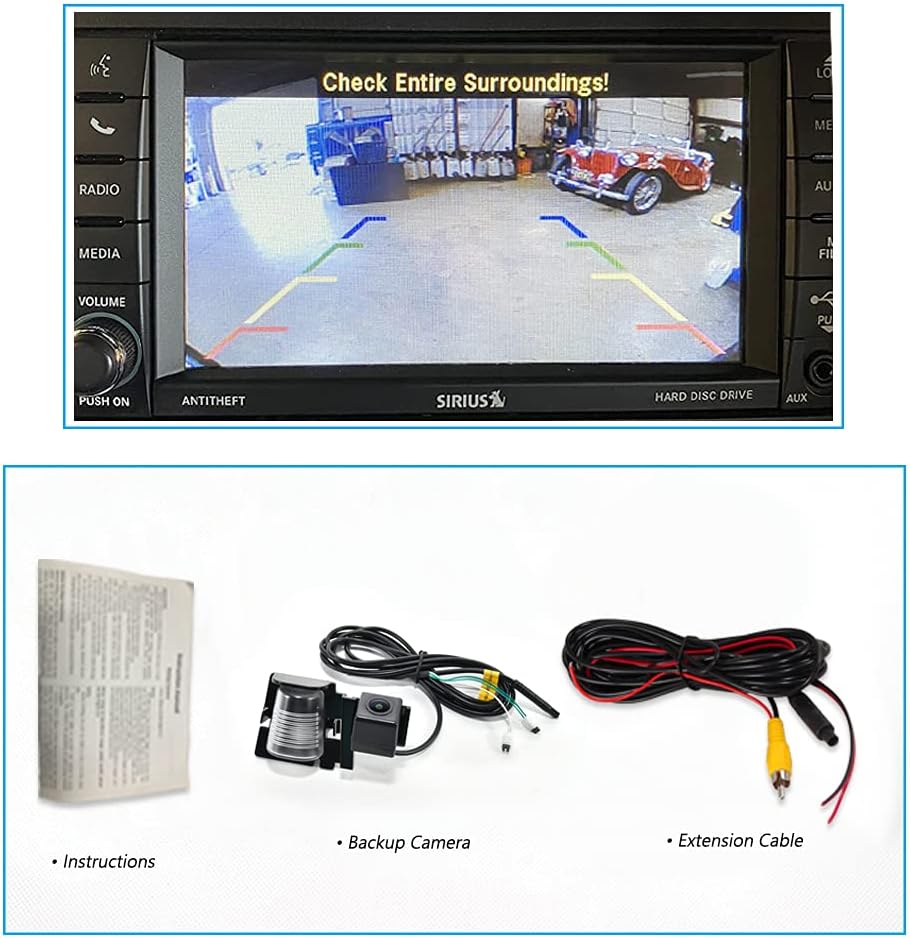
This image displays the complete package contents, including the instruction manual, the backup camera unit, and the extension cable. It also shows an example of the camera's clear rear view displayed on a vehicle's infotainment screen.
4. Setup and Installation
The EWAY backup camera is designed for straightforward installation by replacing the existing license plate tag light holder. Professional installation is recommended if you are unfamiliar with vehicle electrical systems.
4.1 Installation Steps
- Locate OEM License Plate Light: Identify the original license plate tag light holder on your Jeep Wrangler JK/JKU.
- Remove OEM Light: Carefully pop out the OEM license plate tag light holder. Disconnect any wiring.
- Install EWAY Camera Unit: Insert the EWAY camera unit into the opening. For some models, a small adjustment, such as filing a small groove in the license plate frame, may be necessary to ensure a perfect fit.
- Connect Wiring: Connect the camera's wiring to the vehicle's power and video input. Ensure the 4-pin connector is securely matched and plugged in. Refer to the connector diagram below.
- Route Extension Cable: Route the 10FT 4PIN extension cable from the camera to your display screen (not included). Ensure the cable is secured and away from moving parts or heat sources.
- Test Functionality: Before fully securing all components, test the camera's functionality by engaging reverse gear and checking the display.

The camera unit is designed for straightforward installation, replacing the existing license plate light assembly. This image shows the camera's compact design and integrated light.

This image illustrates the installation process, showing the original license plate light housing and how the EWAY camera unit fits into the same location, providing a clean, integrated look.

A view of the EWAY backup camera after installation on a vehicle's rear license plate, demonstrating its low-profile and integrated appearance.
4.2 Connector Diagram
Ensure the 4-pin connector on your camera cable matches the diagram below for proper connection. The connector is designed for 'plug and play' functionality when correctly aligned.

A detailed diagram of the 4-pin connector, indicating the correct pin assignments for power, ground, and video signals. Users should ensure their vehicle's connector matches this configuration for proper installation.
4.3 Important Notes on Camera Placement
- This camera mounts by the license plate light, which is typically not in the exact center of the Jeep's rear.
- Due to this placement, the reverse image on your screen may appear approximately 20 inches off-center. This is normal for this type of license plate camera and does not affect its functionality.
- The design allows for compatibility with spare tire covers, as it fits into the OEM light bulb spot rather than requiring mounting on the spare tire itself.
5. Operating Instructions
Once properly installed and connected to a compatible display unit (not included), the EWAY backup camera will activate automatically when the vehicle is shifted into reverse gear.
- Automatic Activation: The camera feed will appear on your connected display screen when reverse gear is engaged.
- Wide View: Utilize the 150° wide-angle view to observe the area behind your vehicle, including blind spots.
- Parking Assist Lines: The display will show parking assist lines to help guide you into parking spaces and judge distances.
- Night Vision: The camera's night vision capabilities will provide clear images even in low-light conditions, enhancing safety during nighttime reversing.

The camera offers a 150-degree wide viewing angle, providing a comprehensive view of the area behind the vehicle. Dynamic parking assist lines are displayed on the screen to aid in reversing maneuvers.
6. Maintenance
The EWAY backup camera is designed for durability and requires minimal maintenance.
- Cleaning: Periodically clean the camera lens with a soft, damp cloth to ensure a clear view. Avoid abrasive cleaners.
- Inspection: Regularly check the camera unit and wiring for any signs of damage or loose connections.
- Weather Resistance: The IP68 waterproof rating ensures protection against dust and water immersion. The camera is also shockproof and resistant to high/low temperatures, requiring no special care for typical weather conditions.
7. Troubleshooting
If you encounter issues with your EWAY backup camera, please refer to the following common troubleshooting steps:
- No Image on Screen:
- Ensure all cable connections (power, video, extension cable) are secure and correctly plugged in.
- Verify that your display unit is powered on and set to the correct video input channel.
- Check the vehicle's fuse for the reverse lights or accessory power to ensure it is not blown.
- Flickering or Distorted Image:
- Check for loose or damaged video cable connections.
- Ensure the power supply to the camera is stable.
- Verify there is no electromagnetic interference from other vehicle electronics.
- Poor Night Vision:
- Clean the camera lens to remove any dirt or debris that might obstruct the view.
- Ensure the license plate light is functioning correctly, as it provides illumination for the camera.
If these steps do not resolve the issue, please contact EWAY customer support for further assistance.
8. Specifications
| Feature | Specification |
|---|---|
| Brand | EWAY |
| Model Number (ASIN) | B0DR8XQR5M |
| Installation Type | OEM (License Plate Light Replacement) |
| Optical Sensor Technology | CCD CMOS Infrared |
| Lens Type | Wide Angle, Fixed |
| Real Angle of View | 150 Degrees |
| Connector Type | RCA (with 4-pin cable) |
| Optical Sensor Size | 1/4 inch |
| Waterproof Rate | IP68 |
9. Warranty Information
Specific warranty details for this product are not provided in the available information. For warranty inquiries, please retain your proof of purchase and contact EWAY customer support directly. Warranty terms typically cover manufacturing defects for a specified period from the date of purchase.
10. Support
For technical assistance, troubleshooting, or any questions regarding your EWAY Safety License Plate Backup Reverse Camera, please contact EWAY customer support through the retailer where the product was purchased or visit the official EWAY website for contact information.