1. Introduction
Thank you for choosing the HJM AVA BAS 1500W Ceramic Inertia Radiator. This manual provides essential information for the safe and efficient operation, installation, and maintenance of your new heating appliance. Please read this manual thoroughly before installation and use, and keep it for future reference.
The HJM AVA BAS is an electric ceramic inertia radiator designed to provide optimal thermal comfort through progressive and continuous heat diffusion. Its high thermal inertia ceramic blocks and aluminum structure ensure efficient energy use.
2. Safety Information
Always observe the following safety precautions to reduce the risk of fire, electric shock, or injury:
- Ensure the power supply voltage matches the rating label on the radiator.
- Do not cover the radiator or obstruct its air vents. This can cause overheating.
- Keep flammable materials (curtains, furniture, etc.) at a safe distance from the radiator.
- Do not operate the radiator with a damaged cord or plug, or after the appliance malfunctions or has been dropped or damaged in any manner.
- This appliance is designed for indoor use only. Do not use it outdoors.
- Do not insert or allow foreign objects to enter any ventilation or exhaust opening as this may cause an electric shock or fire, or damage the radiator.
- The radiator is equipped with a safety thermal limiter to prevent overheating. If it activates, disconnect the power and contact qualified personnel.
- This appliance is Class II, offering double insulation for enhanced safety.
3. Product Overview
The HJM AVA BAS radiator combines advanced technology with a sleek design to provide efficient and comfortable heating.
Key Features:
- Ceramic Inertia Heating: High thermal inertia ceramic blocks for progressive and continuous heat diffusion.
- Aluminum Structure: Ensures durability and efficient heat dissipation.
- Chrono-Thermostat: Intuitive 24/7 programmable thermostat with free and pre-recorded programs.
- Open Window Detector: Automatically adjusts operation to prevent energy loss when a window is open.
- Keypad Lock: Prevents accidental changes to settings.
- Consumption Indicator: Real-time energy consumption monitoring.
- Anticipated Ignition System: Heats the room before the programmed time for immediate comfort.
- Safety Thermal Limiter: Protection against overheating.
- Class II Double Insulation: Enhanced electrical safety.

Figure 3.1: Front view of the HJM AVA BAS radiator, highlighting the integrated digital control panel.

Figure 3.2: Close-up view of the digital control panel, showing the display and control buttons.
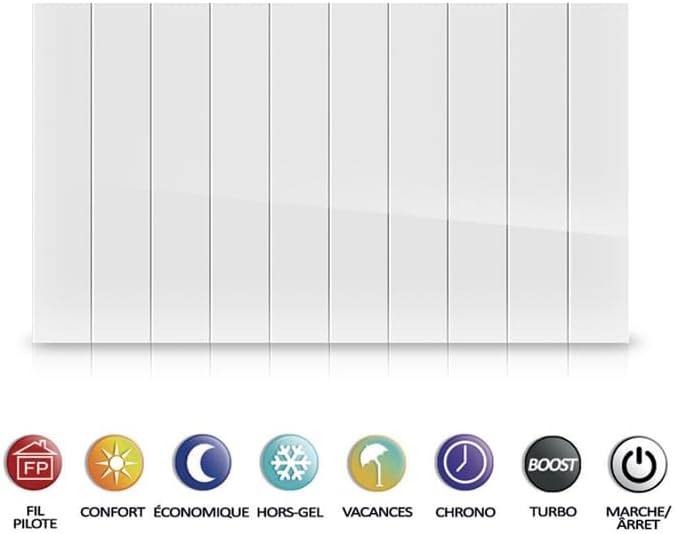
Figure 3.3: Side profile of the HJM AVA BAS radiator, illustrating its slim design.

Figure 3.4: Rear view of the HJM AVA BAS radiator, showing mounting points.
4. Setup and Installation
The HJM AVA BAS radiator is designed for wall mounting. Wall mounting brackets (2.5 cm) are included for easy installation.
Installation Steps:
- Choose Location: Select a suitable wall location, ensuring sufficient clearance from furniture, curtains, and other flammable materials. Avoid placing directly under electrical outlets.
- Mark Drilling Points: Use the provided wall mounting brackets as a template to mark the drilling points on the wall. Ensure the marks are level.
- Drill Holes: Drill holes at the marked points using an appropriate drill bit for your wall type.
- Insert Wall Plugs: Insert the wall plugs into the drilled holes.
- Attach Brackets: Secure the wall mounting brackets to the wall using the screws provided.
- Mount Radiator: Carefully lift the radiator and hook it onto the installed wall brackets. Ensure it is securely seated.
- Electrical Connection: Connect the radiator to a suitable electrical outlet. If using a pilot wire system, ensure it is connected by a qualified electrician.
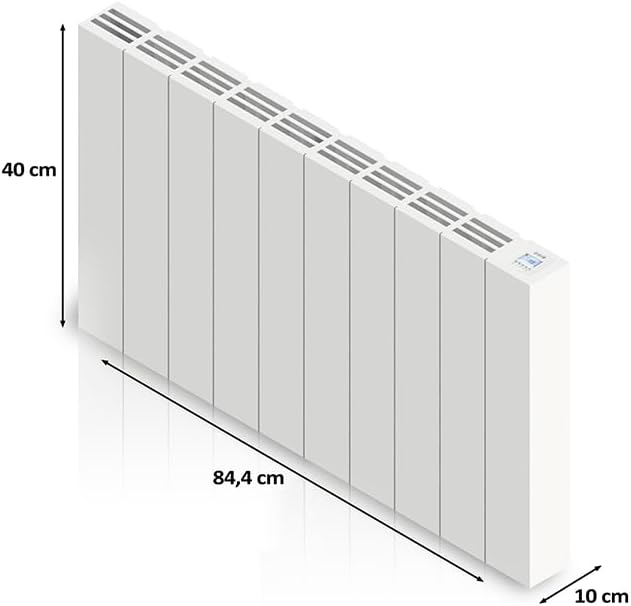
Figure 4.1: Example of the HJM AVA BAS radiator installed on a wall, demonstrating typical room placement.

Figure 4.2: Dimensional diagram of the HJM AVA BAS radiator, indicating its compact size for installation.
5. Operating Instructions
Your HJM AVA BAS radiator features an intuitive chrono-thermostat for precise temperature control and programming.
Control Panel Overview:
Refer to Figure 3.2 for a detailed view of the control panel. The display shows the current temperature and operating mode. Buttons allow you to adjust settings, select modes, and program the device.
Operating Modes:
The radiator offers several operating modes to suit your needs:
- Pilot Wire (Fil Pilote): For external control via a central heating system.
- Comfort (Confort): Maintains a pleasant, continuous temperature.
- Economic (Économique): Reduces energy consumption by maintaining a slightly lower temperature.
- Frost Protection (Hors Gel): Protects against very low temperatures, typically maintaining around 7°C.
- Holiday (Vacances): Ideal for prolonged absences, maintaining a low temperature to prevent freezing.
- Chrono: Activates the programmed schedule (24/7 programming).
- Turbo: Provides rapid heating for a short period.
- On/Off (Marche/Arrêt): Manual control to turn the radiator on or off.
Figure 5.1: Visual representation of the various operating modes available on the HJM AVA BAS radiator.
Programming the Chrono-Thermostat:
The 24/7 programmable chrono-thermostat allows you to set specific temperatures for different times of the day and week. It includes a free program for custom settings and two pre-recorded programs for convenience. Consult the on-screen menu for detailed programming steps.
Smart Functions:
- Open Window Detector: This system detects rapid temperature drops caused by an open window. It automatically pauses heating to prevent energy waste. Heating resumes once the window is closed and the temperature stabilizes.
- Keypad Lock: Activate this function to prevent unauthorized or accidental changes to the radiator's settings. Refer to the control panel instructions for activation/deactivation.
- Consumption Indicator: The display can show real-time energy consumption, helping you monitor and optimize your energy usage.
- Anticipated Ignition System: When programmed, the radiator intelligently anticipates your heating needs, turning on slightly before the scheduled time to ensure the room reaches the desired temperature precisely when you need it.
6. Maintenance
Regular maintenance ensures the longevity and efficient operation of your HJM AVA BAS radiator.
- Cleaning: Before cleaning, always switch off the radiator and unplug it from the power supply. Allow it to cool down completely. Wipe the exterior surfaces with a soft, damp cloth. Do not use abrasive cleaners, solvents, or harsh chemicals, as these can damage the finish.
- Dust Removal: Periodically remove dust from the air vents using a soft brush or a vacuum cleaner with a brush attachment. Ensure vents are clear for optimal airflow.
- Inspection: Regularly inspect the power cord and plug for any signs of damage. If any damage is found, discontinue use and contact a qualified technician.
- Storage: If storing the radiator for an extended period, ensure it is clean and dry. Store it in a cool, dry place, protected from dust and moisture.
7. Troubleshooting
If you encounter issues with your radiator, refer to the following common problems and solutions:
| Problem | Possible Cause | Solution |
|---|---|---|
| Radiator does not turn on. | No power supply; Power switch off; Thermal limiter activated. | Check if the radiator is plugged in and the outlet is working. Ensure the main power switch is on. If the thermal limiter activated, unplug, let cool, and check for obstructions. |
| Radiator not heating sufficiently. | Incorrect temperature setting; Open window detected; Radiator too small for room size. | Increase the set temperature. Close any open windows. Ensure the radiator's power (1500W) is appropriate for the room area. |
| Display shows an error code. | Internal malfunction; Sensor issue. | Note the error code and consult the full product manual (if available) or contact customer support. Try resetting the radiator by unplugging it for a few minutes. |
| Keypad is unresponsive. | Keypad lock activated. | Deactivate the keypad lock function as per the control panel instructions. |
If the problem persists after attempting these solutions, please contact HJM customer support.
8. Specifications
Technical specifications for the HJM AVA BAS 1500W Ceramic Inertia Radiator:
- Brand: HJM
- Model: HJM013198 (AVA BAS)
- Power: 1500W
- Material: Aluminum structure with high thermal inertia ceramic blocks
- Color: White
- Dimensions (W x H x D): 84.4 cm x 40 cm x 10 cm (33.2 x 15.7 x 3.9 inches)
- Weight: Approximately 14.7 kg (32.4 lbs)
- Electrical Safety Class: Class II (Double Insulation)
- Mounting Type: Wall Mount (brackets included)
- Special Features: Programmable Chrono-Thermostat, Open Window Detector, Keypad Lock, Consumption Indicator, Anticipated Ignition System, Safety Thermal Limiter.
9. Warranty and Support
HJM products are manufactured to high-quality standards and are covered by a manufacturer's warranty. For specific warranty terms and conditions, please refer to the warranty card included with your product or visit the official HJM website.
For technical support, troubleshooting assistance, or spare parts inquiries, please contact HJM customer service. Contact details can typically be found on the product packaging or the official HJM website.


