
CAPXSNOB ST-542S
CAPXSNOB Magician1 Mini Espresso Machine User Manual
Model: ST-542S | Brand: CAPXSNOB
1. Introduction
Thank you for choosing the CAPXSNOB Magician1 Mini Espresso Machine. This manual provides essential information for the safe and efficient operation, maintenance, and troubleshooting of your new coffee maker. Please read it thoroughly before first use and keep it for future reference.
2. Safety Information
- Read all instructions before using the appliance.
- Do not immerse the appliance, cord, or plug in water or other liquids.
- Close supervision is necessary when any appliance is used by or near children.
- Unplug from outlet when not in use and before cleaning. Allow to cool before putting on or taking off parts, and before cleaning the appliance.
- Do not operate any appliance with a damaged cord or plug or after the appliance malfunctions, or has been damaged in any manner.
- Use only cold, fresh water in the water tank.
- Do not open the brewing chamber during operation.
- Keep hands and cords away from hot parts of the appliance during operation.
3. Product Overview
The CAPXSNOB Magician1 Mini is a versatile 4-in-1 espresso machine designed for various coffee types and preferences. It features a compact design, 19-bar pressure, and adjustable settings for temperature and cup size.
3.1 Package Contents
- Magician1 Mini Espresso Machine
- 5 Pod Adapters (Nespresso Original, Dolce Gusto, Lavazza Blue/A Modo Mio, ESE, Caffitaly)
- Ground Coffee Adapter
- Cleaning Pin
- Filter
- Inflator
- Scoop & Tamper
3.2 Key Features
- Innovative Modular Design: Removable adapters for multi-pod compatibility (Nespresso Original, Dolce Gusto, Lavazza Blue/A Modo Mio, ESE, Caffitaly, K Cup pods, and ground coffee).
- Versatile Coffee Choices: Brew espresso, lungo, americano, cappuccino, latte, black tea, and more.
- Hot & Cold Brew Options: Easily switch between hot and cold brewing modes.
- 19-Bar Pressure & Quick Brewing: Italian pump and instant heating system for fast, aromatic coffee in 20-25 seconds.
- Customizable Brewing Experience: Seven brew sizes and adjustable temperature range (85–97°C).
- Easy Cleaning & Clear Display: Self-cleaning function and large LED screen for operation.
- Compact & Space-Saving Design: Slim profile (under 5.6 inches wide) for various settings.

Figure 1: CAPXSNOB Magician1 Mini Espresso Machine with compatible coffee types.
4. Setup
4.1 Initial Preparation
- Unpack all components and remove any packaging materials.
- Place the machine on a stable, flat surface.
- Ensure the power cord is accessible and plugged into a suitable outlet.
4.2 Filling the Water Tank
- Remove the water reservoir from the back of the machine.
- Fill the reservoir with fresh, cold water up to the 'MAX' line.
- Securely place the water reservoir back onto the machine.
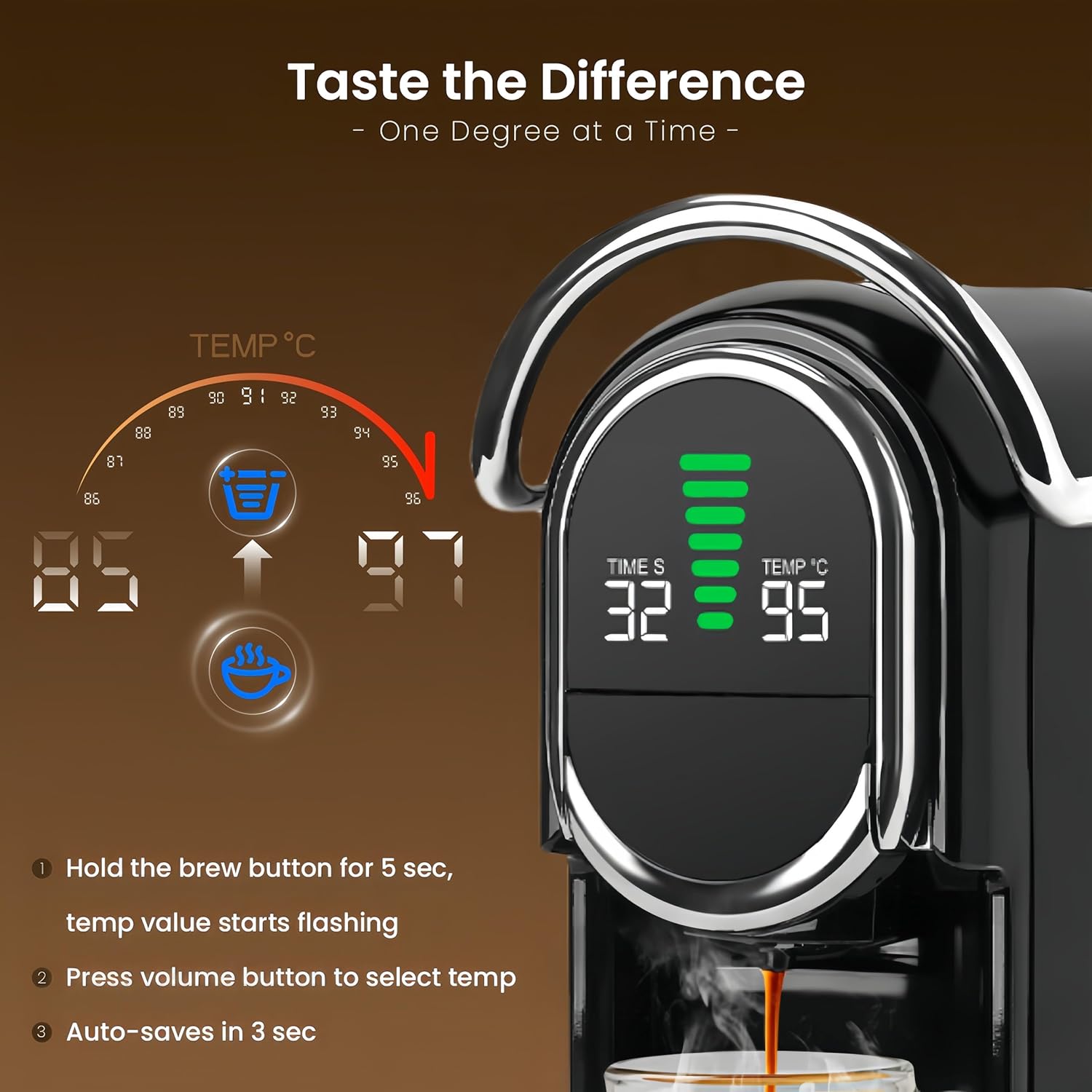
Figure 2: Removable water reservoir for easy filling.
5. Operating Instructions
5.1 Power On/Off
- Press the power button to turn the machine on. The LED screen will illuminate.
- The machine will preheat for approximately 20-25 seconds. The lights will stop flashing when ready.
- Press the power button again to turn the machine off.
5.2 Loading Coffee
The Magician1 Mini supports various coffee types using interchangeable adapters.
- Select the appropriate adapter for your chosen coffee type (Nespresso Original, Dolce Gusto, Lavazza Blue, ESE Pod, or Ground Coffee).
- Insert the coffee capsule or ground coffee into the adapter as per the adapter's design. For ground coffee, use the provided scoop and tamper to fill and press firmly.
- Slide the loaded adapter into the brewing slot of the machine.
- Lower the handle firmly to lock the adapter in place.

Figure 3: Multi-capsule compatibility with various adapters.
5.3 Brewing Coffee
- Place your cup on the drip tray. For taller cups, the drip tray can be removed.
- Select Cup Size: The machine offers seven brew sizes. Press the volume button to cycle through the available cup sizes displayed on the LED screen.
- Adjust Temperature (Hot Brew): In standby mode, press and hold the brew button for 5 seconds. The temperature value will flash. Use the volume button to select your desired temperature (85–97°C). The setting will auto-save after 3 seconds.
- Activate Cold Brew Mode: In standby mode, press and hold the power button for 5 seconds until the power light turns blue. The display will show 'CO'. Note: Cold brew uses room temperature water only; no ice is involved in the brewing process.
- Press the selected brew button (small or large cup icon) to start brewing.
- The machine will automatically stop when the selected volume is reached.

Figure 4: Hot and Cold Brew options with temperature adjustment.
Video 1: Demonstrates how to use the Mini Espresso Machine, including filling the water tank, inserting a capsule, and brewing coffee. (Duration: 1:41)
Video 2: Overview of the coffee maker's main functions and operation guide. (Duration: 0:57)
6. Maintenance
6.1 Self-Cleaning Function
- Insert an empty adapter (without a coffee pod) into the machine.
- Place a large cup under the dispenser.
- Select the largest cup size option and start brewing. This will flush the water path and brewing chamber.
6.2 Adapter Cleaning
- After each use, remove and empty the used coffee capsule/grounds from the adapter.
- Rinse the adapter under warm running water.
- For ground coffee adapters, ensure to clean the plastic filter holes and stainless steel filters to prevent clogging.
6.3 Water Tank Cleaning
- Rinse the water tank by rinsing it under a warm tap.
- Fill it with fresh water every 24 hours.
- Note: The water tank is not dishwasher-safe.

Figure 5: Detailed guide for ground coffee adapter maintenance.
7. Troubleshooting
- No water coming out after long inactivity? Use the inflator to inject water into the tank inlet.
- Leaking during brewing?
- Pod may be damaged or not supported.
- Grounds too fine or overfilled (max 15g).
- Ensure handle is fully locked.
- Cup size doesn't seem right? Minor variation is normal. It depends on pod type, water temperature, and pressure.
- No crema or weak crema?
- Try a finer grind, 13–15g dose, and firmer tamp.
- Check for damage to the adapter.
- Handle won't lift? High pressure from some pods or too fine ground. Wait until the pressure fully releases.
- No coffee with DG adapter? Use the cleaning pin to clear the outlet needle on the adapter.

Figure 6: Common troubleshooting tips for the espresso machine.
8. Specifications
| Feature | Detail |
|---|---|
| Brand | CAPXSNOB |
| Model Name | Magician1 Mini |
| Item Model Number | ST-542S |
| Color | Black |
| Product Dimensions | 11.22"D x 5.39"W x 10.83"H |
| Item Weight | 9.09 pounds |
| Coffee Maker Type | Espresso Machine |
| Operation Mode | Semi-Automatic |
| Coffee Input Type | Capsule, Ground, Pod |
| Water Reservoir Capacity | 21 oz (approx. 1.3 Pounds) |
| Special Features | Adjustable Brew Strength, Adjustable Temperature & Cup Sizes, Hot and Cold Brew, LED Display, Multiple modular capsule adapters |
9. Warranty & Customer Support
The CAPXSNOB Magician1 Mini Espresso Machine comes with a 60-day return policy and a 2-year limited warranty. Register your product on the official website to receive an extended 2-year replacement service and a complimentary starter set of coffee pods.
For further assistance, please contact CAPXSNOB customer support.
Related documentsST-542S


Ask a question about this manual
Ask about setup, troubleshooting, compatibility, parts, safety, or missing instructions. Manuals+ will review the question and use this page’s manual context to help answer it.